
Network Speed
Live upload/download rate for the Omarchy bar.
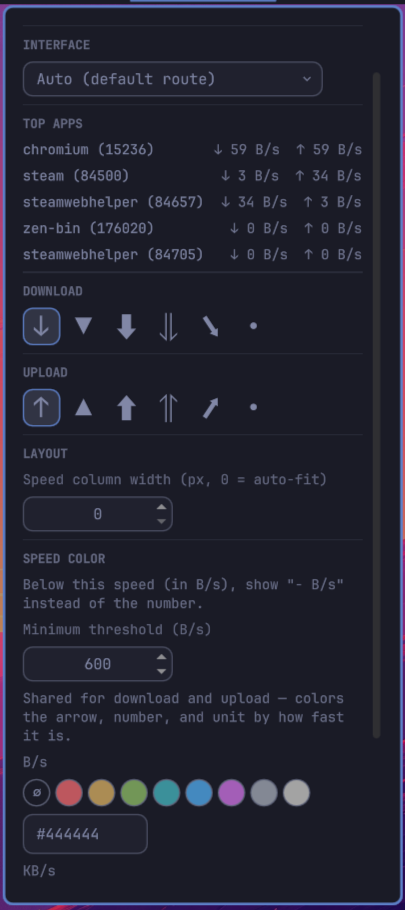
Shows current download and upload throughput in the top bar. Click either reading to open a popup where you can pick which interface to measure (a specific NIC, or all interfaces combined), the icon and shared speed-tier colors, a minimum-speed threshold, and a fixed column width so the bar doesn't reflow as the numbers change.
Installation
omarchy plugin add https://github.com/csawy3r/omarchy-network-speed.git --enable
Install from a local checkout
Copy the repository into the user plugin directory:
mkdir -p ~/.config/omarchy/plugins
cp -r omarchy-network-speed ~/.config/omarchy/plugins/network-speed
Then enable it:
omarchy plugin enable network-speed
If the bar does not update automatically, restart the shell:
omarchy restart shell
Features
| Feature | Description |
|---|---|
| Interface picker | Auto (default route), all interfaces combined, or any specific NIC. |
| Icon picker | Independent icon choices for the download and upload arrows. |
| Speed-tier colors | One shared palette (B/s, KB/s, MB/s) colors the arrow, number, and unit by how fast the current rate is. Swatch choices are read live from your active Omarchy theme's colors.toml and update automatically when you switch themes. |
| Minimum threshold | Below a configurable speed, show - B/s instead of a noisy near-zero number. Set with the up/down arrows (no typing). |
| Fixed column width | Optional constant width so neighboring bar widgets don't shift as digit count changes. Set with the up/down arrows (no typing). |
| Top apps | Popup lists up to 5 of your own processes by current network activity (via ss -tanpi), each with live download/upload rate. Unprivileged — only sees sockets owned by the current user. |
Settings
All settings are stored inline in the widget's ~/.config/omarchy/shell.json layout entry and are editable directly from the popup — no config file editing required.
| Key | Description | Default |
|---|---|---|
selectedInterface |
"auto", "all", or a specific interface name |
"auto" |
downloadIcon / uploadIcon |
Arrow glyph for each direction | "↓" / "↑" |
byteColor / kiloColor / megaColor |
Hex color per speed tier (B/s, KB/s, MB/s) | unset (bar foreground) |
minThreshold |
Bytes/sec below which the reading shows - B/s |
0 (disabled) |
speedWidth |
Fixed pixel width per reading; 0 = auto-fit |
0 |
pollIntervalMs |
Poll interval in milliseconds | 2000 |
License
MIT — see LICENSE.