
Potluck — Omarchy plugin
Potluck local-AI in the Omarchy bar, plus an Ask overlay that streams from the local model without opening the app.
Bar widget
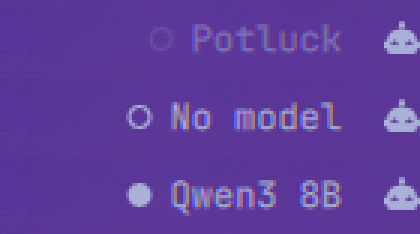
| Dot | Meaning |
|---|---|
| Filled | Sidecar up, a model is loaded and ready to serve |
| Hollow | Sidecar up, no model loaded |
| Dim hollow | Potluck is not running |
Hover for detail: the model and its context window, the device it is actually
running on (CPU, or GPU with the backend, as llama.cpp itself reported during
the load), installed models and disk used, and free RAM. Left-click opens the
Ask overlay, right-click launches or focuses the app, and middle-click forces a
refresh. Set clickAction to Launch app if you would rather left-click go
straight to the app; right-click runs it either way.
If the tooltip says the local API is off, the overlay cannot ask anything yet; see the next section.
Ask overlay
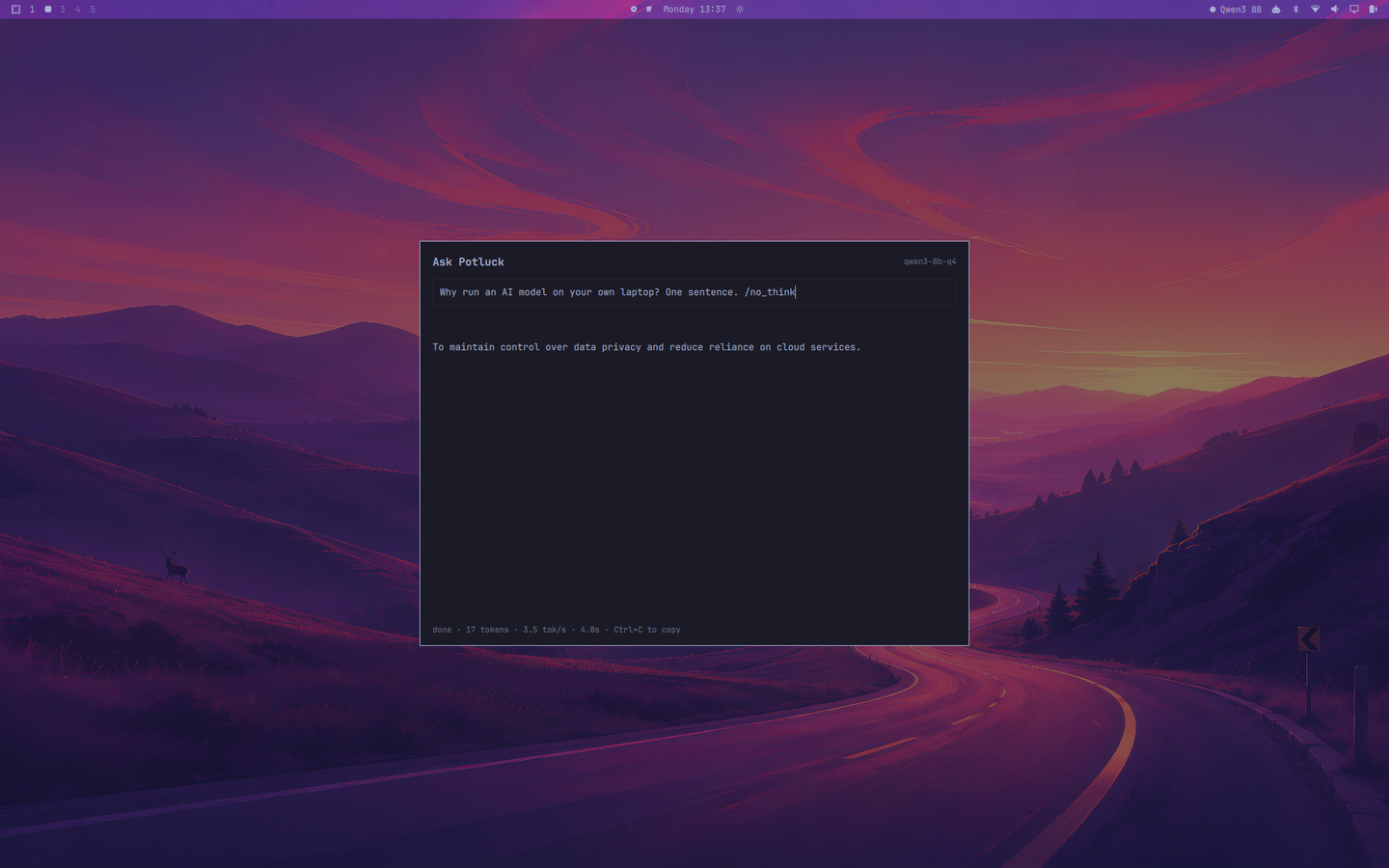
Summon it with a keybinding (see below): type a question, get a streamed answer from the local model.
- Enter send · Tab cycle Ask → Models → Usage · Ctrl+C copy the answer · Ctrl+O open the app · Ctrl+W close it · Esc cancel a stream, then close
- Reasoning-model
<think>blocks are separated from the answer rather than dumped into it, so the reply stays readable. - Streams via
curl -Ninto aSplitParser, the same shape the first-partyomarchy.disk-speedtestplugin uses for line-oriented output.
Turn on Potluck's local API first
The overlay talks to the sidecar's OpenAI-compatible local API (/v1), the
door Potluck opens for other programs on the machine. A packaged Potluck locks
every other sidecar route behind a per-launch token that only the app holds,
so this is the only route an outside caller, this plugin included, can use.
In Potluck: Settings → Connect tools → enable. That writes the switch and a
key to ~/.potluck/config.json; the overlay reads both when it opens. Until
then it explains what to do instead of answering.
Every ask is sent with X-Potluck-Scope: local, so it runs on this machine or
fails with a clear message. It is never routed to a household peer, a trusted
circle or the pool, whatever the app's own routing default is.
Summon with a payload
# Open with a question already sent (the menu snippet uses this for "Ask about clipboard").
omarchy-shell shell summon newtorob.potluck '{"prompt": "Explain: …"}'
# Open straight onto the model manager or the usage view.
omarchy-shell shell summon newtorob.potluck '{"view": "models"}'
# Act on a model without opening anything.
omarchy-shell shell call newtorob.potluck act '{"slug": "qwen3-4b-instruct-2507-q4", "action": "load"}'
#   actions: load · unload · install · cancel-download
Models view
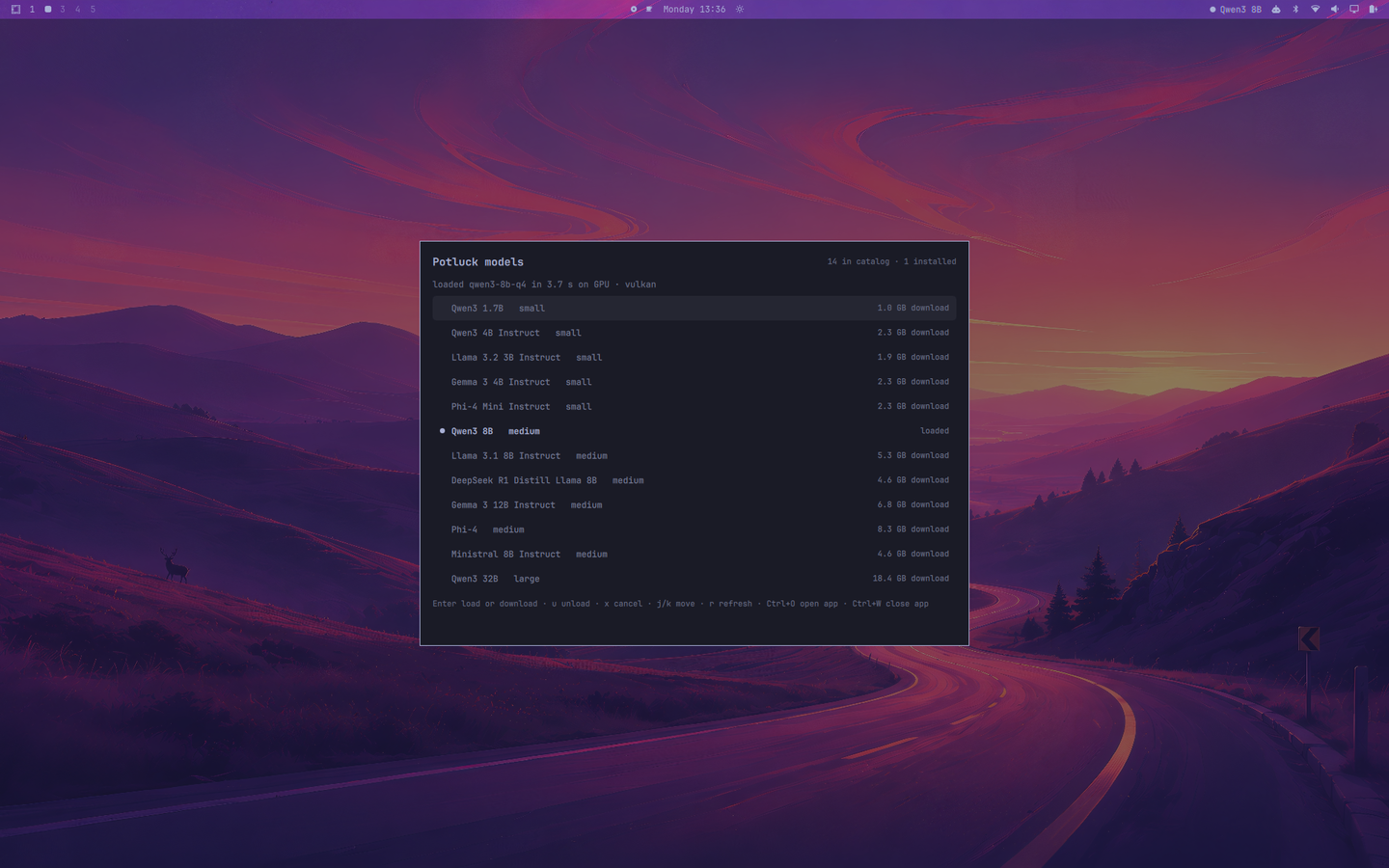
Press Tab once. The catalog Potluck ships, with what is on this machine:
a filled dot is the loaded model, a hollow dot an installed one, and the
right-hand column shows loaded, installed, the download size, or a live
download (downloading 43% · 12 MB/s, then verifying…).
- Enter loads the selected model if it is installed, otherwise starts its download (verified against the catalog's hash by the sidecar, exactly as the app does it) · u unloads the loaded model · x cancels a download · j/k move · r refresh · double-click acts like Enter
- A load reports where it landed:
loaded qwen3-8b-q4 in 4.0 s on GPU · vulkan.
This needs Potluck 0.1.6 or later, which exposes model management on the
local API (/v1/potluck/models). Older versions answer "Not Found" and the
view says so.
Usage view
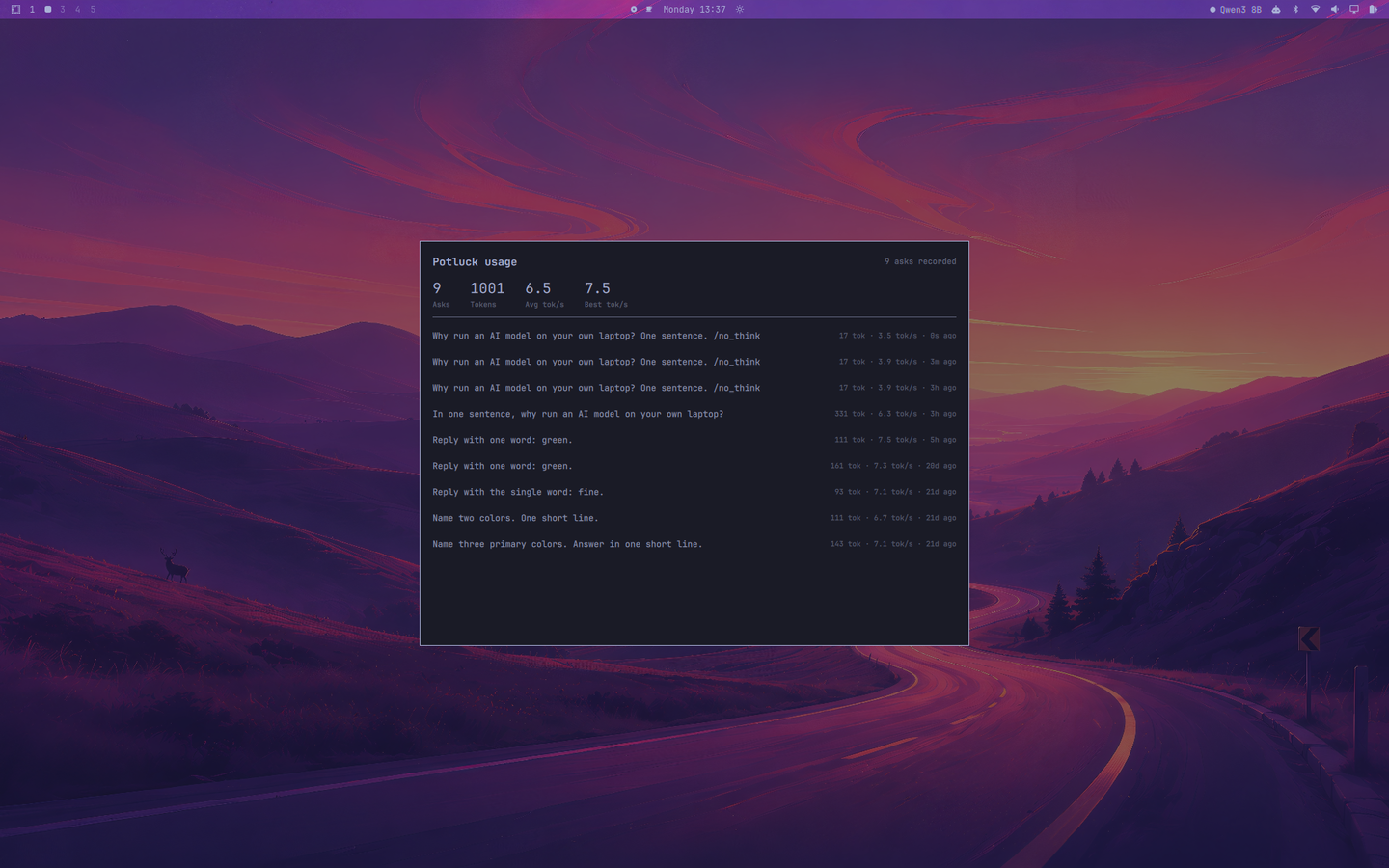
Press Tab in the overlay. Total asks, total tokens, aggregate and best tok/s, and a recent-ask list.
Usage is measured by this plugin as it streams, not read back from Potluck: the app's own usage records sit behind the token described above. Two consequences worth stating plainly:
- Tokens are counted as streamed deltas. That tracks llama.cpp's one-token-per-chunk output closely, but it is an approximation.
- It covers only asks made through this overlay, not chats in the Potluck app. The app's Usage view (0.1.3 and later) is the full picture.
Rates are aggregate (total tokens over total time), so one long ask is not outweighed by a two-token one.
State lives in ~/.local/state/omarchy-potluck/usage.json, capped at 200
entries. It never leaves the machine.
Install
omarchy plugin add https://github.com/newtorob/omarchy-potluck.git --enable --yes
omarchy plugin enable newtorob.potluck --section right
The overlay is a second kind on the same plugin, so it needs an entry in
plugins[] as well as the bar widget's bar.layout entry — omarchy plugin enable handles both. If you edit shell.json by hand, note that plugins[]
entries are objects ({"id": "newtorob.potluck"}), not bare strings; a bare
string silently reads as "not enabled".
Then bind a key to summon the overlay, in ~/.config/hypr/bindings.lua:
o.bind("SUPER + A", "Ask Potluck", "omarchy-shell shell toggle newtorob.potluck")
Note that editing overlay QML needs omarchy restart shell; rescanPlugins
does not reload an already-instantiated keepLoaded overlay. Bar-widget edits
hot-reload normally.
Settings
Bar widget only; the overlay reads the same ~/.potluck/config.json and
uses the default app command for Ctrl+O.
| Key | Default | What it does |
|---|---|---|
sidecarUrl |
http://127.0.0.1:8321 |
The Potluck local sidecar |
refreshIntervalSec |
10 |
Bar widget poll interval, 2–300s |
showModelName |
true |
Off shows just the dot — suits a vertical bar |
launchCommand |
omarchy-launch-or-focus potluck-ai-desktop potluck-ai-desktop |
Run on right-click, and on left-click when clickAction is Launch app |
clickAction |
Ask overlay |
What left-click does: Ask overlay or Launch app |
Requirements and dependencies
- Omarchy with the Quickshell-based
omarchy-shell(third-party plugin API,bar-widgetandoverlaykinds). - Potluck installed and running, with its local API enabled for the overlay. Without the app the bar widget renders its dim "not running" state rather than disappearing, so the click target stays available to launch it; the overlay reports the sidecar as unreachable.
curl,jqandwl-copy— all part of a stock Omarchy. curl streams the answer, jq reads the app's files on disk, wl-copy serves Ctrl+C.
Nothing else. Nothing is bundled or downloaded at install time.
Removal
omarchy plugin remove newtorob.potluck
That removes the checkout and its shell.json entries. Two things it does not
touch, because the plugin did not create them:
# the keybinding, if you added one
sed -i '/newtorob.potluck/d' ~/.config/hypr/bindings.lua && hyprctl reload

# recorded usage history
rm -rf ~/.local/state/omarchy-potluck
Privacy
The plugin only ever talks to the Potluck sidecar on loopback — the same local
process the desktop app uses. It reads /health, and posts to
/v1/chat/completions with X-Potluck-Scope: local when you ask something.
It sends nothing off the machine and never touches your Potluck account or the
cloud API.
The Models view calls /v1/potluck/models (list, load, unload, install,
cancel) with the same key; a download is fetched and verified by the sidecar,
never by the plugin. Ctrl+W asks Hyprland to close the app's window, the same
close request Super+W sends.
It reads four things from disk, all yours and all bounded in size:
~/.potluck/config.json (whether the local API is on, and its key, which is
only ever sent to the sidecar on loopback), ~/.potluck/models/*/model.gguf
(count and size), ~/.potluck/data/model_catalog_cache.json (the loaded
model's display name) and /proc/meminfo (free RAM).
It writes to exactly one path outside its own checkout —
~/.local/state/omarchy-potluck/usage.json — and never modifies your Hyprland,
shell, or Potluck configuration.
License
AGPL-3.0. See LICENSE.