
Omarchy Shazam Widget
Identify music from desktop audio or a selected microphone, directly from the Omarchy bar. Omarchy Shazam Widget checks MPRIS metadata first and falls back to Shazam through SongRec when the player does not already know the track.
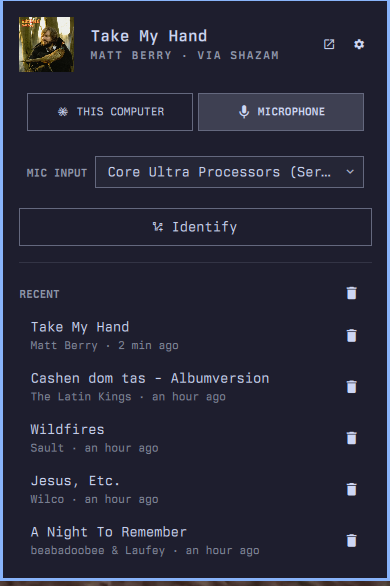
Features
- Identify audio playing on the computer through PipeWire monitor sources.
- Identify music in the room from a selectable microphone.
- Use MPRIS for instant, local results when a media player exposes metadata.
- Fall back to SongRec/Shazam when recognition is needed.
- Show matches and failures as desktop notifications when the panel is closed.
- Show album artwork in the panel and clickable result notifications.
- Return early from live SongRec recognition on right-click.
- Keep recognition state in a persistent shell service.
- Keep a local, deduplicated history of the 50 most recent matches.
- Support mouse, keyboard, middle-click, and Quickshell IPC workflows.
- Follow the active Omarchy theme and shared panel UI conventions.
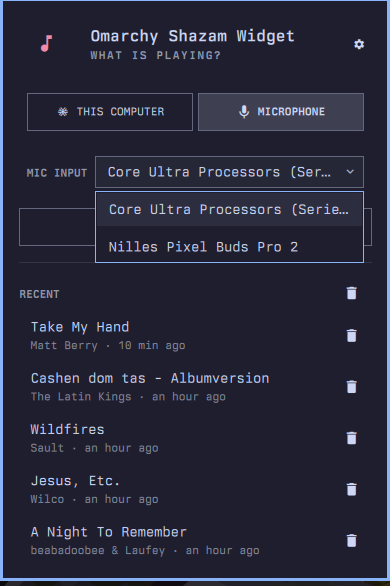
The microphone picker lists connected inputs by readable name, marks the system default, and remembers an explicit choice.
Requirements
- Omarchy 4
songrecfor Shazam recognitionpipewire-pulseforparecand source discoverycurlfor notification artwork- systemd's
busctlfor the MPRIS fast path - Network access when SongRec needs to contact Shazam
Only SongRec normally needs installing on Omarchy:
sudo pacman -S songrec
Install
omarchy plugin add https://github.com/nille/omarchy-shazam --enable
--enable places Omarchy Shazam Widget in the right section of the bar.
Without it, enable the widget later through
Omarchy Menu -> Bar -> Widgets or:
omarchy plugin enable nille.listen --section right
No install hook or build step runs. The plugin is QML plus one Python standard-library helper.
Use
Open the music-note icon in the bar, choose This Computer or Microphone, select a microphone when needed, and press Identify. The button becomes Cancel while recording or looking up a track.
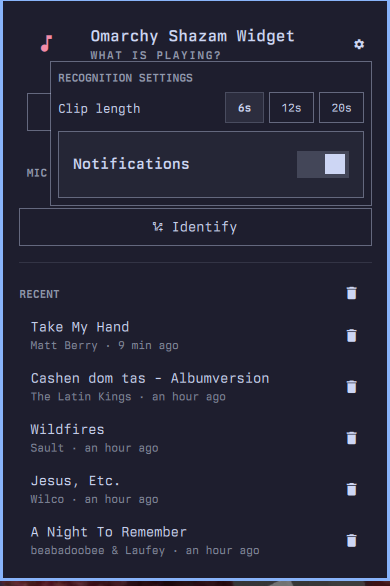
The cog opens recognition settings for clip length and background
notifications. Quit, in the panel's bottom-right corner, disables the widget
— or exits the harness when the panel is running from tests/harness/run.
The bar icon supports three direct actions:
| Mouse action | Result |
|---|---|
| Left click | Open or close the panel |
| Middle click | Run the configured fixed-length lookup without opening the panel |
| Right click | Listen live and return as soon as SongRec finds a match |
Right-clicking again while recognition is active cancels it. Recognition keeps running if the panel is closed, and the result appears as a desktop notification.
Keybinding
Add this to ~/.config/hypr/bindings.lua:
o.bind("SUPER + N", "Identify the music playing", "omarchy-shell nille.listen identify")
The identify IPC action uses the source selected in the panel. The desktop
and mic actions force a source for separate keybindings:
o.bind("SUPER + N", "Identify desktop audio", "omarchy-shell nille.listen desktop")
o.bind("SUPER + ALT + N", "Identify microphone audio", "omarchy-shell nille.listen mic")
For the same early-return behavior as right-click:
o.bind("SUPER + SHIFT + N", "Identify music instantly", "omarchy-shell nille.listen instant")
Panel keys
| Key | Action |
|---|---|
enter |
Activate the selected control or open a selected track |
esc |
Cancel an active lookup, otherwise close the panel |
j / k |
Move through controls and history |
h / l |
Change source or clip length |
m |
Switch between desktop and microphone mode |
o |
Open the selected or current match |
x |
Forget the selected history entry |
r |
Refresh history |
Use the trash button beside Recent to clear all history.
Privacy and data
MPRIS metadata stays local. Recognition clips are written to a temporary WAV, sent through SongRec's Shazam request, and deleted as soon as the lookup finishes or is cancelled. Live recognition streams audio through SongRec until the first match or the configured timeout. No account or API key is used.
When a result contains artwork, the widget loads that image in the panel. For a background result it downloads one notification image to:
~/.cache/omarchy-shazam-widget/cover.jpg
Clicking a match notification opens its Shazam URL, or a web search when the result has no direct URL.
Match history is stored locally at:
$XDG_STATE_HOME/omarchy-shazam/history.json
When XDG_STATE_HOME is unset, this resolves to
~/.local/state/omarchy-shazam/history.json.
SongRec is an unofficial Shazam client. It is not endorsed by Apple or Shazam, and recognition may stop working if the public service changes.
Uninstall
Remove the plugin:
omarchy plugin remove nille.listen
Optionally remove its generated match history:
rm -rf ~/.local/state/omarchy-shazam ~/.cache/omarchy-shazam-widget
The plugin does not modify system files or install a system service. Its persistent recognition component lives inside the existing Omarchy shell process and is removed with the plugin. Omarchy may retain a timestamped backup beside the removed plugin directory.
Helper CLI
The backend can also be used directly:
scripts/listen sources
scripts/listen now
scripts/listen identify
scripts/listen identify --source mic --seconds 20
scripts/listen identify --source bluez_input.XX:XX:XX:XX:XX:XX
scripts/listen identify --no-mpris
scripts/listen identify --stream --seconds 20
scripts/listen history
scripts/listen forget --id abc123
scripts/listen forget --all
Every subcommand prints one JSON object, including errors, so UI and script callers receive the same stable contract.
Development
omarchy plugin validate .
python3 -m unittest discover -s tests -p 'test_*.py'
tests/qml/run
tests/qml/lint
tests/harness/smoke
Model.js and scripts/listen contain the testable behavior. Service.qml
owns recognition, cancellation, artwork notifications, and state that must
survive closing the panel. Panel.qml renders that state and owns the
settings, source picker, and history interface. The lint wrapper supplies the
same temporary qs.Ui and qs.Commons import shim as the standalone harness;
Qt may still report advisory warnings for dynamic Quickshell properties
without .qmltypes metadata.
See CHANGELOG.md for release notes.