
Tailscale for Omarchy
A status-bar plugin for Omarchy Quattro that puts your tailnet on the desktop instead of in a terminal.
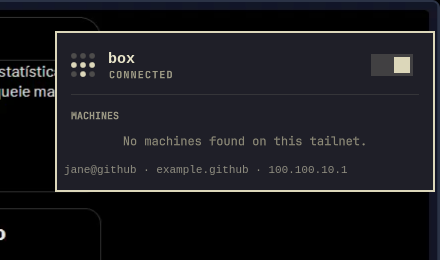
Click the dot-grid mark to see whether you are connected, flip the tunnel on or off, pick an exit node, browse the machines on your tailnet, copy their addresses, and send files with Taildrop. Right-click the icon to toggle Tailscale without opening the panel. It talks to the official tailscale CLI, so the daemon you already trust is still what is running.
Install
omarchy plugin add https://github.com/OberdanSoldi/omarchy-tailscale.git --enable
Requires the tailscale CLI on PATH (the panel tells you if it is missing).
From a local checkout (before or without publishing):
ln -s "$PWD" ~/.config/omarchy/plugins/nino.tailscale
omarchy-shell shell rescanPlugins
omarchy plugin enable nino.tailscale
Remove
omarchy plugin remove nino.tailscale
That disables the widget and deletes the plugin checkout. It does not uninstall Tailscale, stop tailscaled, log you out, or change other Omarchy config. If you used the one-click operator authorization, it also does not revoke that grant — see below.
Use
- Left click: panel
- Right click: toggle Tailscale up/down
- Middle click: refresh status
- Panel: power switch, connection switching, exit-node picker, machine list with copy menu and Taildrop send
Keys inside the panel: j/k or arrows move, Enter/Space activates, t toggle Tailscale, r refresh, c copy peer IP, n copy peer name, d copy peer DNS name, s send files, Esc closes.
Behavior notes
- The bar icon is the Tailscale mark rendered natively as a 3x3 dot grid; it dims and gains a slash when the tunnel is down, and a
!badge when the device needs login or the daemon reports health warnings. - Toggling is optimistic: the icon and switch react the instant you click, and reality catches up on the next status poll.
- If the tunnel drops without you asking, you get one critical desktop notification.
- The CONNECTIONS section lists every logged-in profile (
tailscale switch --list), so you can hop between accounts and tailnets with one click; it appears once more than one profile exists. If the daemon denies profile access, the section offers a one-clickpkexec tailscale set --operator=<you>authorization. Tailscale has no read-only operator role: this grants the selected user full sudo-less control of the daemon (starting/stopping the tunnel, changing settings, switching profiles), and the grant lives in the daemon's state — it persists until revoked, including after removing the plugin. Revoke it withpkexec tailscale set --operator=(empty value). - The footer line (login, tailnet, own IP) is clickable and copies your Tailscale IP.
- Taildrop send only appears when the tailnet allows file sharing and the peer accepts files; it hands off to
omarchy-tailscale-send.
Requirements
- Omarchy 4.0.0+ /
omarchy-shell(bundlesomarchy-tailscale-send, used for Taildrop) tailscaleonPATHwl-copyfor clipboard copy actions
Dev
node --test tests/*.test.js
omarchy plugin validate .
/usr/lib/qt6/bin/qmllint -I /usr/share/omarchy/shell -I /usr/lib/qt6/qml Panel.qml Service.qml TailscaleIcon.qml
The Model.js tests never touch the real CLI or change any state. The qmllint run reports the same import-resolution warnings as the stock Omarchy panels; the authoritative check is omarchy plugin validate plus loading the plugin in the shell.