
Omarchy Wrike
Assigned Wrike tasks in the Omarchy bar. Filter the list, search the account, and open a task without leaving the desktop.
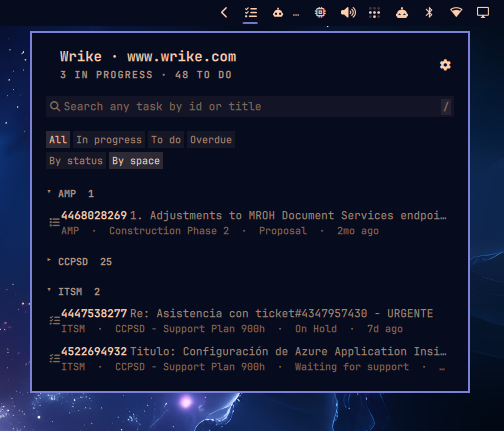
It is not a Wrike client. It answers two questions: what is on my plate, and where is task X.
Quick path
- Add the plugin and put it on the bar.
- Open the panel and press the gear.
- Paste a permanent token. The plugin checks it against Wrike before it stores anything.
- Your assigned work appears grouped by space.
Install
omarchy plugin add https://github.com/niusnet/omarchy-wrike.git --enable
--enable asks which bar section to use. The default is the right side.
Update
omarchy plugin update niusnet.wrike
Remove
omarchy plugin remove niusnet.wrike
Removing the plugin leaves the token in the keyring. Clear it from the gear (Sign out) or with:
~/.config/omarchy/plugins/niusnet.wrike/omarchy-wrike-auth --clear
Dependencies
The plugin requires Omarchy Quattro and these tools on PATH:
curl jq secret-tool
secret-tool comes from libsecret. The plugin does not install packages or change system config. It needs network access to your Wrike host (www.wrike.com, app-eu.wrike.com, or app-us2.wrike.com).
Connect
You need a permanent token. In Wrike: Profile → Apps & Integrations → API → Permanent access token. The token inherits your own permissions.
Two ways to store it:
| Where | How |
|---|---|
| Panel settings | Open the panel, press the gear, enter the host and the token, then Connect |
| Terminal | cd ~/.config/omarchy/plugins/niusnet.wrike && ./omarchy-wrike-auth |
The host is www.wrike.com, eu, or us2. An empty token or Ctrl+C cancels. Nothing is stored until Wrike accepts the token.
Sign out on the same settings page removes the credential from this machine.
The token lives in the system keyring under service=omarchy-wrike. The plugin reads it at request time. It is never written to shell.json, never logged, and never placed on a process command line.
What you see
The icon sits on the bar. Left click opens the panel. Right click refreshes.
The list is the work assigned to you. Completed and cancelled tasks stay out.
| Control | What it does |
|---|---|
| All / In progress / To do / Overdue | Filter the current list |
| By status / By space | Group the same tasks. Space is the default |
| Group header | Collapse or expand that group |
| A row | Open the in-panel preview |
| Search box | Filter the loaded list immediately, then search the whole account |
The preview stays in the panel. It shows the breadcrumb, status, description, comments, and a way to log time. Attachments live on their own tab. Comments load ten at a time. Open the task in the browser only when you want to.
Settings
The gear (or ,) is for Wrike-specific choices:
- Spaces. Untick the ones you do not care about. Ticked spaces feed the list and lead the search. The others stay searchable.
- Connection. Host, token, connect, and sign out.
Refresh interval and row count are ordinary widget settings:
| Setting | Default | Range |
|---|---|---|
| Refresh interval | 900 seconds | 60–3600 |
| Maximum displayed tasks | 25 | 5–100 |
Keyboard
| Input | Action |
|---|---|
j / k / arrows |
Move through rows |
Enter |
Open the highlighted preview |
o |
Open the task in the browser |
y |
Copy the highlighted permalink id |
/ |
Focus search |
r |
Refresh |
, |
Open settings |
Escape |
Close the preview, then the panel |
Search
Typing filters the tasks already loaded. After a short pause the same query goes to Wrike. Both sets land in one list.
109          the task whose permalink is open.htm?id=109
supplier     tasks with that word in the title
IEAAAAA…     a task by its API id
How the list is grouped
Nothing keys off a status name. Every Wrike account names custom statuses freely, so In Review is a label, never a signal.
The portable signals are:
- Wrike's status group:
Active,Completed,Cancelled,Deferred - Whether the task has already started: a Planned task whose start date is today or earlier, or a Milestone whose due date has arrived
Completed and cancelled work is dropped. Started active work is in progress. Everything else assigned to you is to do. Overdue is assigned work whose due date has already passed.
When you group By space, each section is the real Wrike space that owns the task, not the inner folder.
Local development
omarchy plugin validate .
tests/auth-test.sh && tests/helper-test.sh && tests/qml-source-test.sh
node --test tests/model.test.js
Run the helpers directly to see what the panel is given:
./omarchy-wrike-fetch | jq
./omarchy-wrike-fetch --search 109 | jq
QML changes need omarchy restart shell. Touching a file is not enough: the shell keeps the compiled version in memory.
Service.qml schedules omarchy-wrike-fetch, which owns every API call and every credential access and prints one JSON document. Panel.qml assembles the UI. Model.js holds the logic that is tested under node --test.
License
MIT