
Tuxedo Tasks
A todo.txt due-task indicator for the Omarchy Quattro bar, with due-time notifications and a daily digest.
Reads tasks from $TODO_DIR/todo.txt (tuxedo), surfaces anything due today or overdue, and notifies you when a task's due time passes. Optional daily digest gives a morning summary.
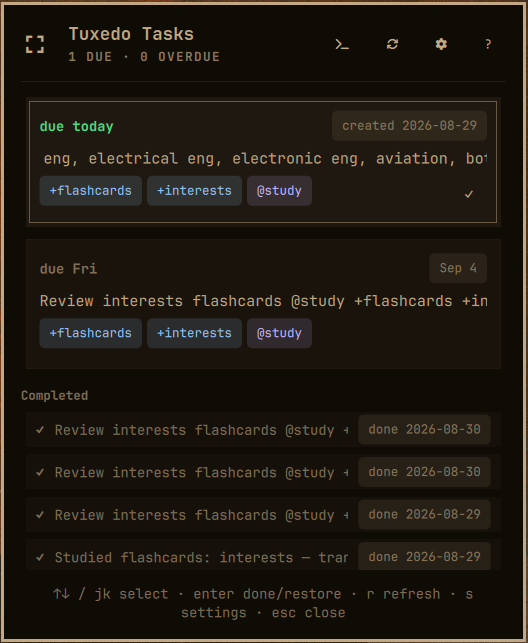
Features
- Due/overdue task indicator in the bar (badge count + icon)
- Desktop notifications when a task becomes due
- Optional daily digest notification at a configurable hour
- Recently completed tasks section (from
done.txt) - Project filtering (
+tags) - Keyboard-first navigation (jk/↑↓, enter to complete/restore, s for settings)
- Middle-click opens a free-floating quickshell window
- Global keybinding to toggle the task list from anywhere (
SUPER + SHIFT + T)
Install
omarchy plugin add https://github.com/niziul/omarchy-tuxedo.git --enable
Usage
- Left click — open the task list popup
- Right click — open settings
- Middle click — open a free-floating window
SUPER + SHIFT + T— toggle the task list (global)
The global shortcut toggles the free-floating window: it opens the task list, or
closes whichever surface (window or popup) is currently open. Add it to
~/.config/hypr/bindings.lua if you aren't using the default:
o.bind("SUPER + SHIFT + T", "Tuxedo tasks", "omarchy-shell niziul.tuxedo.window toggleTaskList")
Internally the binding calls the plugin's toggleTaskList IPC on the
niziul.tuxedo.window target (omarchy-shell niziul.tuxedo.window toggleTaskList).
Keyboard shortcuts (popup & window)
| Key | Action |
|---|---|
j / ↓ |
Move selection down |
k / ↑ |
Move selection up |
enter |
Complete selected task (or restore a done task) |
r |
Refresh scan |
s |
Toggle settings / save settings |
? |
Toggle help |
esc |
Close popup |
Configuration
All settings are accessible from the settings panel (right-click or press s in the popup). Settings persist per-widget instance in ~/.cache/tuxedo-plugin/settings.json.
| Setting | Default | Description |
|---|---|---|
| Rescan interval | 60s | How often to re-read todo.txt (30–3600) |
| Always show icon | on | Keep the bar icon visible even with nothing due |
| Notify on due | on | Desktop notification when a task's due time passes |
| Daily digest | off | One summary notification per day |
| Digest hour | 9 | Hour (0–23) the digest fires |
| Filter projects | (empty) | Comma-separated +project tags to track (empty = all) |
| Show completed tasks | off | Show recently done tasks from done.txt |
| Done task limit | 10 | Number of completed tasks to show (1–50) |
Requirements
- tuxedo CLI (
tuxedo) installed and on$PATH $TODO_DIR/todo.txtwithdue:YYYY-MM-DDordue:YYYY-MM-DDTHH:MMtags- Python 3 (for the scanner script)
Uninstall
Remove the plugin from the shell:
omarchy plugin remove niziul.tuxedo
This removes the plugin code but leaves its cache behind. Clean that up too:
rm -rf ~/.cache/tuxedo-plugin
~/.cache/tuxedo-plugin/ holds the widget's persisted settings (settings.json) and notification/digest state (notified.json). Your tasks in $TODO_DIR/todo.txt and the archive in done.txt are your own data and are never touched — keep them.
If a bar widget entry lingers after removal, rescan:
omarchy-shell shell rescanPlugins
License
MIT