
EVERYTHING-CODER
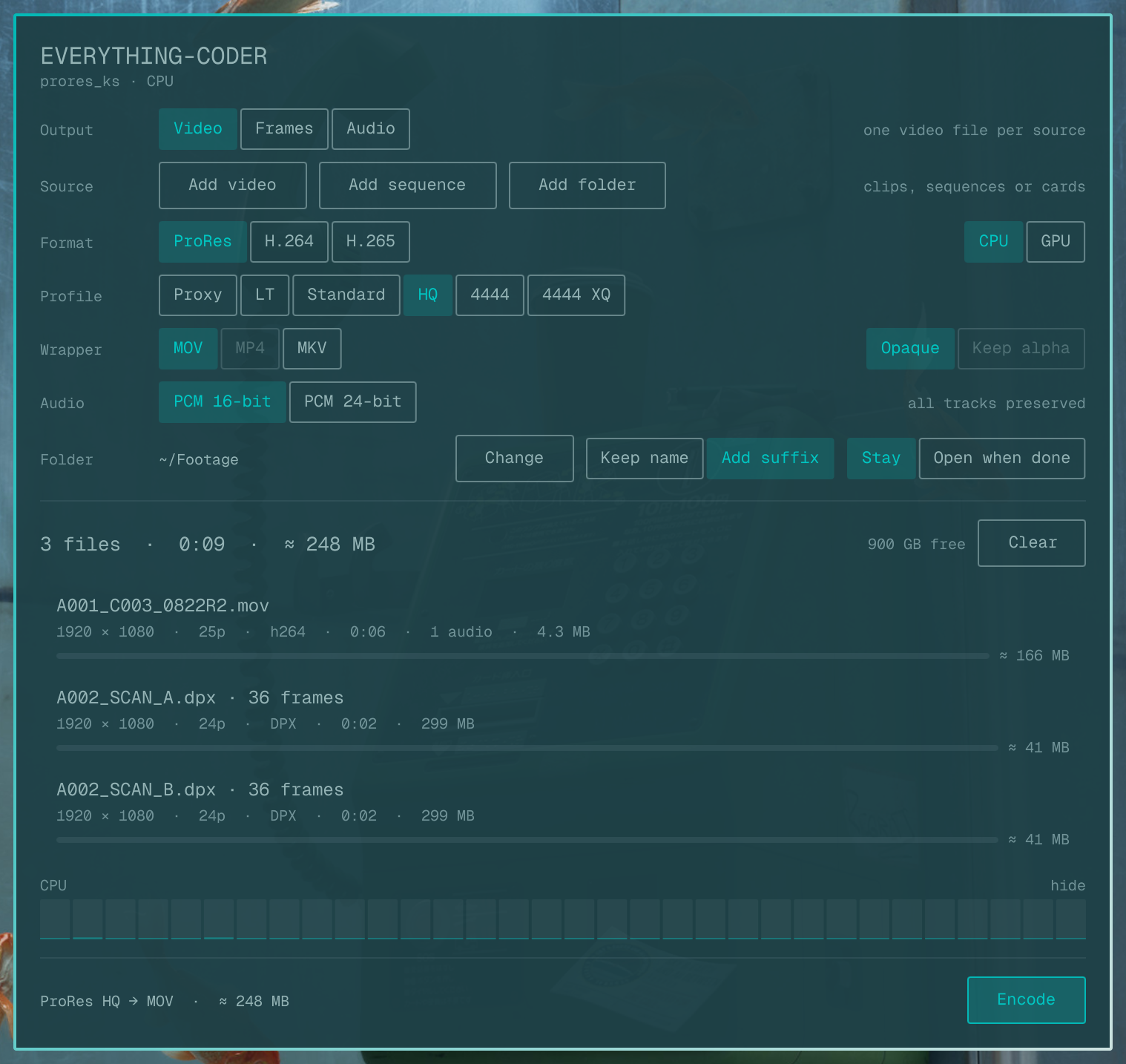
Batch media transcoder for Omarchy. Video, image sequences and audio in; video, stills or audio out. It is a shell plugin rather than an application: a panel you summon over whatever you were doing, and dismiss when the batch is running.
Say what you want out of it. Point it at a file, a folder, or a whole camera card. Encode.
What it does
- Three kinds of output. One control at the top of the panel decides whether a batch produces Video, a folder of Frames, or Audio. Everything below belongs to that choice, including which buttons you get for adding work.
- Video. Apple ProRes in all six profiles (Proxy, LT, Standard, HQ, 4444, 4444 XQ) for editorial; H.264 and H.265 for delivery and for anything that has to travel.
- Frames. Any clip, or another sequence, becomes a folder of stills: PNG, TIFF, EXR, DPX or JPEG, every frame or one every few seconds.
- Audio. Pull the sound off a rush, or convert a recording: WAV, FLAC, ALAC, MP3, AAC or Opus. A multi-track source gives you a chosen track or a mixdown, summed at the level it was recorded at.
- Hardware encoding where the machine has it. NVENC, Quick Sync and VAAPI are each tested on your machine at startup rather than assumed, so the panel only offers what will actually run. Software x264/x265 is one click away when quality per megabyte matters more than wall time. Where ffmpeg has the Vulkan ProRes encoder, ProRes can go on the GPU too.
- Camera cards understood. Point it at a card and it queues the masters
and skips the low-res duplicates beside them — Sony XAVC, Canon XF-AVC and
Panasonic P2 layouts, with their
SUB/,PROXY/andTHMBNL/folders left alone. - Every audio track preserved. A camera that lays down four separate mono streams gets all four back as distinct tracks in the output, in order.
- Image sequences both ways. A folder of numbered frames becomes a video; a video becomes a folder of numbered frames. Each sequence in a folder is found separately, with its own frame count and padding.
- Progress that means something. The speed and the time remaining come from the encoder's own reporting, so they are measured rather than guessed.
- Cancel that cancels. Stopping a batch stops the encoder and deletes the half-written file, which an editor would otherwise happily import.
- Themed. Colours follow the active Omarchy theme.
Install
On an Omarchy 4 desktop, add the plugin the standard way:
omarchy plugin add https://github.com/28allday/everything-coder.git --enable
Needs ffmpeg, jq and zenity. If any is missing the panel says so and
offers to install them for you.
There's also install.sh in the repo, which does the above plus the
dependency install and bar placement in one go, and carries settings over
from the old NO-CODER name. It only runs from a clone, so what you read is
what runs:
git clone https://github.com/28allday/everything-coder.git
cd everything-coder && bash install.sh
Using it
Click the bar icon, or:
omarchy-shell shell toggle nosignal.everythingcoder
Then, in order down the panel: choose what you want out, add the work in, set the format, press Encode.
You can skip the chooser entirely and hand it a list — useful from a script or a keybinding:
omarchy-shell shell summon nosignal.everythingcoder '{"paths":["/media/CARD","/rushes/A001.mxf"]}'
Folders in that list are searched; files are queued directly; a folder that holds numbered frames rather than clips is queued as a sequence.
Keys. Enter starts or cancels the batch, Ctrl+O opens the file
chooser, Ctrl+D opens the folder chooser, Esc closes the panel.
Closing the panel during an encode is fine. The batch keeps running and a notification arrives when it finishes.
Choosing what comes out
Set Output first. It decides which controls you see, because a batch is one kind of output applied to every row in it. A source the current choice cannot serve — an audio file with Frames selected, say — stays in the queue marked skipped rather than disappearing, and comes back the moment you switch to an output that suits it.
Source sits directly underneath and offers what that output can take:
| Output | Source buttons |
|---|---|
| Video | Add video · Add sequence · Add folder |
| Frames | Add sequence · Add folder |
| Audio | Add audio · Add folder |
- Add video / Add audio open a file chooser already set to the right filter. Every other filter is still in the dropdown, so a rush is available when you are extracting audio from one.
- Add sequence opens a folder chooser, because a sequence is a folder. It looks for numbered frames in the folder you point at. It is offered under Video as well as Frames — a DPX or EXR scan going to a ProRes master is exactly what it is for.
- Add folder takes anything a folder can be: a camera card, a day's rushes, or a folder of numbered frames.
Rows can be removed one at a time by hovering them, or all at once with Clear. A finished row offers to open its output instead.
Video
| You want | Pick |
|---|---|
| To edit these files in Resolve, Premiere, FCP or Avid | ProRes — HQ for mastering, LT for a lighter edit, Proxy for offline |
| To send someone a file that plays anywhere | H.264, Delivery |
| To upload, or to keep 4K without filling the disk | H.265, Web or Delivery |
| Maximum quality per megabyte, and time to spare | H.264 or H.265 with Software |
| It done now | H.264 or H.265 with Hardware |
Quality is constant-quality rather than a fixed bitrate: Master is near-transparent, Delivery is high quality at a sane size, Web is for upload, Small is the smallest usable. A tier looks the same whichever encoder runs it.
Effort trades time for efficiency. Slow is worth it on a software encode and does almost nothing on a hardware one.
10-bit is offered for H.265, where it is widely supported. H.265 output is tagged so QuickTime, Finder and Resolve will open it.
Keep alpha is available on ProRes 4444 and 4444 XQ, and only when the source actually carries an alpha channel.
Frames
| You want | Pick |
|---|---|
| A still to grade or print | TIFF or PNG at 16-bit |
| Frames for a scan or a film pipeline | DPX — 10-bit unless you ask for 16 |
| Frames for compositing, with real highlights | EXR — always 32-bit float |
| A quick look, or a contact sheet | JPEG, and one frame every few seconds |
Every frame gives one still per source frame; the other settings sample instead, which is what you want for a contact sheet rather than a 2000-file folder. Each clip gets its own folder, and the row tells you how many frames landed in it.
Watch the size estimate here. A minute of 4K DPX is roughly 60 GB, and the panel will not start a batch it can see will not fit.
Audio
| You want | Pick |
|---|---|
| The sound off a rush, at full quality | WAV 24-bit, or FLAC for half the size |
| To send someone a listenable file | MP3 320k, or AAC |
| The smallest file that still sounds right | Opus |
| Something an Apple app will open natively | ALAC |
One audio file comes out per source, so a four-track camera clip is either First track or Mix all. The mixdown sums the tracks at the level they were recorded at rather than averaging them, which would quietly drop a four-track mix by 12 dB.
Where the files go
The Folder row sets the destination, and it is remembered. Open when done reveals it in your file manager as the batch finishes.
Naming is either Keep name — the source's name with the new extension — or Add suffix, which records what it became:
| Output | Keep name | Add suffix |
|---|---|---|
| ProRes HQ | A001.mov |
A001_prores_hq.mov |
| H.265, Web | A001.mp4 |
A001_hevc_web.mp4 |
| FLAC | A001.flac |
A001_flac.flac |
| DPX stills | A001/ |
A001_dpx/ |
Stills go into a folder of their own per clip, numbered from one:
A001/A001_000001.dpx.
Nothing is ever overwritten. A name already in use gets (2), (3) and
so on. Outputs keep the source file's date, so a card stays in shooting order
after a transcode.
What it accepts
Video — .mov .mp4 .m4v .mkv .avi .mts .m2ts .webm
.mpeg .mpg .3gp .3g2 .mxf
Audio — .wav .flac .mp3 .m4a .aac .ogg .opus .aiff
.aif .wv .wma .ac3 .eac3 .dts .caf .mka .ape
Image sequences — .jpg .png .tif .exr .dpx
Camera RAW is not supported. .crm (Canon Cinema RAW Light), .braw
(Blackmagic), .r3d (RED) and .ari (ARRI) need the vendor's own software to
decode. Convert with Canon Cinema RAW Development, Blackmagic RAW Player,
REDCINE-X or ARRI Meta Extract first, then bring the resulting MXF or MOV
here.
If something is not right
"No usable encoder." The panel tests the encoders on your machine rather than trusting what ffmpeg claims to support. If it says there is nothing for the format you picked, try another — ProRes and the software H.264 and H.265 encoders work anywhere ffmpeg does.
You installed a GPU driver and nothing changed. The test result is cached.
Delete ~/.config/everything-coder/quattro-probe.json and reopen the panel.
A previous batch was interrupted. If a run was killed outright, the panel says so next time it opens and names the file it left behind, so you can tell a partial file from a finished one.
Without the panel
The transcoder is a plain script, so it also works on a machine with no Omarchy shell:
everything-coder.sh probe              # what this machine can encode with
everything-coder.sh scan /media/CARD   # the masters on a card, duplicates skipped
everything-coder.sh meta clip.mxf      # duration, size, audio tracks
Run it with no arguments for the rest.
Settings
Kept in ~/.config/everything-coder/quattro.json and written as you change
them. If you also use the GTK version of NO-CODER, the two coexist — they keep
their settings in separate files.
Upgrading from the plugin when it was called NO-CODER: the installer moves
~/.config/nocoder across for you the first time it runs, so your output
folder, format and naming survive. Omarchy sees the new name as a separate
plugin, so the old one stays registered until you retire it yourself:
omarchy plugin remove nosignal.nocoder
Remove
omarchy plugin remove nosignal.everythingcoder
rm -rf ~/.config/everything-coder
Licence
MIT.