
My Network
An Omarchy shell plugin that scans your local subnet and works out what every device on it is — name, vendor, role and operating system — plus a list of your Tailscale peers. A bar icon and a keyboard-driven panel.
No agent, no daemon, no account, no nmap, no elevated privileges. Nothing
runs while the panel is closed.
What it shows
Local network — one line per device, grouped by what the device is, with computers first:
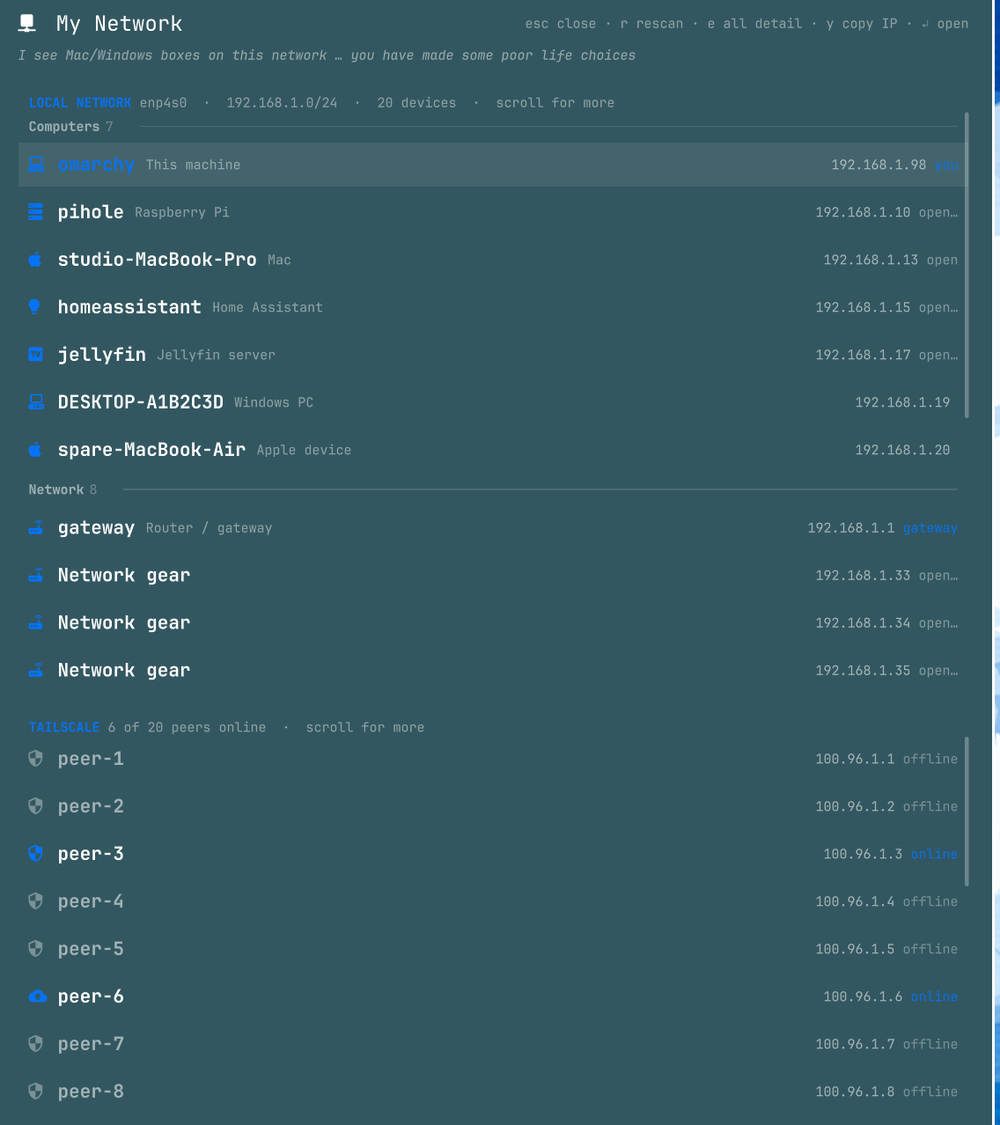
Groups are Computers, Network, Storage, Media, Smart home, Printers & cameras, Phones & tablets, and Other. Empty groups are omitted, this machine heads Computers, and within a group devices are ordered by address.
Press e and every row expands with the rest:
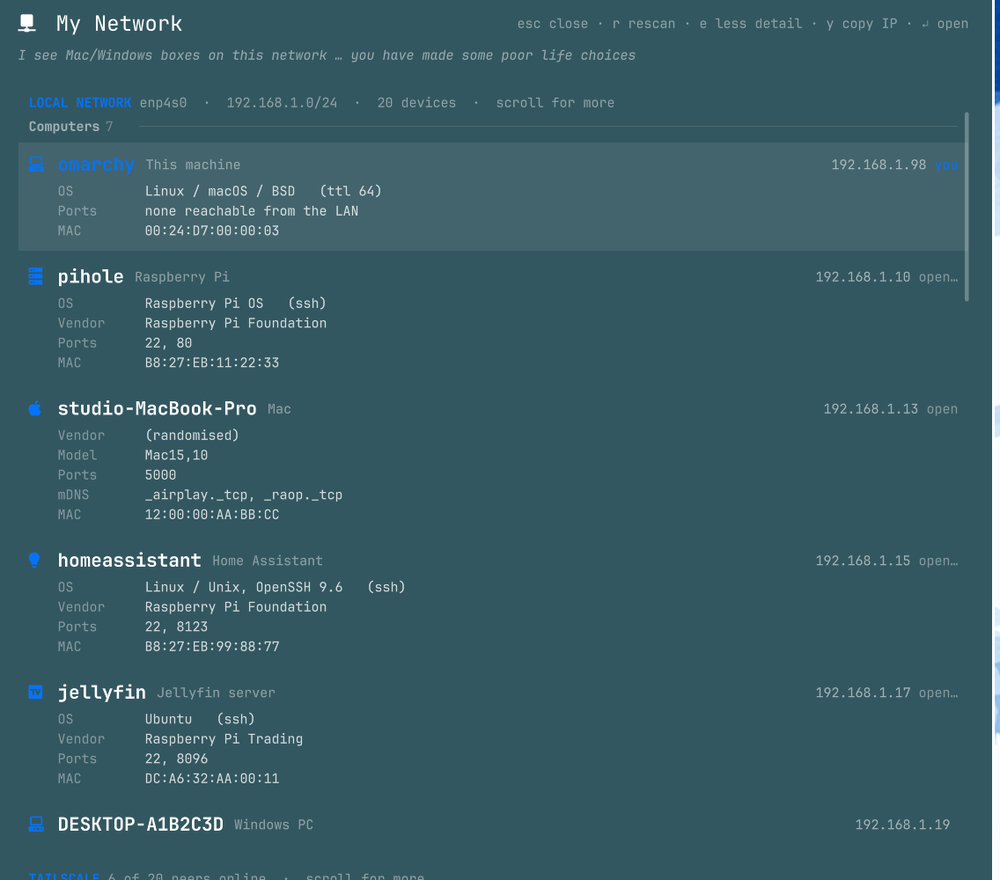
| Field | |
|---|---|
| OS | with the evidence in brackets — macOS (mdns), Ubuntu (ssh), Windows (ttl 128) |
| Vendor | from the MAC's OUI; randomised (locally administered) MACs are labelled as such |
| Model | the mDNS model string, where one is advertised |
| Ports | the open ports found |
| mDNS | the service types the device advertises |
| MAC | the hardware address |
Tailscale — every peer in your tailnet with its name, *.ts.net address, OS
and online state; exit nodes are marked. The section is hidden entirely if
Tailscale isn't installed or you're logged out.
How devices are identified
Signals are ranked and the first match wins:
- Advertised mDNS services —
_printer._tcp,_googlecast._tcpand so on. - Distinctive open ports —
:32400Plex,:8123Home Assistant,:9100a printer. - MAC vendor — Ubiquiti, Raspberry Pi, Sonos, Hikvision…
- Generic ports —
:22,:80,:443. - Naming convention, then PC hardware vendor — a host called
…-MacBook-ProorDESKTOP-…, or an Intel/Lenovo OUI.
Anything unmatched reads Unknown device rather than being guessed at.
A device's role is what it does; its group is what it is. A small x86 box running Jellyfin groups under Computers while its row still reads "Jellyfin server"; a purpose-built NAS stays under Storage.
OS detection
Every OS label carries the evidence that produced it:
| Basis | What it is |
|---|---|
mdns |
the device's own model string (Mac15,10 → macOS) |
ssh |
the SSH banner, which often names the distro (…OpenSSH_8.9p1 Ubuntu-3ubuntu0.10) |
http |
the Server: header — decisive for IIS, and pins embedded firmware exactly |
ttl <n> |
reply TTL: 64 = Linux/macOS/BSD, 128 = Windows, 255 = embedded |
hostname |
a DESKTOP-* / WIN-* convention, always shown with a ? |
A host that gives nothing gets no OS label at all, and the OS is hidden when the role already says it.
Windows is the hardest case: its firewall drops ICMP by default, so a Windows box
with no open ports is identifiable only by its hostname. A Server: header
naming a general-purpose web server is ignored, since it says nothing about the
host OS, and a TimeCapsule* mDNS model is not treated as Apple — NAS firmware
advertises it to attract Time Machine.
Kernel version, exact Windows release and stack fingerprinting (nmap -O) are
out of reach without root.
Keys
| Key | Action |
|---|---|
↑/↓ or k/j |
move — steps over group captions, and off the end of the device list into the Tailscale list |
PgUp / PgDn |
jump a page |
Home / End |
first device / last peer |
e |
toggle full detail on every row (default: off) |
↵ or click |
act on the device — see below |
y |
copy the selected address to the clipboard |
r / F5 |
rescan |
Esc / q / click-outside |
close |
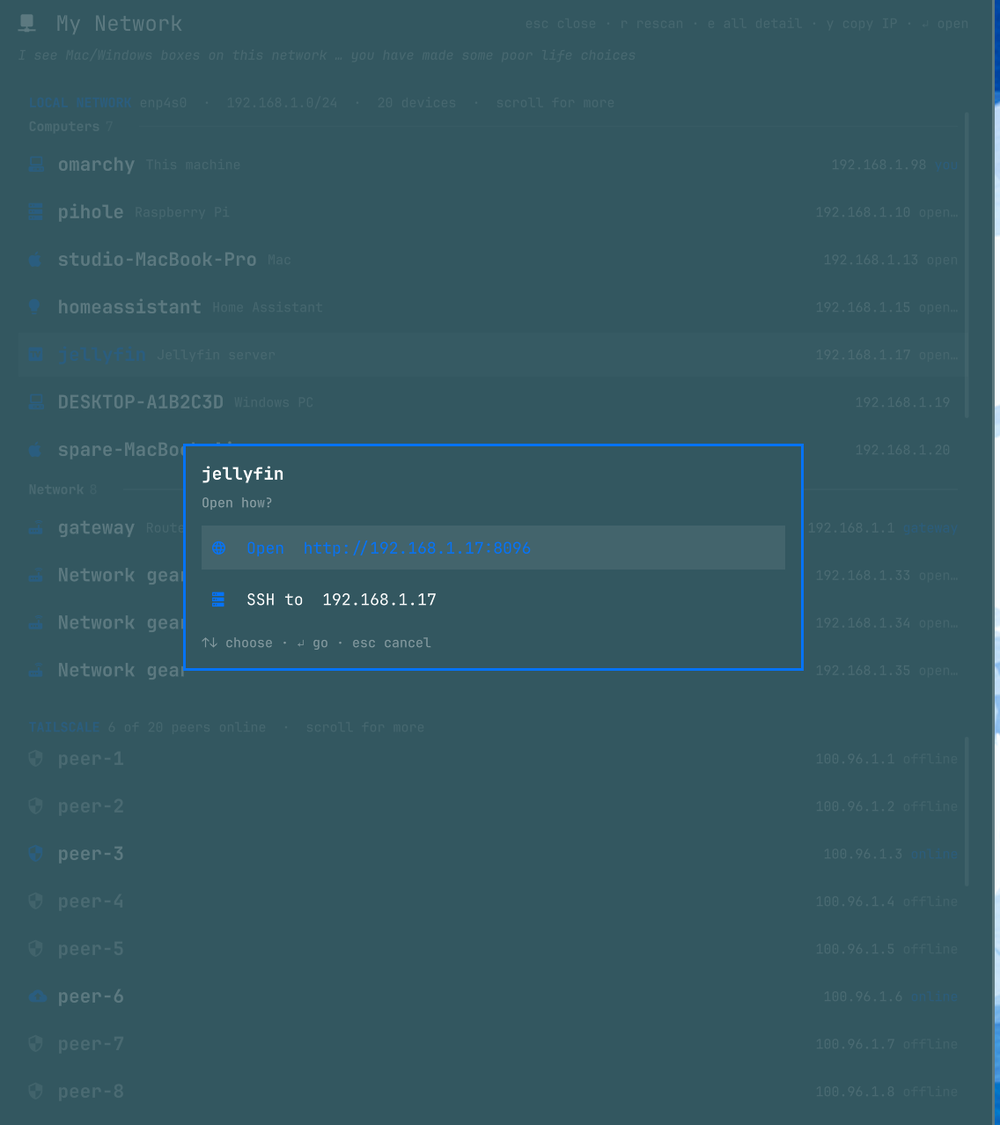
↵ acts when there's something to act on, and asks when there's more than one
way in. A device serving both a web UI and SSH raises a chooser listing every web
port it answers on, most distinctive first (:8096 before :80), plus SSH. One
option goes straight there; none does nothing. The row's right-hand tag says
which you'll get, with open… meaning there's a choice.
SSH targets
On the LAN, SSH follows your ~/.ssh/config. If a Host block points at the
device's address — or its alias matches the device's name — the panel offers the
alias, so the configured User, Port and key apply. Otherwise it falls back to
the address.
Tailscale peers stay on the tailnet. Where a peer has Tailscale SSH enabled,
tailscale ssh is offered first. Otherwise it's plain SSH to the MagicDNS name.
A ~/.ssh/config alias is used only if following it stays on the tailnet, since
aliases for tailnet hosts often point at a public address.
The terminal is held open on a failed connection so you can read the error.
Layout
The two sections scroll independently, each showing roughly 8–10 rows. A section
that overflows says so in its header and gets a slim scrollbar. The selection
cursor runs as one sequence: ↓ off the last device lands on the first peer, and
whichever list owns the selection is the one that scrolls.
With e on, the panel grows to 80% of the screen and the lists scroll further.
Panel geometry changes only when you press e.
How the scan works
Two passes per open, both in scan.sh:
| Pass | Does | Takes |
|---|---|---|
fast |
neighbour (ARP) table + mDNS browse + Tailscale status + name cache | ~1s |
deep |
adds a /24 ping sweep, a TCP probe of 18 ports, and SSH/HTTP banner reads |
~7s |
The fast pass paints a list immediately; the deep pass replaces it. Every ping emits an ARP request first, so hosts that drop ICMP still appear in the neighbour table.
Names are remembered against the MAC, because router-provided reverse DNS answers
only intermittently. A name reused from an earlier scan is labelled as such in
the detail. The cache is $XDG_CACHE_HOME/omarchy-network-scan/names.tsv, capped
at 500 entries; delete it to start cold.
Subnets wider than a /24 are swept as the local /24 only, and the header says
so when that happens. This machine's own open ports come from ss filtered to
LAN-reachable listeners.
This is an active scan
The deep pass sends ICMP to every address on your subnet and opens TCP connections to the hosts it finds. That's ordinary behaviour on a network you own, but it is traffic, and on a network you don't control it may show up in an IDS. Banner reads only touch ports already found open. Use the passive fast pass, or don't use the plugin, where that matters.
Requirements
Nothing is installed for you. Everything is checked at runtime and the panel says what's missing.
| Needs | For | If absent |
|---|---|---|
jq |
all parsing | panel says so and stops |
iproute2 (ip, ss) |
interfaces, ARP table, own listeners | panel says so and stops |
avahi (avahi-browse) |
mDNS names, models, service types | falls back to reverse DNS / vendor |
openbsd-netcat (nc) |
port probing, SSH/HTTP banners | no ports, so role and OS fall back to vendor/TTL |
hwdata (/usr/share/hwdata/oui.txt) |
MAC → vendor | vendor blank |
tailscale |
peer section | section hidden entirely |
wl-clipboard (wl-copy) |
y |
copy silently does nothing |
ping needs no root — Linux grants unprivileged ICMP sockets via
net.ipv4.ping_group_range.
Install
omarchy plugin add https://github.com/28allday/omarchy-network-scan.git
omarchy plugin update                        # fetches, shows a diff, fast-forwards
omarchy plugin remove nosignal.network-scan
add clones into ~/.config/omarchy/plugins/nosignal.network-scan/, validates
the manifest and warns you first — plugins run as unsandboxed code inside
omarchy-shell, so read it before you enable it. It then asks whether to enable,
and which bar section to put the icon in, with right pre-selected. --yes
skips every prompt and takes the defaults.
Bind a key in ~/.config/hypr/bindings.lua:
o.bind("SUPER + ALT + N", "My network", "omarchy-shell shell toggle nosignal.network-scan")
Licence
MIT — see LICENSE.