
OLED Guard
An Omarchy shell plugin that stops your status bar from out-wearing the rest of your OLED panel.
The problem
OLED wear is luminance integrated over time. On a desktop, almost every pixel gets shuffled constantly — windows move, text scrolls, workspaces switch. One surface does not: the bar. The clock, the tray icons, the workspace pills sit in the same physical pixels for the entire life of the session. Over enough hours that strip simply ages faster than the panel around it, and the result is a faint permanent band across the top of the screen.
Manufacturer guidance for this is consistent and boring: hide static UI, keep brightness sane, let the screen switch off. OLED Guard covers the case those leave open — the hours you are actually using the machine and want the bar visible.
What it does
Holds a translucent veil over the bar strip, and only the bar strip.
- Continuous attenuation (
baseOpacity) — a standing reduction in how hard the bar's pixels are driven while you work. - Idle attenuation (
idleOpacity) — deepens once there has been no input foridleAfterSeconds, and lifts the instant you touch anything. - Fullscreen suspend — the veil lifts entirely when there is fullscreen content underneath. Dimming a film is a bug, not a feature. Decided per monitor, so a film on one screen is not veiled because another screen happens to hold focus.
- Reveal on hover (
revealOnHover) — the veil clears the instant the pointer reaches the bar, the way Omarchy's own indicators reveal themselves. This is the setting that makes deep attenuation practical.
It follows the bar: change bar.position to left and the veil moves to the
left edge, resize the bar and the veil resizes with it. Hide the bar entirely
and the veil stops drawing, because there is nothing left to protect.
Two attenuation modes
Flat dim (default) applies uniform alpha across the strip.
Checkerboard ("checkerboard": true) paints two stacked veils: a flat floor
across the whole strip, plus a shallow checker of depth checkerContrast over
half of it, rotating so the pattern cannot etch itself in. The floor carries
whatever attenuation the checker does not, so the delivered average always
equals what you asked for.
It is a look, not a protection level — and it protects slightly worse.
Both modes deliver the same average; they differ only in how it is
distributed. Under a linear wear model that is identical. OLED ageing is
superlinear in drive level, and for a convex wear curve the average of two
extremes exceeds the middle. Modelling wear as L^γ, the penalty depends
only on the checker depth k — the floor term cancels out of the ratio
entirely:
checker depth k |
penalty vs flat (γ=2) |
|---|---|
| 0 — flat dim | +0.0% |
| 0.10 | +0.3% |
| 0.25 — the default | +2.0% |
| 0.50 | +11.1% |
| 1.00 | +100% |
Which is why the floor exists. Painting the checker at 2a with no floor also
hits the average, and is what this plugin used to do — it cost 11% and left
half the pixels at full drive. A floor plus k=0.25 costs 2% for the same
average and the same visible texture, and caps peak drive well below 100%.
Why "let the pixel rest" does not rescue it
The natural defence is that the covered pixels get to rest. They do — but rest is not free. Holding the average fixed, you cannot darken one half without brightening its partner:
checker k |
covered drive | uncovered drive |
|---|---|---|
| 0.00 | 0.750 | 0.750 |
| 0.25 | 0.643 | 0.857 |
| 0.50 | 0.500 | 1.000 |
The covered half only reaches 0.50 because the uncovered half was pushed to full. The rest is funded by overdriving the neighbour, and superlinear wear charges more for the overdrive than it refunds for the rest. Every step toward a softer checker is a step toward flat dim, which is why the curve is monotonic with no interior optimum.
This holds because off-time pauses wear accumulation rather than reversing it. If it reversed damage the conclusion would flip — which is true for the transient charge-trapping component, and not for the permanent emitter degradation that actually produces burn-in.
If you want more protection, raise Depth. That darkens every pixel. Reaching for texture to get protection pays a wear penalty for something Depth gives you for free.
So what is it for? Texture, and one real side effect: the covered and uncovered halves differ in drive, so per-pixel contrast varies across the strip in a way a flat dim does not produce. That is an aesthetic property. It reads as intended at display scale 1, where the eye integrates the pattern spatially; at scale 2 the cells are 2x2 physical pixels and you simply see texture.
It lives under LOOK in the panel, not under PROTECTION, for that reason.
Rotation is mandatory, not a bonus
The phase rotates every checkerPhaseMinutes because without it the
checkerboard would etch its own pattern into the strip -- a permanent
half-brightness grid, caused entirely by the mode meant to prevent burn-in.
Flat dim never creates that problem, so it needs no fix. Rotation is checker
solving something only checker causes; it is not extra protection on top.
The tile is opaque on its diagonal, so it has exactly two distinct states, not four: offsetting by (1,1) maps black onto black and reproduces the original. An earlier four-step walk rendered P, P', P', P -- even total time, so wear levelling still held, but each state was held for two consecutive intervals and the effective period was double the setting. It now alternates strictly.
Rotation genuinely wins where you cannot dim: a shader can only switch pixels fully on or off, so rotating which ones are off is the only lever available. That is hyproled's situation, and why the technique exists there.
One remaining limit: the cell size follows your display scale. The tile is 2x2 logical pixels, so at scale 2 each cell covers a 2x2 block of physical pixels rather than one. Coverage is still 50% and rotation still swaps the covered set completely, so the arithmetic holds, but the texture is coarser than a true one-pixel checker. At fractional scales (1.25, 1.5) nearest neighbour scaling makes cells uneven and the equal-time property degrades.
The old 50% ceiling is gone: because the floor absorbs whatever depth the checker cannot carry, the delivered average now equals the request at any depth.
Flat dim is available at all here only because this is a compositing layer. The existing Hyprland tool in this space, hyproled, uses a checkerboard shader because a shader can only switch pixels fully off — it has no way to ask for "70% as bright". A QML overlay can, which is why the default here is the mode hyproled could not offer.
Reveal on hover
A bar you have to read at a glance can only be dimmed so far. A bar that clears the moment you reach for it can sit far darker the rest of the time — which is a different order of saving, and strictly better than hiding the bar outright because there is nothing to discover and nothing to undo.
Measured on a #c2c2c2 bar at the Veiled depth:
| pointer | delivered attenuation | peak drive |
|---|---|---|
| away from the bar | 0.85 | 33 / 255 |
| on the bar | 0 | 194 / 255 |
Six times less peak drive, with the bar fully legible whenever you actually look at it.
The two directions are timed differently on purpose. Clearing the veil answers a gesture you just made, so it has to feel immediate; putting it back is unprompted, so it should be slow enough that you never catch it happening. A single duration forces a choice between a sluggish reveal and a visibly blinking bar. Measured peak drive on the bar:
| transition | ~100 ms | ~250 ms | settled |
|---|---|---|---|
| clearing | 55 / 255 | — | 194 / 255 |
| veiling back | 194 / 255 | 194 / 255 | 33 / 255 |
Clearing ramps immediately; veiling holds and then eases down, so the bar never appears to blink when you glance away.
Fullscreen counts as a reveal too, and uses the fast path: a film just started, and leaving a veil across the top of it for a second and a half is the bug the suspend exists to prevent.
It costs nothing to implement and grabs no input: the bar already tracks its own hover state, and this plugin's overlay sits on top of it with an empty input region, so pointer events pass straight through to the bar underneath. No polling, no second hover surface, no click interception.
The Veiled depth preset (85% working, 90% idle) exists for this mode and is not really usable without it.
What this plugin deliberately does not do
It does not orbit or nudge the bar. Pixel-shift is the reflex suggestion for burn-in, and for a status bar it is largely theatre: sliding a uniform block two pixels sideways only changes the two-pixel edge, while the static block stays exactly as static. It also isn't available — a plugin cannot translate another plugin's layer-shell surface. Reducing how hard the strip is driven attacks the actual wear term; moving it slightly does not.
It is not a replacement for the boring advice. Lower brightness and a short display-off timeout beat this plugin on effort-to-benefit. Do those first. And worth keeping in proportion: a 3000-hour burn-in test found modern panels hold up well, with damage concentrated in high-contrast static elements. A status bar is exactly that shape, which is why this exists — but it is insurance, not an emergency.
Install
omarchy plugin add https://github.com/rawritude/omarchy-oled-guard.git --enable
Then restart the shell so the plugin's JS library loads:
omarchy restart shell
Enabling adds an entry to ~/.config/omarchy/shell.json. The plugin ships both
a background service and an optional bar indicator, and reads its config from
whichever entry exists — the bar.layout entry if you enabled the widget, or a
plugins[] entry if you want the service without the indicator.
Removing it
omarchy plugin remove oled.guard
That unloads the service, drops the veil immediately, and removes the bar entry
from ~/.config/omarchy/shell.json. A timestamped copy of the plugin directory
is left in ~/.config/omarchy/plugins/ in case you want it back; delete it at
your leisure. Nothing is written anywhere else — no state files, no dotfiles, no
system configuration.
To keep it installed but inert, set "enabled": false, or press Off in the
panel.
Configuration
All keys are optional; the defaults below are what you get with an empty entry.
{
  "id": "oled.guard",

  "enabled": true,             // false disables without uninstalling
  "baseOpacity": 0.15,         // 0.0-0.9  standing attenuation while active
  "idleOpacity": 0.5,          // 0.0-0.95 attenuation once idle
  "idleAfterSeconds": 90,      // 5-3600
  "fadeMs": 700,               // veiling back: gradual, so you never catch it
  "revealMs": 170,             // clearing: fast, it answers a gesture

  "checkerboard": false,       // true adds the rotating texture over the floor
  "checkerPhaseMinutes": 5,    // 1-720
  "checkerContrast": 0.25,     // 0.05-1  depth of the checker layer. This alone
                               // sets the wear penalty; 0.25 costs ~2%.

  "revealOnHover": false,      // clear the veil while the pointer is on the bar
  "hoverOpacity": 0.0,         // 0.0-0.9  attenuation while hovered

  "suspendOnFullscreen": true  // lift the veil over fullscreen content
}
Installing it starts you at Medium — a 15% standing reduction that is easy to stop noticing, deepening to 55% when you go idle. A plugin whose job is to attenuate the bar should do that on install rather than sit inert until configured. One click on Off in the panel stops it entirely.
Config changes hot-reload. Editing the plugin's .js requires
omarchy restart shell (plugin code is cached, .qml and .js alike).
Bar indicator and panel
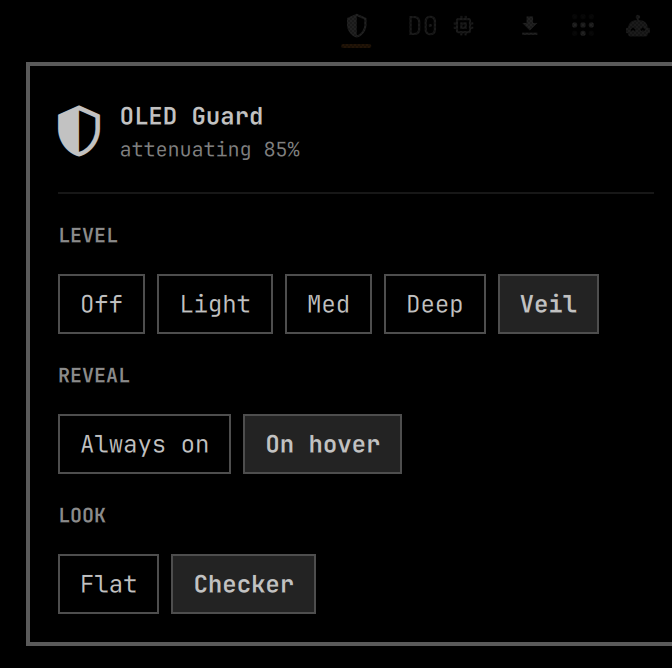
A Nerd Font shield matching the first-party bar indicators: half-full while attenuating, outline while standing by, struck through when paused.
Left click opens a panel — level, reveal behaviour and look, so nothing here
needs hand-editing shell.json. Right click pauses and resumes without
opening anything.
  LEVEL    Off  ·  Light  ·  Med  ·  Deep  ·  Veil
  REVEAL   Always on  ·  On hover
  LOOK     Flat  ·  Checker
Three rows, no prose. Off is the bottom of the intensity scale rather than a separate axis, and every explanation lives in a tooltip -- a settings panel that argues with you is a settings panel you stop opening.
LOOK is a separate section on purpose. Sitting in the protection row, Checker read as a third and strongest setting — the opposite of true.
Levels are presets rather than raw opacities, because "how protected do you want to be" is the question people actually have. Light is 10%/40%, Med 15%/55%, Deep 25%/75%, Veil 85%/90% — working and idle respectively.
Hiding the bar outright is still the theoretical maximum, and Omarchy already ships it at Super + Ctrl + O → Menu Bar. It is deliberately not duplicated here: it would remove the surface its own control lives on, and Reveal on hover gets most of the way there with nothing to discover and nothing to undo.
This panel is the one file that imports Omarchy's internal qs.* UI module, so
it matches every other dropdown. The service and the overlay stay
dependency-free — if a future Omarchy release moves that module, the indicator
is what breaks, never the guarding.
Control
omarchy-shell oledguard status    # JSON: state and geometry
omarchy-shell oledguard pause     # lift the veil for now
omarchy-shell oledguard resume
omarchy-shell oledguard toggle
The panel exposes the same choices, so they can go on a keybinding:
omarchy-shell oled.guard level off|light|medium|deep|veiled
omarchy-shell oled.guard mode off|dim|checker   # sets power and look at once
omarchy-shell oled.guard reveal always|hover
omarchy-shell oled.guard look flat|checker
omarchy-shell oled.guard depth light|medium|deep
omarchy-shell oled.guard toggle   # open/close the panel
omarchy-shell oled.guard state
Pause is deliberately not persisted — it means "not right now". For "not ever",
set "enabled": false.
What it does not keep
There is no running tally of light saved. An earlier version tracked one, and it was the single worst part of the plugin: it accrued "wear avoided" against a locked screen, it banked attenuation the checkerboard never actually delivered, and it sampled once a minute at whatever value happened to be live on the tick — which got materially wronger once hover-reveal started flipping attenuation several times a minute.
Every one of those was fixable. None of them was worth fixing, because the number was never actionable: nobody changes anything on being told "13m reclaimed". The figures worth trusting are the measured ones in this README — peak drive, wear penalties, contrast ratios — and those do not need a counter running in your shell to stay true.
Known limitations
- Multi-monitor is unverified. Fullscreen is resolved per screen, against each overlay's own monitor rather than one global flag, specifically so a film on one display is not veiled because another holds focus. That logic is correct by construction and verified against live Hyprland state — but only on a single-display machine. The multi-head path has never actually run. If you hit a problem there, please open an issue; it is the one thing here I could not test.
- Checkerboard degrades at fractional scaling. The tile is 2x2 logical pixels, so at 1.25 or 1.5 nearest-neighbour scaling makes the cells uneven and the equal-time property weakens. Flat is unaffected, and is the default.
Requirements
Omarchy 4.x (Quickshell-based shell). No external dependencies.
Licence
MIT