
netviz3d — a retro-pixel packet scope for Omarchy
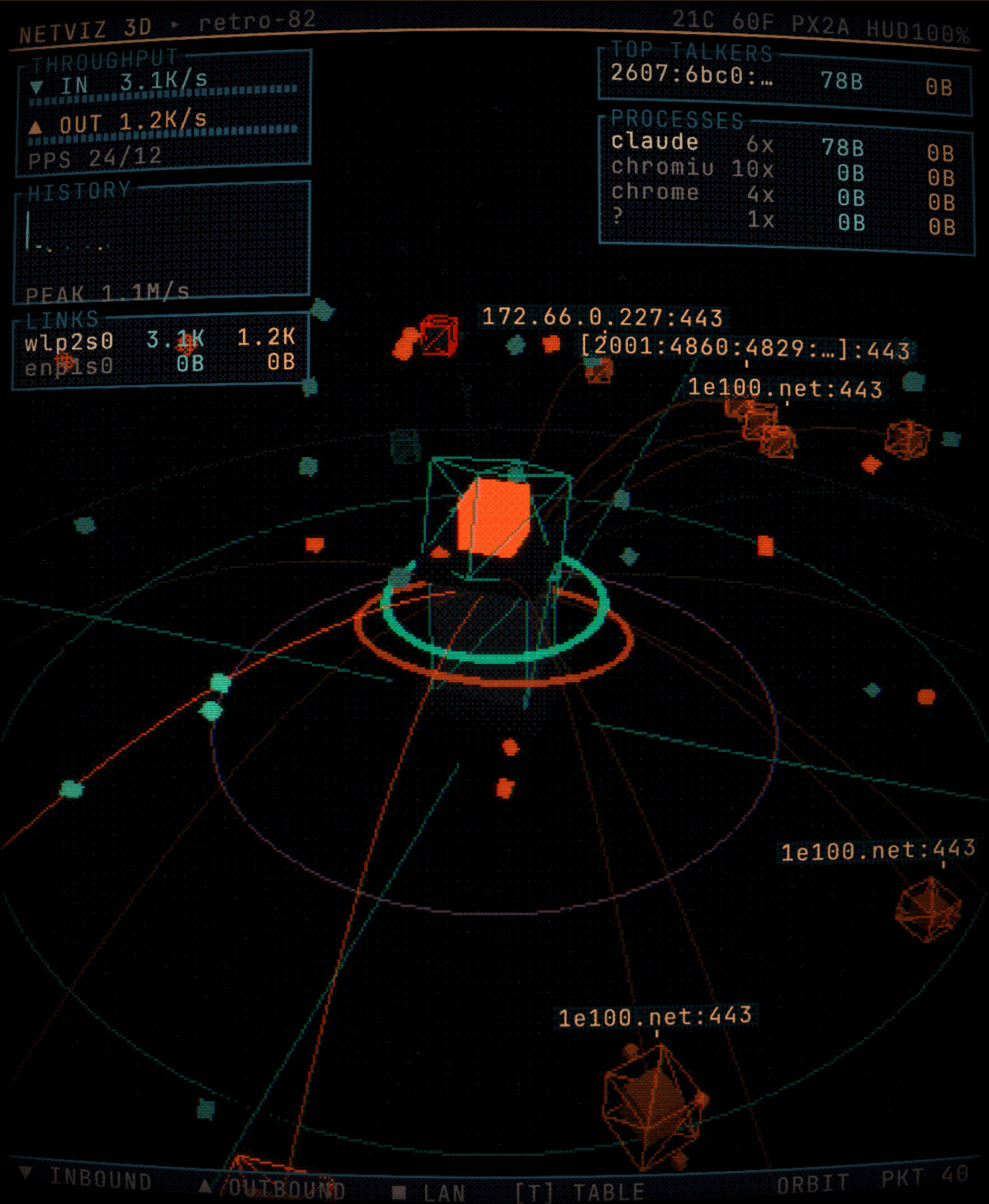
Visualises your machine's inbound and outbound network traffic in 3D, styled like a CRT monitor from the early '90s: low resolution, hard raster, dithered colours, scanlines and tube curvature.
Your machine is the monolith in the centre. Every peer the kernel is currently talking to becomes a voxel node on a ring around it — placed by a stable hash of the IP, so a given host always shows up in the same spot. Every measured byte is turned into small cubes that fly along the connection: inbound towards you, outbound away from you.
┌───────────────┐   /proc/net/dev   ┌──────────────┐  WebSocket  ┌───────────┐
│ Linux kernel  │ ────────────────▶ │   Backend    │ ──────────▶ │ WebGL2 3D │
│               │   ss -tuHnpi      │  (Python,    │   20 Hz     │  Frontend │
└───────────────┘ ────────────────▶ │   stdlib)    │             └───────────┘
                                    └──────────────┘
Installation
As an Omarchy plugin — the repository is the plugin, manifest.json sits at
the root:
omarchy plugin add https://github.com/olivgrau/omarchy-netviz3d.git --enable
Everything lands in ~/.config/omarchy/plugins/olivgrau.netviz3d/, the pill
appears in the bar, and a click starts the scope — the launcher is invoked from
the plugin directory, so nothing has to be on $PATH.
For full desktop integration (keybinding, app launcher entry, window rules), additionally run this from the cloned directory:
./install.sh
That sets up:
| What | Where |
|---|---|
netviz3d launcher |
~/.local/bin/netviz3d (symlink to here) |
| App entry + icon | ~/.local/share/applications/netviz3d.desktop |
| Omarchy bar plugin | ~/.config/omarchy/plugins/olivgrau.netviz3d (symlink to the repo) |
| Keybinding | SUPER + SHIFT + N in ~/.config/hypr/bindings.lua |
| Window rules | Block in ~/.config/hypr/hyprland.lua |
Everything the installer writes into files it does not own is fenced between
-- >>> netviz3d >>> and -- <<< netviz3d <<<. To undo:
./install.sh uninstall
Different keybinding: NETVIZ_KEYBIND="SUPER + ALT + N" ./install.sh
Usage
netviz3d          # start the backend (if needed) and open the window
netviz3d serve    # backend only, in the foreground (for debugging)
netviz3d status   # is the backend running?
netviz3d stop     # stop the backend
Or SUPER + SHIFT + N, or via the app launcher, or by clicking the ↓/↑ pill in
the Omarchy bar.
Keyboard
| Key | Effect |
|---|---|
| Drag | Orbit the camera |
| Scroll wheel | Zoom |
| Click a node | Select peer → detail panel |
N / B |
Next / previous peer (keyboard triage) |
T |
Connection table (full width, nothing truncated) |
- / + |
HUD size (60 % … 145 %, persisted) |
Space |
Pause the packet flow |
H |
Toggle HUD |
P |
Cycle pixel size (auto → 2 → 3 → 4 → 6 → 8) |
G |
Toggle grid |
L |
Toggle peer labels |
C |
Camera preset (Orbit / Top / Low / Close) |
R |
Reset view · Esc clear selection |
F |
Fullscreen |
? |
Help |
P only changes the resolution of the 3D scene, -/+ only that of the HUD —
the two are independent. HUD size, pixel size and view survive a restart
(localStorage).
Colours
A node's colour tells you what kind of traffic it is — TLS, HTTP, DNS, SSH,
infrastructure (DHCP/NTP/SSDP), LAN peer. Packets are coloured by direction.
All colours come from the active Omarchy theme
(~/.local/state/omarchy/current/theme/colors.toml) and follow along live when
you switch themes — dark themes are brightened just enough to stay legible
against the dithering.
What the data is good for (a security angle)
The scope does not answer "have I been hacked", but it does answer questions that would otherwise need three terminals at once: who is talking to whom, over what, and since when.
Per connection, the backend collects:
| Field | Source | Why |
|---|---|---|
| Remote IP, port, service | ss |
the basic question |
| Reverse DNS + forward confirmation | getnameinfo + getaddrinfo |
a name that does not resolve back to the same IP is evidence of nothing |
| ASN, operator, country, prefix | Team Cymru over DNS, whois fallback |
"Google" vs. "some hoster I don't recognise" |
| Process, PID, binary path, user | /proc/<pid>/ |
two processes are called python3, one of them lives in /tmp |
| Bytes live and cumulative, RTT | ss -i (TCP_INFO) |
volume and rough distance |
| Age, number of connections to the address | own bookkeeping | short-lived-and-repeated vs. one long session |
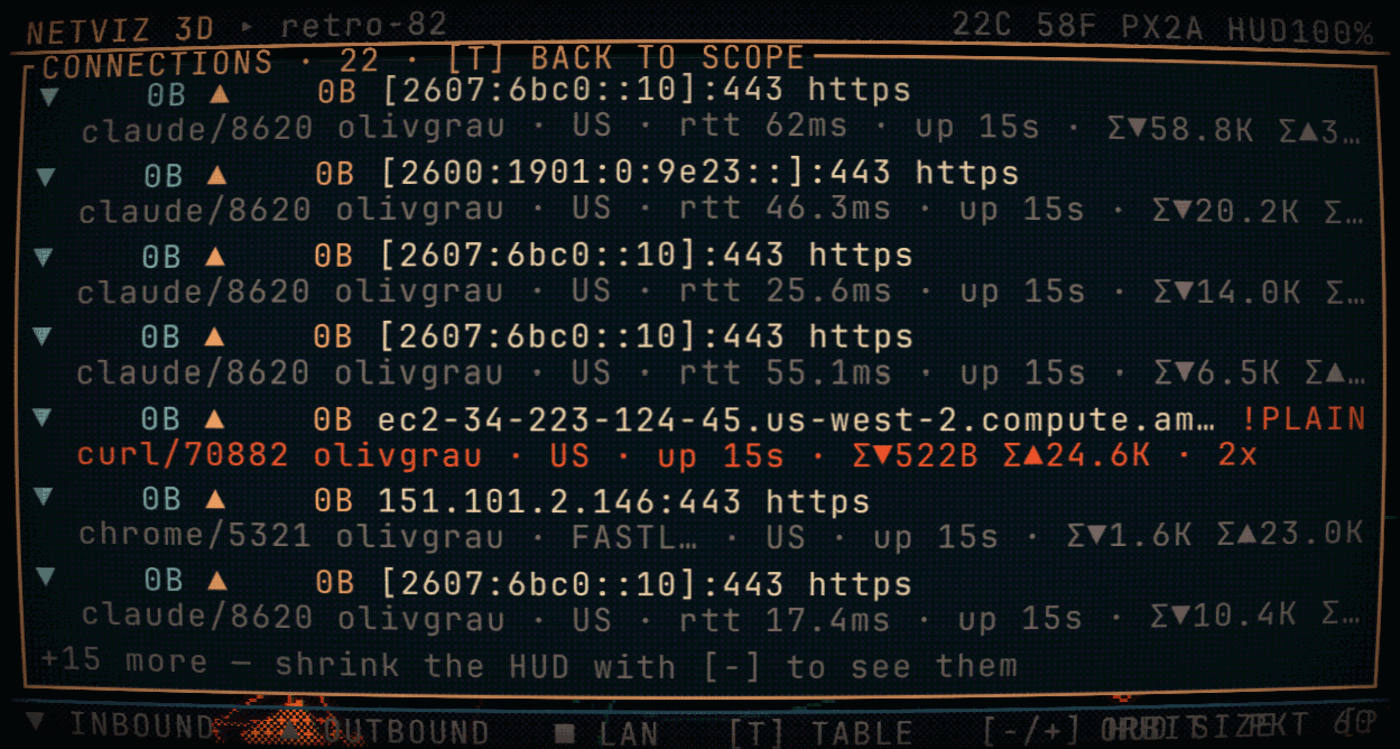
From that come flags, shown in red in the table, which also make the node pulse in the 3D scene:
| Flag | Meaning | Why it matters |
|---|---|---|
!PLAIN |
Cleartext protocol (80, 21, 23, 25, 3306, 6379, …) to the public internet | content, and often credentials, are on the wire |
!RDNS |
Reverse name does not resolve back to the same address | a weak but cheap signal |
~BEACON |
≥ 4 connections to the same address at a conspicuously regular cadence | this is what C2 beaconing looks like — and, unfortunately, every sync client |
+NEW |
Address seen for the first time this session | "that wasn't there before" |
?PROC |
Socket with no visible owning process | belongs to another user or to root |
?DNS |
No reverse name at all | normal for CDNs, less so for individual IPs |
The flags are hints, not verdicts. ~BEACON catches Dropbox just as
readily as a backdoor; !PLAIN catches every HTTP page. The value is that
deviations from your own normal become visible — and you only know your normal
after letting this thing run idle a few times.
Practical starting points:
- Idle baseline: let the machine do nothing, press
T, note who is talking anyway. Anything that shows up later needs an explanation. - Ask about the process, not the address: the PROCESSES panel rolls traffic up per program. A program that appears there with no business being online is the most interesting find.
- Read the
exepath in the detail panel, not the process name. Names are freely chosen, paths less so. - Look at cumulative bytes (
Σ▼/Σ▲) rather than the instantaneous rate: exfiltration is rarely fast, it is persistent. An outbound Σ▲ that does not match what the program ought to be doing stands out here. - RTT as a rough distance: 1–5 ms is your own city or CDN, 100 ms+ is another continent.
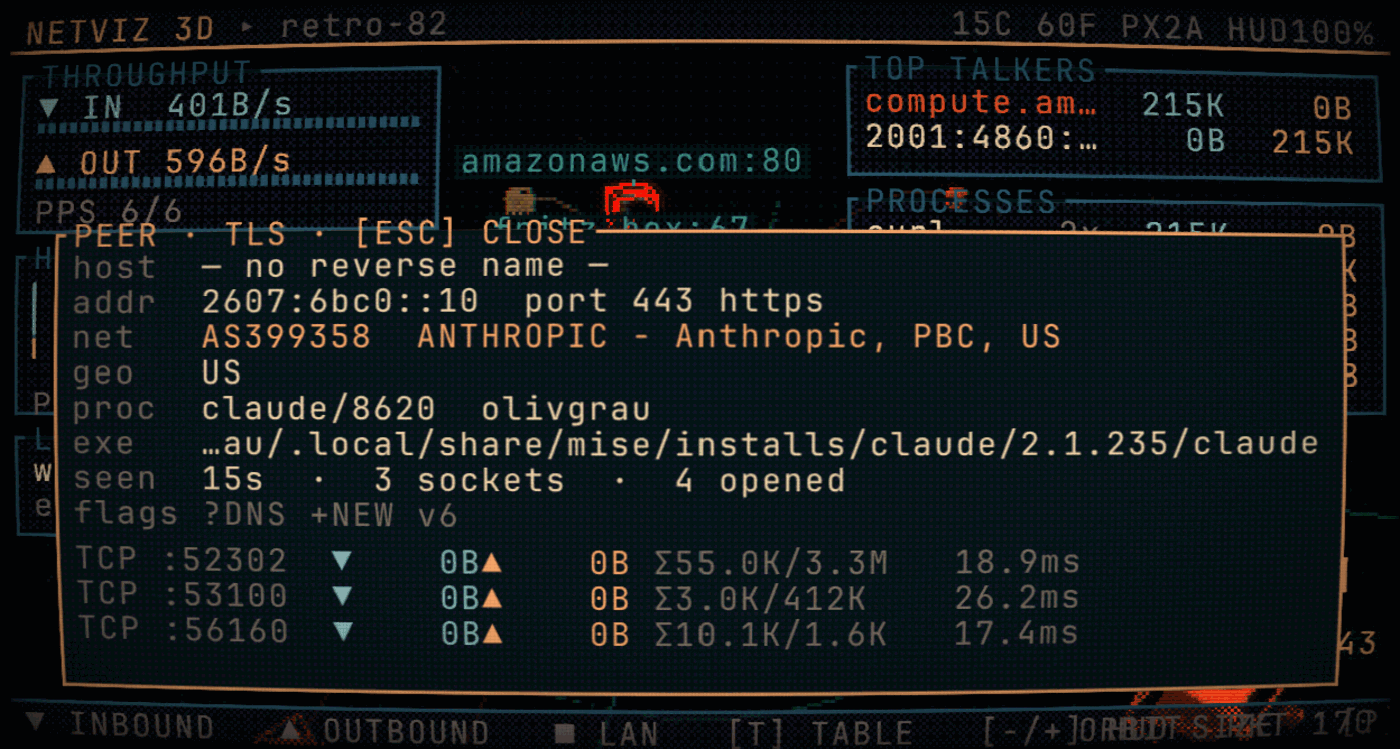
N and B step through the peers in order, without the mouse.
The limits, so it is clear what this cannot do: it only sees sockets that are
open at sampling time (a 200 ms connection in between is missed), it reads no
payload, it does not detect DNS tunnelling, and it does not see traffic that
never passes through this machine's kernel. For real capture, use
tcpdump/Wireshark; for continuous recording, something like Zeek.
The bar plugin
manifest.json + BarWidget.qml at the root make this repository a full
Omarchy shell plugin (kinds: ["bar-widget"]) that runs inside the live
omarchy-shell process:
- shows the aggregated down/up rate, once per second from
/proc/net/dev - left click opens the 3D scope, middle click throws
ss -tunpinto a terminal, right click stops the backend again - works regardless of whether the backend or the window are running
Settings (via shell.json or the plugin settings): interface (empty = all),
showRates, command.
install.sh symlinks the repository directory straight to
~/.config/omarchy/plugins/olivgrau.netviz3d — exactly the layout that
omarchy plugin add produces. Changes to the QML file therefore reload
immediately. If they don't: omarchy-shell shell rescanPlugins.
Data sources
No root, no packet capture, no CAP_NET_RAW:
/proc/net/dev— bytes and packets per interface, every 250 ms. This is the truth about traffic volume.ss -tuHnpi— open TCP/UDP sockets every 500 ms, including thebytes_sent/bytes_receivedcounters fromTCP_INFO. This is where per-connection traffic and the owning process name come from.- Reverse DNS — deferred, cached, on a worker thread; disable with
--no-dns. The name is additionally resolved forward to see whether it leads back to the address. - Team Cymru (DNS) +
whois— ASN, operator, country and announced prefix of the peer. The Cymru part is a single UDP DNS query (the backend ships a minimal DNS client for it,digis not required); because the answer contains the prefix, every further address in the same network is free.whoisonly runs when Cymru returns no name. Cached in~/.cache/netviz3d/netinfo.json, disable with--no-whois. Both services learn which addresses you are asking about — hence the switch. /proc/<pid>/— binary path, command line and user of the process that owns the socket.
Whatever the interface reports but no socket explains (UDP without counters, broadcast, sockets belonging to other users) is rendered as a diffuse background stream rather than quietly dropped.
The backend listens on 127.0.0.1 only and sends nothing outbound. There is no
payload inspection — only counters, addresses and ports.
Because that stream carries PIDs, usernames and command lines, binding to
loopback is not on its own enough — a browser will happily talk to 127.0.0.1
on behalf of any page you have open. So the backend also:
- checks the
Hostheader on every request, which is what stops a domain whose DNS resolves to127.0.0.1(rebinding) from reading the socket table; - checks the
Originheader on the WebSocket, because websockets are exempt from the same-origin policy and a handshake from any page would otherwise be accepted (cross-site websocket hijacking); - bounds concurrent connections at the listener, plus websocket clients, frame sizes and idle sockets. The connection bound has to sit there: a handler thread exists before any header is read, so a check inside the handler is already too late to limit anything;
- refuses a non-loopback
--hostunless you pass--insecure-allow-remote, since nothing authenticates a reader on the network.
Layout
manifest.json              Omarchy plugin manifest (must sit at the root)
BarWidget.qml              Bar widget for omarchy-shell
backend/netviz_server.py   Sampler + enrichment + HTTP + WebSocket (stdlib)
web/app.js                 Bootstrap, camera, input, WebSocket
web/scene.js               3D world: host, peers, packets, grid
web/post.js                Pixel/CRT shader (dither, bloom, scanlines)
web/hud.js                 HUD, drawn in real pixels
web/vendor/                three.js (MIT), local — no CDN dependency
test/hud-smoke.mjs         HUD drawing paths against a canvas stub
test/backend-security.py   Backend access controls and resource bounds
assets/make_icon.py        generates the pixel icon
bin/netviz3d               Launcher
install.sh                 Omarchy integration
The trick behind the look: the scene is rendered into a deliberately tiny
framebuffer (width / pixel size), then scaled back up by a fullscreen shader —
with Bayer dithering down to a few colour steps, bloom, scanlines, tube
curvature, colour fringing and a roll bar. The render target is explicitly
given SRGBColorSpace: three.js works linearly internally and normally
converts on the way to the screen — but this pass writes to the canvas through
a raw shader and would otherwise never get that conversion, leaving everything
at roughly half brightness.
Packets are sized in screen space rather than world space (a constant six pixels or so of the low-res buffer, with a near clip in front of the lens): at this resolution a packet that shrinks with perspective simply disappears, and one right in front of the camera fills half the frame. Their count is deliberately capped — beyond roughly two dozen at once per connection they merge into a solid band that says less than a loose stream does.
The HUD is laid out on the same virtual pixel grid (boxes, bars and dither areas stay coarsely pixelated) but drawn at device resolution and only then composited on top — otherwise 8px type would simply not be readable. For the same reason the peer labels are not sprites in the scene: their 3D position is projected into HUD coordinates and the text is drawn there, including dodging the HUD panels.
Troubleshooting
netviz3d serve                       # backend in the foreground, with logs
netviz3d serve --no-whois --no-dns   # without any external lookup
curl -s localhost:8787/api/state | head -c 400   # look at the raw data
tail -f ~/.local/state/netviz3d/backend.log
node test/hud-smoke.mjs              # exercise the HUD layouts
python3 test/backend-security.py     # the access controls, adversarially
omarchy plugin validate .            # check the manifest against the schema
If the 3D view stutters, a larger pixel size (P) helps — it lowers the render
resolution quadratically.
License
MIT for the code in this repository. web/vendor/three.* is three.js (MIT),
Copyright three.js authors.