
OpenCode Config Manager
Saved opencode model profiles, one click from your Omarchy bar.
Keep a "daily work" set of models, a "full Opus" set for the hard afternoons, and a free one for when you are just poking around. Click the bar to switch between them. Turn on Restart opencode and a running session re-reads its config where it stands — nothing closes, nothing is lost. The conversation you are in keeps the model it started on; the switch lands on everything opened after it.
| Install | Update | Remove |
|---|---|---|
omarchy plugin add https://github.com/oliwier-xiao/opencode-config-manager.git --enable |
omarchy plugin update oliwier.opencode-configs |
omarchy plugin remove oliwier.opencode-configs |

Works with classic opencode and with oh-my-openagent, and it works out which one you are running rather than asking you. Under plain opencode it shows opencode's agents. Under oh-my-openagent it shows oh-my-openagent's — its agents supersede opencode's, so showing both would offer two rows for one decision. The pill in the top right of the panel says which it found.
The list of agents is read off the software you have installed — opencode's own generated schema,
and the schema and declaration files oh-my-openagent ships — never from a list baked into this
plugin. Where its schema lives is read from that package's own exports map rather than assumed,
so a release that renames the file is one this plugin follows; a release that moves it somewhere
nothing can find is one the Health strip names out loud. Agents you defined yourself are read
straight out of your config and come first.
What the mark is telling you
The icon is opencode's own mark, drawn rather than shipped as an image, so it takes the bar's colours instead of fighting them. The frame stays your bar foreground and never moves: it is a logo, and a logo that changes hue on every switch stops being one. The cursor block inside it is the part that carries state.
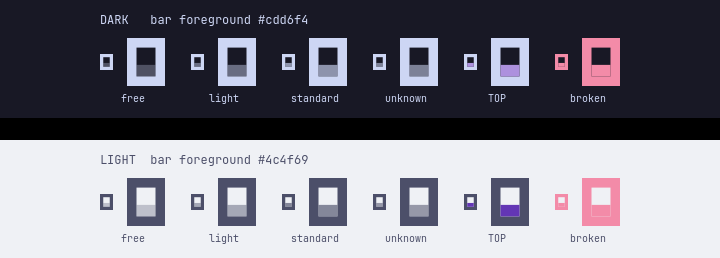
Cost is ordinal, so it is one colour at graded strength rather than a palette of unrelated hues — dim for free, brighter as the profile gets expensive, and opencode's own purple for the profile at the top of your ladder. A config that will not parse turns the whole mark your theme's urgent colour. It is the same grading the dots in the profile list use, so the bar and the panel are never telling you two different things.
mark-preview.qml in the repository root renders every one of those states without starting the
shell — qml6 mark-preview.qml for a window, or QT_QPA_PLATFORM=offscreen qml6 mark-preview.qml
to regenerate the image above.
An Omarchy Quattro shell plugin (bar-widget). Needs omarchy-shell, opencode, and the
jq, python3, flock, sha256sum and pgrep an Arch install already has.
Every file it reads from outside its own checkout goes through bin/safe-read: one
open with O_NOFOLLOW and O_NONBLOCK, the type, owner and size judged on that
descriptor rather than on the name, and only the bytes that were vouched for read back
through it. Every file it writes goes through bin/safe-write: an O_EXCL,
O_NOFOLLOW, mode 0600 temporary in the destination's own directory, fsync, rename,
and an fsync of the directory. Everything it keeps — profiles, backups, the model cache —
sits in folders bin/private-dir has shown to be private: created 0700, opened without
following a link, owned by you, group and other bits cleared on that descriptor; the
copies inside are 0600, and the scripts run under umask 077. A backup holds whatever
your config holds, so it does not inherit the config's own mode: a 0644 config kept
private by its 0700 folder would otherwise become a readable copy somewhere else.
omarchy-shell is one process for the whole desktop, so
nothing read on its behalf may block inside open(2) or be larger than it said it
was. The one exception is assets/templates.json, which ships inside the plugin and
is read by the shell's own FileView; anything able to rewrite that can rewrite the
QML beside it.
Install
omarchy plugin add https://github.com/oliwier-xiao/opencode-config-manager.git --enable
--enable puts it straight on the bar and asks which side you want it on — left, center or right.
Leave the flag off and it installs disabled, so you can read the code first and turn it on later
with omarchy plugin enable oliwier.opencode-configs.
Update anytime with omarchy plugin update oliwier.opencode-configs.
To take it off the bar, see Removing it — your config and profiles stay put.
Your first profile
You already have one. The first time the panel opens it saves whatever you are running as Current config, so there is a copy of your setup before you change anything — and something to come back to. Nothing is written to your opencode config to do that; it is only read.
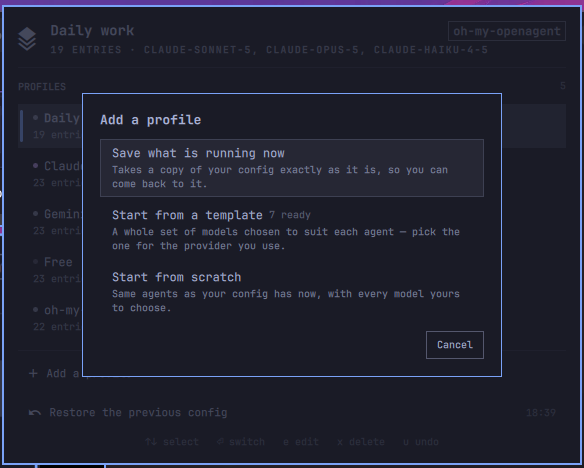
To add more, press Add a profile. It offers three ways in:
| Save what is running now | another copy of your config as it is |
| Start from a template | a whole set of models already matched to each agent, for the provider you use |
| Start from scratch | the same agents your config has now, with every model yours to choose |
Plain opencode
If you use opencode on its own, it manages the model, small_model and agent keys of
~/.config/opencode/opencode.json. The agents are whichever ones your opencode names in its own
config schema — build, plan, general, explore and the three it uses internally — plus any
agent you have defined in that file's agent key: add one and it appears here on the next panel
open, with no configuration.
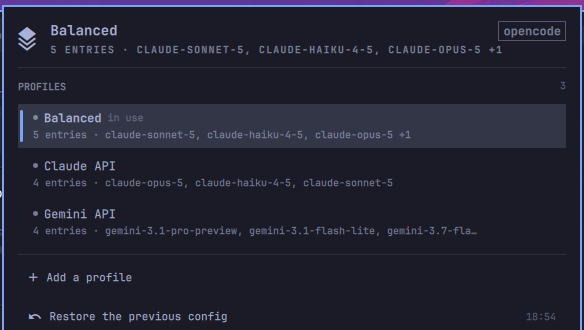
Every profile says how many entries it pins and to what. The dot on the left grades cost the same way the bar mark does — see What the mark is telling you.
Pinned is not the same as running
Neither config shape writes down an agent you have never overridden — both leave it on its own default. So a file naming two agents still runs the whole roster, and a panel that listed only the file would hide the rest behind nothing at all: you cannot pin an agent it never draws.
So the editor draws the whole roster. Your file's own entries come first, in the file's order, and
the rest follow as empty rows waiting for a model. The count in the summary only ever counts the
ones that actually pin something — 2 of 6 pinned means two of the rows are held to a model by
you and four are running on whatever their default is today. An agent the roster has never heard
of still shows up, because the file is read first and the roster only appends.
Editing one gives you every agent in the file, with the model, the reasoning effort, and what each costs per million tokens:
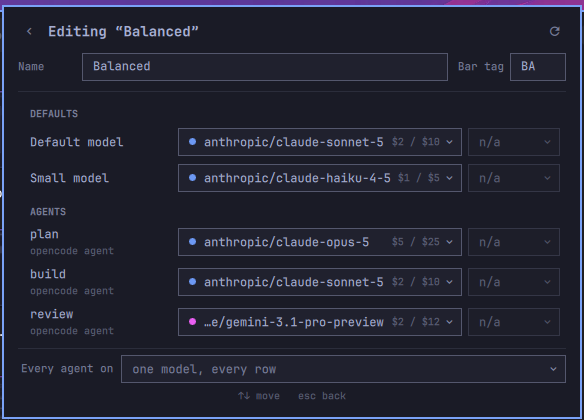
Effort works on agent rows in both shapes — opencode's own agent entries carry a variant just as
oh-my-openagent's do. oh-my-openagent 4.19 renamed its own to reasoning (5.x went back to variant); both spellings are read,
and an entry is written back in the one it already uses, so a config that version migrated for
itself keeps its effort either way. The two rows it is disabled on are Default model and
Small model: those are bare model strings with nowhere to put one. The control stays visible
rather than vanishing, so the rows keep lining up.
With oh-my-openagent
If you run the oh-my-openagent plugin, it
manages ~/.omo/omo.jsonc instead — every agent, every category, and the fallback chain behind
each one. That file is JSONC and it holds one section per harness, so this only ever reads and
writes what is under "[opencode]", and your comments come back untouched.
~/.config/opencode/oh-my-openagent.json was the old location before oh-my-openagent's
2026-07-opencode-config-unification migration moved it. A leftover copy is reported, never edited.
Below the agents and categories sits a small opencode base section holding model and
small_model. oh-my-openagent falls back to those when a category has no model of its own, so
they are worth seeing — but opencode's agent entries are not shown, because oh-my-openagent
supplies its own build and plan and they win.
Detection reads the software, not leftover files: the plugin has to be in your opencode.json
plugin list, or its package has to be installed. You can still force the plain view by turning
manageOhMyOpenAgent off.

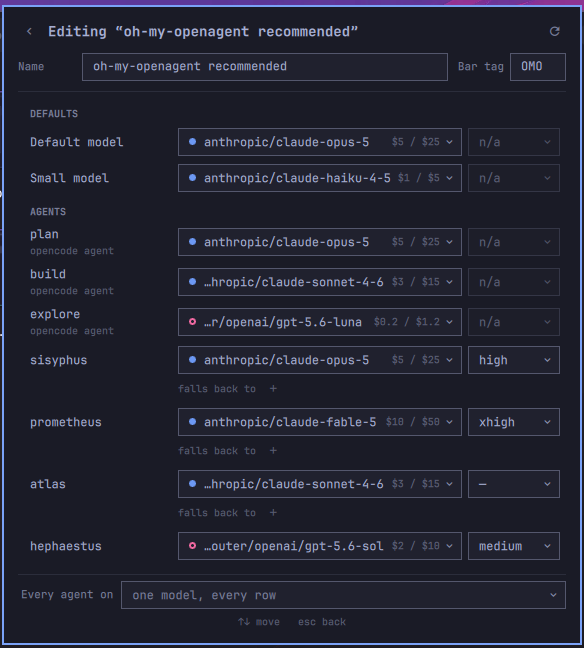
Fallbacks are collapsed to one line per agent, because a fallback is a thing you set once and then want to see is still there.
An agent that only exists as a markdown file in ~/.config/opencode/agents/ works in opencode but
does not appear here — opencode never writes those back into opencode.json, and this panel edits
the file. To manage one, add "<name>": { "model": "..." } under the agent key using the
markdown filename as the key. The prompt and permissions stay in the .md; only the model moves
into the JSON, and the two merge.
Templates
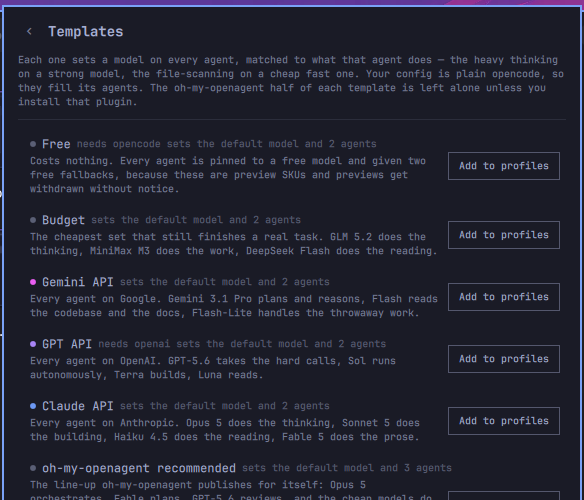
Eight ready-made profiles ship with the plugin. Each one matches models to what an agent actually does — the heavy thinking on a strong model, the file-scanning on a cheap fast one — so someone who has just connected a key does not have to pick every model by hand. Under oh-my-openagent a template fills eleven agents and eight categories; on plain opencode it sets the default model and two agents.
| Claude API | Opus plans, Sonnet builds, Haiku looks things up |
| Gemini API | 3.1 Pro for the thinking, Flash for everything cheap. The lowest-cost coherent config in the catalogue |
| GPT API | the GPT-5 line, codex on the building agent |
| Daily work | a strong brain with cheap models doing the bulk, across providers |
| Budget | the cheapest set on OpenRouter that still finishes a task, nothing above $0.075/M in |
| Free | costs nothing, on one key: every agent on a free OpenCode Zen model |
| Free (OpenRouter) | the same idea on the other key, out of OpenRouter's free tier |
| oh-my-openagent recommended | the line-up its author publishes on omo.dev, model for model |
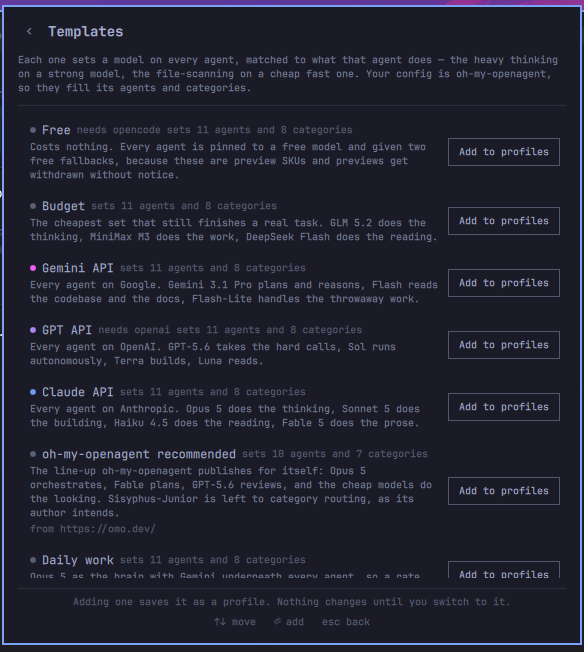
Every template carries a half for each config shape, and only the half that matches your machine is ever written — so on plain opencode the oh-my-openagent half is left alone, and no omo config file is created. Under oh-my-openagent the reverse applies: only the base model crosses over from the opencode half, because its agents supersede opencode's. Each row says what it will actually set here:
oh-my-openagent 5.x
Supported alongside 4.x. The category roster is read from what the installed release declares, so
the deep category that 5.x split into deep-low and deep-high shows up under those names, and
the Claude templates target Opus 5.5 and Sonnet 5.5.
Opencode's TUI remembers the effort you last picked for a model (~/.local/state/opencode/model.json)
and that memory outranks an agent's variant, so an applied profile's efforts can appear to be
ignored. Applying a profile now clears the remembered effort for every model the profile names, and
reverting restores it. Set OC_CLEAR_EFFORT_MEMORY=0 to leave that file alone.
Adding one saves it as a profile — nothing on disk changes until you switch to it, so you can read it and edit it first. A template needing a provider you have not connected is still listed, with the missing one named on the row.
Picking a model
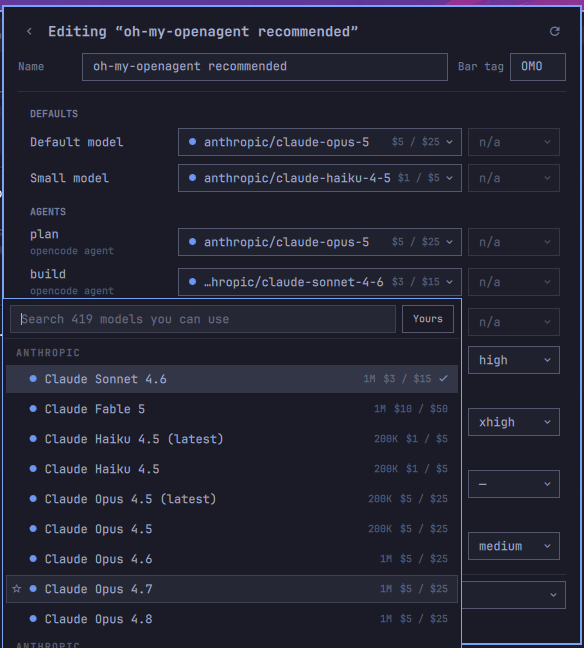
The list comes from your own opencode, so it holds exactly what your keys can reach — connect a
provider and its models appear here by themselves. Opening the panel refreshes a stale list in the
background (what you can reach is re-checked every few minutes, the full catalogue on
catalogRefreshHours); <kbd>r</kbd>, middle-click or refresh over IPC force it now. Press <kbd>Tab</kbd> to search the whole
models.dev catalogue instead, for when you are deciding which provider to add next. (That
catalogue is filtered to models that can call tools and return text — the ones an agent can
actually use.) If your shell cannot run opencode models at all, the picker opens on the full
catalogue rather than on an empty list.
Each row carries the context window, the price per million in and out, and a mark for the vendor. The mark's colour rotates off your theme's accent, so it follows a theme change; filled and hollow alternate so the eight best-known vendors stay apart without relying on colour alone. Anything else gets a neutral mark — the provider is written into every model id anyway.
- <kbd>↑</kbd> <kbd>↓</kbd> move, <kbd>Enter</kbd> pick, <kbd>Esc</kbd> close
- <kbd>*</kbd> star a model — starred models sort to the top everywhere
- <kbd>Tab</kbd> switch between "models you can use" and "every model there is"
- Type a
provider/modelid that is not in the list and it will still let you use it
Picking a model is also where this plugin stops and the provider begins. If a model answers with "The response was blocked by the provider's content filter" — and keeps doing it, even for one harmless word — that is coming from the provider, not from anything written here. Troubleshooting explains what the message means, why the message after it fails too, and what to change. It also covers an oh-my-openagent migration bug that quietly drops the model you pinned to an agent.
Switching, safely
A switch rewrites only the keys a profile claims. Everything else in the file comes back with the
same keys, in the same order, with the same values — your providers, your MCP servers, your plugin
list, your API keys, your agent prompts. The edit is a splice into the text rather than a
re-serialisation, so comments, indentation and blank lines survive it as well; a .jsonc is
edited like any other file.
Before every switch it copies the files it is about to touch. Restore the previous config in the footer puts them back exactly as they were, and the undo is itself undoable.
If you edit a config by hand afterwards, the panel notices and says so rather than carrying on claiming a profile that no longer describes anything:
Your config has been edited since you switched to "Daily work".
[ Update "Daily work" ] [ Save as new profile ]
When something is already broken
Not everything that writes your config is this plugin. oh-my-openagent config migrate rewrites
each agent's model and fallback_models into a models array — and the schema behind the
[opencode] block has no models field, so every agent it touched loads without the model you
pinned. The file validates. The plugin starts. The agent quietly runs on a default, and nothing
says so.
So the panel checks, on every open, and shows what it found — and only then:
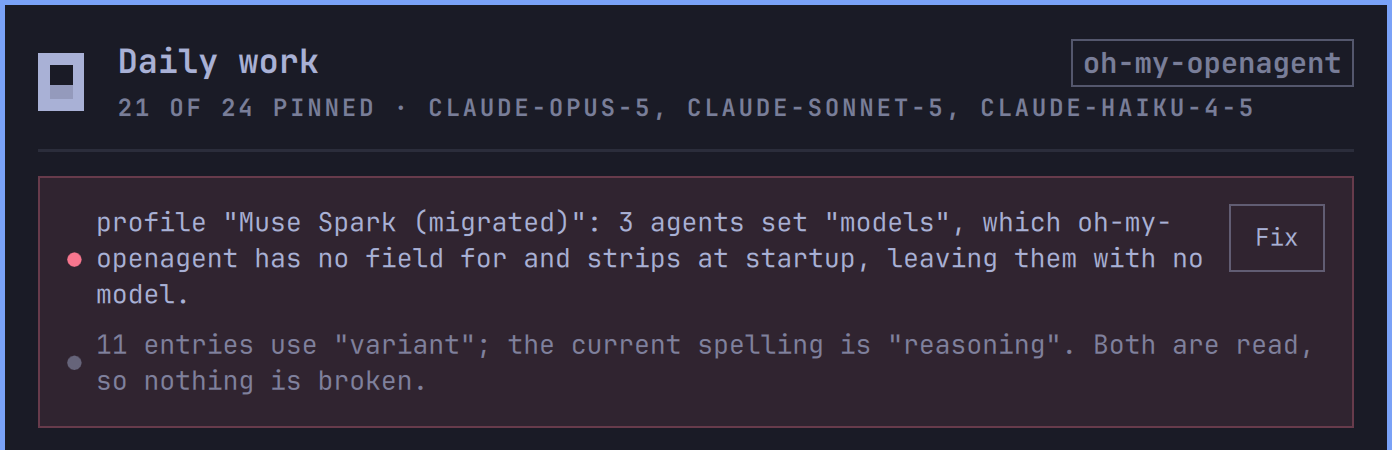
Each line is one problem, in the words of what actually happened rather than a code. Fix is there when there is a repair to run.
The strip only appears when something is repairable — a healthy config draws no strip at all.
The last two rows below are also true of configs that work, so on their own they stay quiet inside
oc-profiles doctor and only come along as context once a real problem has opened the strip.
An agent set to models |
in your config, or in a saved profile. Rewritten back into model plus fallback_models, which is what the schema does have. A category keeps its models — that one is a real field, and rewriting it would be changing a config that works. |
| An agent set to a bare model string | "build": "provider/model" becomes "build": { "model": "provider/model" }. opencode's AgentConfig has no string branch, so the short form is a config it refuses to load. |
A file-level fallback_models |
under [opencode], which doctor reports as Unknown config key against Affects: plugin startup. Deleted, with a splice, so the rest of the file is untouched. |
A legacy oh-my-openagent.json |
left behind by the migration. Reported, never deleted: it may be the only copy of an old setup. |
variant rather than reasoning |
both spellings load — nothing to fix. |
| This plugin can no longer read oh-my-openagent | it declares its agents, its categories and its fields in files this plugin reads; when a release moves them, every probe answers nothing and the panel falls back to the roster it shipped with. That looks like a working panel missing whatever the last few releases added, so it is the one failure nobody would think to report. Named here instead. |
Every repair copies the file first and undoes through the same Restore the previous config; a repair that does not land puts the file back itself. From a terminal it is the same two verbs the panel calls, and a dry run is the default:
oc-profiles doctor                                     # what is wrong, as JSON
oc-profiles repair --fix E_MODELS_IN_CONFIG            # what it would change
oc-profiles repair --fix E_MODELS_IN_CONFIG --apply    # change it
Reloading opencode
opencode reads its config when it starts. With Restart opencode turned on, this plugin does not
restart it either — it sends the same SIGUSR2 that Omarchy sends after a theme change, and
opencode re-reads its config in place. Your session, its history, and everything you had open
survive.
What that does and does not move is worth being exact about. A session fixes its model when it is created and keeps it for its whole life — the conversation you are sitting in stays on the model it started on, however many times you switch. A switch reaches everything created after it: the next session you open, and the subagents each run spawns. To move the conversation you are already in, start a new one — or pick a model in the TUI, which is opencode's own control and nothing this plugin writes.
Only the interactive TUI listens for that signal. A headless opencode serve does not, and the
default behaviour of SIGUSR2 is to terminate — so each process is checked for the handler before
it is signalled, and a server you are running is left alone.
After switching a profile in the widget's settings chooses between:
| Notify | write the files, and say what would need reloading. The default. |
| Restart opencode | write the files and ask every running TUI to re-read them in place (open conversations keep their model — see above) |
| Nothing | write the files and say nothing |
Working on it
./test/run.sh
539 checks over the reader and writer, the model-cache sync, the hardening, the privacy of every folder and backup it keeps, the row model, the JSONC editor,
shape detection, the write path, what doctor finds and repair puts right, and which profile counts as the running one.
One suite points outward: upstream.test.sh asserts what this plugin assumes about the two
programs it sits between, against the copies actually installed — schema location, agent and
category rosters, the refused-field list, and the built-in fallback. It is the suite that goes red
when nothing in this repository changed.
Every one of them runs against a temporary config directory, and the runner fails if any
suite touched the config you actually use. The oh-my-openagent halves skip themselves on
a machine that does not have it installed, and so does the QML suite where there is no Qt6
qml to run it — that one splices functions straight out of the .qml files and executes
them in a real QML engine, because the writers being right says nothing about the call sites.
./dev-sync.sh copies the working tree into ~/.config/omarchy/plugins/ and restarts the
shell — a bar widget already mounted in a slot keeps its old instance otherwise, so a
change lands in the registry and not on the screen.
Driving it from a script
The widget answers on the shell's IPC, under oliwier.opencode-configs:
omarchy-shell oliwier.opencode-configs toggle
omarchy-shell oliwier.opencode-configs refresh
omarchy-shell oliwier.opencode-configs reload
open, close, show, hide and toggle move the panel. refresh makes it
re-read your config and rebuild the model list. reload asks every running opencode
to re-read its config — the same signal Restart opencode sends (see above).
None of them writes a config or switches a profile — a switch is a thing you do in
the panel. reload is the only one that reaches another process, and the pid it
signals is pinned to the process that was checked: same start tick, still an
opencode, still handling the signal. (SIGUSR2 terminates a process that does not
handle it, and pids get reused.)
bin/oc-profiles is the whole of what writes — detect, list, apply <id>,
revert, backups (full list under From a terminal). It prints JSON
and exits 0 for done, 2 for refused with nothing written, 3 for a partial write that was put back.
Settings
Right-click the bar widget → Settings, or edit the entry in ~/.config/omarchy/shell.json.
| Setting | Default | |
|---|---|---|
barLabel |
Profile name | what sits next to the bar icon: the profile's short tag, the model, or nothing |
afterSwitch |
Notify | see Reloading opencode |
confirmSwitch |
off | ask before switching. Off is the fast path the bar is for |
manageOpencodeJson |
on | manage model, small_model and agent in opencode.json |
manageOhMyOpenAgent |
on | manage agents and categories in ~/.omo/omo.jsonc — plus a file-level fallback_models on the legacy oh-my-openagent.json, where that key still exists. Off forces the plain-opencode view |
keepBackups |
10 | copies kept of each config file, oldest deleted past this. The one Undo needs is never pruned |
catalogRefreshHours |
24 | how often the models.dev catalogue is re-downloaded |
showModelMeta |
on | show context window and price on every model row |
configDir |
— | point at a second set of config files, the way OPENCODE_CONFIG_DIR does. Each folder gets its own profiles |
Keys
Profile list — <kbd>↑</kbd><kbd>↓</kbd> select · <kbd>Enter</kbd> switch · <kbd>e</kbd> edit · <kbd>d</kbd> duplicate · <kbd>x</kbd> delete · <kbd>u</kbd> undo · <kbd>r</kbd> refresh · <kbd>Esc</kbd> close. <kbd>/</kbd> focuses the search field, which appears once you have eight profiles. The first press of a key that acts on a row lights the cursor rather than acting, so nothing destructive lands on a selection you cannot see.
Mouse — left click opens the panel, middle click re-reads the config and the model list. Scroll is deliberately unbound: a stray scroll over the bar must never rewrite your agent config.
From a terminal
Everything the panel writes goes through one script, which you can run yourself:
~/.config/omarchy/plugins/oliwier.opencode-configs/bin/oc-profiles detect     # what is on disk
~/.config/omarchy/plugins/oliwier.opencode-configs/bin/oc-profiles list       # profiles + drift
~/.config/omarchy/plugins/oliwier.opencode-configs/bin/oc-profiles capture X  # save the live config
~/.config/omarchy/plugins/oliwier.opencode-configs/bin/oc-profiles seed       # first profile, if there are none
~/.config/omarchy/plugins/oliwier.opencode-configs/bin/oc-profiles apply X    # switch
~/.config/omarchy/plugins/oliwier.opencode-configs/bin/oc-profiles revert     # undo the last switch
~/.config/omarchy/plugins/oliwier.opencode-configs/bin/oc-profiles reload     # re-read config in place
It refuses rather than guesses: a config that will not parse, a .jsonc file it cannot edit safely,
a model id that is not provider/model, or a field the installed oh-my-openagent would silently
drop all stop the write before anything is touched. If a second file fails mid-switch, the first is
put back.
Removing it
omarchy plugin remove oliwier.opencode-configs
That takes the widget off the bar and deletes the plugin. Two things it deliberately does not touch:
- Your opencode config stays as it is. Whatever profile you last switched to is still in effect,
because it was written into your own files and is yours. To go back further, run
oc-profiles revertbefore removing, or restore a copy from the backups folder below. - Your profiles and backups survive, so reinstalling later finds them again. To clear them:
rm -rf ~/.local/state/omarchy/opencode-configs        # profiles and backups
rm -rf ~/.cache/omarchy/oliwier.opencode-configs      # the cached model list
Where things live
~/.local/state/omarchy/opencode-configs/profiles.json |
your profiles, favourites and recents |
~/.local/state/omarchy/opencode-configs/backups/ |
one folder per switch, with a copy of each file |
$XDG_CACHE_HOME/omarchy/oliwier.opencode-configs/models.json |
the model list, rebuilt on panel open when stale |
Both folders, and every folder below them, are 0700, and every file the plugin writes there is 0600 — a backup is a full copy of your config, keys and tokens included. A folder that is a symlink or belongs to another user is refused, and the panel says so, rather than anything being written into it. Folders and files an earlier release left 0755 or 0644 are tightened the next time any command runs. Links inside are never followed, and a file with a second hard link is left alone. Your own config keeps the mode you gave it.
Nothing is written inside the plugin folder, and nothing is written to ~/.config/opencode except
the keys a profile claims.
Profiles and the cached model list are read through the same safe-read ceiling described
above — size and type judged on the opened descriptor, so a swapped-in symlink, FIFO or oversized
file is refused before a byte of it is read.
License
MIT — see LICENSE.