
OMA-CHESS
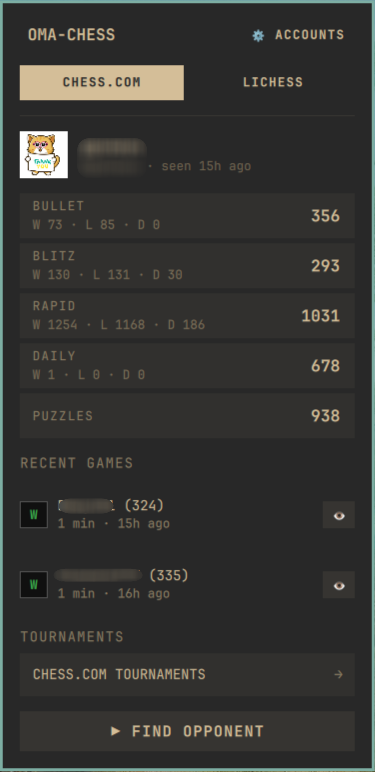
A Chess.com & Lichess stats panel for the Omarchy bar. A ♞ pill that opens a popup with your live ratings, recent games, and upcoming tournaments — plus one-click matchmaking and quick links back to your games.
Install
omarchy plugin add https://github.com/DesaiVishal-16/oma-chess.git --enable
The ♞ icon appears in the bar (category: Info). Reposition it with:
omarchy bar move oma.chess --section right
First run
On first open the panel asks "Where do you play?" — pick Chess.com, Lichess, or both. Click a card, type your username, hit ✓ (or Enter). You can always add, disable or remove accounts later via ⚙ ACCOUNTS:
- The toggle enables/disables a site instantly (disabled sites use no network traffic and lose their tab)
- X clears an account's username
Only your accounts are ever shown — nothing is hardcoded.
Usage
- Click ♞ — open/close the panel
- ⚙ ACCOUNTS (top-right) — manage your chess.com / lichess accounts
- Tabs — appear when both sites are active; ←/→ arrow keys switch tabs
- Esc — close the panel; Tab — jump between bar panels
What each tab shows
| Chess.com | Lichess | |
|---|---|---|
| Ratings | Bullet / Blitz / Rapid / Daily + W-L-D per speed, Puzzles peak, FIDE | Bullet / Blitz / Rapid / Classical / Puzzles with trend arrows |
| Profile | Avatar, name, last seen | Avatar, title, online dot, last seen |
| Recent games | Last 2, click (or 👁) to open on chess.com | Last 2, click (or 👁) to open on lichess |
| Tournaments | Link to chess.com tournaments page (no public API) | Full list of arenas starting within 48h |
Hide ratings you don't care about: hover any rating row → ✕. Hidden
categories come back via the pill chips below the list (Blitz +).
Tournaments: click the TOURNAMENTS entry for your active site to open a full-page list. Lichess shows each arena's live/upcoming status, countdown, category, time control, duration and player count; click any row to open it in the Lichess app. VIEW ALL TOURNAMENTS → opens lichess.org/tournament.
Play
▶ FIND OPPONENT launches the active site in its installed app (Omarchy web apps like Chess/Lichess are detected automatically; native GUIs such as En Croissant or ChessX also work) and falls back to the browser otherwise. Neither platform publicly supports deep-linking a specific time control, so pick it there — both sites remember your last-used control afterwards.
Recent games and tournament rows also respect installed apps: they open inside your Lichess/Chess app window whenever possible.
Keyboard shortcut (optional)
Enable Super + Ctrl + Alt + C by adding one line to your Hyprland Lua
bindings (~/.config/hypr/bindings.lua):
o.bind("SUPER + CTRL + ALT + C", "Chess", "omarchy-shell oma.chess toggle")
(A ready-made snippet ships as bindings.lua in this repo.) Use any combo
you prefer — see omarchy menu keybindings to view existing binds. The
command it runs is simply omarchy-shell oma.chess toggle.
Live game indicator (optional)
Off by default (it polls once every 30s even while the panel is closed).
Enable it in ~/.config/omarchy/shell.json on the widget entry:
{ "id": "oma.chess", "liveIndicator": true }
While one of your lichess games is running, the ♞ pill lights up.
Remove
omarchy plugin remove oma.chess
rm -rf ~/.cache/omarchy-chess
Notes
- Data is cached to
~/.cache/omarchy-chess/and rendered instantly; fetches happen only while the panel is open (unlessliveIndicatoris on) - Requests to chess.com and lichess are serialized per site and back off for 2 minutes after failures, respecting their rate limits
- All links opened from the panel are validated against an allow-list of chess.com / lichess hosts before launching
- Read-only public APIs only — no tokens or credentials are stored
- Known quirk: chess.com's game archive can lag behind live play (ratings update instantly, but newly finished games appear in the recent-games list only after their archive publishes them). Lichess games show up near-instantly