
Pipelines
Track GitHub Actions across all your projects from the Omarchy bar.
One indicator that stays silent while everything is green, turns red the moment a build breaks, and spends almost none of your GitHub API quota doing it.
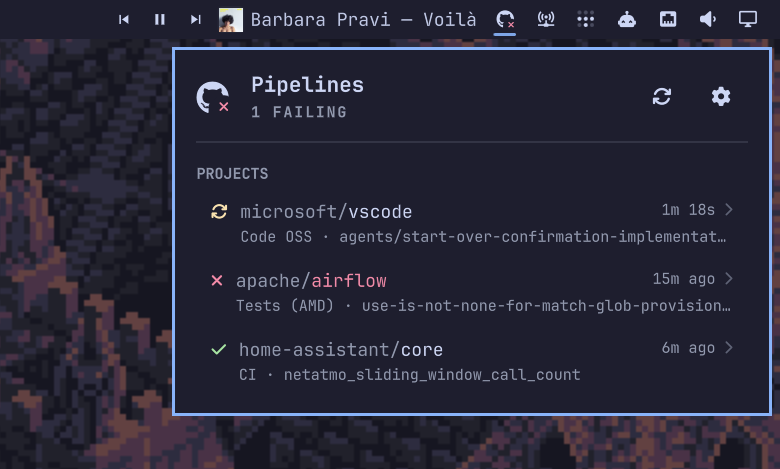
The bar shows a GitHub mark with a small status badge on it, the way a CI favicon works in a browser tab: a check when everything passed, a dot while something is running, a cross when something failed. Nothing configured yet is just the bare mark. The mark never changes, so the widget always looks like itself; only the badge does.
Status colours come from your active Omarchy theme's own palette — the same
green, amber and red the rest of your desktop uses — read from the theme's
colors.toml and re-read when you switch themes. One table drives the bar
badge and every row in the panel, so a state never looks like two different
things depending on where you see it.
Nothing about the icon animates.
Click it for the project list, click a project for its workflows, click a workflow to open the run on GitHub.
Each project is captioned with the workflow the row is actually about and the branch it ran on — the failing one when the row is red, not simply the newest — so a broken project names what broke without being opened. A run still in flight shows the time it has been going, counting up live.
Why it is cheap to run
A naive CI widget polls every repository on a timer and burns through the hourly
rate limit — which matters, because that limit is shared with your gh CLI,
your editor and your scripts. This one is built around two facts:
- A conditional request that matches costs nothing. Every repository's
ETagis stored, every poll sendsIf-None-Match, and GitHub answers an unchanged repository with a304that is not charged against the rate limit. Verified against the live API: two consecutive conditional requests both reported the samex-ratelimit-remaining. - The quota is not ours alone. A configurable share of the hourly limit (25% by default) is reserved and never spent. The poll interval is then computed to fit the remaining budget into the remaining window, assuming the worst case of one charged request per repository. If the budget is thin, the interval stretches automatically instead of failing at the end of the hour.
On top of that the cadence adapts: fast while the panel is open, medium while a run is in progress, slow when everything is green and nobody is looking. The cache is written to disk, so a shell restart repaints instantly and revalidates for free rather than re-fetching everything.
None of this is surfaced in the panel. It is the plugin's job to stay within its budget, not the user's job to watch it do so.
Install
git clone https://github.com/alexandre-vl/omarchy-pipelines.git
cd omarchy-pipelines
./install.sh
install.sh installs the plugin and fetches a checksum-verified prebuilt
helper from the latest release. To build the helper from source instead, which
needs a Rust toolchain:
omarchy plugin add https://github.com/alexandre-vl/omarchy-pipelines.git
cd ~/.config/omarchy/plugins/oma.pipelines && ./build.sh
Either way, the plugin does nothing until the helper exists — omarchy plugin add on its own is not enough. Then add Pipelines to your bar from Bar
settings and restart the shell.
Remove it
omarchy plugin disable oma.pipelines
omarchy plugin remove oma.pipelines
That takes the widget out of your bar and deletes the plugin folder. Two things live outside it and are left alone deliberately, so removing the plugin does not silently destroy a credential or a setting you might still want:
secret-tool clear service omarchy-pipelines account github   # the stored token
rm -rf "${XDG_CACHE_HOME:-$HOME/.cache}/omarchy/pipelines"    # the run cache
The Disconnect button in the panel clears the token without uninstalling.
Nothing is left in shell.json: disabling the widget removes its entry, and
that entry is the only configuration the plugin ever writes.
What it depends on
Everything below ships with a stock Omarchy install; the plugin adds nothing to your system.
| Needed | For |
|---|---|
secret-tool (libsecret) |
Storing the token in your login keyring |
xdg-open |
Opening a run on GitHub |
notify-send |
Failure and recovery notifications |
gh |
Optional — only to import an existing token in one click |
The helper is a single static-ish binary built from three Rust crates —
ureq for HTTPS, and
serde with
serde_json for the wire format. TLS is
rustls, not OpenSSL, so there is no system TLS dependency.
It talks to exactly one host, api.github.com, and nothing else.
Connect a GitHub account
Open the panel. If you already use the GitHub CLI, Import from GitHub CLI is one click and needs nothing else.
Otherwise paste a fine-grained token with read access to Actions and Metadata on the repositories you want to watch. It is validated against the API before it is stored, so a bad token tells you immediately instead of silently never refreshing.
The token goes into your login keyring through secret-tool. If the keyring is
locked or unavailable it falls back to a 0600 file, and the panel says so
rather than letting you assume otherwise. See SECURITY.md.
Add projects
Type owner/repository in settings, or paste a GitHub URL — https://github.com/owner/repo/actions
works fine. The field validates as you type: shape and duplicates instantly,
then existence and access against the API a moment later.
Drag the handle to reorder, or select a row and press J / K. The order in
the list is the order in the panel.
The panel is fully keyboard-driven: arrows move, Enter opens, Escape goes
back, , opens settings, r refreshes, Tab focuses the text field, and
J / K reorder the selected project.
Mute a project to keep polling it without letting it colour the bar — useful for the one repository with a known-broken nightly that would otherwise hold the indicator red forever.
Settings
Refresh cadence, quota reserve and notifications live in Bar settings → Pipelines, because they are declared in the manifest and Omarchy renders them natively. The project list is edited in the panel.
| Setting | Default | What it does |
|---|---|---|
| Refresh while open | 15s | Cadence while the panel is open on any monitor |
| Refresh while running | 30s | Cadence when a workflow is queued or running |
| Refresh while idle | 180s | Cadence when everything is green and closed |
| API quota kept free | 25% | Share of the hourly limit never spent |
| Notify on failure | on | Desktop notification when a workflow starts failing |
| Notify on recovery | off | Desktop notification when it goes green again |
Notifications fire on transitions only, so a build that is already red stays quiet, and a shell restart does not re-announce failures you have already seen.
Status meanings
| Badge | State | Meaning |
|---|---|---|
| red cross | Failing | Latest run of some workflow failed, timed out, or needs a human |
| amber dot | Running | Something is queued or in progress |
| green check | Passing | Latest run of every workflow succeeded |
| grey dot | Stale or unknown | The last poll failed, or there is nothing to interpret |
| no badge | Empty | Nothing configured, or no account connected |
The bar shows the worst state across every unmuted project.
Cancelled and skipped runs are deliberately not failures. A run someone stopped on purpose, or one skipped by a path filter, is not a broken build, and counting it as one teaches people to ignore the light.
Command line
omarchy shell oma.pipelines toggle
omarchy shell oma.pipelines refresh
omarchy shell oma.pipelines status
status prints JSON, so it composes:
omarchy shell oma.pipelines status | jq -r '.summary.worst'
How it is put together
| File | Role |
|---|---|
Service.qml |
Loaded once per session. Owns the helper, the snapshot, IPC and all writes to shell.json. |
Panel.qml |
Built once per monitor. A view; owns only its own cursor and fields. |
Model.js |
Pure functions shared by both, tested under node. |
backend/ |
Rust helper: HTTP, auth, rate limiting, caching. |
The helper speaks newline-delimited JSON on stdin/stdout. It holds no
configuration of its own — the shell owns that in shell.json and pushes it
down on every change.
Contributions: CONTRIBUTING.md. Working with an AI agent in this repository: AGENTS.md.
Licence
MIT. See LICENSE.