
Omaquake — an Omarchy bar plugin
A top-bar earthquake tracker for Omarchy, fed by the USGS Earthquake Hazards Program.
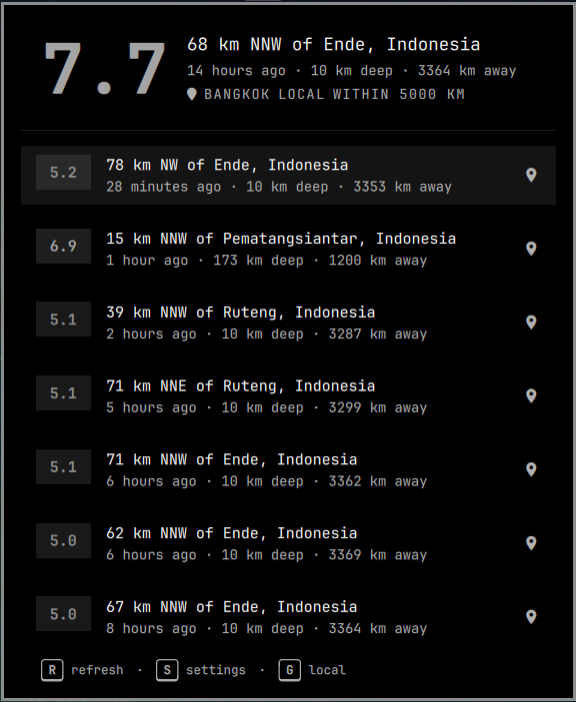
A pulse glyph sits in the bar with the latest matching magnitude. Click it to open a themed list of recent events. Set your latitude, longitude, and range to watch a local radius; events at or above the alert magnitude flash urgent and can raise a desktop notification.
No account needed. With no coordinates configured it finds an approximate
location from your IP address. Press E in the panel (or click the location
label) to enter a city, lat, lon, and range.
Install
From this directory, during development:
ln -sfn "$(pwd)" ~/.config/omarchy/plugins/oma.quake
omarchy-shell shell rescanPlugins
omarchy plugin enable oma.quake
From a git remote:
omarchy plugin add https://github.com/rsoutar/omaquake
omarchy plugin enable oma.quake
The widget lands in the right section of the bar by default. Move it with
omarchy bar move oma.quake --section right.
Uninstall
omarchy plugin disable oma.quake
omarchy plugin remove oma.quake
If you installed with a symlink, disable it and remove
~/.config/omarchy/plugins/oma.quake.
Settings
All settings live on the bar layout entry in ~/.config/omarchy/shell.json.
They can also be edited from Setup → Plugins, or from the panel location editor.
| Setting | Default | Meaning |
|---|---|---|
latitude / longitude |
empty | Watch origin. Blank uses IP geolocation. |
locationName |
empty | Optional label for the origin |
rangeKm |
1000 |
Haversine radius in kilometres |
minMagnitude |
2.5 |
Hide smaller events |
alertMagnitude |
6.0 |
Urgent pill + notification |
scope |
global |
global shows everything above minMagnitude; local keeps events inside the radius |
refreshMinutes |
5 |
Poll interval in minutes. Fractions allowed (0.25 = 15s) for near-realtime local scope; USGS caches responses for 60s so faster polls hit the cache |
notify |
true |
Desktop alerts for new alert-magnitude events |
units |
auto |
km, mi, or locale auto |
Panel keys
Hints for R / S / G sit at the bottom of the panel, the same way Flight Radar shows R / S.
- R — refresh now
- S — toggle settings (range, magnitude, alerts, units)
- G — toggle local / global scope
- E — edit location
- U — cycle km / mi / auto
- J / K or arrows — move the event cursor
- Enter — open the selected event on USGS
- Esc — close
- Middle-click the pill — refresh
- Right-click the pill — send a status notification
Each card opens the official USGS event page. The map icon opens the coordinates on OpenStreetMap.
Data
Events come from the USGS GeoJSON summary feeds and, for a local radius or a
minimum magnitude below 2.5, the
FDSN Event API. Feeds are public
and require no key. FDSN polls use the incremental updatedafter
parameter, asking only for events updated since the last successful fetch.
USGS caches feed/API responses for 60 seconds, so the next poll is never
scheduled sooner than that (or the Expires header), whatever the user's
interval; HTTP 429 rate-limit responses back off via Retry-After.
Development
node --test tests/model.test.js
Saving files under ~/.config/omarchy/plugins/oma.quake/ reloads the plugin.
Force a rescan with omarchy-shell shell rescanPlugins if a bad load sticks.
License
MIT — see LICENSE.