
OmaConnect
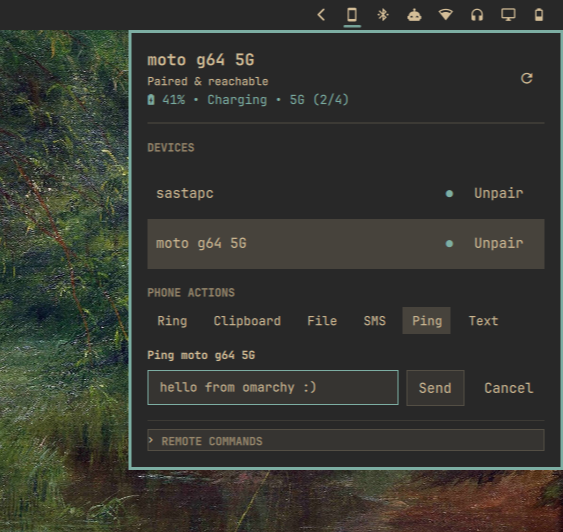
Control phones and connected devices from the Omarchy bar using KDE Connect.
Install
Just install the plugin with this command. It will handle dependencies and firewall in GUI.
omarchy plugin add https://github.com/jitendradara12/omaconnect.git --enable --yes
Features
- Device status. Battery level, charging state, cellular network type, signal strength, and reachability.
- Quick actions. Ring phone, sync clipboard, send files, share text or links, and ping devices.
- SMS launcher. Open
kdeconnect-smsfor paired devices. - Media playback. Track metadata, playback controls, and player switching.
- File picker. Pick recent files with
omarchy-menu-select. - Remote commands. Run custom commands configured on paired devices.
- Pairing. Manage requests, verification keys, and unpairing.
- Network discovery. Add Tailscale peers or custom LAN and VPN IP addresses.
- Bar widget. Show connection and battery status directly in the Omarchy bar.
Preferences
Configure OmaConnect in Omarchy bar widget settings.
| Setting | Default | Description |
|---|---|---|
showBatteryStats |
true |
Battery percentage and charging state |
showBarBattery |
false |
Battery percentage next to the icon in the bar |
showNetworkStats |
true |
Cellular network type and signal strength |
showTailscale |
true |
Tailscale and custom IP discovery |
showDeviceTypeIcons |
true |
Device type icons in bar and panel |
showMediaPlayer |
true |
Media player controls and track metadata |
showRemoteCommands |
true |
Remote commands section |
showTroubleshooting |
true |
Setup and firewall helpers when offline |
showActionRing |
true |
Ring device button |
showActionClipboard |
true |
Clipboard sync button |
showActionFile |
true |
File transfer button |
showActionSms |
true |
SMS launcher button |
showActionPing |
false |
Ping button |
showActionText |
true |
Text and link share button |
defaultPingMessage |
"" |
Default ping message draft |
Shortcuts
(Optional) Add to ~/.config/omarchy/shortcuts.lua:
o.bind("SUPER + SHIFT + C", "Toggle OmaConnect", "omarchy-shell shell toggle omaconnect")
Dependencies
Requires kdeconnect, glib2, dbus, and omarchy-menu-select (for file sharing). tailscale and kdeconnect-sms are optional.
sudo pacman -S --needed kdeconnect glib2 dbus
Tailscale and custom IPs
Expand Network Discovery to add detected Tailscale peers, or enter custom LAN and VPN IP addresses directly.
Firewall
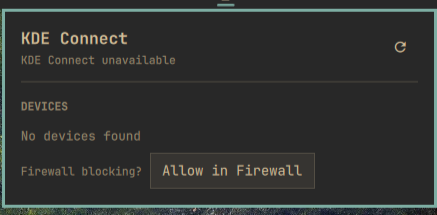
KDE Connect requires ports 1714:1764 (TCP and UDP). Click Allow in Firewall in the panel when devices are offline, or allow them manually:
sudo ufw allow 1714:1764/tcp comment 'KDE Connect'
sudo ufw allow 1714:1764/udp comment 'KDE Connect'
sudo ufw reload
Update
omarchy plugin update omaconnect
Remove
omarchy plugin remove omaconnect