
Omahub
← All plugins
J

Kaomoji

by JoeJoeflyn

Fast native Japanese kaomoji picker & emoticon search for Omarchy — (◕‿◕)

Security review

No obvious issues detected

Deterministic scan — not a security guarantee

None
Risk level
None
Analyzed commit
bdf06de
Scanned
3 weeks ago

No potentially dangerous behavior detected in the analyzed commit.

Automated analysis only — not a security guarantee.

AI advisory review

No obvious issues detected

Language-model assessment · ~deepseek/deepseek-v4-flash-latest — advisory only

Low
AI risk level
Low
Recommendation
install
Model
~deepseek/deepseek-v4-flash-latest
Analyzed commit
bdf06de
Reviewed
3 weeks ago

This is a kaomoji picker overlay for Omarchy. It loads a local JSON file, filters kaomoji, and on selection copies the chosen kaomoji to the clipboard and simulates Ctrl+V to paste it. It also registers a menu entry by writing to the user's Omarchy config and running a refresh command. All operations are local and benign.

  • The plugin writes to ~/.config/omarchy/extensions/omarchy-menu.jsonc and runs 'omarchy-menu refresh' via os.system, but this is a fixed, non-destructive command.
  • insert.sh uses wtype to simulate a paste keystroke, which is expected behavior for a picker plugin.
  • No network access, obfuscation, or hidden malicious behavior was found.
How this check works

This review combines the deterministic scan (the rule-based results above) with an independent look at the plugin's code by a language model. The model reads a trimmed sample of the repository's files, the manifest, and the README, then gives a plain-language risk level and a recommendation: install (no notable danger), review (look closer first), or avoid (clearly dangerous).

It runs on the same analyzed commit as the deterministic scan and is strictly advisory — it is not a security guarantee and never blocks a plugin by itself. A human moderator still reviews plugins before they are listed.

AI advisory only — automated analysis, not a security guarantee.

Install
$ omarchy plugin add https://github.com/JoeJoeflyn/omakaomoji --enable
Productivity #Hyprland #quickshell #launcher

🌸 Kaomoji (omakaomoji)

A fast, lightweight, and native Japanese Kaomoji & Emoticon picker for Omarchy.

¯\_(ツ)_/¯ (。♥‿♥。) (╯°□°)╯︵ ┻━┻ ʕっ•ᴥ•ʔっ ( ͡° ͜ʖ ͡°)
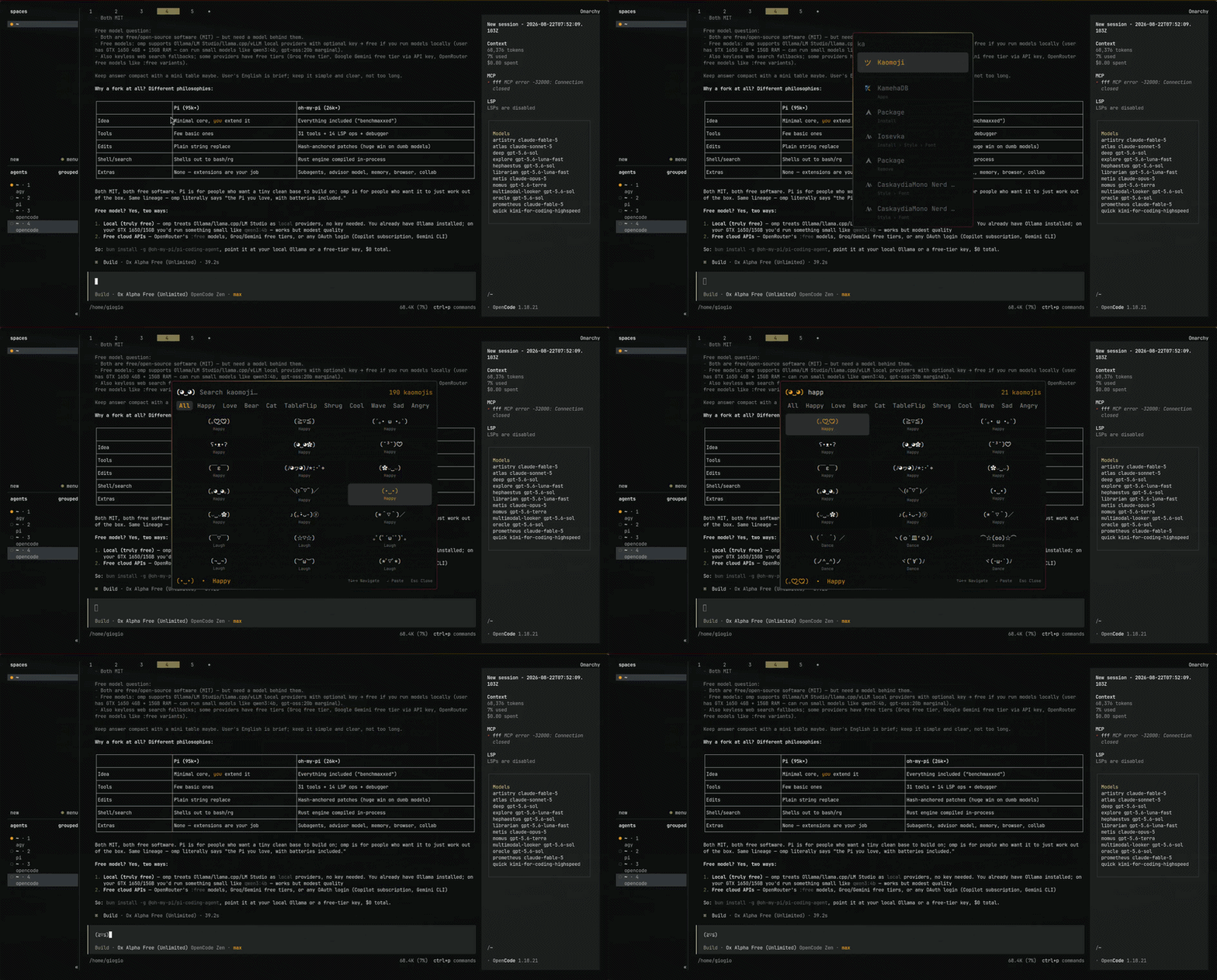
Kaomoji Preview


✨ Features

  • ⚡ 0ms In-Memory Search: Embedded JavaScript search engine with zero process spawning overhead.
  • 🔍 Fuzzy Subsequence Matching: Type shorthand abbreviations (e.g. tbl $\rightarrow$ (╯°□°)╯︵ ┻━┻ TableFlip, shrg $\rightarrow$ ¯\_(ツ)_/¯).
  • 🔠 Multi-Keyword Matching: Narrow down expressions with space-separated terms (e.g. bear hug $\rightarrow$ ʕっ•ᴥ•ʔっ, sad cry $\rightarrow$ (╥﹏╥)).
  • 🏷️ Category Quick Filters: Interactive pill tabs for Happy, Love, Bear, Cat, TableFlip, Shrug, Cool, Wave, Sad, Angry, and Music.
  • ↵ Auto-Paste & Copy: Selecting a kaomoji automatically types it straight into your active application/chat via wtype and copies it to clipboard (wl-copy).
  • 🎨 100% Native Omarchy Theme Integration: Uses Omarchy's menu color tokens and surface borders — automatically matches Turbonite, Catppuccin, Nord, Everforest, Tokyo Night, and custom themes.
  • ⌨️ Keyboard-First Control: Smooth arrow navigation (↑ ↓ ← →), PageUp/PageDown, Enter to insert, and Esc to clear/dismiss.

📦 Installation

Install directly with the Omarchy plugin manager:

omarchy plugin add https://github.com/JoeJoeflyn/omakaomoji.git --enable

⌨️ Hyprland Keybinding

Add this to your ~/.config/hypr/hyprland.conf to summon the kaomoji picker with a hotkey (e.g. Super + Alt + K):

bind = SUPER ALT, K, exec, omarchy-shell shell toggle omakaomoji

🚀 Omarchy Menu Integration (Super + Space)

Kaomoji automatically integrates into your Omarchy menu upon install! Press Super + Space $\rightarrow$ Trigger $\rightarrow$ Kaomoji or search kaomoji / emoticon directly from the launcher.


🗑️ Removal

omarchy plugin remove omakaomoji

📜 License

MIT License © 2026 JoeJoeflyn