
OmaKeyboard-Brightness
An Omarchy bar widget for keyboard-backlight brightness. It adds a compact, vector-drawn keyboard icon to the bar; click it to open a slider popup.
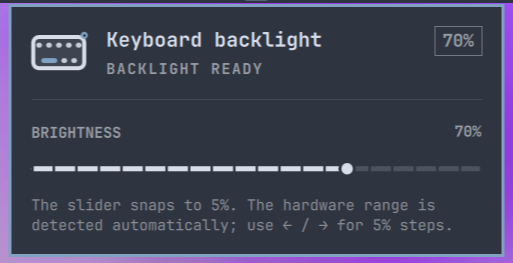
The widget discovers the keyboard LED under /sys/class/leds, reads its brightness and max_brightness attributes, and applies the selected raw level with brightnessctl. An equivalent command for a concrete device looks like this:
brightnessctl -q -d spi::kbd_backlight set 179
The UI snaps to 5% targets. The raw value is derived from the device's real maximum, so selecting 70% on a 255-level keyboard writes raw level 179. Hardware with only a few physical levels still settles on its nearest available level.
The plugin itself creates no settings or state file. It always reads the active value from the kernel interface. A driver or the keyboard firmware may retain that hardware value across restarts independently of the plugin.
Difference from Omarchy's brightness command
omarchy-brightness-keyboard up|down is a convenient, separate command for key bindings. It finds the same *kbd_backlight* device, but advances it by a hardware-dependent step of about 10% of the maximum and normally shows Omarchy's OSD.
OmaKeyboard-Brightness does not call that command for slider changes. It uses /usr/bin/brightnessctl with the device's exact, range-clamped raw level, which makes the 5% slider grid meaningful and avoids an OSD for every slider update.
Requirements
- Omarchy with its Quickshell shell
brightnessctl(included with a standard Omarchy installation)- A kernel keyboard LED matching
/sys/class/leds/*kbd_backlight*
Install
Install and enable it with:
omarchy plugin add https://github.com/odessa2/OmaKeyboard-Brightness.git --enable
For a local test from inside this checked-out repository:
omarchy plugin add "$PWD" --enable
Omarchy will ask which bar section to use; the manifest suggests the right section. If you install without --enable, enable it later with:
omarchy plugin enable omakeyboard.brightness --section right
Remove
Remove the installed plugin and its bar entry with:
omarchy plugin remove omakeyboard.brightness
This removes only the copy in ~/.config/omarchy/plugins/; your source checkout remains intact. To install it again, use the install command above.
Update
Git-managed installations can be updated through Omarchy:
omarchy plugin update omakeyboard.brightness
Security model
Omarchy plugins execute as unsandboxed code in the user's shell process, so install this plugin only from a trusted checkout or the official repository URL above. This plugin does not use network access, request elevated privileges, start a shell, or create plugin-owned state files. Discovery does not collect process output: it enumerates /sys/class/leds and reads only the kernel-provided brightness and max_brightness attributes. Device names and numeric contents are length- and format-checked before use. Writes invoke /usr/bin/brightnessctl by absolute path, with the device name and range-clamped numeric brightness passed as separate process arguments.
The remaining trust boundary is the plugin update itself: changed QML code receives the same user-level access as the rest of omarchy-shell. Review the diff shown by omarchy plugin update before accepting an update. A failed brightness write is stopped and reported instead of being retried in a process loop.
Repository layout
manifest.json— Omarchy plugin manifestBarWidget.qml— bar icon and popup hostPanel.qml— slider and command integrationKeyboardIcon.qml— theme-aware vector iconpreview.png— plugin preview used in this README
License
MIT. See LICENSE.