
Omaphone
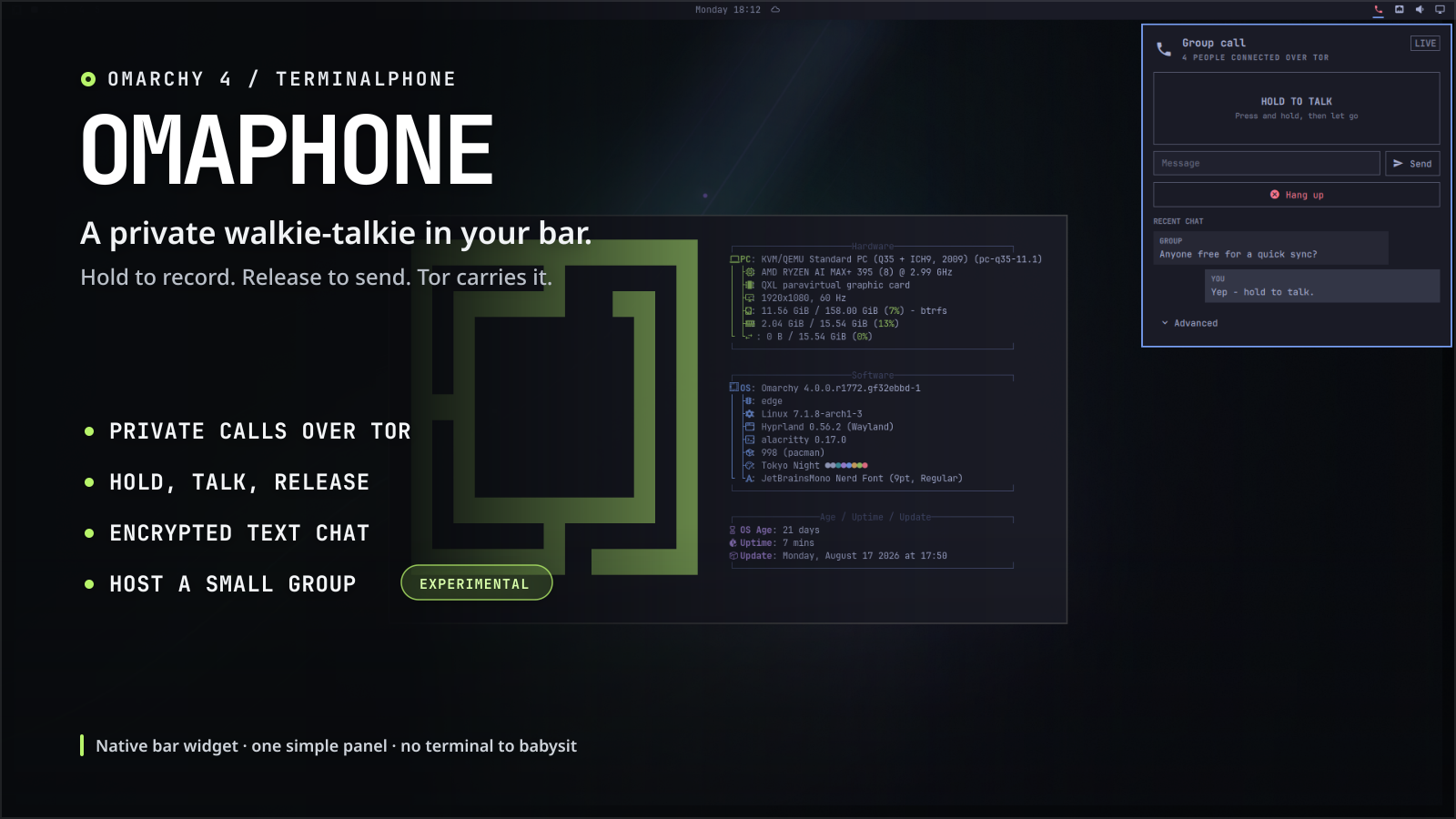
A private walkie-talkie in your Omarchy bar. Hold to record. Release to send. Tor carries it.
Omaphone turns TerminalPhone into a small, native Omarchy 4 widget. Open it from the bar, call a friend, hold the big talk button, and let go when you are done. You can also send text messages or host an experimental group room.
It feels like a call, but the audio is intentionally not live. Omaphone records one short voice message while you hold the button, then encrypts and sends it when you release. That simple rhythm works well over Tor and makes taking turns feel natural.
What you get
- Private, direct voice calls carried through Tor onion services.
- One big hold-to-record button, with clear local and remote activity.
- Encrypted text chat alongside every call.
- Simple private contact cards: share yours, or add one from someone you trust.
- An experimental group-room host for small push-to-talk conversations.
- First-run setup, audio testing, call quality, voice effects, and chimes.
- Optional connection and authentication controls tucked into Advanced.
- A theme-aware Omarchy panel with keyboard navigation and no terminal window to manage.
Underneath the friendly panel, Omaphone runs one pinned copy of TerminalPhone. TerminalPhone still owns the Tor connection, audio, encryption, and wire protocol; Omaphone handles setup, lifecycle, safe state, and the desktop experience. See Architecture for the full design.
Install
From a committed checkout of this repository:
omarchy plugin validate .
omarchy plugin add "$PWD" --enable --yes
Or install the published repository directly:
omarchy plugin add https://github.com/tomdavenport/omaphone.git --enable --yes
Omarchy clones the plugin into
~/.config/omarchy/plugins/omaphone.phone and adds the phone to the right side
of the bar.
Open the phone and choose Set up Omaphone. If it says a few tools are missing, choose Install missing tools. After that, the two first-call buttons handle the Tor setup for you. Creating a private route can take a minute or two the first time.
Update an installed copy with:
omarchy-shell omaphone.phone offline
omarchy plugin update omaphone.phone --yes
The --yes flag skips the long change preview in the terminal. Without it,
press q when you have finished reading that preview; the update is waiting,
not stuck. Omarchy validates the update and reloads the plugin automatically.
Very early local-checkout installs made before the public repository may not share its Git history. If Omarchy refuses that one update even though the checkout is clean, remove it with the command below and run the published install command again; Omaphone's private state is kept.
To remove Omaphone cleanly:
omarchy-shell omaphone.phone offline
omarchy plugin remove omaphone.phone
Going offline first stops the background listener. Removing the plugin leaves your private address, room key, settings, and local messages in your standard per-user data folders, so reinstalling does not unexpectedly give you a new identity.
Make your first private call
Decide which computer will wait and which will connect:
- Receiver: choose Share my phone, send the copied private contact card through a trusted channel, and leave Omaphone waiting.
- Caller: choose Add a phone, paste the private contact card, then choose Add & connect.
That is the whole connection flow. You do not need to copy an onion address, go online separately, or press a second Call button. Omaphone prepares Tor, remembers the paired phone, and starts the call.
There is no telephone-style ringing or separate answer phase in the underlying TerminalPhone protocol. The receiver waits while the caller opens the route; both sides move to the conversation when it is ready. Do not wait for a ring or an Answer button. Sounds are connection and push-to-talk feedback, not a ringtone.
Once connected, hold the talk button to record and release it to send. Type below it when text is easier, then choose Hang up when you are finished. Next time, the receiver can wait again and the caller can choose Call paired phone.
The private contact card contains both the receiver's address and the key to the conversation; it does not expire after use. Anyone who gets it can attempt to call and decrypt compatible traffic, so treat it like a password: do not post it in public, and remove it from clipboard history when that matters. You can delete the small local text history from Advanced.
Under the current TerminalPhone backend, this installation has one stable
.onion device address and one global direct-call secret. A private contact
card does not create a different number or cryptographic key for each person.
The connecting side saves one Paired phone. Adding a different card
replaces that saved phone and the active global secret, so the earlier card
must be added again before that conversation will work. A proper multi-contact
design needs separate, invisible per-contact keys; it is not something 1.2
pretends to provide.
The normal guided flow deliberately hides raw .onion addresses. Manual
address calling remains under Advanced for troubleshooting and
TerminalPhone interoperability.
Host a group room (experimental)
TerminalPhone includes an experimental multi-caller relay, and Omaphone makes it available as Host a group on this computer. The host can be an ordinary local machine. You do not need a public server, a public IP address, or router port forwarding: Tor publishes the room as an onion service.
The trade-off is that the host machine must stay awake, online, and running the room. That Omaphone instance becomes a relay only; it cannot talk or chat in the room. Join from another machine if the host also wants to take part.
Each time you host, Omaphone makes a fresh room key in memory. It does not replace or share the host's regular call key, and Omaphone does not save it to disk. Participants save the room key as their current call key when they use the invite, so they should still treat it like a password. A clipboard manager may retain a copied room invite after the room stops.
To join a room, open Advanced, choose Join a room, paste the host's private room invite, then choose Join room. There is no separate online or call step; the relay identifies the connection as a group call. A room invite is a shared room capability, not a phone contact.
A room invite uses the same one-pair slot as a direct call. Joining a room therefore replaces the paired phone and call key remembered on that device. If a phone is already paired, the final button says Replace & join and the panel warns before applying it. After the call, Omaphone shows the saved room separately instead of pretending it is a paired phone: rejoin while the host is online, clear it, or choose Add a phone instead. Re-adding a phone is also explicit: the final button says Replace & connect.
To host a room:
- Under Small group · Experimental, choose Host a group on this computer and confirm.
- Wait for Room is ready, then choose Copy room invite.
- Send that same invite to every participant through a trusted private channel.
- Keep the host awake. Everyone else follows the joining step above.
Take turns speaking. This is push-to-talk forwarding, not a live audio mix.
Keep rooms small and have one person speak at a time. The upstream design can accept multiple callers, but Omaphone labels the feature experimental because it does not set a tested capacity or provide moderation, admission controls, or speaking queues.
There is one important hosting caveat in the currently pinned TerminalPhone:
its socat listener does not explicitly bind to loopback, so the listening
port may also be reachable on the host's LAN interfaces. No router forwarding
is needed, but the host should use a firewall to block non-loopback access to
that port. The default is TCP 7777. Read the room's metadata and trust limits
in Security before inviting people.
Requirements
- Omarchy 4.x with the
omarchy-shell/Quickshell bar. - Python 3, used only by Omaphone's local supervisor.
- TerminalPhone's Arch packages:
tor,opus-tools,sox,socat,openssl,alsa-utils, andlibpulse. - The AUR package
snowflake-pt-client-binonly if you turn on the optional Snowflake connection method.
Install missing tools uses PolicyKit for package-manager approval. It does not store or bypass an administrator password. Normal Tor calls and group rooms do not need Snowflake. It is only an alternative way to reach Tor on a network that blocks it: Tor connects through temporary volunteer proxies. Snowflake changes how Tor gets online; it is not an extra privacy mode.
Omaphone does not silently build optional AUR software. If you need Snowflake, review the AUR package and its build instructions, then install the compatible package yourself:
omarchy pkg aur add snowflake-pt-client-bin
The -bin package matters: it provides the snowflake-client command that
TerminalPhone expects. If Snowflake was already turned on but that command is
missing, choose Use normal Tor in Omaphone. You can also recover from a
terminal without changing your private address, call key, or messages:
omarchy-shell omaphone.phone setConfig snowflake false
Privacy, in plain English
Omaphone hides networking and cryptography controls; it does not make their trade-offs disappear. Your current call key is kept in a user-only file so Omaphone can listen in the background without asking for a passphrase after every restart. A hosted room uses a separate, short-lived key in the host process; participants save it when they use the room invite. Recent text messages are also local plaintext with user-only permissions. Disk encryption and a locked session still matter.
TerminalPhone has not been independently audited as part of this project. Omaphone preserves its implementation instead of inventing a second cryptographic protocol. Read Security before relying on it for a high-risk conversation.
Omaphone does not ship an address book yet. The planned model keeps one stable device number, adds local names, and gives each relationship its own invisible cryptographic key. The legacy backend cannot get there by sharing its one global key with a list of names. See the Contacts roadmap.
The larger product direction—People, Private Drops, video Postcards, a self-hosted answering machine, and the honest boundary around live video—is in the communications roadmap.
Command-line controls
The widget exposes the Omarchy Shell target omaphone.phone:
omarchy-shell omaphone.phone open
omarchy-shell omaphone.phone status
omarchy-shell omaphone.phone online
omarchy-shell omaphone.phone offline
omarchy-shell omaphone.phone hangup
Development
The Omaphone supervisor has no third-party Python dependencies. Run the non-desktop checks with:
python3 -m unittest discover -s tests -v
python3 -m py_compile scripts/*.py
omarchy plugin validate .
These checks do not need Tor, a microphone, root access, a compositor, or control of the host desktop.
Omaphone is MIT licensed. TerminalPhone's separate license, pinned revision, and checksum are recorded in Third-party notices.