
Omarchy Google Calendar and Clock
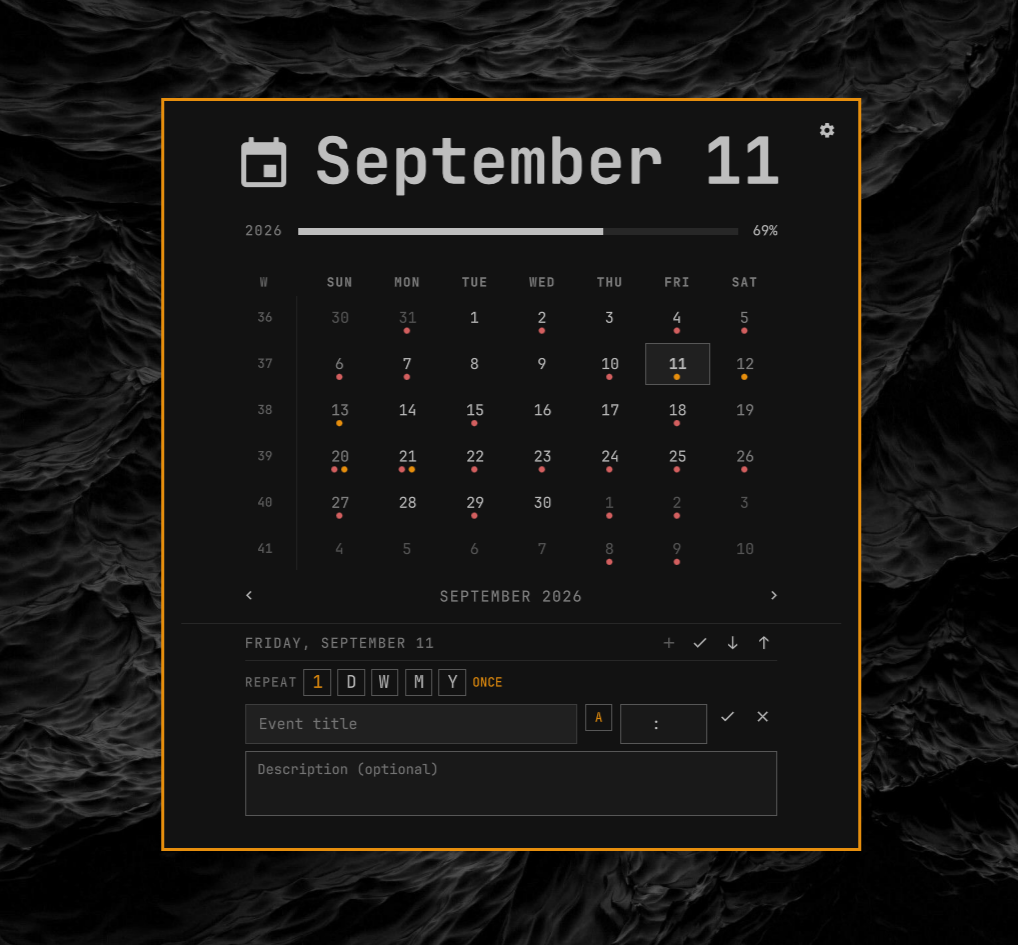
An Omarchy bar clock with a local-first calendar. It reads standard .ics
files through Caldir, supports local event
creation and editing, and can pull from or push to Google Calendar on demand.
Calendar data and OAuth credentials stay in Caldir's local directories. The plugin stores only an owner-readable derived event cache and includes no telemetry.
Requirements
- Omarchy with the Quattro plugin API
- An x86-64 or ARM64 Linux system
- A Google account for Google sync
The plugin downloads its own verified Caldir runtime; no Rust toolchain or separate Caldir installation is required.
Each release includes one committed SHA-256 digest per architecture. Setup verifies the downloaded archive against the digest in the installed plugin checkout before extracting or executing it.
When upgrading to the bundled Caldir 0.13.1-or-later runtime, setup preserves the existing Google-default reminder behavior for alarm-free local events. It adds the standard Caldir marker atomically and skips events that already have an explicit alarm or reminder marker.
Install and set up
Add and enable the plugin with Omarchy:
omarchy plugin add https://github.com/NachoRodriguezM/omarchy-google-calendar-clock --enable
It initially behaves as a plain clock. Click it to open the calendar, then select Direct setup or Hosted setup. The selected flow opens in a terminal and guides you through the remaining steps.
You can run the same setup from a terminal:
~/.config/omarchy/plugins/omarchy-google-calendar-clock/setup          # Direct
~/.config/omarchy/plugins/omarchy-google-calendar-clock/setup --hosted # Hosted
After setup verifies the release, Google connection, and first calendar pull, it disables the built-in clock, enables this widget, and anchors it at the exact center of the bar.
Choose an OAuth mode
Direct (default, recommended). You create a Desktop OAuth client in your own Google Cloud project. Authentication and token refreshes go directly between your machine and Google.
Hosted. Caldir.org provides the OAuth relay, so no Google Cloud project is needed. The trade-off is that sign-in and future token refreshes depend on caldir.org, and OAuth tokens pass through its servers.
The setup flow explains the same choice before it proceeds. An existing OAuth session is reused; it is not recreated on every setup run.
Switch modes later
~/.config/omarchy/plugins/omarchy-google-calendar-clock/scripts/calendar-auth-mode switch hosted
~/.config/omarchy/plugins/omarchy-google-calendar-clock/scripts/calendar-auth-mode switch direct
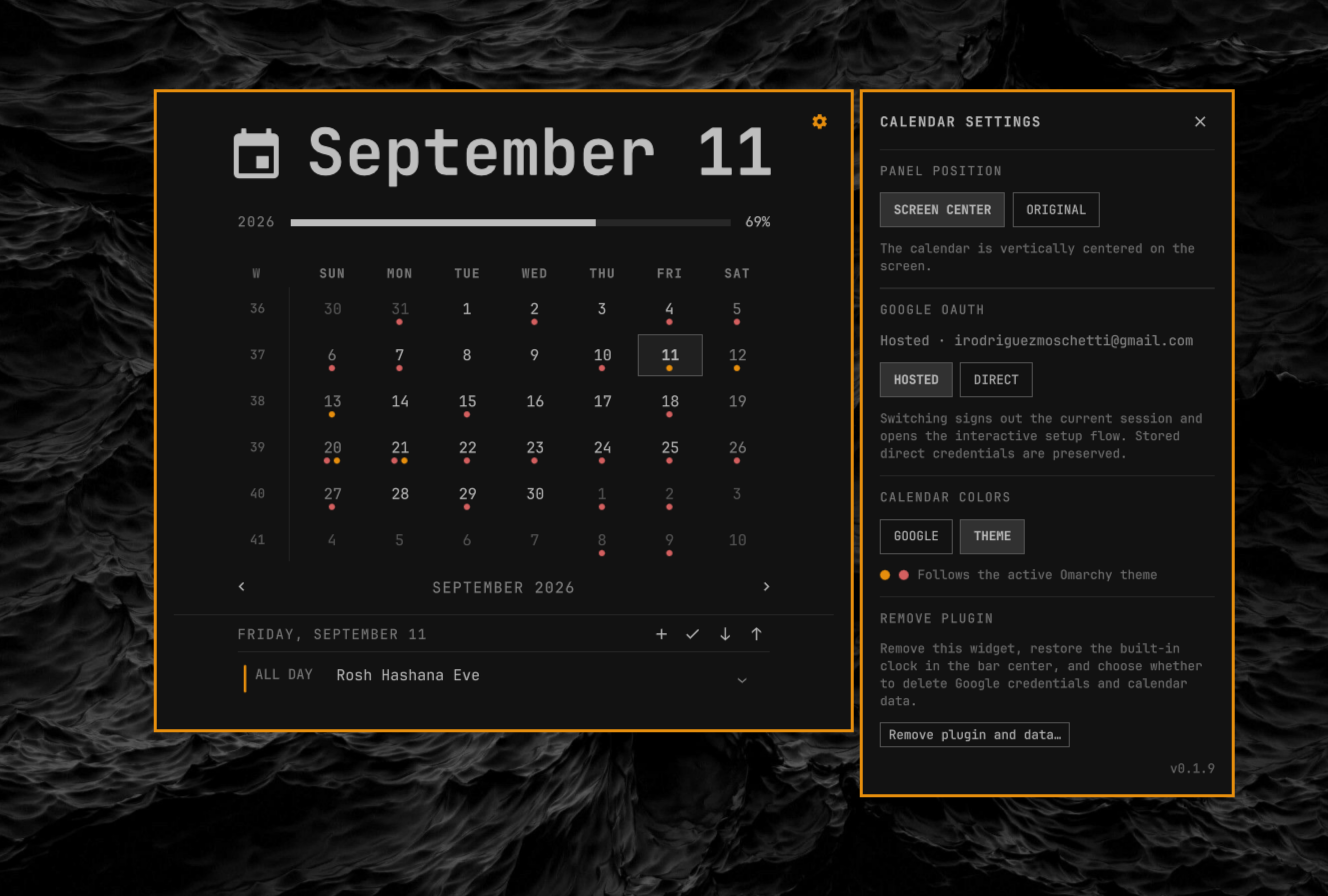
Switching signs out the current session and starts the chosen sign-in flow. Your direct OAuth client ID and secret are kept when switching modes. Check the current mode with:
~/.config/omarchy/plugins/omarchy-google-calendar-clock/scripts/calendar-auth-mode status --json
You can see the chosen mode and switch from the settings panel too.
Use
Click the clock to open the calendar. The toolbar lets you:
- create an event (
+); - preview local and remote differences (
✓); - pull from Google (
↓); - push local changes after confirmation (
↑).
The settings button can switch OAuth mode, choose Google or theme calendar colors, and open the interactive full-uninstall flow.
The plugin reads its local cache immediately, refreshes in the background at
shell startup, and pulls every 30 minutes. Automatic refresh never pushes your
local changes. The cache is stored at
~/.local/state/omarchy/calendar-cache.json with owner-only permissions.
Update
omarchy plugin update omarchy-google-calendar-clock
~/.config/omarchy/plugins/omarchy-google-calendar-clock/setup
Setup safely replaces the plugin runtime and reuses a valid existing OAuth session.
Remove
Prefer the plugin’s uninstaller to Omarchy’s Plugins menu removal tool:
~/.config/omarchy/plugins/omarchy-google-calendar-clock/uninstall
It removes the plugin, its downloaded Caldir runtime, and its event cache. It
then restores the built-in omarchy.clock as the fixed center anchor of the
bar.
The uninstaller separately asks whether to delete Google OAuth credentials and
local Caldir calendar data. Keeping them allows a later reinstall to reuse
your calendar state. Pass --yes only after reviewing the script: it accepts
all removal prompts.
Using the removal hook in Omarchy menu removes the plugin directory, but leaves the above mentioned data and does not restore the built-in clock.
In the future if this hook can be pointed to a script, I'll update to have a cleaned uninstall experience.