
omarCS
omarCS is a local-first Counter-Strike 2 match dashboard for the Omarchy
shell. Plugin id: omarcs.stats. License: MIT.
It imports CS2 .dem files, calculates personal Match Reports with its
Rust executable, stores a small local history, and shows the latest
result and recent trends in the bar. All demos and derived data stay on
this computer.
Install
omarchy plugin add https://github.com/Kieren-Foenander/omarCS.git --enable
omarchy plugin add only clones and validates the repository. It does
not run plugin code or install hooks. Enabling the widget is the
consent to finish setup.
On first open, the widget:
- downloads the versioned static
omarcsexecutable and verifies it against the SHA-256 checksum committed in the same plugin snapshot before installing it atomically - downloads SHA-256-pinned CS2 helper archives into
~/.local/share/omarcs/ - writes the CS2 Game State Integration file and a user-level systemd unit, backing up any existing file it replaces
- starts
omarcs-autofetch.serviceand scans the usual demo folders - removes the obsolete Python environment and
omarcs-nativeexecutable after the Rust daemon starts successfully - removes the obsolete Cargo
target/directory from an installed plugin clone after the standalone executable is available
Python and uv are not required. Rust/cargo is only needed as a fallback if the release asset is unavailable, on an unsupported CPU architecture, or when a developer explicitly requests a source build.
No sudo or pkexec is required. Place the widget with:
omarchy bar move omarcs.stats --section right
Remove
omarchy plugin update omarcs.stats
omarchy plugin remove omarcs.stats
Removing the plugin unloads the dashboard. To stop automatic match fetching as well:
systemctl --user disable --now omarcs-autofetch.service
rm ~/.config/systemd/user/omarcs-autofetch.service
Optional leftovers, only if you want them gone too:
~/.config/omarcs/config.toml— optional user settings; omarCS never creates this filegamestate_integration_omarcs.cfgin the local CS2cfgdirectory~/.local/state/omarcs/— Match Report history~/.local/share/omarcs/— demos, helper tools, and the Rust executable
What enabling writes
omarCS does not edit ~/.config/omarchy/shell.json. Omarchy's own
plugin enable / plugin remove commands own bar placement.
When you enable the widget (or run omarcs setup-auto), omarCS may
replace these files after copying a timestamped backup into
~/.local/state/omarcs/backups/:
~/.config/systemd/user/omarcs-autofetch.servicegamestate_integration_omarcs.cfgin the local CS2cfgdirectory
It never overwrites ~/.config/omarcs/config.toml. Create that file
yourself if you want to pin a Steam account or change import paths.
Usage
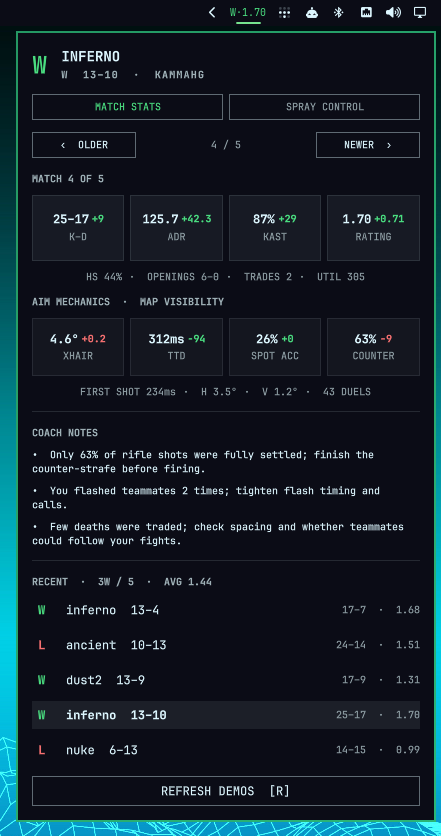
Click the bar pill to open the popup. Use Older / Newer, click a
recent-match row, or press Left/Right (H/L) to browse the five most
recent games. Press R, click Refresh demos, or middle-click the bar
pill to scan again.
A .dem file in ~/Downloads, ~/.local/share/omarcs/demos, or the
local CS2 folder is found by the five-minute scan, or immediately with
Refresh demos. Import one file from a terminal with:
omarcs import ~/Downloads/match.dem
omarCS detects the most recently used local Steam account. If the demo belongs to another account, select it by SteamID64 or exact in-demo name:
omarcs import ~/Downloads/match.dem --player 76561198000000000
omarcs import ~/Downloads/match.dem --player "Player name"
Features
- Result and round score
- K/D/A, ADR, KAST, rating and headshot percentage
- Opening duels, trade kills and traded deaths
- Utility damage and flash impact
- Deterministic coaching notes
- Browsable five-match popup and ten-match averages
- Automatic retrieval and parsing of new Valve Premier/Competitive demos
- Map-aware crosshair correction, first-shot time, time-to-damage, spotted accuracy, and proper counter-strafing
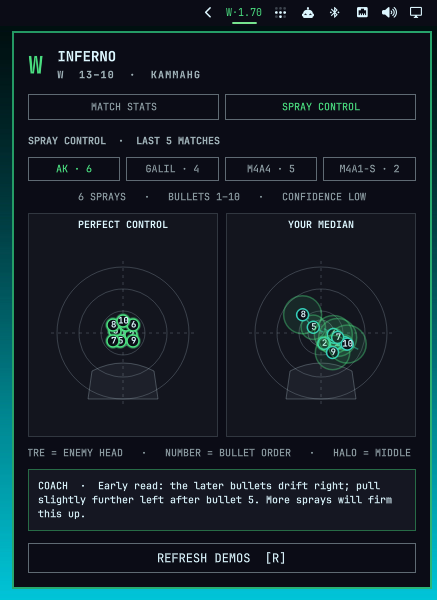
- Interactive AK-47, Galil, M4A4, and M4A1-S spray-control targets with numbered bullets, consistency halos, confidence, and coaching
Aim mechanics use collision geometry from the locally installed CS2 map to reconstruct when an enemy enters your field of view. Crosshair placement is the median view-angle correction from first visibility to first damage. Time-to-damage excludes engagements lasting one second or longer; counter-strafing counts uncrouched rifle shots below 34% of that weapon's maximum movement speed. Static geometry cannot perfectly model smoke edges or moving props, so trends across several matches are more meaningful than a single duel.
Spray control groups bursts of at least five bullets that begin while settled and have a plausible visible target. Each recorded shot ray is projected onto the enemy's head plane at that tick. The dashboard shows the median position for each bullet number across the latest ten matches; the halo is the middle 50% of those positions. Spray transfers are target-relative at every shot, while wall spam and shots without a visible enemy are excluded. Low sample counts are labelled rather than presented as reliable coaching.
Automatic matches
Enabling the widget starts the user-level fetcher. You can also run:
omarcs setup-auto
omarcs auto-status --pretty
CS2's Game State Integration schedules a replay check 30 seconds after the match ends. It checks every 30 seconds for up to ten minutes, then returns to a 15-minute idle check. Existing matches are recorded as a baseline during setup, so they are not downloaded again.
Downloads, decompression, and parsing pause or stop whenever CS2 reports warmup, live play, or intermission. The user service uses idle I/O scheduling, a nice value of 10, and low systemd CPU/I/O weights. Partial downloads resume later. Valve currently exposes the latest eight Premier/Competitive replays; FACEIT is not yet automatic.
Automatic downloads accept only exact http://replay<number>.valve.net/730/
or https://replay<number>.valve.net/730/ Demo URLs and reject redirects
outside those origin patterns. Valve currently publishes replay URLs over
HTTP, so Demo contents are treated as untrusted input. Compressed and
expanded sizes are bounded; bzip2 verifies its stream checksum during
decompression, and omarCS verifies the CS2 demo header before invoking the
parser. The complete delta from the pinned parser source is documented in
vendor/demoparser/VENDORED.md.
Optional configuration
Create ~/.config/omarcs/config.toml only if you want to override
defaults:
[player]
steam_id = "76561198000000000"

[import]
paths = ["~/Downloads", "~/.local/share/omarcs/demos"]

[history]
keep_recent = 20
Match history is stored in ~/.local/state/omarcs/omarcs.db; the shell
watches summary.json in the same directory.
Current limitation
Steam permits only one active CS2 Game Coordinator session. If the helper cannot query while CS2 still owns that session, omarCS keeps retrying during the post-match window and again when the game closes. FACEIT demos currently require manual download or privileged FACEIT Downloads API access.
Dependencies
The normal x86-64 installation uses a static Rust executable from the release
pinned in omarcs-release. Its expected digest is pinned separately in
omarcs-release.sha256, so replacing both mutable release assets cannot change
the executable accepted by a reviewed plugin commit. The launcher uses the
standard Omarchy tools curl, sha256sum, tar, install, and flock; there
is no Python runtime, virtual environment, Rust toolchain, or Cargo build cache
to install.
If the release cannot be downloaded, the launcher can use an existing Cargo
installation to build the checked-out source in a temporary cache directory.
That directory is removed after installation. Set OMARCS_BUILD_FROM_SOURCE=1
to deliberately exercise this path.
First enable also downloads these SHA-256-pinned GitHub release zips into
~/.local/share/omarcs/ (not piped to a shell):
| Archive | License | Use |
|---|---|---|
| boiler-writter 1.7.0 | MIT | Valve match discovery |
| Source2Viewer-CLI 20.0 | MIT | CS2 map geometry |
The boiler-writter archive includes Valve's libsteam_api.so
redistributable. Helpers stay on this computer and are not re-downloaded
when the checksums already match.
Vendored in this repository:
| Project | License | Use |
|---|---|---|
LaihoE/demoparser at 57f24c76776ac176e893833f3a5b4aad718a8196 |
MIT | Demo parser (vendor/demoparser) |
License
omarCS is MIT licensed. See LICENSE. The same license covers
the vendored demoparser sources (vendor/demoparser/LICENSE) and the
optional helper archives listed above.
This plugin runs unsandboxed inside omarchy-shell with your user
permissions. Marketplace listing approval is not a security review.
Local development
One Rust executable owns scanning, storage, the Dashboard Summary, automatic Demo intake, and Match Report calculation:
omarchy plugin validate .
cargo test -p omarcs
cargo build --release -p omarcs
target/release/omarcs probe ~/Downloads/match.dem --pretty
target/release/omarcs facts ~/Downloads/match.dem --pretty
target/release/omarcs stats ~/Downloads/match.dem "Player name" --pretty
target/release/omarcs mechanics ~/Downloads/match.dem "Player name" --pretty
target/release/omarcs sprays ~/Downloads/match.dem "Player name" --pretty
target/release/omarcs insights ~/Downloads/match.dem "Player name" --pretty
target/release/omarcs report ~/Downloads/match.dem "Player name" --pretty
To test the plugin launcher against local source instead of its pinned release:
OMARCS_BUILD_FROM_SOURCE=1 ./omarcs-plugin --help
Releasing
Keep the package version in crates/omarcs/Cargo.toml and the v-prefixed
version in omarcs-release in sync. Commit the complete release, tag that exact
commit with the same value (for example v0.1.0), then push the tag.
The release workflow tests the workspace, builds a static
x86_64-unknown-linux-musl executable, packages it with a checksum, creates a
build-provenance attestation, and publishes both files to the GitHub Release.
This repository has GitHub release immutability enabled, so the published tag
and assets cannot subsequently be replaced. If a plugin update briefly reaches
a user before its release workflow finishes, the Cargo fallback builds the
same checked-out source.