
OmarGram 💬
Native, lightweight Telegram status bar client for the Omarchy Quattro Desktop.
OmarGram lets you read and reply to your Telegram chats directly from the Omarchy status bar on the same screen, without needing to open a new window for Telegram. It is designed to be lightweight, snappy, and consume minimal RAM.
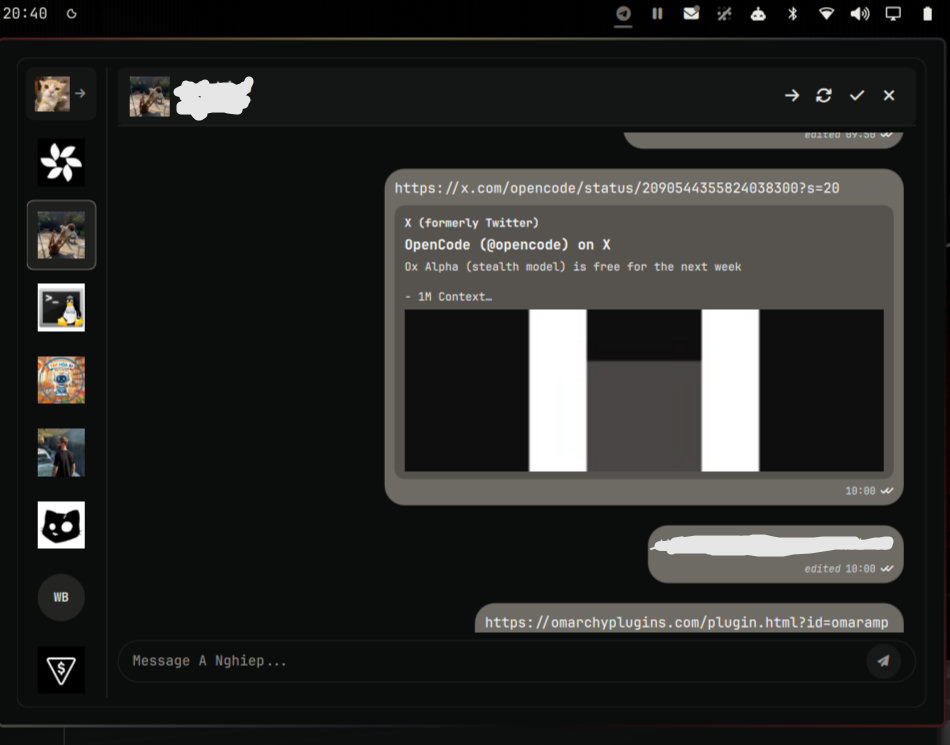
✨ Features
- 💬 Live Unread Badge: Real-time unread message counter directly in the Omarchy bar.
- 📱 1-Click QR Code Login: Scan the QR code with your phone (Telegram Settings → Devices → Link Desktop Device) to log in in 3 seconds.
- ⚡ Two-Column Fluid Layout: Sidebar with Direct Messages, Groups, and Channels + smooth-scrolling conversation stream.
- 🚀 Instant Message Composer: Quick-reply input with Enter to send and Shift+Enter for multiline formatting.
- ✏️ Edit & Pin Messages: Edit sent messages inline and pin/unpin important messages with a direct jump banner.
- ↗️ Forward & Multi-Select: Batch select messages with custom checkboxes to forward, copy, or delete at once.
- 🎨 Theme-Native Visuals: Matches your active Omarchy colorway, dynamic accent colors, and custom typography.
- 🔒 Security-First Architecture:
- Encrypted MTProto Transport: Official client-to-server MTProto 2.0 protocol directly to Telegram cloud servers.
- Owner-Only Local Caching: Enforces strict
0700directory modes and0600file permissions on~/.config/omargramand~/.cache/omargramto protect user metadata and session tokens from other local users. - Isolated IPC & PID Verification: Dedicated UNIX socket in
$XDG_RUNTIME_DIR/omargramwith0600socket permissions and PIDstarttimeverification preventing process hijacking or PID-reuse termination. - Injection & SSRF Safe: All incoming message text and remote metadata strictly rendered as
Text.PlainText.
📦 External Dependencies
OmarGram requires the following Python libraries for MTProto communication and QR code rendering:
| Dependency | Purpose | Package |
|---|---|---|
python-telethon |
Native Telegram MTProto API client | python-telethon (or pip install telethon) |
python-qrcode |
QR code generation for instant phone pairing | python-qrcode (or pip install qrcode[pil]) |
python-pillow |
Image handling and profile avatar caching | python-pillow (or pip install pillow) |
Install Dependencies:
python3 -m pip install --user telethon qrcode[pil] pillow
📥 Installation
Install OmarGram using the Omarchy CLI:
omarchy plugin add https://github.com/JoeJoeflyn/omargram --enable
omarchy restart shell
Manual Bar Configuration
Add "omargram" to your desired status bar section in ~/.config/omarchy/shell.json:
{
  "bar": {
    "sections": {
      "right": [
        "omargram",
        "omarmail",
        "omaramp",
        "omarchy.audio"
      ]
    }
  }
}
⌨️ Shortcuts & Navigation
| Key | Action |
|---|---|
Click Bar Icon |
Toggle OmarGram popout window |
Enter (in composer) |
Send message immediately |
Shift + Enter |
Insert newline in message |
Click Chat |
Open chat & mark messages as read |
Esc |
Close active chat or hide panel |
🗑️ Removal & Uninstallation
To disable and remove OmarGram:
omarchy plugin disable omargram
omarchy plugin remove omargram
omarchy restart shell
To purge cached avatars and session data:
rm -rf ~/.config/omargram ~/.cache/omargram
📄 License
MIT © JoeJoeflyn