
✉️ Omarmail
A native status bar email widget and rich inbox reader for the Omarchy desktop shell.



🌟 Highlights
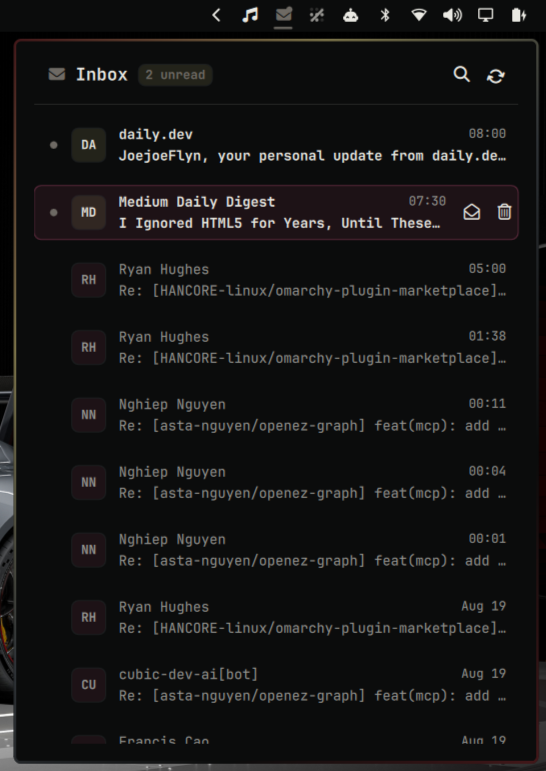
- Native Omarchy Bar Widget: Status bar envelope icon with real-time unread badges, status dots, and interactive tooltips.
- Anchored Flyout Panel: Anchored seamlessly below the status bar tray, matching first-party Omarchy panels (
tailscale,audio,network). - Safe Rich Email Renderer:
- Sanitized HTML and plain-text/Markdown rendering with formatted typography, headings, bullet lists, blockquotes, and tables.
- Remote body images and active markup are blocked; optional GitHub sender avatars are validated and cached privately.
- Monospace code block support for patch diffs, stack traces, and developer notifications.
- Only HTTP(S) and mail links can open in your default browser.
- Fast Mailbox Actions:
- The active mailbox is refreshed from the server whenever the panel opens.
- Instant Mark as Read / Unread toggle without triggering detail view.
- Inbox and Trash tabs with one-click trash and restore actions.
- Sender initials avatar bubbles and clean relative timestamps.
- Live Search & Gmail Filter:
- Instant live fuzzy filtering by sender, email address, or subject.
- Full IMAP query integration (
from:,to:,subject:,is:unread, etc.).
- Gmail Category Toggles: Hide Promotions, Social, Updates, or Forums with one click from the inbox header.
- Keyboard First Navigation: Full navigation via keyboard shortcuts (
j/k,Enter,Escape,u,d,/,r).
📥 Installation
Install directly using the Omarchy CLI:
omarchy plugin add https://github.com/JoeJoeflyn/omarmail
Add to Status Bar
Add an omarmail entry to the right section of the bar layout in ~/.config/omarchy/shell.json:
{
  "bar": {
    "layout": {
      "right": [
        { "id": "omarmail" },
        { "id": "omarchy.network" },
        { "id": "omarchy.audio" },
        { "id": "omarchy.battery" }
      ]
    }
  }
}
⚡ Prerequisites
Omarmail is powered by himalaya for IMAP and a pinned ortie release for Gmail OAuth. Use only the checksummed v2.2.0 assets below — not an unversioned remote installer.
1. Install Himalaya
omarchy pkg add himalaya
2. Install Ortie (Gmail OAuth only)
Download ortie v2.2.0, verify the SHA-256, then extract into ~/.local/bin. Skip this if you use IMAP with password auth.
x86_64 Linux:
archive=$(mktemp --suffix=.ortie.tgz)
trap 'rm -f "$archive"' EXIT
curl --fail --proto '=https' --tlsv1.2 -sSL -o "$archive" https://github.com/pimalaya/ortie/releases/download/v2.2.0/ortie.x86_64-linux.tgz
echo "526972ac0b98eac66c943058de350c668d594e0898c8c6bb2d1b0348fafcdb52  $archive" | sha256sum -c
mkdir -p ~/.local/bin
tar -xzf "$archive" -C ~/.local/bin
aarch64 Linux: use ortie.aarch64-linux.tgz with sha256 667586c32ec3d087a40418014f286f0b8912001d32deef94edf668a634d898c6.
3. Configure Your Mailbox
Create or configure ~/.config/himalaya/config.toml. Note: omarchy pkg add himalaya installs himalaya v2, which uses a flat imap.* schema — the legacy v1 keys (imap.host, imap.port, imap.login, imap.auth) no longer parse.
[accounts.personal]
default = true
email = "you@example.com"
mailbox.alias.inbox = "INBOX"
imap.server = "imap.example.com:993"
imap.sasl.plain.username = "you@example.com"
imap.sasl.plain.password.command = ["secret-tool", "lookup", "service", "omarmail", "account", "you@example.com"]
Store the secret first with secret-tool store --label="Omarmail" service omarmail account you@example.com. Himalaya and Omarmail also support other password-manager commands such as pass or gopass. A password.raw value remains compatible, but a password-manager command is recommended so the app password is not stored in plaintext.
For Gmail, use imap.server = "imap.gmail.com:993" with a dedicated app password — never your account password. The account may have any name; Omarmail scans configured accounts.
For Gmail OAuth instead: install ortie (step 2), then sign in when the panel prompts — the plugin writes ~/.config/ortie/config.toml and the himalaya OAuth config automatically.
⌨️ Keybindings & Controls
Keyboard Shortcuts (within panel)
| Key | Action |
|---|---|
j / ↓ |
Move cursor down |
k / ↑ |
Move cursor up |
Enter |
Open selected email |
Escape / Backspace |
Back to inbox / close search / close panel |
u |
Toggle Read / Unread status |
d |
Move to Trash, or restore to Inbox from the Trash tab |
/ or s |
Focus search bar |
r |
Refresh inbox |
Hyprland Global Hotkey
Bind a toggle hotkey in ~/.config/hypr/bindings.lua:
-- Super + M to toggle Omarmail
o.bind("SUPER, M, exec, omarchy-shell omarmail toggle")
🔌 IPC Commands
Control Omarmail programmatically via omarchy-shell:
omarchy-shell omarmail open             # Open inbox popup
omarchy-shell omarmail toggle           # Toggle popup visibility
omarchy-shell omarmail refresh          # Sync latest emails
omarchy-shell omarmail openMessage <id> # Open specific email detail
📄 License
This project is licensed under the MIT License.
🗑️ Removal
Uninstall the plugin and clean up cached data:
omarchy plugin remove omarmail
rm -rf ~/.cache/omarmail
rm -rf ~/.config/omarmail
Then remove the {"id": "omarmail"} entry from the right section of the bar layout in ~/.config/omarchy/shell.json.