
omasot — Screen Time Tracker for Omarchy
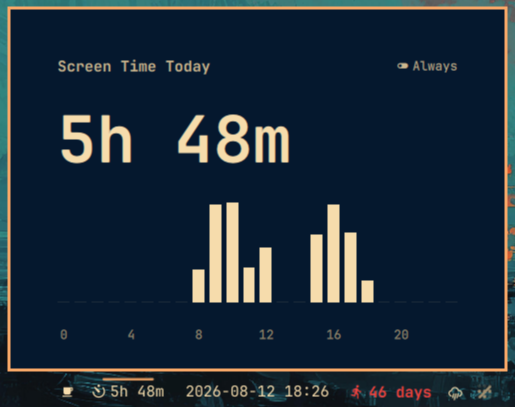
A lightweight screen time tracker plugin for the Omarchy shell bar. Shows your daily screen-on time at a glance and provides an hourly breakdown chart when clicked.
Features
- Bar widget — displays total screen time today (e.g.
2h 34m) - Daily view — hourly bars with a right-hand value axis; unused small hours collapse into one narrow
0–9block so the hours you use get the width - Weekly view — Mon–Sun bars with a value axis, week total and share of 168h, and a FOCUSED / OVERALL switch: focused counts only time attributed to an app, overall adds idle, lock and empty-desktop time
- App stats — per-app usage for today or any day you click in the weekly chart (top-6 + Other with time and % share, plus an Idle / other row so the day reconciles); Show more expands all
- Identity modes — Simple records window class only (e.g. zen/foot); Smart resolves the foreground process inside terminals (e.g. opencode not foot), uses the game title for steam_app_<id>, and shortens reverse-DNS names
- Private by design — window titles are never stored except Steam game titles; fully local, no network access
- Tracking Modes — use the mode switch in the panel to switch between "Active" (measures only actively used time) and "Always" (measures total screen-on time, whether being used or unused)
- Theme-aware — adapts colors to your current Omarchy theme
- Lightweight — simple Python backend, no daemons or databases
Screenshot
Requirements
- Omarchy Quattro with Quickshell
- Python 3 (pre-installed on Omarchy)
Installation
omarchy plugin add https://github.com/kamal-v8/omasot.git --enable
This clones the plugin and enables it in your bar automatically.
Alternatively, you can manually clone and configure:
git clone https://github.com/kamal-v8/omasot.git ~/.config/omarchy/plugins/omasot
Then add it to your bar in ~/.config/omarchy/shell.json:
{
  "id": "omasot"
}
The shell hot-reloads on save — no restart needed.
Usage
Click the widget to open the details panel. Press Escape to close it. Click the
mode switch in the top-right of the panel to switch between Active and
Always tracking.
The Weekly view shows the week at a glance; the Apps view breaks a day down:
- Use the week pager (
‹ Sep 7 – 13, 2026 · W37 ›) to move between weeks. Bars show Mon–Sun totals with the week total and share of 168h. Switch FOCUSED / OVERALL to compare app-attributed time against total screen-on time; hovering a bar always shows both. - Click a day to see its top apps. Each row shows time and % share; top-6 plus Other are shown by default and Show more expands all.
Click the gear icon for Settings:
- Weekly view toggle
- App view toggle
- App icons toggle
- Tracking mode: Off / Simple / Smart
- History retention: 30 / 90 / 180 / 365 days (default 365, max 365)
Removal
Remove from your bar layout in ~/.config/omarchy/shell.json, then remove the plugin:
omarchy plugin remove omasot
Optionally remove the state file:
rm ~/.local/state/screentime.json
How It Works
- A background service runs a 60-second timer. Each tick, it checks your idle status via Quickshell's
IdleMonitor. It then callstracker.py recordto log one minute. - The bar widget calls
tracker.py(no args) every 60 seconds to read today's total and display it. - Clicking the widget opens a panel with a 24-hour bar chart showing minutes per hour.
- The mode switch in the panel switches between Active (monitors only active use cases, pausing when idle) and Always (tracks all screen-on usage).
- Data is stored in
~/.local/state/screentime.jsonas a simple JSON object keyed by date and hour, with per-day_appsseconds for per-app totals. Old days are pruned according to the retention setting (30/90/180/365 days, default 365, max 365). No network access, no elevated privileges. - A background attribution loop polls
hyprctl activewindowevery 5 seconds and credits 5 seconds to the focused app. Idle time attributes nothing, and disabled (Off) mode attributes nothing. - App identity depends on tracking mode: Simple records window class only (e.g. zen/foot); Smart resolves the foreground process inside terminals (e.g. opencode not foot), uses the game title for
steam_app_<id>, and shortens reverse-DNS names. Window titles are never stored except Steam game titles. All resolution is local with no network access. - Attribution splits at midnight so seconds before and after midnight count toward their respective days.
External Dependencies
| Dependency | Purpose | Included in Omarchy? |
|---|---|---|
| Python 3 | Data recording and reading | Yes |
| hyprctl | Focused-window attribution | Yes |