
Omatape
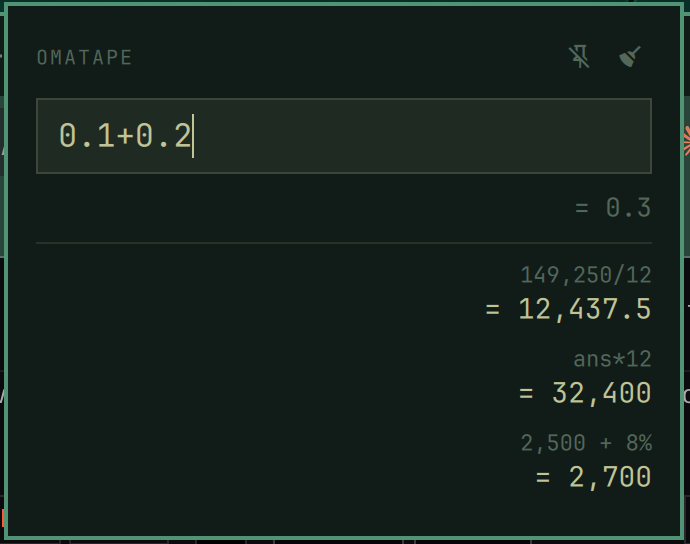
The adding-machine tape for Omarchy. A keyboard-first drop-down calculator for the Omarchy bar, built for finance and accounting work: exact decimal math (never floats), accountant-style percent, a persistent calculation tape, and auto-copy of every result.
Why
Omacalc is fine for quick sums; Omatape is for people who calculate all day.
Every result is one SUPER+V away from a spreadsheet, the tape remembers your
whole session, 250+8% means what an accountant means by it, and
0.1 + 0.2 is exactly 0.3.
Install
omarchy plugin add https://github.com/dheilandiii/omatape
Then add a keybinding in ~/.config/hypr/bindings.lua (pick any key you like):
o.bind("SUPER + Q", "Calculator", "omarchy-shell -q omatape summon")
The widget lands in the bar's right section (move it with
omarchy bar move omatape --section right --index 0). The panel drops down
from the bar icon as an overlay — nothing in your tiling layout shifts.
Remove: omarchy plugin remove omatape and delete the keybinding line.
Omatape touches nothing else; its only runtime state is
$XDG_STATE_HOME/omatape/state.json (default ~/.local/state/omatape/).
Use
| Action | How |
|---|---|
| Open / close | your keybinding (or click the bar icon) |
| Evaluate and copy the result | Enter — raw number goes to the clipboard, paste with SUPER+V (auto-copy is toggleable; a tape result click always copies) |
| Clear the entry | c |
| Close | Esc, click outside, or focus another window |
| Recall past expressions | ↑ / ↓ |
| Chain from the last result | start an empty entry with an operator: *300 becomes ans*300 |
| Reuse a tape entry | click a result to copy it; click its faded expression to edit it |
| Pin / auto-copy / clear memory | right-click the bar icon (or the icons in the panel header) |
Math
- Exact decimal arithmetic — digit-string math, not IEEE floats:
0.1+0.2 = 0.3, cents never drift. Division carries 34 digits; display and clipboard round at 12. - Accountant percent:
250+8% = 270·250-8% = 230·250*8% = 20·250/50% = 500·50% = 0.5 ansis the newest tape result.- Forgiving input:
$, thousands commas, andx/×/÷all accepted. - Results display with thousands separators (
12,437.5); the clipboard always gets the raw number (12437.5) so spreadsheets accept the paste.
Memory
The tape persists to $XDG_STATE_HOME/omatape/state.json (default
~/.local/state/omatape/state.json, a private directory): it survives shell
restarts, logout, and reboot — clear it on demand via right-click →
Clear memory. Capped at 200 entries.
State I/O is hardened: all reads and writes go through stateio.py, which
verifies on the open descriptor that the file is a regular, user-owned file
under a size ceiling before reading (no symlink following, no blocking on a
FIFO), and replaces the file atomically on write. Restored history is
re-capped to 200 bounded entries no matter what the file contains.
Pinned mode
Pinned, the panel stays on screen while you work in other windows: it releases
the keyboard and clicks pass through around the card. Your summon keybinding
(or clicking the card) re-engages it for typing; Esc still closes it.
Omatape follows your Omarchy theme automatically — it draws entirely from the shell's theme tokens.
Architecture
| File | Role |
|---|---|
BarWidget.qml |
Bar icon, right-click menu, omatape IPC target (summon, toggle, open, close, pin, unpin, autocopyOn, autocopyOff, clear) |
Panel.qml |
Panel content, tape, persistence, clipboard (wl-copy) |
CalcPanelWindow.qml |
Vendored qs.Ui.KeyboardPanel plus the pinned engaged/disengaged mode (header comment explains the Hyprland focus subtleties) |
Model.js |
Decimal engine + expression parser — pure JS, no Qt dependencies |
stateio.py |
Descriptor-safe bounded state read/write (python3, stock on Omarchy) |
tests/model.test.mjs |
Engine test suite: node tests/model.test.mjs |
No external dependencies beyond a stock Omarchy install (wl-copy and
python3 ship with it). Qt's QML engine has no BigInt, which is why the
engine does digit-string arithmetic.
Known limits
- No exponent/power operator, no implicit multiplication (
5(2+3)). - On multi-monitor setups the panel opens on the monitor whose bar instance owns the IPC target, which may not be the focused monitor.
License
MIT © 2026 Don Heiland III