
Caldir widget for Omarchy
⚡ Lightning-fast access to your next calendar events in the Omarchy bar. Works great with renCal.
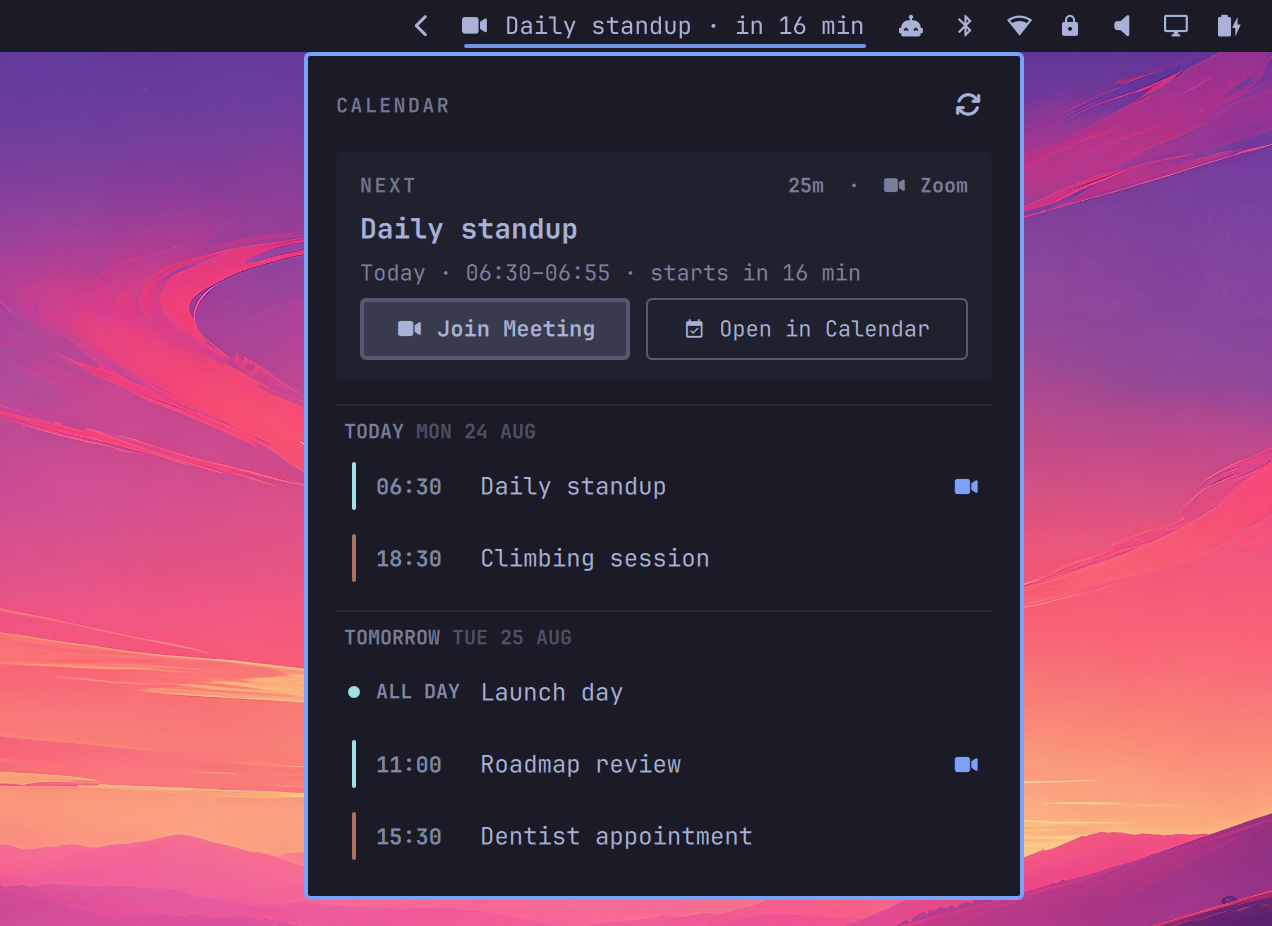
Features
- Supports all major calendar providers (Google Calendar, iCloud, Outlook, CalDAV...) through caldir.
- Uses vim motions (<kbd>h</kbd>, <kbd>j</kbd>, <kbd>k</kbd>,<kbd>l</kbd>) for navigation.
- Highlights the next meeting when it's close to start.
- Shows a badge for pending invitations, with Maybe, Decline, and Accept actions in the panel.
- One-click action. Meeting events (Google Meet, Zoom, etc) open the video URL in your browser. Non-meeting events open in renCal.
- Syncs automatically (or trigger manually with <kbd>s</kbd>).
Installation
omarchy plugin add https://github.com/t4t5/omarchy-caldir-widget --enable
This will add the widget to ~/.config/omarchy/shell.json as:
{
  "id": "org.ren.caldir"
}
The widget uses caldir-cli to read your calendar data (requires v0.12.1 or higher). Pending invitations and RSVP actions are enabled with caldir v0.13.1 or higher; older supported versions continue to show and sync the agenda.
Usage
See the caldir docs for how to connect a calendar.
It is also recommended to have renCal installed, so that you can view and edit your caldir events through a GUI.
Shortcuts
Set a key binding in ~/.config/hypr/bindings.lua to open the widget more quickly:
-- Toggle caldir widget
o.bind("SUPER + SHIFT + C", "Caldir widget", "omarchy shell org.ren.caldir toggle")
IPC
omarchy shell org.ren.caldir toggle
omarchy shell org.ren.caldir open
omarchy shell org.ren.caldir close
omarchy shell org.ren.caldir refresh
Settings
Preferences
Set your preferences in ~/.config/omarchy/shell.json:
{
  "id": "org.ren.caldir",
  "daysAhead": 3,
  "lookaheadMinutes": 60,
  "highlightEvents": "all"
}
| Setting | Default | Purpose |
|---|---|---|
daysAhead |
2 |
Number of future schedule days to display |
lookaheadMinutes |
30 |
How long before it starts an event appears in the bar (1-1440) |
highlightEvents |
"meetings" |
"meetings" shows only events with a detected video link. "all" also shows events without one |
Choosing what reaches the bar
By default the bar follows MeetingBar's rules: it shows an event only once it
is within lookaheadMinutes of starting, and only when a video link was
detected. Everything else stays in the panel.
Raise lookaheadMinutes if you want more warning before a call, and set
highlightEvents to "all" if your calendar carries meetings that have no link
(a room booking, a recurring focus block, an off-site).
Declined, all-day, and tentative events stay off the bar under both settings. When the selected event has no video link, the "Next" card drops its Join Meeting button and offers Open in Calendar alone.
Invitations
Pending invitations appear above the next meeting in the panel, with a count
beside the calendar icon in the bar. This uses caldir invites --json (released
in caldir v0.13.1) and covers caldir's next 30 days, independently of daysAhead.
All-day invitations and invitations without a video link are included.
Choose Maybe, Decline, or Accept to save and send your response
immediately. The widget runs caldir rsvp, then caldir push --calendar for
that invitation's calendar. Caldir pushes all pending changes in that calendar.
If sending cannot be confirmed, Retry sending (or <kbd>s</kbd>) retries it.
Recurring occurrences that share a source file count as one invitation; the response applies to that source event, usually the whole series. Occurrence overrides with their own files appear separately. Use <kbd>j</kbd>/<kbd>k</kbd> to move between invitation cards, the meeting card, and agenda rows; <kbd>h</kbd>/<kbd>l</kbd> selects an action and Enter responds.
Custom script
When clicking an event item, the default behaviour is the following:
- events with a detected meeting link open that link in your browser.
- all other events open in renCal through a
rencal://deeplink.
For the "Next meeting" card:
- the Join Meeting button (or a right-click on the bar) opens the meeting link in your browser.
- the Open in Calendar button opens the event in renCal.
To customize this behavior, create ~/.config/omarchy/caldir/open.lua and define on_open:
Examples
-- Show a notification whenever an event is opened
function on_open(event, action)
  exec { "notify-send", "Hello world" }
  default_open(event, action)
end
-- Start a transcript whenever you join a meeting
function on_open(event, action)
  if action == "join" then
    exec { "start-transcription", "--title", event.title }
  end
  default_open(event, action)
end
-- View the event in your preferred app instead of renCal
function on_open(event, action)
  if action == "calendar" then
    exec { "my-calendar-app", "--event", event.uid }
    return -- Skip default_open here because it would open the event in renCal.
  end

  default_open(event, action) -- Keep the stock behavior for meeting links.
end
Options
event is a table with the following fields (can also be nil):
| Field | Value |
|---|---|
uid |
Event UID |
recurrence_id |
RFC 5545 recurrence ID of the occurrence (e.g. 20260911 or TZID=Europe/London:20260911T100000); empty for non-recurring events |
title |
Event title |
conference_url |
Detected video meeting URL |
action is either:
"join"(to open the detected meeting link)"calendar"(to open the event in a calendar)
You can use these global helper functions in your script:
| Function | Behavior |
|---|---|
default_open(event, action) |
Runs the bundled join or calendar policy |
open_url(url) |
Opens a URL through xdg-open |
open_rencal(event) |
Opens the event in renCal |
exec(command) |
Runs a command in the background |
Uninstall
omarchy plugin remove org.ren.caldir
To temporarily hide the widget instead, use omarchy plugin disable org.ren.caldir.
If you created a custom script at ~/.config/omarchy/caldir/open.lua, remove it manually.
Contributing
For local development, we use a justfile for developer commands.
Install the locally cloned repo in your Omarchy bar to test:
just install
When making changes, you can reload it with:
just reload
To remove the plugin:
just uninstall
Before submitting a PR, ensure everything runs with just test.
Acknowledgments
The design of the "Next meeting" card is based on next-event by @tobiasz-p.
The policy logic is taken from MeetingBar.