
Battery Health for Omarchy
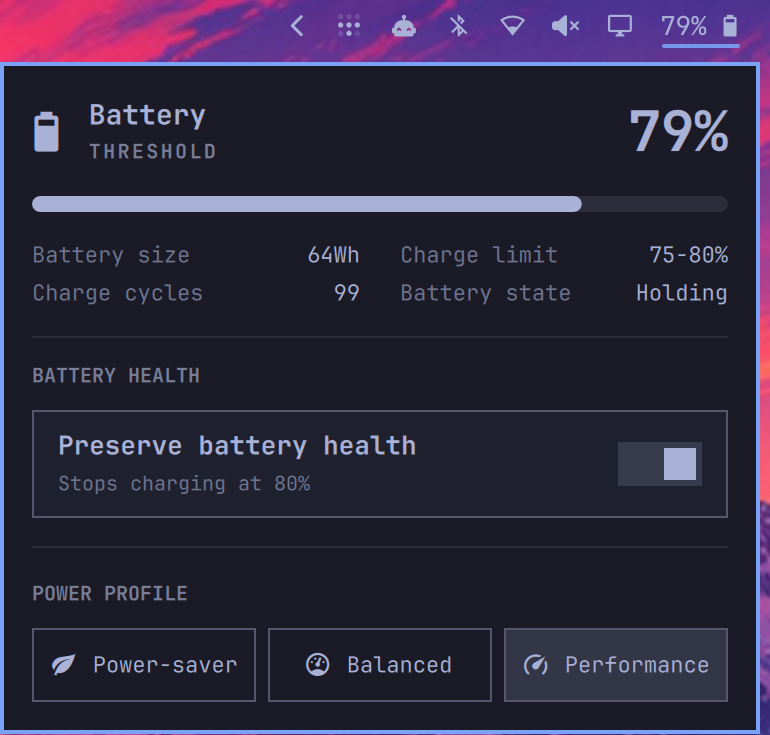
The built-in Omarchy power widget, extended with a battery-health toggle that uses the charging policy exposed by your laptop through UPower.

Wallpaper by Simon Høiberg, featuring Switzerland, our home.
What it does
- Shows battery level, capacity, charge cycles, charge rate, and remaining time.
- Switches between the power profiles available on the system.
- Enables or disables the laptop's firmware-provided charge limit.
- Hides the battery-health control when the hardware does not support it.
- Shows the battery percentage in the bar when you right-click the battery icon.
UPower reports the charging policy supported by the laptop. This may be a fixed limit, a start/end range, or a firmware-optimized charging mode.
Panel close-up
Installing it
omarchy plugin add https://github.com/patcastle/omarchy-battery-health --enable
The plugin declares itself as a clone of omarchy.power, so Omarchy replaces
the built-in power widget in place and keeps its bar position and settings. You
do not need to disable or move the original widget manually.
Click the battery icon and use Preserve battery health. The control only appears when UPower reports charge-threshold support.
Compatibility
Requires an Omarchy version with shell plugin support, plus upower and
busctl. Those are part of a normal Omarchy installation.
Actual support depends on the laptop firmware, kernel driver, and UPower. The
plugin uses UPower's D-Bus API and does not use sudo or pkexec.
If another tool already manages your charge threshold, use one or the other so they do not fight over the setting.
Removing it
omarchy plugin disable patcastle.power
omarchy plugin remove patcastle.power
Disabling or removing it restores the built-in omarchy.power widget.
Development
omarchy plugin validate .
./test.sh
This is a clone of Omarchy's power widget while the corresponding upstream change is under review in basecamp/omarchy#8579.
License
MIT