
Gamepad Wheel
An Omarchy 4 plugin. Hold a button on your controller, flick the left stick, release — the launcher you picked opens in its console/gaming mode. The point is to get from a controller in your hands to a game running without touching a keyboard.
# install
omarchy plugin add https://github.com/perfektnacht/controller-launcher --enable && omarchy restart shell

# update
omarchy plugin update perfektnacht.controller-launcher && omarchy restart shell

# remove
omarchy plugin remove perfektnacht.controller-launcher
Details in Install below.
Requirements
Omarchy 4 or newer, and a gamepad. Nothing here has an install step of its own, and nothing is bundled or vendored:
| Needs | For | Notes |
|---|---|---|
| Omarchy 4+ | Hosting the overlay and the bar widget | Provides the Quickshell runtime too |
| Python 3 | The daemon that reads the controller | Standard library only — no pip, no venv |
bash, jq, coreutils |
The helper scripts that build the wheel's entry list | All already present on Omarchy |
The daemon reads gamepad events from /dev/input/event*, read-only. No udev
rule is installed and none is needed: logind's ACL already grants the seat
owner access to their own input devices.
The launchers the wheel points at — Steam, Lutris, Heroic and the rest — are not dependencies. An entry whose guard fails just sits inert, so the wheel still opens on a machine with none of them installed.
What it does
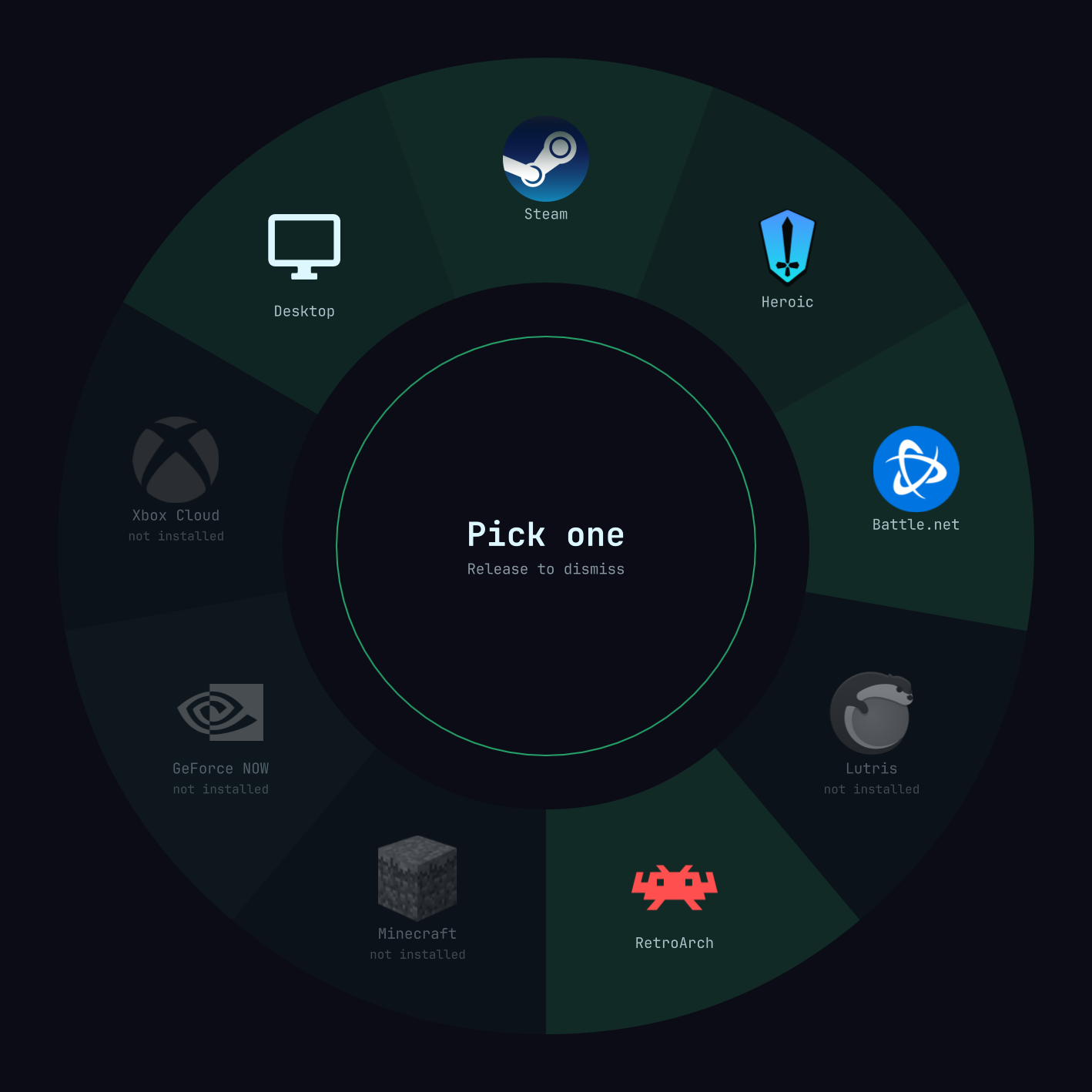
Holding the summon button (PS / Xbox / Steam by default) puts a donut of arc wedges in the middle of the screen, one per launcher, laid out clockwise from the top with each launcher's real icon. The left stick's direction lights a wedge — it extrudes outward, fills with that launcher's brand color, and the hub swaps to its logo and name. Releasing the summon button fires it. There is no confirm step, so the whole gesture is about half a second once you know where things are.
The ring unfurls clockwise on open, and a soft halo behind the dial picks up the selected launcher's color.
Everything is sized as a proportion of the shorter screen edge rather than in fixed pixels, so the wheel fills the display it is on — this is gaming mode, it should own the screen — and a 13" laptop gets the same proportions as a 27" monitor instead of a postage stamp in the middle.
Icons resolve in three tiers: the system icon theme first, so installed apps
match the rest of your desktop; then a logo bundled in media/; then the
entry's nerd-font glyph. The middle tier matters more than it sounds — an
application that is not installed has no icon-theme entry by definition, so
without bundled art every uninstalled wedge would fall back to a glyph, and
several of those are simply missing from JetBrainsMono Nerd Font.
A few marks are only legible against one kind of background — anything built out of white, or out of near-black. Those ship as a pair and the wheel picks between them by measuring the luminance of the scrim it is about to paint, rather than trusting the theme's own light/dark label: what a logo has to hold its own against is the surface directly behind it.
Circle / B while holding cancels. So does Escape, or a click anywhere outside the wheel — every cell is also clickable, so the wheel works with a mouse and is testable with no controller attached at all.
The wheel carries Omarchy's stock gaming roster:
| Entry | Launches |
|---|---|
| Steam | steam steam://open/bigpicture — Big Picture |
| Heroic | heroic --console — Console Mode |
| Battle.net | omarchy-launch-battlenet |
| Lutris | lutris |
| RetroArch | retroarch |
| Minecraft | minecraft-launcher |
| GeForce NOW | flatpak run com.nvidia.geforcenow |
| Xbox Cloud | omarchy-launch-webapp …/play |
| Desktop | dismiss |
An entry you have not installed still gets a sector, but it is inert. It draws as a fainter card, with a desaturated logo and a "not installed" caption; the hub reads Not installed; and releasing on it does nothing. This wheel launches games — it does not install software. Install something through Omarchy's own menu and it comes to life on the next summon, no restart.
Keeping the sector rather than hiding it is deliberate: positions are fixed and never reorder, because a radial menu is only fast if muscle memory holds. An entry that appears and disappears as you install things would move everything after it.
Two of Omarchy's gaming menu entries are deliberately absent. Xbox
Controllers installs xpadneo-dkms, a driver — there is nothing to launch,
so under the inert rule it could only ever be a permanently dead sector.
RetroArch Game Launcher is an interactive tool that prompts for a core and
a ROM path through fuzzy menus to generate a per-game .desktop — a keyboard
flow, and precisely what this wheel exists to avoid.
Three entries ship switched off rather than absent. Prism is a third-party
Minecraft launcher, Moonlight streams from a PC running Sunshine or
GeForce Experience, and Omakade is a community game library that gathers
Steam, Lutris, Heroic, Faugus, and RetroArch into one controller-ready view.
None of them is part of Omarchy's roster, so none belongs on everyone's wheel.
Prism and Moonlight are the cases that most punish hand-written config,
because each installs more than one way and the obvious guard is wrong for most
of them — Prism's package and binary share a name only if you picked the right
package, and Moonlight's binary is moonlight while its package is
moonlight-qt. All three are already written and tested; tick any of them in
the bar menu to put it on the ring. See
Switching entries on and off.
If you ever get down to a single entry, the wheel gives it a Desktop cell for company, taking the bottom half. One entry alone would mean one sector spanning the whole circle, so any push of the stick would arm a launch with no direction that means not that one — releasing dead centre would still dismiss, but that is something you have to know rather than something the ring shows you.
Nothing persists
Removing this plugin returns the machine to exactly where it started. That is a design constraint, not a side effect, so it is worth being specific about what it rules out.
The plugin has two states, and the difference between them is the whole point of the bar toggle:
- Passive (the default, and the state after every shell start). The daemon reads the controller and nothing else. Every game and application sees the controller exactly as it did before. There is nothing to undo, because nothing was changed.
- Capturing. Adds
EVIOCGRABon the gamepad so the summon button does not leak into whatever has focus. The kernel drops the grab when the process's fd closes, including onSIGKILL, so a crash cannot leave your controller captured.
You turn capturing on deliberately, and it is never remembered — armed is not
persisted anywhere, so every shell start comes up passive. Input capture is
always something you switched on this session, never something a previous one
left behind.
Launching drops back to passive. A launch hands the controller to whatever just opened, so capture has done its job, and keeping it would break the thing you launched: the grab is device-wide, so a launcher reading the pad through evdev — an Electron one through the browser gamepad API, say — sees a device that never sends an event and reads as having no controller attached. Heroic is the case you notice, because Steam talks to a DualSense over hidraw and is unaffected. Dismissing does not disarm, and neither does releasing on an entry that is not installed: both leave you at the desktop with the controller still in your hands, which is exactly when the next summon has to work.
Beyond that, the plugin does not:
- write to
~/.config/hypr/or add any keybind (it reads the gamepad directly) - install a udev rule, a systemd unit, or a modprobe config
- load, bind, or patch a kernel module
- create a uinput device
- change any state inside the controller's firmware
That last one is why the Steam Controller is read the way it is: the plugin only ever reads the report the controller already sends, and never writes to it. See Controller support below.
State lives in the plugin directory and in shell.json's plugin settings, both
of which omarchy plugin remove cleans up.
Install
The three lines at the top are the whole of it. What they are doing:
omarchy plugin add clones the repository into ~/.config/omarchy/plugins/,
then asks whether to place the bar widget left, center, or right, preselected
to right; --yes takes right without asking. The install directory is
named from the manifest's id, not from the repository, so it lands at
~/.config/omarchy/plugins/perfektnacht.controller-launcher — the shell will
not find the plugin if the two disagree.
The restart is part of both the install and the update line because entry
points are read when the shell starts. Without it on install, the plugin is
installed and enabled but nothing appears in the bar until the next restart,
which reads as the install having failed; without it on update, omarchy plugin update has pulled and rescanned but the shell is still running the old QML.
omarchy plugin remove needs no restart and leaves nothing behind — see
Nothing persists.
The bar widget shows a controller glyph — dim when passive, bright when capturing. Left click toggles capture; right click opens a menu holding the controller picker, the wheel's contents, and the wheel itself.
Configuration
Which entries appear is a checkbox in the bar menu. Everything else — labels, colors, what an entry actually runs, entries of your own — is a JSON file.
Switching entries on and off
Right-click the bar widget. Under the controller picker is every entry the wheel knows about, the switched-off ones included, and clicking one flips it. This one has been customised a little — Battle.net switched off, and a hand-written condition on Lutris:
On the wheel
 ✓ Steam
 ✓ Heroic
   Battle.net
 ✓ Lutris                          rule
 ✓ RetroArch
 ✓ Minecraft            not installed
   Prism                not installed
   Moonlight            not installed
   Omakade              not installed
 ✓ GeForce NOW          not installed
 ✓ Xbox Cloud           not installed
 ✓ Desktop
Switched-off entries keep their place in that list rather than sinking to the bottom, so nothing reorders under the cursor and an entry switched back on returns to the slot it always had — the same reason the wheel itself never moves a sector. The menu stays open as you click, since rearranging the wheel means a few of these at once.
not installed is a warning, not a refusal: you can put an entry on the ring before installing the application, and it will sit there inert until you do.
rule means the entry's when is an expression rather than a plain yes or
no, and the menu will not touch it. Flipping it would mean overwriting whatever
condition you wrote there, with nothing to undo it — so those rows show their
state and decline to respond. Edit the file if you want to change one.
The same thing from a terminal, which is what the menu calls:
cd ~/.config/omarchy/plugins/perfektnacht.controller-launcher
bin/omarchy-controller-launcher-launchers --all           # every entry, with state
bin/omarchy-controller-launcher-toggle prismlauncher on   # on | off | flip
Without --all, the first command prints what the wheel will draw — which is
also what the wheel itself runs on every summon.
The toggle writes when into your extensions file and nothing else. It will
not overwrite a file it cannot parse, it refuses expression guards the same way
the menu does, and switching an entry back to how it ships removes the override
rather than pinning it — so the file only ever carries the decisions that
differ from the defaults.
The entries themselves
Drop a ~/.config/omarchy/extensions/gamepad-wheel.json to override entries by
key. It is merged over the defaults, so you only name what you are changing:
{
  "steam": { "sublabel": "Big Picture, 4K" },
  "battlenet": { "when": "false" },
  "bottles": {
    "icon": "com.usebottles.bottles",
    "accent": "#c39b6a",
    "label": "Bottles",
    "sublabel": "Wine",
    "installed": "flatpak info com.usebottles.bottles >/dev/null 2>&1",
    "action": "exec flatpak run com.usebottles.bottles"
  }
}
Wheel order follows key order. The fields:
| Field | Meaning |
|---|---|
when |
should this entry appear at all — set "false" to hide a default. A plain "true" or "false" is what the bar menu switches; an expression locks the row against it |
installed |
shell guard; a non-zero exit renders the entry inert |
action |
run when installed; empty just dismisses, which is the desktop cell |
install |
carried through but unused — reserved, in case install-on-select ever returns behind a flag |
accent |
brand color for the wedge, hub, and halo; empty inherits the theme accent |
icon |
icon-theme name, tried first |
media |
basename in media/, defaults to the entry id; "" skips to the glyph |
mediaThemed |
the art ships as <media>-dark.png and <media>-light.png, picked by the wheel's own backing |
glyph |
nerd-font fallback |
All three of when, installed and action are run through a shell, so they
can be whole expressions rather than single commands — but not the same shell.
The two guards run under bash -c, inheriting the shell's environment; the
action runs under bash -lc, so it gets your login profile and whatever PATH
that sets up. Worth knowing if a launcher lives somewhere only your profile
knows about: the entry can launch fine and still read as not installed.
Ask what the machine can launch, not which package it came from. The
temptation is omarchy-pkg-present <name>, but that is pacman -Q on that
exact name, so an application installed from a different package — an AUR -git
variant, a flatpak — reads as missing and the entry sits greyed out with the
thing sitting right there. command -v does not care what provided the binary.
The shipped Prism entry is the worked example:
"installed": "command -v prismlauncher >/dev/null 2>&1 || flatpak info org.prismlauncher.PrismLauncher >/dev/null 2>&1",
"action": "if command -v prismlauncher >/dev/null 2>&1; then exec prismlauncher; else exec flatpak run org.prismlauncher.PrismLauncher; fi"
Three install routes, two launch shapes — the repo package and the -git
package put the same binary on PATH — and nothing to edit when you switch
between them.
Guards run on every summon, so keep them local. command -v, pacman -Q and
flatpak info are all instant; anything that queries a remote will stall the
refresh.
The summon button
Summon is on PS / Xbox / Steam by default. Steam grabs that button whenever it is running, so if the wheel does not come up while Steam has the controller, move it to one Steam does not take:
omarchy-shell shell setBarWidget perfektnacht.controller-launcher \
  summonButton '"select"' '{}'
Takes effect immediately — the daemon restarts on the spot, no shell restart.
One of south, east, north, west, select, start, mode, naming the
physical button by position rather than by the letter printed on it:
| Value | DualSense | Xbox |
|---|---|---|
south |
Cross | A |
east |
Circle | B |
north |
Triangle | Y |
west |
Square | X |
select |
Create | Back |
start |
Options | Start |
mode |
PS | Xbox |
select is usually the safest, since little else claims it. Anything not on
that list falls back to mode rather than leaving you without a wheel. The
setting is stored in shell.json alongside the bar widget, so it survives
restarts; remove the key to go back to the default.
The cancel button (Circle / B) is not configurable yet.
The controller
By default the daemon chooses: the first evdev gamepad it finds, and only if none answered, a Steam Controller puck. With one controller on the desk there is nothing to decide.
With more than one, right-click the bar widget. The menu lists every controller attached right now, marks the one currently driving the wheel, and pins whichever you pick:
Controller
 ● Automatic
 ○ Sony Interactive Entertainment DualSense Wireless Controller  (in use)
 ○ Valve Software Steam Controller Puck
 ─────────────────────────────────────
On the wheel
 ✓ Steam
   Battle.net
 ✓ Lutris                          rule
 ─────────────────────────────────────
 Open the wheel
A pin is stored in shell.json next to summonButton and survives restarts,
so a controller you keep on the desk stays chosen. Automatic clears it. The
daemon restarts on the spot either way, the same as changing the summon button.
The same list is available from a terminal, which is also how you find a device path by hand:
~/.config/omarchy/plugins/perfektnacht.controller-launcher/bin/omarchy-controller-launcherd --list-devices
A pinned controller that is switched off simply reads as no controller, rather than as a connected one that never responds. Nothing falls back to a different device behind your back: pinning means that controller or none.
Controller support
DualSense — works. The kernel's playstation driver exposes it as a
well-behaved evdev gamepad, so there is nothing to reverse engineer. The input
layer is generic evdev, so most gamepads should work; the daemon takes the
first node with a south face button and a left stick.
Steam Controller — works, without Steam running. That qualifier is the whole caveat: while Steam is up, the Steam button belongs to Steam. Pressing it opens Big Picture Mode, and although the wheel is summoned alongside it, the stick no longer reaches the wheel — the selection stays at centre and there is nothing to release onto. Quit Steam and the wheel behaves normally.
The puck (28de:1304) is not in hid-steam's device table, which claims only
1102, 1142 and 1205. So all five of its interfaces fall through to
hid-generic, the kernel publishes no gamepad, and what you get is the
controller's own firmware emulation — lizard mode, four "Puck Mouse" and four
"Puck Keyboard" nodes.
The controller volunteers its real state regardless: the vendor collection
streams a 53-byte input report 0x42 at about 270Hz whether or not anything
has taken it out of lizard mode. So the daemon opens that hidraw node and
reads, and that is the whole trick. No driver, no Steam, nothing to configure
in Steam, and no udev rule — logind's ACL already grants the seat owner access
to hidraw.
Above all, no writes. Taking the controller out of lizard mode would be a
firmware state change that outlives this process, which is the one thing this
plugin will not do; reading a report the controller was already sending costs
nothing and leaves nothing behind. The 0x01/0x02 feature channel that would
do the writing goes untouched.
Arming grabs the puck's own mouse and keyboard nodes, which is the equivalent
of EVIOCGRAB on a normal pad: lizard mode originates in firmware, so those
nodes are what would otherwise fling the pointer around and type into whatever
has focus while the wheel is up. The kernel drops those grabs when the process
exits, the same as any other.
The puck has four wireless slots and every one of them advertises the report, so the daemon opens all of its interfaces and keeps whichever is actually streaming. A slot with no controller on it stays silent.
Silence is also how the daemon notices a puck being switched off. What enumerates is the dongle, not the controller, so powering a controller down leaves the node open and readable — it simply stops delivering. Nothing errors and nothing reaches end of file. Since a connected puck streams whether or not it is being touched, two seconds of silence is taken as gone, and the daemon goes looking again. That is what lets you turn a Steam Controller off, switch a DualSense on, and have the wheel follow you across without a restart.
Known limits
- Battle.net has no controller navigation once it opens; it is a Wine window. Steam and Heroic both hand off cleanly to full gamepad UIs.
- The wheel launches launchers, not games. Launching a specific game directly
(
steam://rungameid/…from the.acffiles,heroic://launch/…from Heroic's store JSON) is the obvious next ring and would skip launcher UIs entirely. - The summon button is shared with Steam, which grabs the PS button while it is running. On a Steam Controller the wheel still appears, but Big Picture Mode opens with it and takes the stick, so no selection can be made. Close Steam to use the wheel properly.
- Around a dozen entries is the practical ceiling. Nothing caps the list and
the aiming stays exact at any size — sectors are just
360 / count. What runs out is room: each icon and label sits in a fixed-size box on a fixed orbit, so above roughly twelve they start overlapping and the labels collide. Nine has room to spare, fourteen is tight but legible, twenty is unusable. Switch entries off rather than crowding them in.
Bundled art
media/ holds each launcher's logo so uninstalled entries still look like
themselves. Sources:
steam,minecraft,geforce-now,xbox-cloud— homarr-labs/dashboard-icons, the same set Omarchy's own Xbox installer pulls fromheroic— the Heroic Games Launcher repolutris— the Lutris repoprismlauncher— the Prism Launcher project's own logoomakade— rasterised from the SVG shipped by Omakadebattlenet,retroarch— simple-icons, tinted to each entry's accentmoonlight-dark,moonlight-light— rasterised from the SVG shipped in Arch'smoonlight-qtpackage, tinted the same way. The mark is two-tone white and near-black, which is exactly the case that needs a pair. The suffix names the backing the file is for, not the colour of the art in it:-darkis the one for a dark wheel, so it is the one that keeps the white spokes, and-lightswaps them for a deep neutral so they do not vanish on a pale one
These are the applications' own marks, included to identify them. They belong to their respective owners.
Security
Reviewed against the Omarchy Plugin Marketplace's pre-submission security
scan on 19 August 2026, at commit 136678f. Fixes landed in db416e9.
This is a self-review, not a marketplace audit. Nobody from the marketplace has reviewed this repository. Omarchy plugins run unsandboxed as upstream code, so no scan — this one included — makes a plugin safe. It is published so you can check the claims rather than take them.
What it can do
Running a launcher means running a command, so this plugin executes shell
strings by design — the same way a .desktop file's Exec= line does. Those
strings come from launchers.json and from your own config file. It also reads
gamepad events from /dev/input/event*, read-only. It makes no network
connections.
What the scan changed
Text from outside is no longer allowed to become rich text. QML's Text
defaults to AutoText, which sniffs its input for markup and quietly upgrades
to rich text — and rich text resolves <img src="...">, local paths and remote
URLs alike, from the shell process. The bar renders a controller's
self-reported name, which is a string the hardware chooses, so a USB device
that named itself with an img tag could have made the bar fetch a URL. That
Text and the four others carrying config or subprocess output are now pinned to
PlainText.
Your config file is checked before its guards are trusted. The when and
installed guards are shell expressions evaluated on every summon, which makes
~/.config/omarchy/extensions/gamepad-wheel.json executable configuration — in
a directory other extensions also write to. It is now held to the rule ssh uses
for its own config: it has to be owned by you, and not writable by group or
others. A file that fails is skipped with a message rather than being fatal, so
a bad mode costs you your customisations and not your wheel.
Found something this missed? Report it privately through the marketplace's security policy, or open an issue here.
License
MIT — see LICENSE, which also lists the plugin's external
dependencies and the upstream license of every logo in media/.
What it needs to run is in Requirements, and none of it is
bundled or vendored here — the daemon is Python 3 standard library, the helper
scripts are bash, jq and coreutils, and the rest is QML the Omarchy shell
already knows how to load.