
Apple Music for Omarchy
Apple Music in the Omarchy bar, backed by Chromium.
Usage
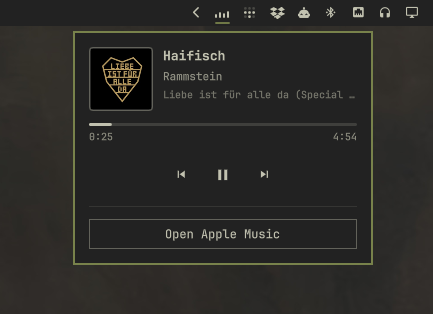
- Left-click the bar icon: a themed popover — artwork, title, artist, album, elapsed/remaining time, and prev/play-pause/next controls. Built as native Omarchy UI, not a reskin of the Apple Music page, so it always matches the current theme. While something is playing, the icon itself becomes a small animated equalizer.
- Right-click the bar icon, or the "Open/Hide Apple Music" button at the
bottom of the popover: opens
music.apple.comas a normal Chromium window — tiled or floated by your usual window rules, not anchored to the bar. Right-click again while it's the window currently in view to hide it instead of closing it (parked on a hidden workspace, so playback and the signed-in session keep going); right-click once more to bring it back. Closing the window normally (its own controls, or your usual close keybind) ends the session, the same as closing any other window. - Tapping the artwork or title in the popover always brings the window into view — unlike the button above, it never hides an already-visible window.
- Scroll the bar icon: previous/next track.
- Hover the bar icon: shows the current title and artist as a tooltip.
How it works
This isn't a lookalike or a stripped-down player — it's the real
music.apple.com, running in its own dedicated Chromium window, so
everything you'd expect from Apple Music (your library, search, lyrics,
signing in) just works.
The bar popover is a separate, native piece of Omarchy UI layered on top of that. It reads whatever's currently playing the same way any "now playing" widget on Linux does, so it's never a screenshot or a reskin of Apple's page — it's built from the same components as the rest of your bar, which is why it always matches your theme instead of looking like a webpage in a box.
The distinctive part is what right-click does. Most apps only really have two states — open and closed — and closing ends everything. This plugin adds a third: hidden. Right-click brings the window up, and right-clicking again while it's the one in view tucks it away instead of quitting it, the same way minimizing an app would: playback keeps going and you stay signed in. Right-click once more and it's back exactly where you left it. Only actually closing the window — its own controls, or your usual close shortcut — ends the session, the same as closing any other window.
Install
omarchy plugin add https://github.com/nickpestov/omarchy-am.git --enable
This plugin never touches Hyprland's global keybind state, so there's no compositor-side cleanup step on removal.
Removal
omarchy plugin remove pestov.apple-music
This is a clean removal: it quits the dedicated Chromium window if one is running, visible or hidden, and deletes its Chromium profile on disk — the cache, cookies, and signed-in Apple Music session that browser window used, kept separate from any other browser profile on the system. Nothing is left running or signed in behind you. Merely disabling the plugin (without removing it) only quits the window and leaves the profile alone, so toggling it off temporarily doesn't cost you your signed-in session.
While it runs, the plugin also keeps one copy of the current cover art under
$XDG_RUNTIME_DIR/pestov-apple-music/art, readable only by you. It is
replaced as the track changes, removed when the plugin is disabled or
removed, and gone at the end of the session regardless.
If you ever need to do either step by hand — the folder was deleted without
going through omarchy plugin remove, for instance — from a terminal:
pkill -f -- "--user-data-dir=$HOME/.local/share/pestov-apple-music"
rm -rf ~/.local/share/pestov-apple-music
(If $XDG_DATA_HOME is set to something other than ~/.local/share, the
profile lives under that instead.)
IPC
omarchy-shell pestov.apple-music status
omarchy-shell pestov.apple-music open     # toggle: open, or hide if visible
omarchy-shell pestov.apple-music show     # always bring the window into view
omarchy-shell pestov.apple-music playPause
omarchy-shell pestov.apple-music next
omarchy-shell pestov.apple-music previous
omarchy-shell pestov.apple-music refresh
Requirements
Omarchy 4 (Quattro) or newer running omarchy-shell on Hyprland, with
chromium and python3 on PATH. Playback still depends on Chromium's
Widevine CDM for protected tracks.
License
MIT — see LICENSE.