
Screenshot Picker — omarchy plugin
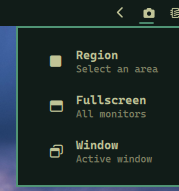
A bar widget that lets you pick screenshot mode: region, fullscreen, or window.
Install
omarchy plugin add https://github.com/nightdevil00/pick.screenshot.git --enable
This clones the repo, validates the manifest, and prompts you to place the icon in your bar.
Usage
Click the camera icon () in the bar to open the picker:
- Region —
omarchy-capture-screenshot region - Fullscreen —
omarchy-capture-screenshot fullscreen - Window —
omarchy-capture-screenshot windows
Right-click the icon to take an instant default screenshot.
Files
manifest.json       — plugin metadata
ScreenshotMenu.qml  — bar widget with popup menu
README.md           — this file