
Pomodoro Timer
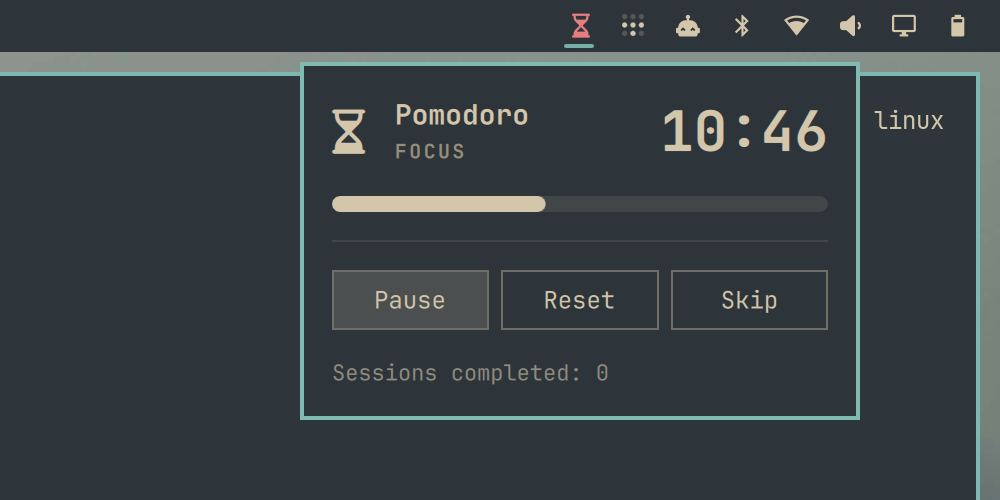
A Pomodoro focus timer plugin for the Omarchy shell bar. Shows a single monochrome hourglass icon in the bar; click it to open a popup with the countdown, progress bar, and controls.
Install
Option 1 — omarchy plugin add (recommended):
omarchy plugin add https://github.com/Macs9319/Pomodoro.git --enable
You'll be prompted to pick a bar section (left/center/right) for the icon.
Option 2 — manual clone:
git clone https://github.com/Macs9319/Pomodoro.git ~/.config/omarchy/plugins/pomodoro
omarchy plugin enable pomodoro right
Either way, the shell picks up the plugin without a restart — edits under
~/.config/omarchy/plugins/ hot-reload automatically.
Usage
Bar icon:
| Action | Effect |
|---|---|
| Left click | Open/close the timer popup |
| Right click | Reset the current phase to full duration |
| Middle click | Skip straight to the next phase |
Popup controls: Start/Pause, Reset, Skip, plus a live countdown, progress bar, and completed-session count.
Work phases auto-advance into a break (with a desktop notification via
notify-send); breaks pause on completion so a work session only starts on
a deliberate click. Every 4th break is a longer one.
Configuration
Settings live on the plugin's bar entry in ~/.config/omarchy/shell.json
(hot-reloads on save). Defaults:
| Setting | Default | Meaning |
|---|---|---|
workMinutes |
25 |
Work phase length |
breakMinutes |
5 |
Short break length |
longBreakMinutes |
15 |
Long break length |
sessionsUntilLongBreak |
4 |
Work sessions between long breaks |
Example entry:
{ "id": "pomodoro", "workMinutes": 50, "breakMinutes": 10 }
Uninstall
omarchy plugin remove pomodoro
License
MIT — see LICENSE.