
Omadisk
See what is eating the disk without leaving the Omarchy bar.
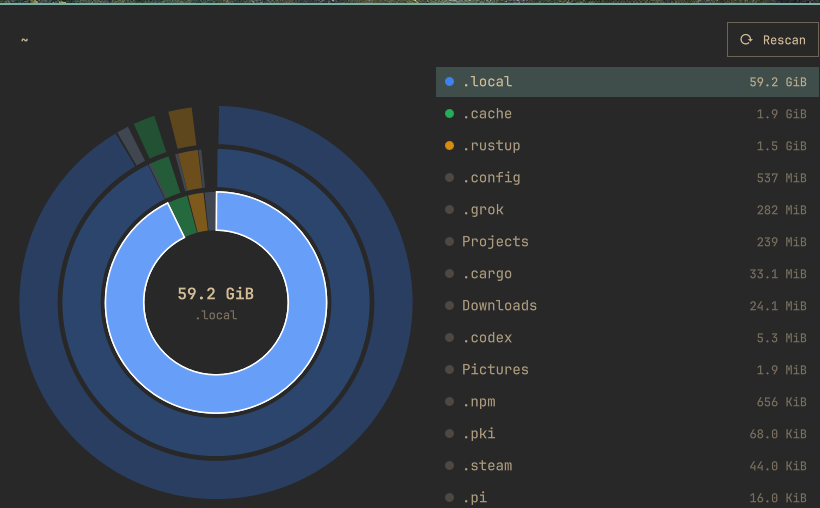
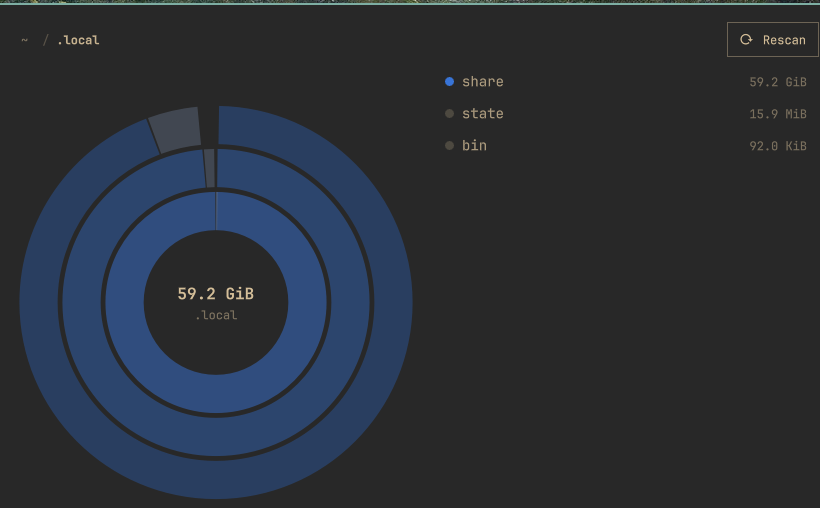
Omadisk is a read-only DaisyDisk-style explorer for Omarchy. A hard-disk icon sits on the bar. Click it and a panel peeks out underneath — the same chrome as Network and Display — with a sunburst map, a folder list, and breadcrumbs.
Hover a slice and the matching row lights up. Click either side to drill in. Escape goes up one folder, or closes the panel at the scan root.
Plugin id: postman.omadisk · License: MIT · Kind: bar widget
The UI never walks the filesystem. A small Rust scanner (omadisk-scan) streams a capped NDJSON view so the single omarchy-shell process stays responsive.
Screenshots
Home directory, largest child selected:
Drilled into ~/.local:
Install
omarchy plugin add clones the plugin. It does not compile the scanner. You need mise (or any Rust toolchain) once, after clone.
omarchy plugin add https://github.com/kennetpostigo/omadisk.git --enable
cd ~/.config/omarchy/plugins/postman.omadisk
mise install
./scripts/build.sh
omarchy-shell shell rescanPlugins
Place the chip if it did not land on the right:
omarchy plugin enable postman.omadisk --section right
Optional Super-menu entry (opt-in; writes only trigger.omadisk into your menu extension):
./scripts/install-menu.sh
Use
Click the disk icon, or:
omarchy-shell shell toggle postman.omadisk
| Key | Action |
|---|---|
j / k / arrows |
Move in the list |
l / Enter |
Drill into a folder |
h / Backspace |
Go up |
| Esc | Go up, or close at the scan root |
r |
Rescan |
o |
Open the focused path |
y |
Copy the focused path |
v1 is read-only. There is no delete, trash, or write into the scanned tree.
Widget settings:
| Key | Default | Meaning |
|---|---|---|
root |
empty ($HOME) |
Directory to scan |
refreshIntervalSec |
30 |
How often the chip re-reads free space |
showFree |
false |
Show available space next to the icon |
omarchy bar move postman.omadisk --section right
How it works
This section is for anyone who wants to change, port, or harden Omadisk. Coding agents should also read AGENTS.md. The on-the-wire contract is protocol.md.
Two processes, one overlay
omarchy-shell is one long-lived Quickshell process. It hosts the bar, notifications, lock screen, and every plugin overlay. Walking a home directory from QML or JS would stall the desktop.
Omadisk therefore splits in two:
bar/BarWidget.qml          KeyboardPanel peek + bar icon
        │
        ▼
overlay/Overlay.qml        session, hover, drill, Process children
        │
        │  stdout NDJSON (one JSON object per line)
        ▼
target/release/omadisk-scan
        scan | view | stat | proto
The overlay never calls FolderListModel, never os.walks, and never holds the full tree. It only renders a capped depth-3 view: at most 40 slices per ring (plus an Other wedge), 120 slice nodes total, and 200 list rows.
The scanner is launched with nice -n 10 and ionice -c 2 -n 7 when those tools exist, so a scan yields to interactive work.
Scanner (src/)
| Module | Job |
|---|---|
walk.rs |
Iterative walk. Allocated size (st_blocks * 512) by default. One filesystem. Hardlinks counted once. Directory symlinks not followed. Always skips /proc, /dev, /sys, /run. |
view.rs |
Projects a focus path to a depth-3 JSON view. Collapses tiny children into Other. Caps slice count so QML cannot receive a 41³ tree. |
cache.rs |
Atomic publish under ~/.cache/omadisk/scans/<key>/ (0700 / 0600). Slot cap 4. Key is sha256(realpath, metric, stay_on_fs, hardlink_aware)[:16]. |
statfs.rs |
statvfs used / free / total for the chip and the status bar. Not a wedge on the chart. |
protocol.rs |
Event constructors and parsers. Unknown type values are ignored. |
main.rs |
CLI: scan, view, stat, proto. |
scan streams hello → progress / skip / error / view snapshots → done, then atomically replaces tree.json + meta.json. A signal or abort does not publish a partial cache.
view prints one view event from a published cache (exit 3 on miss). The overlay uses that for instant reopen and for drilling past the live snapshot.
proto prints the protocol version and ensures the cache directory exists. The overlay runs it on load so session.json writes are allowed.
Overlay data flow
- Open →
startSession. RestorelastRoot/lastFocusfrom in-memorysessionObj(preferred) or~/.cache/omadisk/session.json. view --root … --path … --depth 3. Cache hit paints immediately.- Cache miss (
exit 3) startsscan --root … --emit-view-ms 500. Liveviewevents paint a partial tree while the walk continues. - Drill uses
OverlayModel.projectwhen the path is already inside the last root view; otherwise it asksviewagain. Mid-scan drills that have no subtree yet show an empty partial view (deeperPending) and refresh ondone. - Hover is a single
hoverPathplus ahoverTickcounter. The sunburst and the list both read that live. Do not clear hover onMouseArea.onExited— the pointer crossing from canvas to list would flash empty. - Close →
persistSessionwrites memory andsession.json. The next open must not reset focus back to the scan root if a valid descendant is stored.
Slice layout lives in overlay/OverlayModel.js (layoutSlices, hitTestSlices). Colors are a categorical palette, not heat-all-red. ListModel must not use a role named color — Quickshell treats that as reserved and the sunburst goes monochrome.
Breadcrumb ancestors are drillable even when they are not in the current list. isDrillable treats a path as a folder if it is the scan root or an ancestor of focusPath, not only when pathKind found a list row.
Limits and safety
- Read-only. The scanner
stats /scandirs. It does not read file contents. It does not write into the scanned tree. - Cache and session files go only under
~/.cache/omadisk/. That cache lists every path under the scan root — treat it as private. - Plugins run unsandboxed inside
omarchy-shell. Review the source before enabling anything. omarchy plugin addnever runs install hooks. A clone without./scripts/build.shshows a missing-scanner error, it does not compile Rust for you.
Repository map
manifest.json                 plugin id, bar-widget schema
bar/BarWidget.qml             icon + KeyboardPanel host
bar/Model.js                  chip icon / tooltip / stat parse
overlay/Overlay.qml           session, processes, keyboard
overlay/OverlayModel.js       layout, hit-test, project, parse
overlay/SunburstCanvas.qml    filled wedges
overlay/ChildList.qml         sibling list
overlay/BreadcrumbBar.qml     path + Rescan
overlay/HubLabel.qml          selected / focused total
overlay/StatusBar.qml         free space + cache age
overlay/Format.js             human sizes
src/*.rs                      scanner
tests/                        unit + CLI goldens
protocol.md                   NDJSON contract
scripts/build.sh              mise exec cargo build --release
scripts/test.sh               cargo test + plugin validate
scripts/dev-install.sh        symlink into ~/.config/omarchy/plugins
Develop
mise install
./scripts/test.sh
./scripts/dev-install.sh
./scripts/dev-watch.sh
Scanner:
./target/release/omadisk-scan proto
./target/release/omadisk-scan scan --root "$HOME"
./target/release/omadisk-scan view --root "$HOME"
./target/release/omadisk-scan stat --path "$HOME"
./scripts/test.sh is the gate: 44 scanner unit tests, 12 CLI tests, omarchy plugin validate, and a JSON parse of manifest.json.
Remove
omarchy plugin disable postman.omadisk
omarchy plugin remove postman.omadisk --yes
rm -rf ~/.cache/omadisk
pkill -f omadisk-scan || true
If you added the optional menu trigger, delete the trigger.omadisk block from ~/.config/omarchy/extensions/omarchy-menu.jsonc.
A local symlink install (from ./scripts/dev-install.sh) is not a git checkout:
rm -f ~/.config/omarchy/plugins/postman.omadisk
License
MIT. See LICENSE.