
Omascreentime
See where the day went without leaving the Omarchy bar.
Omascreentime is a screen-time explorer for Omarchy. A clock-glyph chip on the bar shows today's focused time. Click it and a panel peeks out — the same chrome as Omadisk, Network, and Display — with three tabs:
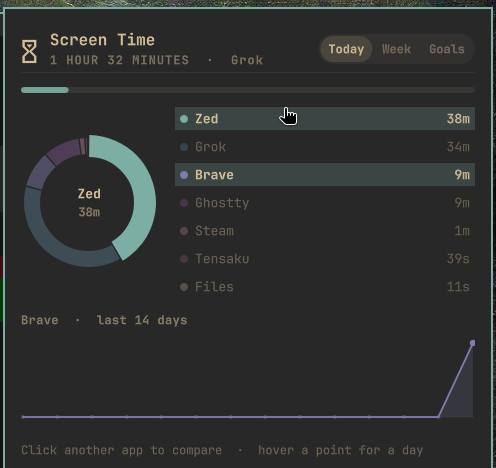
- Today — donut + every app you focused for at least 5 seconds, and a 14-day sparkline when you click a row
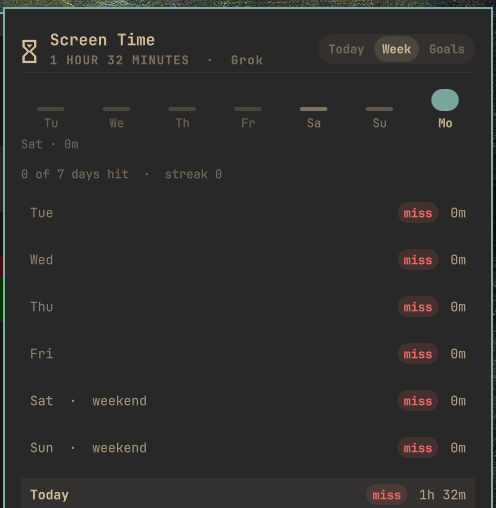
- Week — last 7 days, weekends called out, goal hit/miss
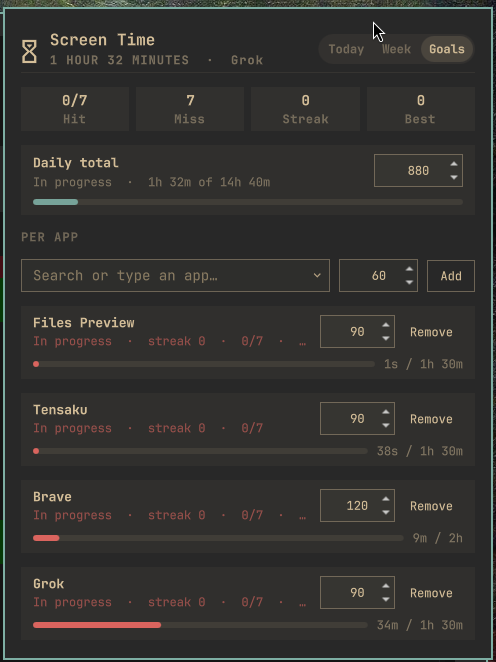
- Goals — a daily cap and per-app goals, with streaks
Only the focused window counts. Idle, lock, and the screensaver do not. When a terminal is focused, the tracker looks inside it, so Neovim is Neovim, not Ghostty.
Plugin id: postman.omascreentime · License: MIT · Kinds: service + bar widget
The UI never watches windows itself. A small Rust tracker
(omascreentime-track) listens to Hyprland, persists history, and speaks
a capped NDJSON view so the single omarchy-shell process stays responsive.
Screenshots
Today — donut, full app list, click a row for a 14-day trend:
Week — last 7 days and whether the daily goal was hit:
Goals — daily total plus per-app targets and streaks:
Install
omarchy plugin add clones the plugin. It does not compile the
tracker. You need mise (or any Rust toolchain)
once, after clone.
omarchy plugin add https://github.com/kennetpostigo/omascreentime.git --enable
cd ~/.config/omarchy/plugins/postman.omascreentime
mise install
./scripts/build.sh
omarchy-shell shell rescanPlugins
If the chip did not land on the right of the bar:
omarchy plugin enable postman.omascreentime --section right
Optional Super-menu entry (opt-in; writes only trigger.omascreentime
into your menu extension):
./scripts/install-menu.sh
Use
Click the chip, or:
omarchy-shell shell toggle postman.omascreentime
| Key | Action |
|---|---|
1 / 2 / 3 |
Today / Week / Goals |
| arrows | Scroll the panel |
j / k |
Move in the app list |
| click an app | Pin it and show a 14-day trend |
p |
Open Goals |
r |
Refresh the view |
g / G |
Scroll to top / bottom |
| Esc | Close |
| Right-click the chip | Icon-only mode |
Widget settings:
| Key | Default | Meaning |
|---|---|---|
idleTimeoutSec |
60 |
Extra idle pause; 0 uses session idle only |
dailyGoalMin |
480 |
Daily goal in minutes (0 = off). Edit it on Goals, or: omarchy bar set postman.omascreentime dailyGoalMin 360 |
keepDays |
31 |
History window |
iconOnly |
false |
Hide the duration on the bar |
omarchy bar move postman.omascreentime --section right
How it works
This section is for anyone who wants to change, port, or harden
Omascreentime. Coding agents should also read AGENTS.md.
The on-the-wire contract is protocol.md.
Two processes, one overlay
omarchy-shell is one long-lived Quickshell process. Walking /proc or
polling Hyprland from QML would stall the desktop.
Omascreentime therefore splits in two:
service/Service.qml            keep the tracker daemon alive
bar/BarWidget.qml              KeyboardPanel peek + bar chip
        │
        ▼
overlay/Overlay.qml            tabs, hover, FileView, Process children
        │
        │  Unix socket  +  atomic snapshot.json
        ▼
target/release/omascreentime-track
        daemon | ensure | status | view | proto | stop
        goal | app-goal
The daemon listens to Hyprland's event socket, resolves the focused
window (and the foreground process inside a terminal), and atomically
writes snapshot.json. The bar chip and the overlay watch that file.
Opening the panel also asks view once for a fresh read. There is no
2-second process poll.
What gets counted
| Counts | Does not count |
|---|---|
| The focused Hyprland window | Windows open in the background |
Video players with inhibitingIdle |
Idle past idleTimeoutSec / session IdleHint |
| The app inside a terminal | Lock screen, hyprlock, screensaver |
| Any focus of at least 5 seconds (list) | Empty desktop / no window |
Midnight: the open bucket is credited to the local day it started on, then a new bucket opens.
Terminal unwrap
Hyprland's window class for a terminal is ghostty / foot / … The
interesting app is the foreground process on that pty (nvim, btop,
grok, …).
resolve.rs walks only the terminal's process tree (not every pid on
the machine). It reads /proc/<pid>/task/*/children — Ghostty and some
other terminals fork the shell from a non-main thread, so looking at
/proc/<pid>/task/<pid>/children alone would miss it and credit the
terminal.
Wrappers are peeled once:
- runtimes (
node,python3.13,ruby, …) - launchers (
npx,mise,uv,sudo, …) - helpers (
systemd-inhibit,sleep)
Stop at the first real app so jobs under Neovim are not stolen. Re-resolve every 5s while a terminal stays focused.
Browsers fold to one id (brave-origin → brave, zen-bin → zen).
Steam's helper processes fold to steam.
Tracker (src/)
| Module | Job |
|---|---|
hypr.rs |
Command socket (j/activewindow) + event stream. Lock/unlock are first-class events. |
resolve.rs |
Terminal pty → foreground process group, targeted tree walk |
session.rs |
loginctl show-session $XDG_SESSION_ID for IdleHint / LockedHint |
tracker.rs |
Per-app buckets, midnight rollover, live view / status |
store.rs |
Atomic history.json / snapshot.json |
goals.rs |
Daily + per-app goals, current/best streak, week hit/miss |
daemon.rs |
poll loop, control socket, 30s commit, snapshot skip if unchanged |
apps.rs |
Format, canonical names, display names, week keys |
paths.rs |
State dir (0700), flock, unique tmp names |
protocol.rs |
NDJSON constructors |
main.rs |
CLI |
Crash loss is bounded by the 30s commit. A signal flushes the open
bucket and does not leave a torn JSON file. Snapshots are
rename-replaced without fsync; history is fsync'd.
State:
~/.local/state/omascreentime/     # or $XDG_STATE_HOME/omascreentime
  history.json                    # { v, days: { YYYY-MM-DD: { total, apps } } }
  snapshot.json                   # last view event (bar + overlay watch this)
  goals.json                      # dailyMin + per-app minutes
  daemon.lock / daemon.pid

$XDG_RUNTIME_DIR/omascreentime/omascreentime.sock
Overlay data flow
- Service starts (and every 60s
ensures) the daemon. - Bar chip
FileViewssnapshot.json. No periodicProcess. - Open →
startSession: reload snapshot,ensure, oneview. appsis the full list (≥5s).Overlay.relayoutgroups the donut to 6 slices (tail → Other). The list shows every row — a 39s Tensaku session is Tensaku, not Other.- Shared hover: one
hoverId+hoverTick. Donut and list both read it. Do not clear hover on canvasonExited. - Click a row to pin
focusIdand showTrendChart(14 days). - Header (logo, title, time, tabs) stays outside the Flickable so it stays pinned while the body scrolls.
g/G/ arrows scroll.123switch tabs.
Slice layout lives in overlay/OverlayModel.js (layoutSlices,
hitTestSlices, groupedApps, accent-derived hues). ListModel must
not use a role named color — Quickshell treats that as reserved.
Limits and safety
- The tracker reads compositor events and
/proc. It does not keylog. - History lists every focused app id — treat the state dir as private.
- Plugins run unsandboxed inside
omarchy-shell. Review the source before enabling anything. omarchy plugin addnever runs install hooks. A clone without./scripts/build.shshows a missing-tracker error.
Repository map
manifest.json                 plugin id, service + bar-widget schema
service/Service.qml           supervise omascreentime-track
bar/BarWidget.qml             chip + KeyboardPanel host
bar/Model.js                  chip text / tooltip / parse
overlay/Overlay.qml           session, tabs, FileView, keyboard
overlay/OverlayModel.js       donut layout, hit-test, palette, grouping
overlay/Hero.qml              pinned title + tabs
overlay/DonutCanvas.qml       wedges
overlay/AppList.qml           full app list
overlay/TrendChart.qml        14-day sparkline
overlay/WeekPanel.qml         7-day strip + rows
overlay/GoalsPanel.qml        daily + per-app goals
overlay/AppPicker.qml         searchable add-goal control
overlay/Format.js             durations
src/*.rs                      tracker daemon
tests/                        unit + CLI
protocol.md                   NDJSON contract
scripts/build.sh              mise exec cargo build --release
scripts/test.sh               cargo test + plugin validate
scripts/dev-install.sh        symlink into ~/.config/omarchy/plugins
Develop
mise install
./scripts/test.sh
./scripts/dev-install.sh
./scripts/dev-watch.sh
After QML edits on a symlink install, force a reload with
omarchy-shell shell rescanPlugins — inotify does not follow the plugin
symlink.
Tracker:
./target/release/omascreentime-track proto
./target/release/omascreentime-track ensure
./target/release/omascreentime-track view
./target/release/omascreentime-track status
./target/release/omascreentime-track resolve
./target/release/omascreentime-track stop
./scripts/test.sh is the gate: unit tests, CLI tests,
omarchy plugin validate, and a JSON parse of manifest.json.
Remove
omarchy plugin disable postman.omascreentime
omarchy plugin remove postman.omascreentime --yes
./target/release/omascreentime-track stop || true
rm -rf ~/.local/state/omascreentime
rm -rf "${XDG_RUNTIME_DIR:-/run/user/$UID}/omascreentime"
If you added the optional menu trigger, delete the
trigger.omascreentime block from
~/.config/omarchy/extensions/omarchy-menu.jsonc.
A local symlink install (from ./scripts/dev-install.sh) is not a git
checkout:
rm -f ~/.config/omarchy/plugins/postman.omascreentime
License
MIT. See LICENSE.