
Before Sunset
Version 0.7.5 · what changed
Follow the sun: one Omarchy theme through the day, another through the night, each with its own wallpaper and its own answer to whether the top bar should be transparent.
The name is a loose nod to Linklater's Before Sunset, and to the two films either side of it — between them they cover sunrise, sunset and midnight. This concerns itself with the same three moments, and with considerably less conversation.
Why this exists
Warp's terminal lets you nominate a light theme and a dark theme and then forget about it — the editor follows the system, and each side keeps its own look. I wanted that for the whole desktop, not one application: a bright theme while the sun is up, something calmer after dark, each remembering the wallpaper I picked for it, switching on its own.
Omarchy already has everything needed to do this well. Themes declare whether
they are light or dark, omarchy theme set retints the entire desktop in one
command, and the shell hosts long-running plugins. What was missing was
something to decide when, and somewhere to keep the two choices apart. That
is all this plugin is.
It is not the only one
Other people have built versions of this — Darky, Dusk, Theme Scheduler, NightMan, and probably more by the time you read it. Some I found only after starting; some may not have existed yet. Go and look at them: one of them may suit you better, and none of us is going to mind.
That several of these exist is not a problem to be solved. It is the whole point of the arrangement. On this kind of system you can simply write the thing you want, the way you think it ought to work, on the evening you decide you want it — and then leave it out where the next person can take it or ignore it. This one is a mix of what I liked in the others, my own ideas, and a run of stray thoughts about how the day ought to turn over.
<details> <summary><b>The longer answer, if you have a minute</b></summary> <br>My first Linux was Red Hat 5.0 — the one called Hurricane — in 1997. I was thrilled by it, and stayed thrilled through a long run of distributions after that. Then work happened. Windows for years, then macOS for more years, with the occasional wistful glance over the fence at whatever the Linux world was up to that decade.
Omarchy put me back over the fence, and it turns out I had missed it more than I knew. I have not enjoyed anything this much in a long time: the poking, the reading of other people's shell scripts, the discovery that the thing you assumed was hard-coded is in fact a TOML file you are allowed to edit. It has cost me an unreasonable number of hours lately. I regret none of them.
Before Sunset was meant to be a small thing for my own machine — pick two themes, follow the sun, done by Tuesday. Then I kept asking what else was possible, and it stopped being small. Somewhere along the way it grew opinions about wallpapers, bar transparency, the volume after dark, and the exact colour of the screen at twenty past nine.
This is where it got to. It is here as-is, in case it is useful to someone else. Enjoy.
</details>What it does
- Switches themes at sunrise and sunset, computed locally from your coordinates — or at fixed clock times, or from an ambient light sensor if the machine has one.
- Remembers a background per theme and restores it, so an automatic switch never discards the wallpaper you chose.
- Remembers whether the top bar should be transparent per theme, because a wallpaper that works behind a transparent bar in one theme rarely does in another.
- Adopts any theme you pick elsewhere into whichever half of the day is running, so the schedule learns from what you actually do instead of fighting it.
The two slots
The slots are called day and night, not light and dark, and they mean exactly that: which half of the day they cover. Nothing stops you putting a light theme in both — a bright one for daylight and a softer, warmer light theme for the evening is a perfectly reasonable setup, and one the naming would get in the way of if the slots were called "light" and "dark".
Each slot's theme is still labelled with what it reads as, because that is useful to know. It just never constrains the choice.
One rule
A theme change lands in the slot that is currently in force.
That holds wherever the change comes from — this panel, the theme switcher
(Super + Ctrl + Shift + Space), the Omarchy menu, omarchy theme set, a
keybinding of your own. Pick a theme during the day and it becomes your day
theme; pick one at night and it becomes your night theme. Nothing is reverted
behind your back, and nothing quietly expires at the next sunrise.
To step outside the schedule, pin a half. Pinning shows in the panel and stays until you change it, which is the honest version of an override.
Installation
omarchy plugin add https://github.com/priard/omarchy-before-sunset --enable
Then put the widget on the bar from the bar settings, or add it to
~/.config/omarchy/shell.json by hand:
{ "id": "priard.before-sunset" }
The plugin seeds itself on first run: the theme already on screen takes the slot matching its own light/dark reading, and the other slot gets a stock counterpart. It starts working immediately without changing your desktop out from under you.
Updating
omarchy plugin update priard.before-sunset
It fetches, shows you the diff, fast-forwards, and re-validates the manifest — rolling the update back if the new revision does not pass. Run it without an id to be offered every git-managed plugin at once.
Two things it will not do. It will not prompt for credentials, so the repository has to be readable without any: a public repo, or one your git already has a token for. And it will not merge over local edits, because it only ever fast-forwards — if you have been changing the plugin in place, it stops and says so rather than touching your work.
Removal
omarchy plugin remove priard.before-sunset
That is the whole of it for the plugin: it disables it, which drops its entry —
slots, schedule, levels and all — out of ~/.config/omarchy/shell.json, then
deletes the directory and rescans. No restart, and nothing left in your config.
One file stays, and it is not deleted for you because it holds choices you made: which wallpaper goes with which theme, and which themes wanted a transparent bar.
rm ~/.local/state/omarchy/settings/before-sunset.json
Delete it before reinstalling if you want the plugin to seed itself from scratch rather than pick up where it left off.
If the shell was not running when you removed the plugin, the entry cannot have been dropped from the config and will still be there. This takes it out of the bar layout and the plugins list, wherever it ended up:
jq '(.bar.layout |= map_values(map(select(.id != "priard.before-sunset"))))
    | (.plugins |= map(select(.id != "priard.before-sunset")))' \
  ~/.config/omarchy/shell.json > /tmp/shell.json &&
  mv /tmp/shell.json ~/.config/omarchy/shell.json
One thing genuinely stays changed: the bar's transparent flag is left wherever
the schedule last set it, because it is a bar setting rather than a plugin one.
Set it back from the bar settings if the last theme's preference was not yours.
Your themes and wallpapers stay as they are — the plugin only ever drove
Omarchy's own commands, and the one on screen when it left is simply the one you
were using.
The panel
Click the bar icon. Right-click pins the other half without opening anything, and pins back to Auto from there.
MODE — Day and Night pin one slot and stop the schedule. Auto
follows it.
SCHEDULE (Auto only) — how the half of the day gets decided. Options that
cannot work are not offered: Sun needs coordinates, Light sensor needs
hardware. A button that quietly does something else is worse than a button that
is not there.
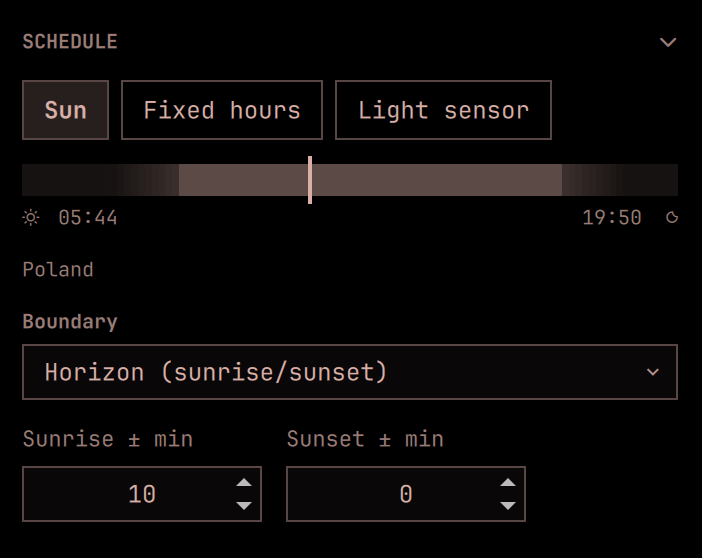
Sun draws the day as a strip — night, the lit stretch, night again, with a
marker for now — and puts the boundary and offset controls under it, so those
settings show their result instead of describing it. Boundary chooses where
the day ends: the visible horizon, or one of the three twilights. The two
offsets nudge one side without moving the other.
Fixed hours takes a from/to pair.
The strip shades the twilight either side of the day block, out to where the
sky runs out of light. That span is the range Boundary can move the turn
across, so the control shows its own reach before you touch it. The block
itself keeps hard edges: a theme switch is a step, and drawing it as a fade
would be drawing something that does not happen.
Light sensor reads the ambient light sensor and decides from the room rather than the clock — useful under heavy blinds, or in a basement where the sun has no say. See below.
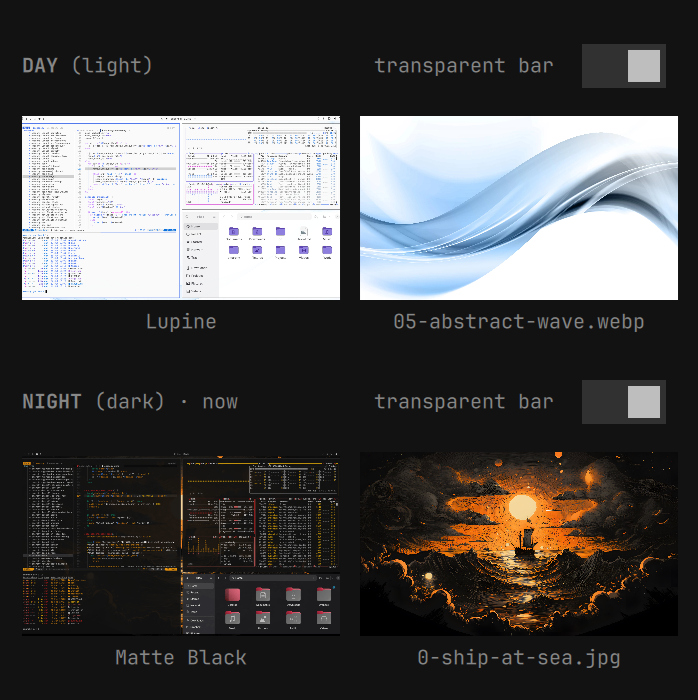
THEMES — one card per slot, showing the two pictures that actually decide how that half of the day looks: the theme's own preview and the exact wallpaper the slot will restore. Under them, what the theme reads as, which slot is in force, and a transparency switch.
Click the theme to open Omarchy's theme picker. Click the wallpaper to pick a different one from that theme's backgrounds. Themes are not required to ship a preview image, so cards for those show the name instead of an empty frame.
Both pickers open with that slot's current choice selected, not the one on screen — those differ whenever you are setting up the half of the day that is not running. Browsing changes nothing, and a choice made for the inactive slot is stored without touching the desktop.
Location
Coordinates come from the location Omarchy already stores for the weather widget, so it only has to be set once — in the Weather panel, or:
omarchy-weather-location --set "Warsaw" 52.22977,21.01178
Changing it there changes the schedule here. Setting latitude and
longitude in this plugin's own settings overrides it.
Light sensor
Machines with an ambient light sensor expose it through the kernel's IIO
interface, one file per reading. The plugin reads it directly rather than
through iio-sensor-proxy, which is not installed everywhere and would be a
dependency for something cat already answers. Where no sensor exists the
option simply does not appear.
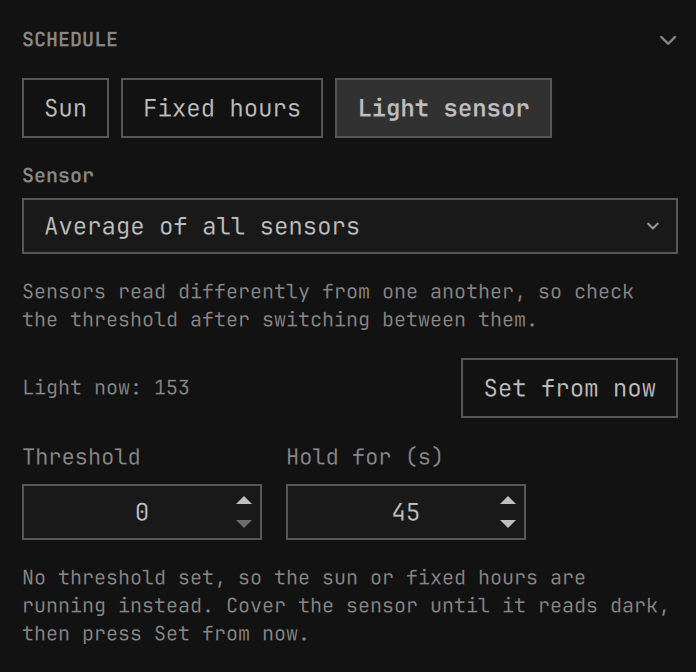
Readings are raw sensor counts scaled by the driver, not calibrated lux. They differ by orders of magnitude between machines, so no default threshold could mean anything. The panel therefore shows the live reading and a Set from now button: put the room in the state you want to be the boundary, press it, and the current reading becomes the threshold.
Two things keep the room from redecorating your desktop every time someone walks past:
- Hysteresis — a band either side of the threshold where the sensor is given no opinion, so a reading sitting on the line does not oscillate. 15% by default.
- Hold for — how long a changed reading has to persist before it counts. A hand passing over the sensor is not dusk. 45 seconds by default.
The first reading of a session commits immediately; there is nothing to flap away from yet, and waiting would leave the desktop undecided for no reason.
If sensor mode is selected but no threshold has been set, or the sensor disappears, the schedule falls back to the sun or fixed hours rather than freezing: an unconfigured preference should not take the desktop down with it.
Warming the screen after dark
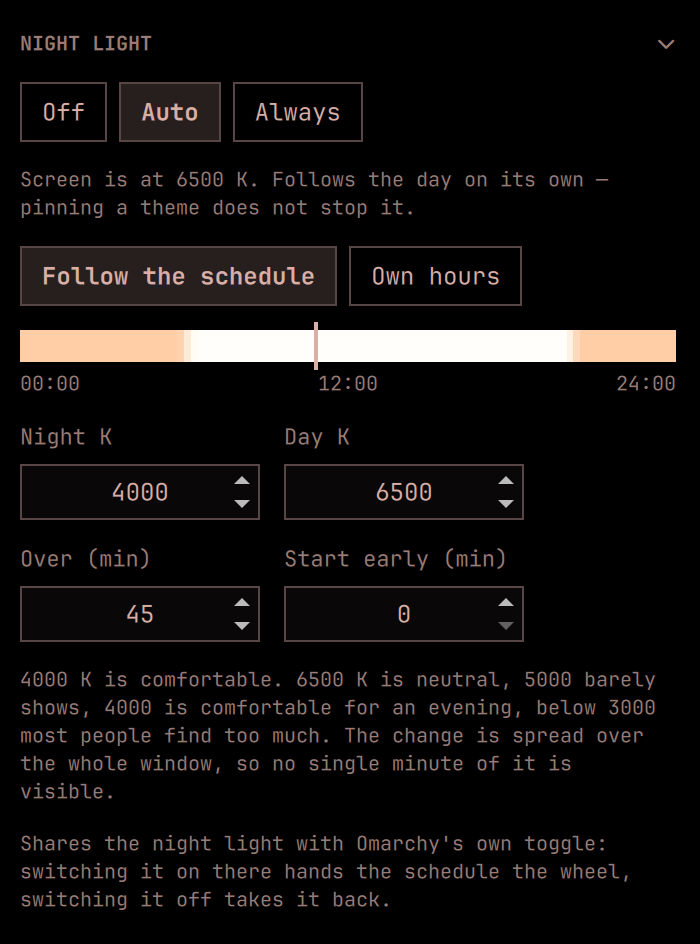
Omarchy has a night light toggle: on or off, 4000 K or 6500 K, with nothing in between. This adds the part in between — the screen eases from one to the other across the turn of the day instead of stepping.
Three modes, and they are its own, not the theme's:
- Off — the plugin does not touch the night light, and Omarchy's toggle behaves exactly as it always has.
- Auto — follows the day, ramping across each turn.
- Always — holds the warm temperature around the clock.
Keeping this separate from the theme's mode matters: pinning a theme to Day says something about colours on screen, not about whether your eyes want a warmer picture at midnight. Because it has hours of its own, it keeps them while a theme is pinned — it is the one thing on the schedule that does.
The volume and the brightness have no hours of their own; they only ever ride the schedule. So pinning a half stops them, and the panel dims all three sections to say so. Everything stays adjustable while dimmed — setting the night levels in the middle of the afternoon is the normal way round — and switching back to Auto lands them on the half of the day that is running, without waiting for the next turn.
Its own hours, if you want them
By default the warming follows the same schedule the themes do. It does not have to. Own hours gives it a from/to pair of its own, which is useful when a theme should turn at sunset but the screen has no business warming until the evening proper — and it gives the night light a timetable under the light sensor, which has none.
Choosing the numbers
Kelvin means little until you have seen it on your own screen, so as a rough ladder:
| 6500 K | neutral, what hyprsunset calls identity |
| 5000 K | barely shows |
| 4000 K | comfortable for an evening — the default, and what Omarchy's own toggle means by "on" |
| 3400 K | strong |
| 2700 K | most people find this too much for anything but reading |
The span defaults to 45 minutes. That puts each minute's move around fifty kelvin, which is below what the eye picks up against a room that is itself getting darker — the whole point being that you never catch it happening. Twenty minutes is noticeable if you are looking; anything under ten is a step with extra stages.
The ramp begins as the day turns over and finishes a span later. If you would rather already be warm by nightfall, Start early moves the beginning forward by that many minutes.
Seeing it
The section draws the whole day as a strip, tinted with the temperature the screen will actually be at each point, with a marker for now. It is generated by the same function that drives hyprsunset, so it cannot show one thing while another happens.
It also answers a question the numbers do not. Switching to auto in the late afternoon can look like it did nothing — and it did nothing, correctly, because sunset has not come yet and the marker is still in the neutral stretch. The strip makes that obvious instead of leaving it to be guessed at, and Start early is right underneath if you would rather it began sooner.
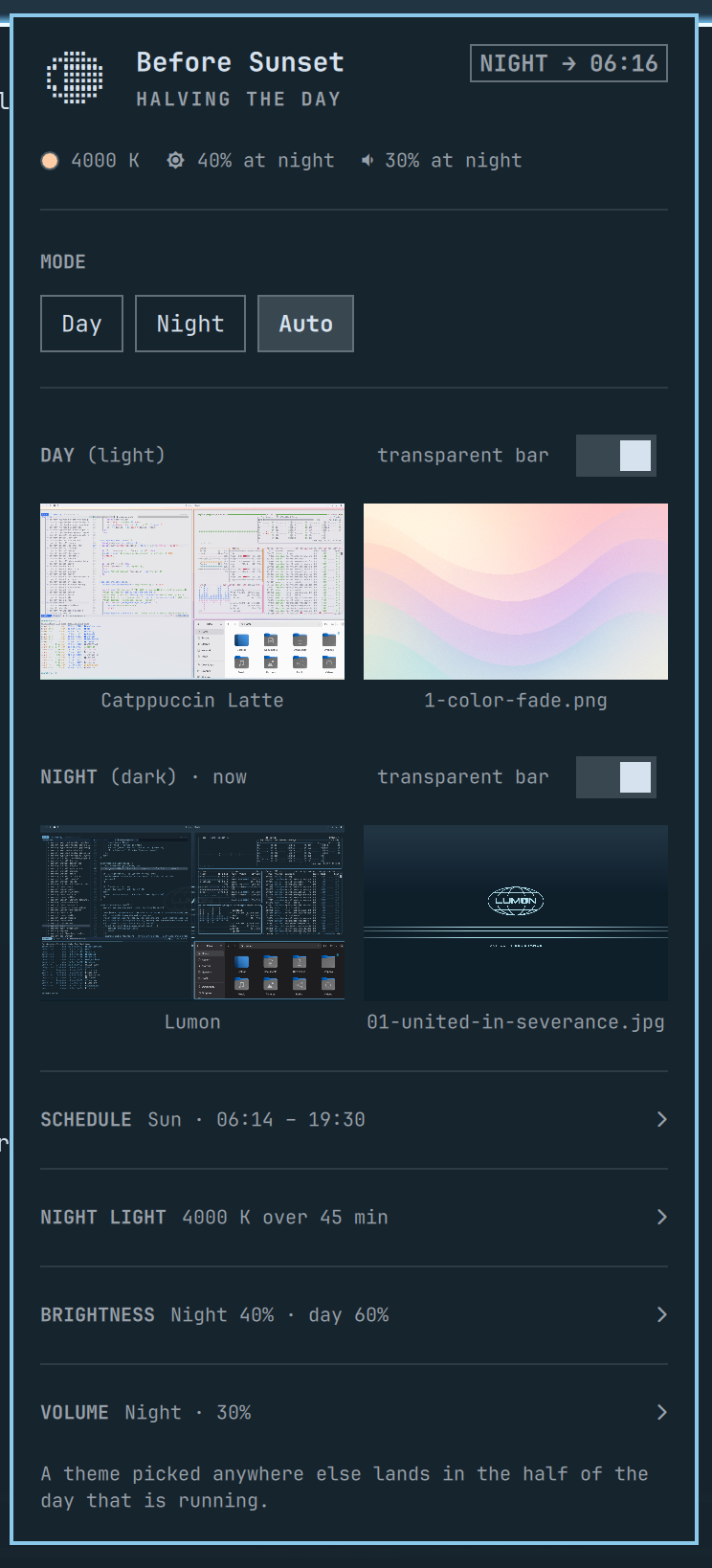
The icon beside the heading is drawn rather than typed: a braille canvas twelve dots square, which is enough for a disc that reads as round. By day the sun's rays turn slowly — the disc holds still, because what moves is the light coming off it — and only while the panel is open. By night it is the moon, at tonight's real phase, counted from a known new moon through the mean synodic month. It drifts a few hours against the sky and under a day across a century, which nobody can see in twelve dots. The unlit part is drawn as a rim, so a new moon is still a moon rather than an empty square.
A line under the panel heading carries the temperature on screen, in a swatch of
that colour, alongside the dim and the volume, so none of the three needs its
section opened to be checked. Each level names the half it belongs to — 80% at day while the day is running, 40% at night once the night is — and shows the
half that is coming when the one running has no level of its own.
The dim and the volume appear only while they are actually going to move. Pin a half or run on the light sensor and they stand down, so the line drops them rather than promising something nobody is going to do. The night light stays, because it keeps its own hours whatever the mode.
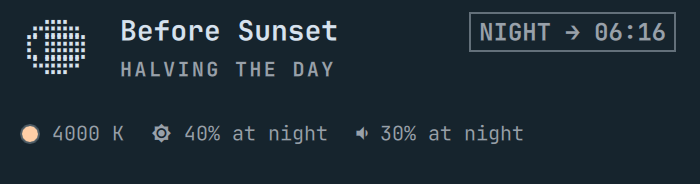
What the day is doing sits in a pill in the corner of the heading — DAY → 19:50
— where it can be read at any moment rather than waited for. The arrow rather
than a separator, because the time is not a property of the half that is
running: it is where that half is going. The line under the
heading is then free to say what the plugin is doing to work that out, and while
the panel is open in Auto it cycles through a few of them. Pinned or off it does
not cycle: holding a half is a state worth naming once, and a line that kept
changing under a pinned desktop would suggest the plugin is up to something it
is deliberately not up to.
Sharing the toggle
The ramp drives the same hyprsunset that Omarchy's toggle and bar indicator use, so they see our changes as their own — the indicator calls anything under 6000 K "on". It only re-reads when told to, so it is refreshed after each step; otherwise its icon would lie.
Going the other way: pressing that toggle switches this on or off to match. And because the toggle is a statement about right now, pressing it at a time the schedule disagrees with holds your choice until the day next turns over, rather than being undone a minute later.
Easing the volume down at night
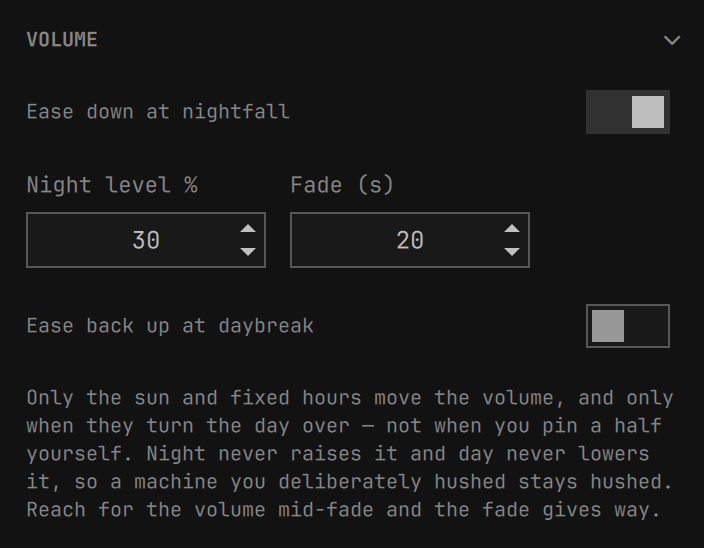
Give the plugin a level and the output volume slides to it when the schedule turns the day over. It is a slide, not a jump, and it shows no on-screen display — nobody pressed a key, so nothing should flash.
The rules are deliberately one-directional. Night lowers and never raises; day, if you enable it, raises and never lowers. A machine you deliberately hushed stays hushed either way. Reach for the volume keys mid-fade and the fade gives way, because someone pressing them has an opinion about the volume that outranks the schedule's.
Only the sun and fixed hours move it, and only when they turn the day over, and only while the schedule is running: pin a half and it stands still until Auto takes over again. The light sensor stops it too — a lamp switched on is not the morning, and a room that brightens should not get louder.
The sink is resolved through omarchy-audio-output-sink, the same helper the
volume keys and the audio panel use, so a DSP or combined sink in front of the
hardware is honoured rather than bypassed.
Dimming the screens at night
The same idea as the volume, pointed at the displays. Give the plugin a night level and a day level and every screen that can be driven moves to them when the schedule turns the day over.
The rules are the same one-directional ones. Night dims and never brightens; day brightens and never dims. A screen you turned down yourself in the middle of the afternoon is still where you left it at dusk, because dusk only ever moves a screen further down. There is a floor of a few percent under every target: a screen at zero is a screen nobody can find the setting on again.
Only the sun and fixed hours move it, and only at the turn of the day. Pinning a half stops it until Auto takes over, and the light sensor never moves it at all.
The slide happens in software
A hardware brightness change is a step: DDC and asdcontrol take one value and
the screen is at it. Stepping the whole desktop at dusk is the thing this plugin
exists not to do — but writing a hundred intermediate values is worse, because
DDC brightness lives in the monitor's own memory and some panels have a finite
number of writes in them.
So the slide is drawn in gamma and the hardware moves once. hyprsunset already
holds a gamma table for every output — it is what the night light drives — and
takes a percentage over the same socket, which costs about four milliseconds and
nothing at all in the monitor.
At dusk gamma slides down to the ratio between where a screen is and where it is going, and at the bottom the hardware takes the real value while gamma returns to full. At dawn the two happen together — gamma drops by exactly as much as the hardware rises, so nothing jumps — and then gamma slides back up. Both swaps are ordered so the gap between the two writes reads as a momentary dip rather than a flash: a screen that darkens for a frame is missable, a screen that flares is not.
Gamma is one table for the whole session, with no per-output switch, so with several displays the slide follows the shallowest of them. Nothing is ever darker on the way than it will be at the end, and the deeper targets finish falling in the hardware step, which is the direction they were going anyway.
The fade is driven by the clock rather than by a step count, so it takes the
number of seconds it was given whatever the machine costs per write. Reach for
the brightness keys while it is running and it stops: you have an opinion about
the brightness, which outranks the schedule's. Set the fade to zero, or run
without hyprsunset, and the hardware simply steps as it did before.
No notification is sent. This is the one change on the schedule nobody can fail to notice, and announcing it would be telling you what you are looking at.
One pair of numbers, and overrides if you want them
Most setups want one night level and one day level for everything, so that is what the section shows. Per display folds open a row for each display that answered, each starting on the pair above; taking one off the pair starts it on the numbers it already had, so the switch itself never changes what the screen is doing — only what moves it next time.
A display keeps its numbers while it is unplugged. The list is what answered
this minute; the file remembers every display that ever did, keyed by its EDID
serial rather than its connector, because DP-1 and DP-2 trade places the
moment two cables do.
What can and cannot be driven
Three mechanisms, and Omarchy already knows which display wants which:
brightnessctl for a laptop's own panel, DDC/CI for most external monitors,
and asdcontrol for Apple's. The first two go through
omarchy-brightness-display, the same command the brightness keys use.
Apple's displays are driven directly, for the same reason the night light
drives hyprsunset rather than Omarchy's toggle: the command cannot do what is
needed here. omarchy-brightness-display --monitor DP-2 accepts the monitor
name and then hands the work to a helper that ignores it, driving whichever
Apple display it detected first. With two of them connected, every write lands
on the same panel and the other never moves. Addressing the devices ourselves
is the only way both of them dim.
Which Apple display is on which connector, though, is not knowable — a display's EDID serial and its USB serial have nothing in common — so they are listed as displays in their own right rather than being tied to a monitor. The live reading in each row is what tells two identical panels apart.
A display that answers nothing is not listed and not reported: a monitor with no DDC, or one whose firmware refuses the brightness code, is left alone. Where no display answers at all, the section is not drawn, the same way the light sensor is absent on machines that have none.
Backgrounds are remembered per theme
omarchy theme set picks a theme's first background whenever it enters that
theme, because the current-background symlink still points into the previous
theme's directory and matches nothing in the new one. Left alone, every
automatic switch would quietly discard the wallpaper you chose.
So the plugin watches which background is in use, remembers it per theme, and on a switch applies the theme without touching the background before restoring the remembered one. Pick a new wallpaper in the background switcher and that becomes the remembered one from then on.
Only the filename is stored, never a path: the directory a background is served from is staging, replaced wholesale on every theme switch.
Bar transparency is remembered per theme
Each theme gets its own answer to whether the top bar should be transparent, stored beside its background. Toggle it on a slot's row in the panel, or just change it the usual way while a theme is on screen — that is recorded as that theme's preference, the same as a background.
When the wallpaper cannot be painted
A transparent bar is transparent to something. Omarchy already picks the bar text colour by sampling the wallpaper strip behind it, so a light theme over a dark wallpaper gets light text and vice versa — that part needs no help from this plugin.
What breaks the arrangement is a wallpaper that never reaches the screen. Qt renders a few formats itself and gets the rest from imageformat plugins; if the decoder for a format is missing, the desktop paints black while every tool that reads the file — the contrast helper included — sees the real picture and picks the colour that contrasts with that. The bar ends up coloured for an image nobody can see, and a light theme becomes black-on-black.
So before trusting transparency, the plugin checks whether the current
wallpaper's format has a decoder on this system. When it does not, transparency
is held off and the bar paints the theme's own [bar] background and
[bar] text, which is legible by construction. Your preference is captured
first and kept: the moment the format can be decoded, transparency comes back
on its own.
The check is deliberately one-sided. Reporting a format as decodable when it is not costs an ugly bar until the wallpaper changes; reporting a decodable format as broken would switch off transparency on a perfectly healthy desktop. Every uncertain case — an unfamiliar extension, a Qt layout the check does not recognise — is treated as fine and left alone.
On a stock Omarchy this rarely fires: the base install carries
qt6-imageformats, which covers the WebP most themes ship. It earns its keep
with themes that bring wallpapers in formats nothing on the system can read,
and on installs upgraded from an older Omarchy where that package never
arrived.
Configuration
The panel writes these; hand-editing works too. Settings live in this plugin's
entry in ~/.config/omarchy/shell.json — the bar layout entry when the widget
is on the bar, otherwise an entry in the top-level plugins[] array. That is
the same precedence the shell's own updateEntryInline uses.
{
  "id": "priard.before-sunset",
  "dayTheme": "catppuccin-latte",
  "nightTheme": "matte-black",
  "mode": "auto",
  "autoMode": "sun",
  "twilight": "official"
}
| Key | Default | Meaning |
|---|---|---|
dayTheme |
seeded | Theme for the day half. |
nightTheme |
seeded | Theme for the night half. |
mode |
"auto" |
auto follows a schedule, day / night pin one slot, off parks the plugin without unloading it. |
autoMode |
"sun" |
Which schedule auto follows: sun, fixed, or sensor. |
twilight |
"official" |
Where the boundary sits: official (the visible horizon, i.e. sunrise and sunset), civil (~30 min later in the evening, earlier in the morning), nautical, astronomical, or a zenith angle in degrees. |
sunriseOffsetMinutes |
0 |
Shifts the morning switch. Negative is earlier. |
sunsetOffsetMinutes |
0 |
Shifts the evening switch. Negative is earlier. |
fixed |
{"day":"07:00","night":"19:00"} |
Clock times for autoMode: "fixed", and the fallback during polar day or polar night. |
latitude / longitude |
— | Override the shared weather location for this plugin only. |
notify |
false |
Send a desktop notification on each switch and each adoption. |
sensor |
— | {"threshold": 0, "hysteresis": 0.15, "dwellSeconds": 45, "device": ""} for autoMode: "sensor". A threshold of 0 means not calibrated yet; an empty device averages every sensor found. |
volume |
— | {"night": 25, "day": null, "fadeSeconds": 20}. Percentages; null leaves that side alone. 0 is a real target, meaning silence. |
nightlight |
— | {"mode": "off", "source": "schedule", "fixed": {"day": "07:00", "night": "21:00"}, "day": 6500, "night": 4000, "transitionMinutes": 45, "leadMinutes": 0}. mode is off, auto or on; source is schedule or fixed. |
Theme names accept either form: "matte-black" or "Matte Black".
Remembered backgrounds and transparency live outside this entry, in
~/.local/state/omarchy/settings/before-sunset.json: they are state the plugin
observes, not configuration you would hand-write.
CLI
omarchy-shell before-sunset status              # JSON: mode, slots, transitions, location, remembered state
omarchy-shell before-sunset toggle              # pin the other half, or hand control back to the schedule
omarchy-shell before-sunset day                 # pin the day slot
omarchy-shell before-sunset night               # pin the night slot
omarchy-shell before-sunset auto                # follow the schedule again
omarchy-shell before-sunset off                 # stand down; day, night or auto starts it again
omarchy-shell before-sunset schedule sun        # what auto follows: sun, fixed, sensor
omarchy-shell before-sunset nightlight always   # the night light: off, auto, always
omarchy-shell before-sunset refresh             # re-evaluate now, the same nudge a resume gives
Each answers with the value it settled on, so a binding can act on the result
rather than asking again. schedule and nightlight want one word; hand
either an empty string and it reports the mode in force without changing it.
Nothing here sets a number. Temperatures, offsets, thresholds and volumes are chosen in the panel, where you can see what they do to the day while you pick them — a number typed blind at a prompt is the one thing this plugin has no good way to show you.
Bind the toggle to a key in ~/.config/hypr/bindings.lua if you want it on the
keyboard rather than the bar.
How it works
Sun.js implements the US Naval Observatory almanac algorithm, cross-checked
against an independent NOAA solar-position implementation and agreeing with it
to within a minute across solstices, equinoxes and both hemispheres.
The service holds no countdown. Every tick recomputes, from scratch, which half of the day the current instant falls in, and compares that against the theme actually on screen. That is what makes it survive suspend, hibernate, clock changes and daylight saving: a laptop opened after two days asleep corrects itself on the next tick rather than waiting out a timer that never ran.
The tick is monotonic, so it does not run while the machine is suspended, and on
its own it would leave a laptop opened in the morning showing last night's theme
for the better part of a minute. So the resume is not waited for. logind
announces it on the system bus the moment it happens, ahead of the lock screen
asking for a password, and the schedule is evaluated there — which is early
enough that the right half of the day is already on screen behind the password
prompt. It is a shortcut rather than the mechanism: on a machine with no gdbus
the tick still corrects everything, just later.
Inside the polar circles there are stretches with no sunrise or sunset at all.
The schedule falls back to the fixed clock times so the desktop keeps some
rhythm instead of freezing on one theme for weeks.
Light and dark readings come from omarchy-theme-color, the same helper the
rest of Omarchy uses, so its precedence (mode, legacy theme_type, a
light.mode marker, then background luminance) is honoured rather than
reimplemented. Themes shipping only an alacritty.toml have no colors.toml
until applied, and are judged on their background with the same rule. This
reading is advisory: it labels the slots and seeds them on first run, and never
restricts what you can put where.
Layout
manifest.json          plugin metadata
Service.qml            the schedule, adoption, and remembered state
BeforeSunsetPanel.qml     bar icon and settings panel
Sun.js                 sunrise/sunset and the moon's phase, pure functions
Sky.js                 the sun and the moon drawn in braille, pure functions
bin/before-sunset-apply   switch a theme, restoring its remembered background
bin/before-sunset-pick    open the theme picker with a given theme preselected
bin/before-sunset-themes  list installed themes and which side each reads as
bin/before-sunset-bg-state  the current wallpaper, and whether Qt can decode it
bin/before-sunset-bg-pick   pick a wallpaper from any theme's backgrounds
bin/before-sunset-slot      resolve a slot's preview and wallpaper for the panel
bin/before-sunset-sensor    read the ambient light sensor, if there is one
bin/before-sunset-volume    ease the output volume to a level over a few seconds
bin/before-sunset-nightlight  read or set the screen colour temperature
bin/before-sunset-brightness  list the displays that can be dimmed, and dim one
bin/before-sunset-wake      report each resume from suspend, so the theme can catch up at once
bin/before-sunset-transparent  set the bar's transparency, from outside the shell
Requirements and dependencies
A stock Omarchy 4. Nothing to install.
The plugin shells out only to bash, jq, coreutils, and Omarchy's own
commands — omarchy-theme-set, omarchy-theme-bg-set, omarchy-theme-color,
omarchy-theme-switcher, omarchy-menu-images, omarchy-audio-output-sink,
omarchy-notification-send, omarchy-brightness-display, omarchy-bar — plus pactl for
the volume fade, hyprctl for the night light and the monitor list, gdbus
for the resume announcement, and udevadm to tell two identical displays
apart, all part of a base install.
Brightness on Apple's displays goes through asdcontrol, which Omarchy ships in
its base packages along with the /etc/sudoers.d rule that lets it run without a
password. That rule is Omarchy's own file and grants exactly one command —
NOPASSWD: /usr/bin/asdcontrol — which this plugin reads and never installs,
edits or removes. Every call passes -n, so where the rule is absent the
displays simply do not appear in the list and nothing prompts. It makes no network requests: sunrise and sunset
are arithmetic, not an API call.
It listens on the system bus for logind's resume announcement, which is a broadcast signal: received with no privileges, and nothing is sent back.
It reads /sys/bus/iio/devices/ for a light sensor, sets the output volume and
the screen colour temperature when you ask it to, and writes to exactly two
places: its own entry in ~/.config/omarchy/shell.json, and
~/.local/state/omarchy/settings/before-sunset.json. It changes the bar's
transparent flag when a theme's remembered preference or an undecodable
wallpaper calls for it.
Development
The version is written in three places and they are expected to agree:
manifest.json, the heading at the top of this file, and the newest section of
CHANGELOG.md.
Saving a file under ~/.config/omarchy/plugins/ logs a plugin reload, but a
running service instance keeps its old code and its IPC target, and a mounted
bar widget keeps its old code too. Run omarchy restart shell after editing
the QML, before concluding anything about behaviour.
Changelog
See CHANGELOG.md.
License
MIT. See LICENSE.