
Volta for Omarchy
Independent left/right output volume and stereo balance controls for the Omarchy bar.
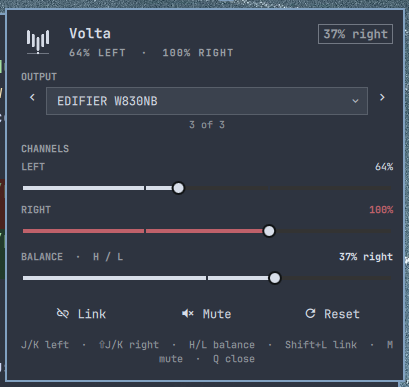
Features
- Separate left and right volume sliders, plus a centered balance control.
- Link channels, mute, reset to 100%, and select the active output sink.
- 0–150% range with a visible over-gain warning above 100%.
- Theme-native bar indicator with mouse, wheel, touchpad, and keyboard support.
Install
omarchy plugin add https://github.com/mateuspim/omarchy-volta.git --enable
Remove it with:
omarchy plugin remove pym.volta
Controls
On the bar: left click opens the popup, right click toggles mute, middle click resets both channels, and the wheel changes both channels by 5%.
In the popup:
| Key | Action |
|---|---|
j / k |
Left volume −/+ 5% |
Shift+j / Shift+k |
Right volume −/+ 5% |
h / l |
Balance left/right by 3% |
Left / Right, Shift+Tab / Tab |
Previous/next output |
Shift+l |
Link channels (averages them) |
m |
Mute/unmute |
r |
Reset to 100% and unlock |
q / Escape |
Close |
Up / Down |
Move between controls |
For compositor bindings, actions are also available through omarchy-shell pym.volta-control: mute, reset, lock, leftUp, leftDown, rightUp, rightDown, balanceLeft, balanceRight, previousSink, and nextSink.
Volta does not install global compositor bindings. Add explicit Hyprland bindings for any of those IPC actions you want available while the popup is closed.
Requirements
- Omarchy 4.0+ with the Quickshell-based
omarchy-shell - PipeWire/WirePlumber
- A stereo output exposing
FrontLeftandFrontRight
Mono outputs and channel maps without both front channels remain usable for mute and sink selection, but independent L/R controls are disabled.
Backend
Volta uses Quickshell's native PipeWire API for reactive channel reads/writes, mute, and default-node changes. It uses Omarchy's omarchy-audio-output-sink and omarchy-audio-output-set-default helpers so speaker tuning/DSP routing follows the system audio panel. No daemon, sudo access, or continuously spawned volume command is required.
Development
From a checkout, link the plugin into the user plugin directory (never /usr/share/omarchy):
ln -s /path/to/omarchy-volta ~/.config/omarchy/plugins/pym.volta
npm test
omarchy plugin validate .
omarchy-shell shell rescanPlugins
omarchy plugin enable pym.volta
Changes under the user plugin directory hot-reload with the shell.
Troubleshooting
- No output: check
wpctl status, then runomarchy restart shell. - Stereo controls disabled: the selected sink is mono or lacks
FrontLeft/FrontRight. - Plugin not visible: run
omarchy plugin validate ., rescan plugins, and enablepym.volta. - Wrong device behind DSP: verify
omarchy-audio-output-sink; Volta reports a visible error if resolution fails. - A value does not stick: another audio policy may be changing it; Volta reflects the resulting PipeWire state.
License
MIT