
Proton Drive — an Omarchy bar plugin
Browse Proton Drive from the Omarchy bar, download and upload by drag and drop, and keep folders in two-way sync — without leaving the shell or opening a browser.
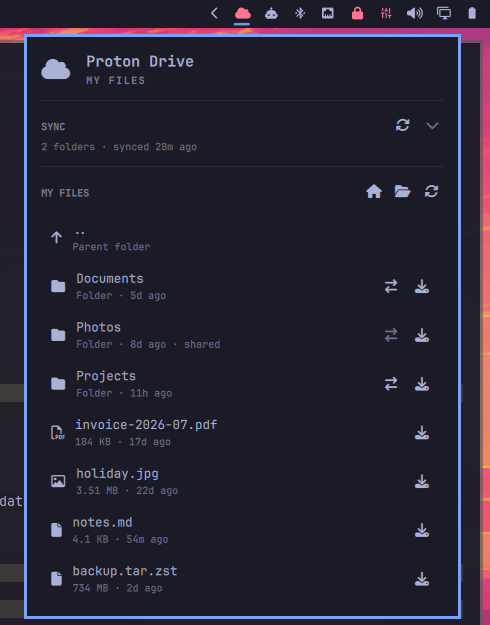
What it does
- A file browser, not a status readout. Click a folder to descend, click a
file to download it. Files land in
~/Downloads/Proton Driveunless you point the setting somewhere else. - Drag and drop, both directions. Drag a file out of the panel to any Wayland app that accepts drops; drag files onto the bar icon or into the open panel to upload them to the folder on screen.
- Two-way folder sync. Pair a remote folder with a local one and a background daemon keeps them together — inotify for local edits, a periodic sweep for remote ones.
- Nothing polls. Every listing costs a process spawn, a network round trip and a decryption pass, so work happens only when you open the panel, navigate, or ask for a refresh. The bar icon itself is free.
Requirements
- Omarchy with the Quickshell-based shell
- The Proton Drive CLI —
proton-drive, from the AUR packageproton-drive-cli-bin. The panel says so plainly if it is missing. python3(the sync engine) andzenity(the folder picker)
omarchy pkg aur add proton-drive-cli-bin
Install
omarchy plugin add https://github.com/schneipp/omarchy-proton-drive-plugin.git --enable
Pick a bar section when prompted (right is the default). Both helper scripts
ship inside the plugin and are invoked by absolute path, so nothing lands on
your PATH.
Then click the bar icon and choose Sign in. That opens the Proton login in a
terminal window, which has to stay alive until the browser hands the session
back — the plugin uses omarchy-launch-tui for exactly that reason.
omarchy plugin update rams.proton-drive   # update
omarchy plugin remove rams.proton-drive   # remove
If you had folders synced, disable the daemon before removing the plugin —
the unit's ExecStart points into the plugin directory:
~/.config/omarchy/plugins/rams.proton-drive/bin/omarchy-proton-drive-sync daemon stop
Settings
From the bar settings panel, or directly in ~/.config/omarchy/shell.json:
| Key | Default | What it does |
|---|---|---|
startPath |
/my-files |
The folder the panel opens on |
downloadDir |
(blank) | Where downloads land. Blank means ~/Downloads/Proton Drive |
{
  "id": "rams.proton-drive",
  "startPath": "/my-files",
  "downloadDir": "/home/you/Proton"
}
Folder sync
The Proton Drive CLI has no sync command. This one is built on top of
list / upload / download, and works because Proton keeps enough per-revision
metadata in plain filesystem list --json output to decide anything a sync needs:
| Field | Used for |
|---|---|
activeRevision.claimedSize |
real size |
activeRevision.claimedModificationTime |
the uploader's local mtime, preserved |
activeRevision.claimedDigests.sha1 |
content hash — matches local sha1sum exactly |
Pair a folder from the panel, or from the shell:
BIN=~/.config/omarchy/plugins/rams.proton-drive/bin
$BIN/omarchy-proton-drive-sync add /my-files/Notes ~/Notes
$BIN/omarchy-proton-drive-sync pairs
$BIN/omarchy-proton-drive-sync run           # sync every pair now
$BIN/omarchy-proton-drive-sync status
$BIN/omarchy-proton-drive-sync disable /my-files/Notes
$BIN/omarchy-proton-drive-sync remove /my-files/Notes
$BIN/omarchy-proton-drive-sync daemon start|stop|status
Pairing a folder writes and enables a systemd user unit,
omarchy-proton-drive-sync.service, which runs the watcher. A sync should
survive the bar being restarted and the panel being closed, so it is a unit
rather than a thread inside the shell — the bar is a view onto the sync, not the
thing doing the work.
State lives in ~/.config/omarchy-proton-drive/ (pairs) and
~/.local/state/omarchy-proton-drive/ (per-pair sync state). The state file is
what distinguishes "deleted here" from "added there"; without it a sync either
resurrects deleted files or deletes data it shouldn't.
What it will and won't do to your data
- Uploads can't lose remote data.
upload -f create-new-revisionkeeps the previous revision, so an overwrite is always recoverable from Proton. - Downloads can lose local data, since
download -f removeoverwrites. So when both sides changed and the remote copy is newer, the local file is renamed aside before the download — never silently replaced. - A missing local root is an error, not a deletion. If a pair has files in
its state and the local folder is gone, the run refuses rather than recreating
an empty directory and reading that as "every file was deleted" — an unmounted
drive is a far likelier explanation.
run --forceaccepts it as genuinely empty. - Deletions propagate by default.
add --no-deletespairs a folder that only ever gains files.
Scripting
omarchy-shell rams.proton-drive path                      # current folder
omarchy-shell rams.proton-drive syncStatus                # JSON, every pair
Read those without -q: that flag is quiet mode and suppresses the answer along
with the errors. For actions it is what you want, since a keybinding has nowhere
to print a failure.
omarchy-shell -q rams.proton-drive toggle
omarchy-shell -q rams.proton-drive browse "/my-files/Notes"
omarchy-shell -q rams.proton-drive refresh
omarchy-shell -q rams.proton-drive login
omarchy-shell -q rams.proton-drive sync "/my-files/Notes"
omarchy-shell -q rams.proton-drive upload "$(printf '%s\n' ~/a.txt ~/b.txt)"
The helper CLI
bin/omarchy-proton-drive normalises the Proton Drive CLI into a stable JSON
contract:
status                  installed / authenticated
list PATH               folder contents, normalised
download PATH...        download to the destination folder
upload PARENT LOCAL...  upload local files into a remote folder
open PATH               open a downloaded file
login | logout          session management
dest                    print the download directory
That normalisation is deliberately not in the QML. The CLI is a ~120MB bundled
binary with an undocumented JSON shape and several sharp edges — global flags
must come after the subcommand, unauthenticated calls print nothing on stdout
and fail on stderr, name is a Result wrapper that can hold an error instead
of a string, and a literal / inside a node name is escaped as \/. Keeping all
of it in one script means a CLI change is a one-file fix.
Security
A folder's contents are untrusted input: names, sizes and timestamps come from
whoever owns or shared it. Every remote name is checked before it can become a
local path, every local path is proved to sit inside the folder you paired
(symlinks included), no command is ever built as a string, and every label in
the panel is plain text so a file called <img src=…> stays a file name.
SECURITY.md has the whole picture: trust boundaries, what is enforced where, the capabilities this plugin uses and why, the limits worth being honest about, and how to report a vulnerability.
Tests
tests/run
Planner decisions including every deletion path, hostile input of every kind the plugin can meet, the strings the panel displays, the manifest, a check that every label is pinned to plain text, and a check that no Nerd Font glyph got stripped to an empty string. Nothing in the suite touches the network, your Proton account, or any file outside the plugin directory.
How it fits together
| File | Role |
|---|---|
manifest.json |
The bar-widget declaration and its settings schema |
BarWidget.qml |
Bar face, browser panel, drag-and-drop, sync UI |
Model.js |
Pure data helpers — path arithmetic and presentation strings |
bin/omarchy-proton-drive |
Proton Drive CLI wrapper, JSON contract |
bin/omarchy-proton-drive-sync |
Two-way sync engine and its watcher daemon |
tests/ |
Regression suite, including the hostile-input tests |
SECURITY.md |
Trust boundaries, what is enforced where, how to report a hole |
Two notes for anyone reading the QML. Quickshell's layer shell is a real
QWaylandShellIntegration over a QWaylandWindow, so Qt's ordinary drag and
drop applies to bar and panel surfaces — but KeyboardPanel claims the whole
screen as its input region for click-to-dismiss, which would swallow any drag
leaving the panel, so its mask is narrowed to the card while a drag is in
flight. And dragging a file out needs a local copy at the instant the drag
starts, which is why every listing entry carries a local field.
License
MIT. See LICENSE.