
VPN — an Omarchy bar plugin
Connect and disconnect NetworkManager VPN and WireGuard tunnels from the Omarchy bar, including profiles that ask for a password.
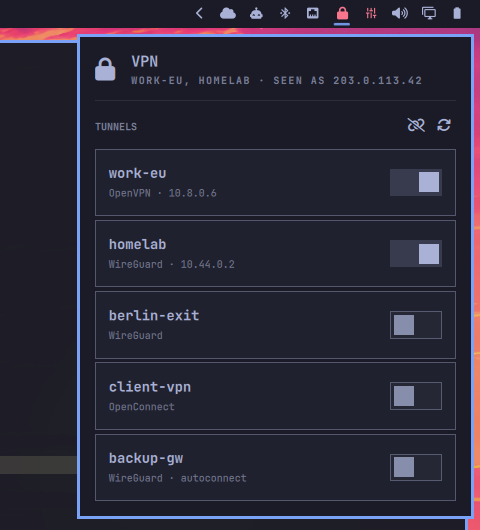
NetworkManager already owns every tunnel on the machine — WireGuard profiles
and OpenVPN profiles alike — so this plugin keeps no state of its own. It reads
NetworkManager and writes back to it, which is what makes the bar agree with
nmcli and with tunnels raised from outside the shell.
What it does
-
Lists every VPN and WireGuard profile NetworkManager knows about, connected ones first, then alphabetically.
-
Shows the tunnel address on each connected row — the thing you would otherwise open a terminal for.
-
Shows the public address on the panel header, phrased "seen as", because that is the one way to tell a VPN that is carrying traffic from one that is merely up. With a split-tunnel profile it is still your ISP's address, and that contrast is exactly the point.
-
Asks for credentials when a profile needs them, and stores what you type in your login keyring so it only asks once.
-
Bar face — a closed padlock while a tunnel is up, an open one while none is, and a warning glyph when NetworkManager holds no VPN profiles at all. The tooltip names the connected tunnels and their addresses. Left click opens the panel; right or middle click refreshes.
-
Keyboard, once the panel is open:
Key ↑↓move the cursor (the first press only arms it, so a stray key cannot drop a tunnel) Enter/Spaceconnect or disconnect the tunnel under the cursor rrefresh ddisconnect everything copen the credentials dialog for the last failed connect fforget the stored credentials for the tunnel under the cursor Escclose the panel
Why the credentials dialog exists
The Omarchy shell runs no NetworkManager secret agent. A profile whose password is flagged "always ask" — a typical OpenVPN setup with an encrypted private key — therefore fails to activate with "No agents were available for this request", and no amount of clicking will fix it.
Rather than install nm-applet for its agent alone (a second tray icon and a
second network UI), the plugin ships its own dialog. It asks for exactly the
fields the profile needs — nothing for WireGuard, up to three for OpenVPN —
and hands them to the helper.
Secrets go into your login keyring via libsecret, not into NetworkManager's
own store, which would write them to /etc/NetworkManager/system-connections
as root-owned plaintext. The keyring unlocks with your session, so a tunnel you
have signed into once comes up from the bar with no prompt at all.
They are also never passed as command arguments — /proc/<pid>/cmdline is
world-readable for the lifetime of a process. The dialog writes them to the
helper's stdin; the helper writes them to a 0600 file in $XDG_RUNTIME_DIR
(tmpfs) for as long as nmcli takes to read it, then deletes it.
Wrong password saved? Put the cursor on the row and press f. Without that,
a saved-but-wrong password fails silently forever.
Requirements
- Omarchy with the Quickshell-based shell
networkmanager—nmcliis the whole backendjq— the helper speaks JSON to the QMLlibsecret—secret-tool, for the keyringcurl— for the public address lookup- A running keyring daemon (
gnome-keyring-daemon, standard on Omarchy)
All of these are already present on a stock Omarchy install.
Install
omarchy plugin add https://github.com/schneipp/omarchy-vpn-plugin.git --enable
Pick a bar section when prompted (right is the default). That is the whole
install — the helper script ships inside the plugin and is invoked by absolute
path, so nothing lands on your PATH.
To update later:
omarchy plugin update rams.vpn
To remove it:
omarchy plugin remove rams.vpn
Settings
Configurable from the bar settings panel, or directly in
~/.config/omarchy/shell.json:
| Key | Default | What it does |
|---|---|---|
pollIntervalSec |
8 |
How often the bar re-reads tunnel state. The panel always polls every 2s while it is open, regardless. |
hideWhenEmpty |
false |
Hide the bar icon entirely while no tunnel is connected. |
{
  "id": "rams.vpn",
  "pollIntervalSec": 15,
  "hideWhenEmpty": true
}
Scripting and keybindings
The widget exposes an IPC surface, so tunnels can be driven from a keybinding or a script. Connections are addressed by name — the part you already know — rather than by UUID.
omarchy-shell rams.vpn status              # "work-eu" — names of the active tunnels
omarchy-shell rams.vpn addresses           # "work-eu (10.8.0.6)"
Read those two without -q: that flag is quiet mode and suppresses the answer
along with the errors. For the actions it is what you want, since a keybinding
has nowhere to print a failure anyway.
omarchy-shell -q rams.vpn toggle           # open/close the panel
omarchy-shell -q rams.vpn up "work-eu"
omarchy-shell -q rams.vpn down "work-eu"
omarchy-shell -q rams.vpn switchTunnel "work-eu"
omarchy-shell -q rams.vpn disconnectAll
omarchy-shell -q rams.vpn signIn "work-eu" # open the credentials dialog
omarchy-shell -q rams.vpn forget "work-eu" # drop the stored secrets
Bound to a key in ~/.config/hypr/bindings.lua:
o.bind("SUPER SHIFT", "V", "Toggle work VPN",
  'omarchy-shell -q rams.vpn switchTunnel "work-eu"')
The helper CLI
bin/omarchy-vpn is a normal script and works on its own. Symlink it if you
want it on your PATH:
ln -s ~/.config/omarchy/plugins/rams.vpn/bin/omarchy-vpn ~/.local/bin/omarchy-vpn
omarchy-vpn list            JSON inventory of every VPN and WireGuard connection
omarchy-vpn public          the address the far end of the internet sees us as
omarchy-vpn needs <uuid>    which credentials this profile actually requires
omarchy-vpn up <uuid>       activate; reports whether a failure was about secrets
omarchy-vpn down <uuid>     deactivate
omarchy-vpn login <uuid>    store credentials from stdin, then activate
omarchy-vpn forget <uuid>   drop the stored credentials
omarchy-vpn ask <uuid>      activate in a terminal so nmcli can prompt
omarchy-vpn status          count of active tunnels, for scripts
The plugin talks to this rather than to nmcli directly because nmcli is
awkward to consume from QML: terse output backslash-escapes its separators, the
VPN subtype lives on a different property than the connection type, and every
VPN backend words its failures differently. Normalising that in one place means
a change in nmcli output is a one-file fix.
How it fits together
| File | Role |
|---|---|
manifest.json |
Declares two kinds — bar-widget and overlay — so one plugin ships both surfaces |
BarWidget.qml |
The barWidget entry point: bar face, tunnel list, panel |
Prompt.qml |
The overlay entry point: the credentials dialog |
Model.js |
Pure data helpers, so the QML never has to know how nmcli spells things |
bin/omarchy-vpn |
NetworkManager and keyring access |
The dialog is a separate entry point rather than part of the panel because a bar panel is anchored under its icon and cannot take exclusive keyboard focus, which a password field must have.
One consequence worth knowing: because the plugin claims the overlay kind,
omarchy-shell shell summon rams.vpn opens the credentials dialog, not the
panel. Use the widget's own IPC target — omarchy-shell -q rams.vpn toggle —
for the panel.
License
MIT. See LICENSE.