
OmarchyNotes
A plain notepad for the Omarchy shell bar (Quickshell / Hyprland), with a clip shelf underneath. One icon () in the right cluster; click it for a card with a text area that saves itself, and a place to park clipboard contents. Pinnable, IPC-drivable.
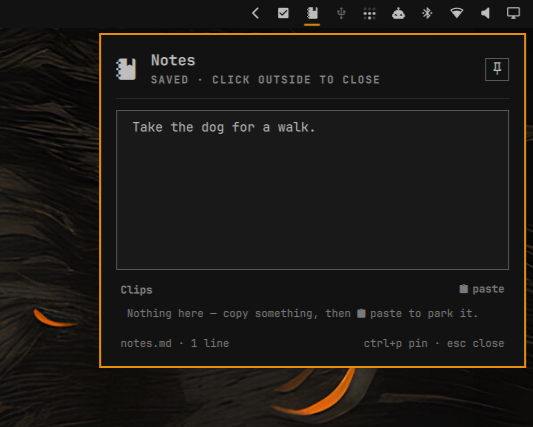
- The pad — a free-text editor over
~/.local/share/omarchy-notes/notes.md. Click the icon and the cursor is already in the text. It autosaves ~500 ms after the last keystroke (atomic write; also flushed on close, on pin, andCtrl+Sif you're twitchy). The subtitle showsSaving…/Saved. The file is watched, so edits from nvim or a synced copy show up live (your unsaved keystrokes win if both happen at once). The pad grows with its content up to the card's max height, then scrolls. - Links —
Ctrl+clicka URL in the pad (orCtrl+Owith the cursor on one) opens it withxdg-open. - Clips — a holding shelf for the clipboard.
paste(orvwhen the shelf has keyboard focus) takes whatever is on the clipboard and puts it on the shelf, newest first. Click a clip, or its button, and it's back on the clipboard (wl-copy) ready to paste somewhere else; the subtitle flashes "Copied". Multi-line clips show their first line + a line count and the full text on hover. Hover a row for the ✕.clearempties the shelf. Stored inclips.jsonnext to the notes, capped atmaxClips(30). - Pin — the button top-right (or
Ctrl+P, or middle-click the bar icon). Unpinned, the card is a normal popout: click outside to dismiss. Pinned, it stays on screen while you work; the bar icon still toggles it. Pin state persists instate.json.
Install
omarchy plugin add https://github.com/Robindfuller/omarchy-notes --enable
That's the whole install: the repo root is the plugin. Enable the Notes
widget in the bar settings (or add {"id":"rdf.notes"} to bar.layout.right
in ~/.config/omarchy/shell.json) and restart the shell.
From a checkout
git clone https://github.com/Robindfuller/omarchy-notes
cd omarchy-notes
./install.sh          # symlinks the repo as the plugin, creates the data dir, adds rdf.notes to bar.layout.right
omarchy restart shell
install.sh backs up shell.json before touching it and won't add a second
entry if one is already there. uninstall.sh reverses the layout change and
unlinks the plugin; the notes stay.
Dependencies
Everything is in the Omarchy base install: wl-clipboard (wl-copy /
wl-paste) for the clip shelf, xdg-open for links, and jq for
install.sh's layout edit. License is MIT.
Config (shell.json, the layout entry)
{ "id": "rdf.notes", "dir": "~/.local/share/omarchy-notes", "maxHeight": 620, "width": 400, "maxClips": 30, "clipRows": 5 }
clipRows is how many clip rows show before the shelf scrolls.
Keyboard
In the pad: type. Esc close · Ctrl+P pin/unpin · Ctrl+S save now ·
Ctrl+O open link under cursor · Tab jump to the clips (when there are any).
On the clips (after Tab or clicking a row): ↑↓/j k move · ⏎/␣/y
copy · x remove · o open the clip's link · v paste clipboard onto the
shelf · Shift+C clear · p pin · i/a/Tab/↑ past the top → back to
the pad · Esc close.
IPC
omarchy-shell rdf.notes toggle|show|hide
omarchy-shell rdf.notes pin|unpin|togglePin
omarchy-shell rdf.notes append "a line for the pad"
omarchy-shell rdf.notes clipClipboard          # clipboard -> shelf
omarchy-shell rdf.notes clip "some text"       # text -> shelf
omarchy-shell rdf.notes copyClip 0             # shelf[0] -> clipboard
omarchy-shell rdf.notes removeClip 0 | clearClips
omarchy-shell rdf.notes text                   # print the pad
omarchy-shell rdf.notes state                  # JSON: opened, pinned, lines, clips…
Files
Panel.qml   bar icon, the card (popout + pinned surface), editor, clip rows, IPC
Store.qml   notes.md (debounced atomic save, watched), clips.json, state.json
Links.js    URL detection for ctrl+click / `o`