
Omarchy Creators
An Omarchy shell plugin that watches the YouTube channels you subscribe to and the Twitch channels you follow, and tells you the moment one of them posts a video or goes live — with a chime, a desktop notification, and a click that opens the stream either in your browser or in a small picture-in-picture window you can snap anywhere on screen.
You choose which channels alert you. Everything else stays quiet.
Screenshots
| Feed | YouTube |
|---|---|
 |
 |
| Twitch | Player |
|---|---|
 |
 |
What it does
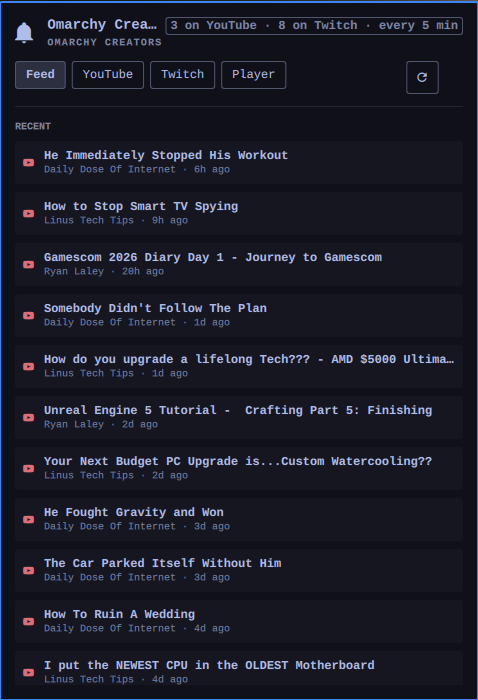
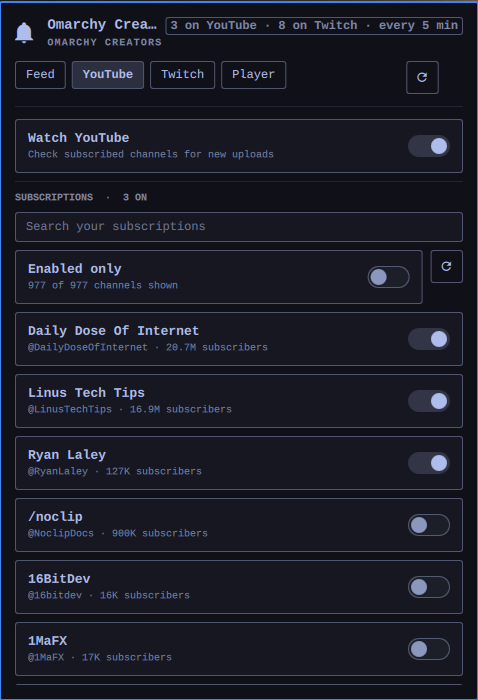
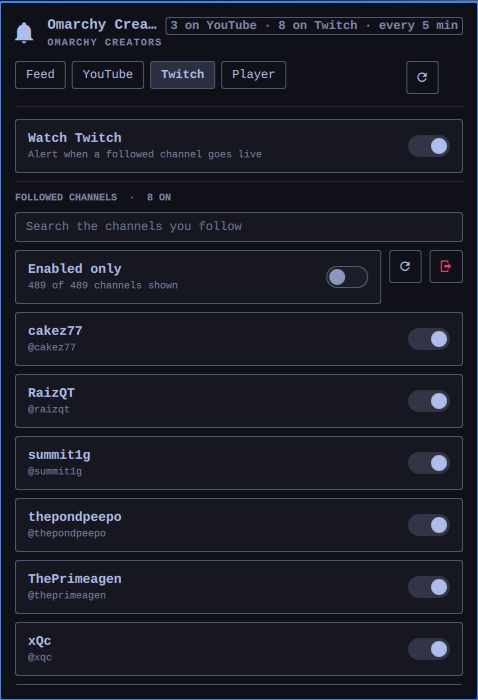
- A channel list with a switch on every row. Both tabs are searchable, because a subscription list runs to hundreds of channels. Enabled channels sort to the top, and "Enabled only" hides the rest.
- A chime you can tell apart. YouTube and Twitch get distinct arpeggios, one per batch — ten uploads landing together will not queue ten sounds.
- A desktop notification carrying the channel's avatar or the stream's thumbnail. For Twitch it also carries the game and the viewer count.
- Click to watch. Either the full browser, or a floating mpv window that snaps to any of nine screen anchors at three sizes and stays pinned across workspaces — while still being draggable and resizable by hand.
- No alert storms. A channel you have just switched on is baselined silently: alerts start from that moment, not from its back catalogue.
Requirements
yt-dlp, mpv, jq, pw-play, and notify-send — all present on a stock
Omarchy install. Python 3 is used for the data helper, stdlib only.
How each service is read
YouTube needs no API key and no quota. The subscription list is read once
from the session in a browser you are already signed into (via yt-dlp's cookie
support), then each enabled channel is polled through its public RSS feed. Set
cookieBrowser to auto to use the newest signed-in profile found, or to
yt-dlp's BROWSER:PROFILE syntax to pin one. Firefox forks such as Zen and
LibreWolf are read as firefox pointed at their profile directory.
That RSS endpoint is unreliable in a way that is worth knowing about: it answers the same valid feed URL with 200, 404 and 500 more or less at random once you poll it with any regularity. A 404 there says nothing about the channel. Each feed is therefore retried up to four times with an exponential, jittered backoff. A feed that still will not answer is picked up on the next check, so the only cost is a late notification, and the panel stays quiet about it — it speaks up only once more than half the enabled feeds have gone quiet in the same round, which is the point at which you are looking at a visibly thinner feed rather than a hiccup.
A machine that has just booted is a separate case: the plugin's first check can easily beat NetworkManager to the finish, and the errors that come back then say nothing useful — Twitch reports a name-resolution failure, and yt-dlp reports a failed webpage download as though your cookies were wrong. When a check finds no route out at all the panel simply says Waiting for the network and tries again every 20 seconds until there is one.
Twitch gates follow lists behind an authorised session — the cookies in your
browser carry a token without the user:read:follows scope, and the GraphQL
fields for follows are fenced off — so the plugin signs in properly instead.
The plugin ships with its own Twitch application Client ID, so nobody installing it registers anything — they press Connect Twitch, approve the code in the browser tab that opens, and are done. A Client ID is a public identifier, not a secret; Chatterino and Streamlink Twitch GUI ship theirs the same way. There is no client secret anywhere in this plugin.
The id lives in CreatorsModel.js as TWITCH_CLIENT_ID, with the same value
mirrored into manifest.json so the settings UI pre-fills it. Manifest defaults
are not merged into what a widget sees at runtime, which is why the constant
is the source of truth and the manifest only follows it. Setting
twitchClientId on the widget overrides it, for pointing the plugin at your own
registered app.
To register a replacement: https://dev.twitch.tv/console/apps, OAuth redirect
http://localhost (unused — the device-code flow does not redirect), Client
Type Public, scope user:read:follows.
The resulting token is written to
~/.local/state/omarchy/creators/twitch-token.json with mode 0600, and
is refreshed automatically. Disconnect deletes it.
Install
omarchy plugin add https://github.com/renews/omarchy-creators.git --enable --yes
Or, from a checkout in ~/.config/omarchy/plugins/renews.creators/:
omarchy-shell shell rescanPlugins
omarchy plugin enable renews.creators --section right
The plugin writes nothing outside its own directory, its own state and cache
directories, and its own entry in shell.json. It never edits your Hyprland
config: the picture-in-picture window is placed with runtime hyprctl
dispatches, so there are no window rules to install or to clean up afterwards.
Removing it
omarchy plugin remove renews.creators
That disables the plugin and deletes its directory and its shell.json entry.
To take everything else with it — including the stored Twitch token:
rm -rf ~/.local/state/omarchy/creators ~/.cache/omarchy/creators
Revoking the plugin's access to your Twitch account is separate, and is done from https://www.twitch.tv/settings/connections. Nothing is left on YouTube's side to revoke: the plugin only ever reads your existing browser session.
Using it
Click the bar widget to open the panel.
| Feed | Live channels first, then recent uploads. Left click opens with your configured action, right click takes the other route. |
| YouTube | Search your subscriptions and switch on the ones you want. |
| Twitch | Connect once, then search your follows and switch them on. |
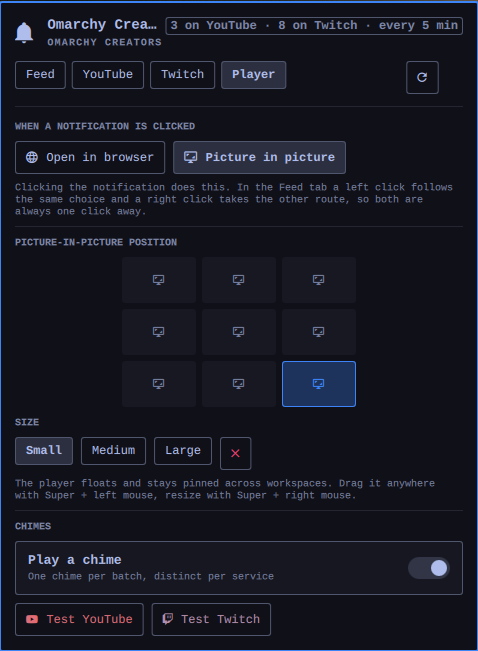
| Player | Where the picture-in-picture window sits, how big it is, and the chimes. |
Right click the bar widget to check right now. With the panel focused, r
checks now and / jumps to the search field.
The picture-in-picture window floats and stays pinned across workspaces. Drag it
with Super + left mouse and resize it with Super + right mouse; the nine
anchors in the Player tab are there for when you want it back in a corner.
Settings
Everything is editable from Setup → Plugins, or inline in shell.json.
| Key | Default | |
|---|---|---|
refreshIntervalSec |
300 |
How often to check, 60–3600. |
youtubeEnabled / twitchEnabled |
true |
Turn a whole service off. |
youtubeChannels / twitchChannels |
[] |
Managed by the panel's toggles. |
cookieBrowser |
auto |
Which browser profile holds your YouTube session. |
twitchClientId |
shipped | Override to use your own app. |
clickAction |
Browser |
Or Picture in picture. |
pipPosition / pipSize |
bottom-right / medium |
|
soundEnabled, soundVolume, youtubeSoundPath, twitchSoundPath |
true, 100, bundled |
Chime volume is a percentage for both services. |
notificationsEnabled, notificationTimeoutSec |
true, 12 |
0 never expires. |
Note on notification buttons
The helper sends browser and pip as named notification actions, which mako
and dunst draw as buttons. Omarchy uses a persistent click command that follows
the clickAction setting; the helper also supplies the default action for compatibility. The
Feed tab's right click is the always-available way to take the other route.
Layout
Service.qml |
Polling, alerting, sound queue, Twitch sign-in state. |
Panel.qml |
Bar widget and the four-tab panel. |
CreatorsModel.js |
Pure logic: search, selection, formatting, feed merge. |
creators |
Data helper. One JSON document per invocation, always exit 0. |
creators-notify |
One notification, and the click it may produce. |
creators-pip |
The mpv window and its Hyprland geometry. |
State lives in ~/.local/state/omarchy/creators/ (what has been seen, the
Twitch token, the player's last placement); caches in
~/.cache/omarchy/creators/ (the channel catalogues and avatars).
Tests
node tests/model.test.js     # pure logic
./tests/helper.test.sh       # helper JSON contract and input refusal
Neither touches the network, the compositor, or your real state directory.
tests/make-chimes.py regenerates the bundled sounds.
Licence
MIT.