
Automations for Omarchy
An event-driven automation engine for Omarchy: define simple when → do rules in a JSON file and the plugin reacts to what is happening on your machine — monitors plugged in, power state, battery thresholds, Wi-Fi networks, sunrise/sunset, and daily times.
{
  "name": "Sunset: dark theme",
  "when": "sunsets",
  "actions": [ "omarchy theme set catppuccin-mocha" ]
}
Demo
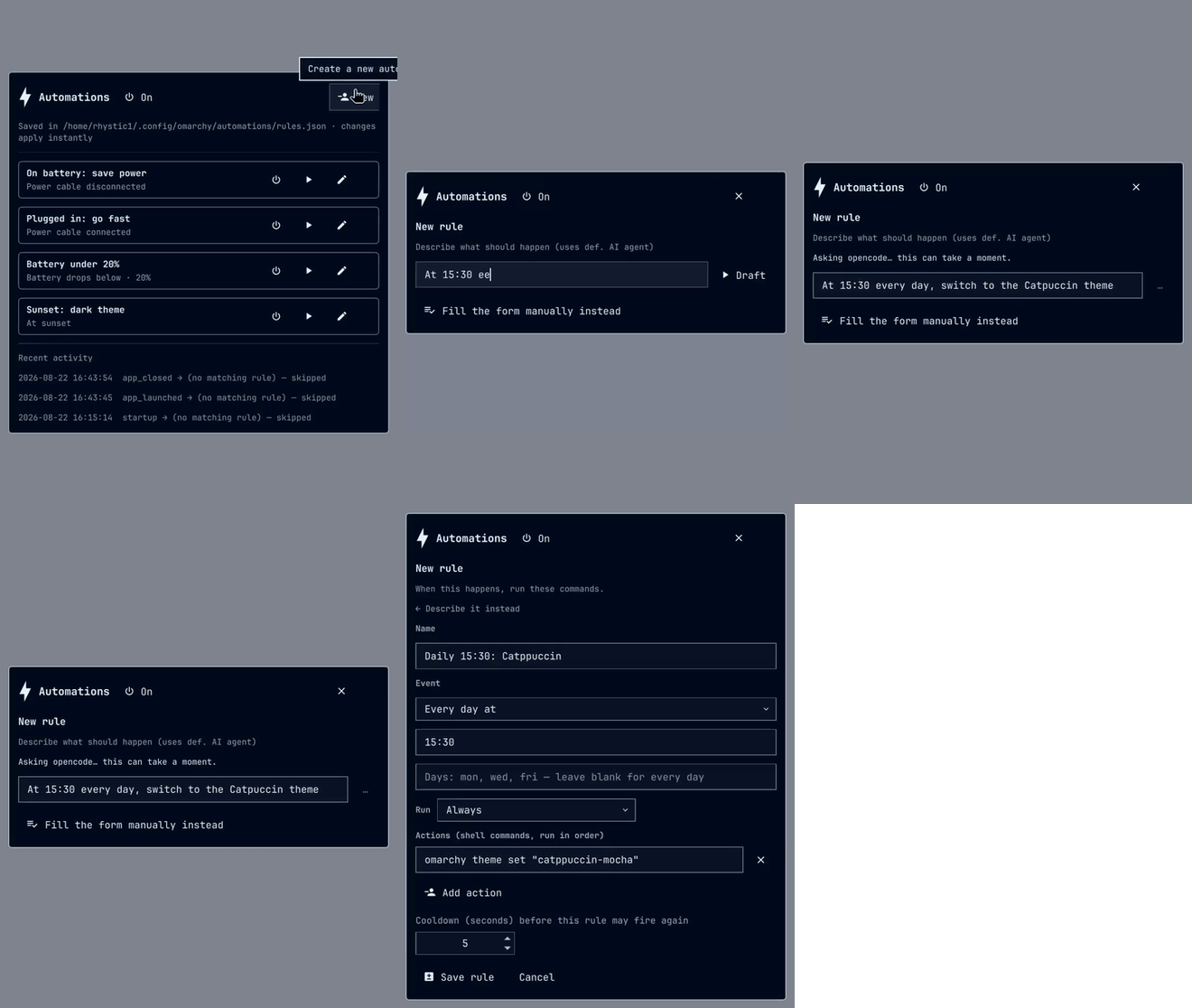
Creating a rule by describing it in plain language, with the default coding agent drafting it for review in the editor.
Install
omarchy plugin add https://github.com/rhystic1/omarchy-automations --enable
Click the ⚡ icon in the bar and hit New rule — that's the whole setup.
Rules are stored in ~/.config/omarchy/automations/rules.json (you never have
to open it) and ~/.config/omarchy/automations/config.json optionally holds
latitude/longitude for sun events. Both files hot-reload on save.
Uninstall
omarchy plugin remove rhystic1.automations
Your rules survive removal in ~/.config/omarchy/automations/ — delete that
folder too if you want a full cleanup. The plugin writes nothing outside that
folder, your plugin directory, and ~/.cache/omarchy/automations/ (the agent
trace log for the describe feature).
Events
when |
match |
Fires when |
|---|---|---|
monitor_connected / monitor_disconnected |
{ "monitor": "DP-1" } |
A monitor is hot-plugged / removed (any monitor if match is omitted) |
power_plugged / power_unplugged |
— | AC adapter connects / disconnects |
battery_below / battery_above |
{ "level": 20 } |
Battery charge crosses down/up past level |
wifi_connected / wifi_disconnected |
{ "ssid": "OfficeWifi" } |
Any (or a specific) network connection comes up / goes down |
bluetooth_connected / bluetooth_disconnected |
{ "device": "WH-1000XM4" } |
A Bluetooth device connects / disconnects (matches by name or MAC) |
app_launched / app_closed |
{ "app": "firefox" } |
A window with that class opens / closes (blank = any app) |
lid_open / lid_close |
— | The laptop lid opens / closes |
sunrises / sunsets |
— | Local sunrise/sunset (needs latitude/longitude in config.json) |
daily |
{ "at": "09:45", "days": ["mon", "fri"] } |
At that local time, optionally only on listed days (blank = every day) |
startup |
— | Once, when the desktop (and the first rule set) starts |
idle_started / user_active |
— | After 5 minutes idle / on the first activity afterwards |
Any rule can also carry a power gate:
{ "name": "Sunset theme", "when": "sunsets", "if": { "onBattery": true },
  "actions": ["omarchy theme set catppuccin-mocha"] }
if accepts { "onBattery": true } or { "onAC": true } and is checked at
fire time. In the panel this is the "Run" dropdown (Always / Only on battery /
Only on power cable).
actions is a list of shell commands, run in order. Each rule also accepts
cooldownSec (default 5) to rate-limit refires, and enabled: false to ship
it dormant.
Battery rules use crossing semantics: battery_below at 20 fires once when
the charge drops past 20%, and only refires after the level climbs back above
the threshold and crosses again.
Daily rules don't play catch-up: if the shell wasn't running at the scheduled minute (or started after it), the rule waits for its next day.
Custom events from your own scripts
Anything on the machine can trigger rules — your scripts, keybindings, cron, or Omarchy's own hooks — through the trigger IPC:
omarchy-shell rhystic1.automations trigger backup.done '{"status":"ok"}'
Rules written for when: "backup.done" (or any event name you invent) match
against the payload keys the same way built-ins do. omarchy-shell rhystic1.automations events lists the built-in event names, but custom ones
are unconstrained. A rule file edited to use a custom event keeps working even
though the editor's dropdown only offers built-ins (pick "Custom event…" to
enter one in the form).
The event payload reaches actions as environment variables: AUTOMATION_EVENT
always, plus AUTOMATION_<KEY> for every payload key (built-ins included —
AUTOMATION_MONITOR, AUTOMATION_SSID, AUTOMATION_LEVEL, …):
omarchy-shell rhystic1.automations trigger backup.done '{"status":"ok"}'
# rule action: notify-send "Backup" "$AUTOMATION_STATUS"
The bar widget & panel
The bar icon shows whether automations are armed (dim when paused) and its tooltip reports the last rule that fired. Clicking it opens the settings panel, where you can:
- describe an automation in words — "when my battery drops below 15
percent, notify me and switch to power saver" — and your default coding
agent (
omarchy default agent) drafts the rule for you; the draft opens pre-filled in the editor so you review it before anything is saved - create, edit, and delete rules in a form (event picker, match fields,
action list, cooldown) — written straight to
rules.json, no JSON editing - pause/resume all automations (the ▶ manual run and the
fireIPC still work while paused — pausing stops automatic firing only) - toggle or run individual rules immediately (▶ runs a rule's actions on the spot)
- read the recent fire log
Headless describe works with opencode, Claude Code, Codex, Crush, and
Copilot as the default agent. The call runs from /tmp with stdin closed,
so project skills and permission prompts cannot derail it, and the wish text
is the only thing sent to your model provider. Agent replies are collected
under a hard 128 KiB cap, and each attempt's stderr is appended to
~/.cache/omarchy/automations/agent-trace.log for troubleshooting — a file
only you can read, trimmed to its last 512 KiB once it passes 1 MiB.
Command line
The same operations are available over IPC for scripting:
omarchy-shell rhystic1.automations list
omarchy-shell rhystic1.automations add '{"name":"Focus","when":"wifi_connected","match":{"ssid":"Office"},"actions":["notify-send work mode"]}' ""
omarchy-shell rhystic1.automations fire "Focus"
omarchy-shell rhystic1.automations remove "Focus"
omarchy-shell rhystic1.automations describe "dark theme at sunset"   # agent draft; poll: lastdraft
omarchy-shell rhystic1.automations lastdraft
omarchy-shell rhystic1.automations pause   # or: resume
omarchy-shell rhystic1.automations log
How it works & dependencies
The engine is a headless service plugin inside the Omarchy shell
(Quickshell) — no extra daemon:
- monitor hotplug: Hyprland's event socket (
Quickshell.Hyprland) - power/battery: UPower (
Quickshell.Services.UPower) - Wi-Fi:
nmcli --terse device monitor - sun times: computed locally from
latitude/longitude(NOAA algorithm)
External dependencies: nmcli (ships with NetworkManager, already part of
Omarchy). Nothing else.
Everything runs with your user permissions — actions are plain shell
commands, so anything you could type in a terminal works. No root is
required or used. Location coordinates are read from config.json only; no
network lookups are made. The polling probes (hyprctl, bluetoothctl)
are byte-capped before the shell collects them and their retained records
(addresses, window classes, device names) are bounded, so neither the
compositor nor a Bluetooth peer can grow the long-lived shell process; a
poll that overruns a cap is rejected and noted in the fire log.
Relation to Omarchy's built-in hooks
Omarchy ships omarchy hook install for a handful of fixed events
(battery-low, theme-set, post-boot, ...). This plugin covers the events
Omarchy doesn't: monitor hotplug, AC/battery transitions at any threshold,
per-SSID network reactions, and sun/time schedules — with matching,
cooldowns, a toggle UI, and a fire log on top.
Development
omarchy plugin validate ~/.config/omarchy/plugins/rhystic1.automations
node tests/model.test.js
qmllint -I /usr/share/omarchy/shell Service.qml BarWidget.qml Panel.qml
MIT licensed. Sunrise algorithm adapted from the BSD-licensed suncalc.