
App Scale for Omarchy
A compact Omarchy Shell widget for changing the UI scale of the focused application without changing the scale of the entire display.
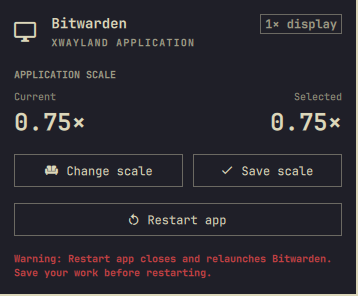
The bar stays uncluttered with a single scale icon. Open the panel to select and save a scale, then restart the application separately when you are ready.
Features
- Follows the focused Hyprland window.
- Discovers its desktop launcher automatically.
- Shows the saved application scale and focused display scale.
- Offers
0.75x,1x,1.25x,1.5x,2x, and3xpresets. - Keeps Save scale and Restart app as separate actions.
- Preserves the original desktop launcher before creating a user override.
- Supports standard Qt and GTK scaling controls.
- Includes a dedicated Steam scaling adapter.
Requirements
- Omarchy Quattro with
omarchy-shell - Hyprland
bash,jq,awk,find, andgtk-launch- A discoverable
.desktoplauncher for the focused application
Install
Once the repository is published, install it with:
omarchy plugin add https://github.com/ricardojrgpimentel/omarchy-app-scale.git
omarchy plugin enable ricardo.app-scale right
The widget declares right as its default section, so this also works:
omarchy plugin enable ricardo.app-scale
Usage
- Focus the application you want to scale.
- Click the scale icon in the top bar.
- Use Change scale to choose a preset.
- Select Save scale to update its user desktop launcher.
- Save your work, then select Restart app.
The Save button is disabled when the selected value already matches the saved value. Restart remains independent, allowing the application to be relaunched without rewriting its launcher.
How it works
App Scale resolves the focused window to a desktop entry using its application
ID, StartupWMClass, display name, or executable. It stores original launchers
under ~/.local/state/omarchy-app-scale/originals/ and writes scaled overrides
to ~/.local/share/applications/.
For standard applications it configures:
- Qt:
QT_SCALE_FACTOR - GTK:
GDK_SCALEandGDK_DPI_SCALE - Steam:
-forcedesktopscaling
Scaling is selected when an application starts. A running application must be restarted before a newly saved value can take effect.
Limitations
There is no universal Linux application-scaling API. Applications with custom rendering engines may ignore Qt and GTK scaling variables. Apps without a discoverable desktop launcher are intentionally left unchanged.
Restart sends SIGTERM to the focused application process and launches its
desktop entry again. Save application work before using it.
Remove
To remove the widget while keeping any launcher scales you saved:
omarchy plugin disable ricardo.app-scale
omarchy plugin remove ricardo.app-scale --yes
To restore every launcher changed by App Scale before removing the plugin, run:
plugin_dir="$HOME/.config/omarchy/plugins/ricardo.app-scale"
scales_file="$HOME/.local/state/omarchy-app-scale/scales.tsv"

if [[ -f "$scales_file" ]]; then
  while IFS=$'\t' read -r desktop_id _; do
    [[ -n "$desktop_id" ]] && "$plugin_dir/backend.sh" reset "$desktop_id"
  done < "$scales_file"
fi

omarchy plugin disable ricardo.app-scale
omarchy plugin remove ricardo.app-scale --yes
The reset operation restores preserved local launchers and removes generated
overrides when the application already has a system launcher. State backups
remain under ~/.local/state/omarchy-app-scale/ for manual recovery.
Development
Install or link the repository at:
~/.config/omarchy/plugins/ricardo.app-scale/
Then validate and reload it:
omarchy plugin validate ~/.config/omarchy/plugins/ricardo.app-scale
omarchy-shell shell rescanPlugins
License
MIT © 2026 Ricardo Pimentel