
Capacities for Omarchy
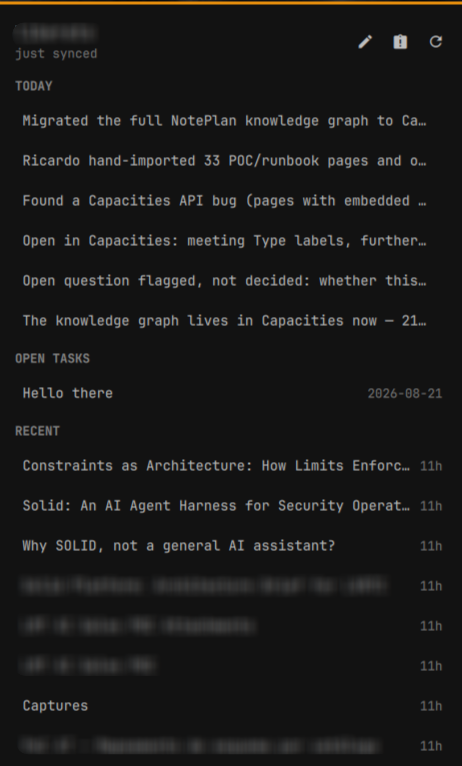
A thought, a key, Enter — it's in today's daily note. Or ask the space a question and land in the object.
One overlay with two modes. Capture is the one you reach for without thinking: whatever you type is appended to today's daily note in Capacities, under the timestamp it stamps itself. Search asks the same surface a question instead — type, Enter, pick, and the desktop app opens on that object.
Capturing and organizing are separate moments. This owns the capture.
Install
omarchy plugin add <this repo> --enable
Then connect it to a space. Generate a token in the Capacities desktop app (Settings → Capacities API → Generate new token, read and write), then:
omarchy-capacities login --token cap-api-…
A token is bound to one space, which is how this knows where captures go.
What it needs: Omarchy's Quickshell shell, and Python 3 — standard library
only, no pip. wl-clipboard if you want Save clipboard link (Omarchy ships
it). The Capacities desktop app if you want rows to open in it rather than the
browser; without it, set "openIn": "web". node is for the tests, not for
running the plugin.
On first load the plugin writes ~/.config/omarchy-capacities/config.json,
puts omarchy-capacities on your PATH, and adds a Capacities section to
the Omarchy menu under Trigger. It takes no keybinding — a key is yours to
give:
capacities-bind-key
capacities-bind-key "SUPER + J" "SUPER + SHIFT + J" "SUPER + CTRL + J"
That is one letter at three depths:
| Key | |
|---|---|
| <kbd>SUPER</kbd>+<kbd>M</kbd> | type into the day |
| <kbd>SUPER</kbd>+<kbd>Shift</kbd>+<kbd>M</kbd> | peek at it — the panel |
| <kbd>SUPER</kbd>+<kbd>Ctrl</kbd>+<kbd>M</kbd> | leave for the app |
Search gets no key of its own: it is <kbd>Tab</kbd> away from capture, <kbd>s</kbd> in the peek, and the lamp's right click.
Or write them yourself in ~/.config/hypr/bindings.lua:
o.bind("SUPER + M", "Capture", "omarchy-shell shell toggle riclib.capacities '{}'")
o.bind("SUPER + SHIFT + M", "Peek", "omarchy-shell riclib.capacities.bar toggle")
o.bind("SUPER + CTRL + M", "Open Capacities", "omarchy launch or focus io.capacities.app 'uwsm app -- capacities'")
Usage
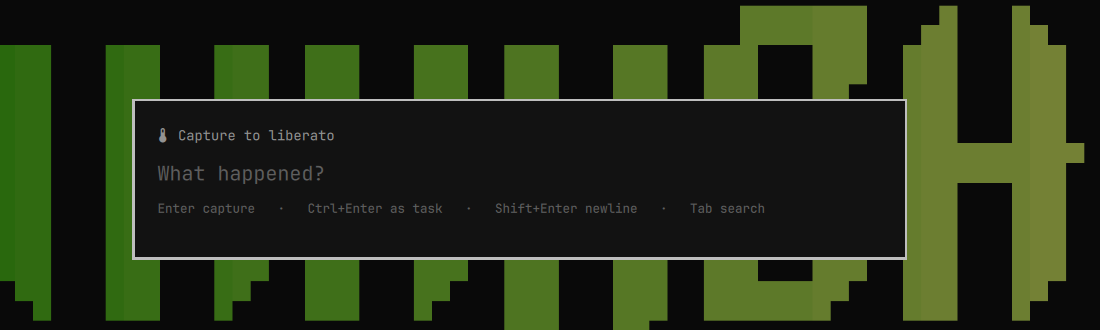
| Key | Capture mode | Search mode |
|---|---|---|
| type | compose the thought | compose the query |
| <kbd>Enter</kbd> | append to the daily note, close | search — then open the picked object |
| <kbd>Ctrl</kbd>+<kbd>Enter</kbd> | append as - [ ] task |
— |
| <kbd>Shift</kbd>+<kbd>Enter</kbd> | new line, same capture | — |
| <kbd>↑</kbd> <kbd>↓</kbd> | — | walk the results (wraps) |
| <kbd>Tab</kbd> | switch to search | switch to capture |
| <kbd>Esc</kbd> | clear, then close | drop results, then clear, then close |
Click outside the card to close without saving.
In search mode <kbd>Enter</kbd> searches while the query has moved on since the last one, and opens what you picked once it hasn't — so the key does the obvious thing at speed rather than needing you to track a mode.
The bar
The plugin also puts a lightbulb on the bar, for the days you have not learned the key yet.
| Click | What opens |
|---|---|
| left | the panel — today, open tasks, recent |
| middle | the capture overlay |
| right | the search overlay |
While a capture is stuck in the outbox the icon wears the urgent colour and the count beside it. That is the one thing only the bar can say — the overlay is only on screen while you are typing into it.
The panel
- Today — the last few lines of today's daily note. Clicking one opens the note at that line, using a block-level deep link.
- Open tasks — tasks with no completion date, soonest first.
- Recent — recently created objects, newest first.
- Buttons for capture, search, and sync; <kbd>c</kbd>, <kbd>s</kbd>, <kbd>r</kbd> do the same, <kbd>t</kbd> opens today's note, <kbd>Esc</kbd> closes.
Opening the panel is what syncs it, and only if the cache is more than two minutes old — so a second monitor's panel doesn't repeat the refresh the first one just did. Nothing polls in the background.
Recent needs a creation time. Capacities tracks when every object was made, but only exposes it on types where Created at is among the type's properties. The panel names the types it had to leave out, and there are two kinds:
-
A custom type (Meeting, Idea, Project, your own) can be given the property in its settings. Do that, then tell the plugin to re-read the type list, which it otherwise caches for twelve hours:
omarchy-capacities structures --refreshObjects read before the property existed are re-read rather than trusted, so nothing needs clearing.
-
A basic type (Task, Daily Note, Tag, Query, AI Chat) cannot — Capacities says as much on the settings screen: properties of basic object types cannot be edited. Page, File, PDF and Weblink already ship with one. The rest never will, so the panel says so instead of offering a fix that does not exist.
Recent warms up. List responses carry no timestamps and no ordering, so a creation time costs one read per object, capped per sync to stay inside the quota. The first syncs show the objects it has read so far, not the true newest. To fill it in one sitting:
omarchy-capacities warm --minutes 10
That reads at the quota's pace — a round, a wait, another round — and stops
when a round finds nothing new. It is safe to interrupt: every round writes the
cache before it sleeps. sync --backfill 20 is the one-shot version.
Enabling Created at on a type that was already synced is picked up too: an object cached before the property existed is re-read rather than trusted.
From a terminal
omarchy-capacities capture "the thought"      # → today's daily note
omarchy-capacities capture --task "do it"     # → as a checkbox
omarchy-capacities link                       # clipboard URL → a Weblink object
omarchy-capacities link https://example.com --note "why this matters"
omarchy-capacities search solid               # → JSON, what the overlay parses
omarchy-capacities open <object-id>           # → capacities:// deep link
omarchy-capacities status                     # token, space, queue depth
omarchy-capacities sync                       # refresh what the panel shows
omarchy-capacities sync --backfill 20         # warm Recent faster
omarchy-capacities drain                      # retry what the queue holds
A capture is never lost
If the API can't be reached — no network, or a 429, or a 5xx — the capture goes
to ~/.local/state/omarchy/capacities/outbox.json and a toast says so. The next
capture drains it first, or omarchy-capacities drain does it by hand; the
overlay's footer shows the depth while anything is waiting. A request the API
rejected is not queued, because replaying it just gets rejected again.
Configuration
~/.config/omarchy-capacities/config.json:
{
  "template": "- {text}",
  "taskTemplate": "- [ ] {text}",
  "searchLimit": 12,
  "openIn": "app",
  "todayBullets": 8,
  "taskLimit": 8,
  "recentLimit": 8,
  "recentStructures": ["Page", "Idea", "Meeting", "Project"],
  "syncTaskDetails": 10,
  "syncRecentDetails": 8
}
template is the markdown a capture becomes. {text} is what you typed;
everything else goes through strftime, so "- %H:%M {text}" works.
Captures land as plain bullets. Put the clock back with
"template": "- %H:%M {text}" if you want one.
openIn is app or web — whether a picked result opens in the desktop app
(capacities://…) or the browser.
The sync* numbers are how many object reads one panel refresh may spend.
Raising them fills Recent and task state faster and eats more of the
thirty-requests-per-minute quota; recentStructures names the types Recent
considers, and any of them without a Created at property is skipped.
Where things live
Capture.qml      the overlay: both modes, the key handling, the result list
BarSlot.qml      the bar icon, the queued badge, and the panel it hosts
Panel.qml        today / open tasks / recent, and the actions
PanelRow.qml     one clickable line
Model.js         parsing and index arithmetic — plain JS, tested with node
bin/omarchy-capacities   the API client: token, outbox, structure cache
bin/capacities-setup     first-load setup — config, menu rows, PATH
bin/capacities-bind-key  the shortcuts, when you ask for them
bin/capacities-uninstall take back everything setup added
The daily-note endpoint
Captures are appended to today's daily note object with POST /blocks/append,
not with Capacities' dedicated POST /blocks/daily-note/append.
The dedicated endpoint is documented as asynchronous, and on 2026-08-21 that
meant answering 200 with an empty body and delivering many minutes later —
long enough that four probes looked lost, across two different days, in the
same minutes that /blocks/append to an ordinary object landed and read back
immediately. They did eventually arrive. A capture tool cannot use a write it
cannot confirm: the outbox exists to hold what did not arrive, and it can only
do that if arrival is knowable. So this resolves the day's note by title
(cached per day) and appends to it like any other object, which is immediate
and verifiable. If the dedicated endpoint gets a delivery guarantee, the
resolve step is what to delete.
A day whose note does not exist yet is queued rather than dropped: Capacities creates the note when the app opens the day, and the queued capture lands then.
The QML never talks to the API. The token belongs in a 0600 file rather than in the shell's process state, a failed capture belongs in a queue on disk, and the space's structure list wants a cache so a search doesn't spend one of its ten-per-minute space reads relabelling rows. All three are ordinary in Python and miserable in QML.
What it writes, and taking it back
Everything outside the plugin's own directory is either a marked block or a symlink it made, so removal is exact:
| Path | What |
|---|---|
~/.config/omarchy-capacities/config.json |
written once, only if absent |
~/.local/state/omarchy/capacities/ |
token (0600), outbox, caches |
~/.config/omarchy/extensions/omarchy-menu.jsonc |
a marked block of menu rows |
~/.local/bin/ |
symlinks for the three commands |
~/.config/hypr/bindings.lua |
a marked block — only if you ask for it |
It takes no keybinding on its own, and it never rewrites a file wholesale: an existing config is left alone, and a command name that is not our symlink stays where it is.
To remove it:
capacities-uninstall            # menu rows, keybindings, commands
capacities-uninstall --purge    # …and the config, caches and token
omarchy plugin remove riclib.capacities
Your notes are never involved — they live in Capacities.
Treating the API as untrusted
The shell is a long-lived process shared by every widget on the bar, so a compromised or misbehaving endpoint must not be able to spend its memory or make it fetch anything:
- Responses are read up to a cap (8 MB, and 64 KB for error bodies) and refused past it, rather than buffered to whatever length the server likes.
- Strings bound for the UI are clamped before they are written to the cache.
- Every
Textin this plugin setstextFormat: Text.PlainText. Qt's default isAutoText, which guesses rich text — and rich text loads resources. No API-derived string should ever get to decide that.
The tests cover the first two against a server that floods the connection.
Rate limits
Capacities' quotas are small and per-endpoint: 10/60s for space reads, 30/60s for search and daily-note appends. Nothing here polls. Searches run on <kbd>Enter</kbd>, never per keystroke, and the structure list is cached for 12 hours.
Tests
node --test tests/model.test.js    # parsing, wrapping selection, ages, elision
tests/cli.test.sh                  # the offline queue, token mode, uninstall
Both run without a network or a token.
License
MIT