
RiteChoice23 Notification Center
A private, searchable, keyboard-driven notification center for the Omarchy top bar.
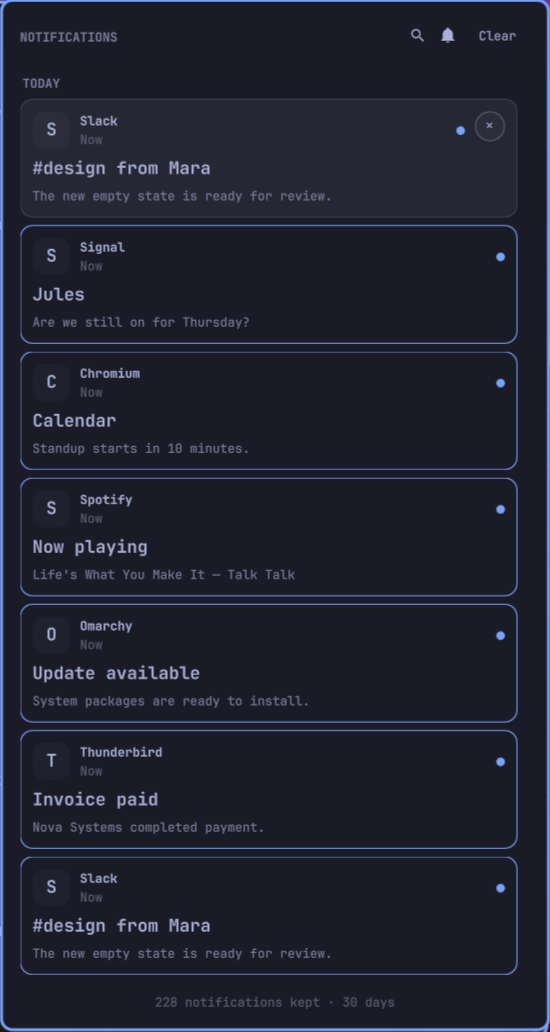
It keeps every retained notification as an individual chronological card, follows Omarchy’s active palette and corner radius, and provides a durable history without turning notification-provided shell commands into delayed click actions.
Highlights
- Searchable history — Search app names, titles, and message bodies with the header button,
/, orCtrl+F. - Individual chronological cards — Newest first, separated into Today, Yesterday, weekdays, and older dates.
- Complete keyboard control — Arrow or Vim navigation, Enter to activate,
xto dismiss, Escape to close, and Tab to switch panels. - Safe click-to-open — Invokes a live notification’s canonical default action when available, otherwise opens only a validated archived image or focuses the strongest matching Hyprland window. Stored shell text is never executed.
- Live sender media — Reuses Omarchy’s live notification image for avatars before falling back to archived media or the application icon.
- Exact PWA focus — Web origins, desktop entries,
StartupWMClass, and normalized client metadata are scored before focusing the exact window address. - Do Not Disturb — Toggle DND in the panel or right-click the bar bell without opening it.
- Private durable storage — State directories are
0700; records and media are0600; writes and multi-monitor access are serialized. - Bounded retention — Age and count limits both apply, with orphaned media removed automatically.
- Privacy controls — Hide message bodies, disable and purge picture previews, or remove the unread marker.
- Omarchy-native UI — Uses the shell’s shared controls, colors, typography, spacing, border specifications, and adaptive screen bounds.
Installation
omarchy plugin add https://github.com/ritechoice23/ritechoice23-omarchy-notification.git --enable --yes
omarchy bar put ritechoice23.omarchy.notification --before omarchy.power
For local development:
bash install-local.sh
The local installer validates and stages the complete plugin before replacing the installed copy, then restarts the Omarchy shell to avoid stale compiled QML.
Controls
| Input | Action |
|---|---|
| Left-click bar bell | Toggle the notification center |
| Right-click bar bell | Toggle Do Not Disturb |
| Left-click card | Dismiss immediately, then safely open its image or focus its app in the background |
Right-side × |
Dismiss one archived notification |
/ or Ctrl+F |
Search notifications |
↓ / j, ↑ / k |
Move the selected card |
Enter / Space |
Activate the selected card |
x |
Dismiss the selected card |
Escape |
Leave search, then close the panel |
Tab / Shift+Tab |
Switch to an adjacent bar panel |
Activation removes the card and updates the count immediately. The panel closes while the sender’s live default action, image opening, or window focus continues in the background. Live browser notifications can therefore jump to their exact conversation while the sender action still exists; expired history safely falls back to matching the existing application window.
Settings
Configure the widget through omarchy launch bar-settings or omarchy bar set.
| Setting | Default | Description |
|---|---|---|
historyLimit |
1000 |
Maximum retained entries, from 50 to 10,000 |
keepDays |
30 |
Maximum age, from 1 to 365 days |
badge |
Count |
Dot, Count, or None |
clickAction |
Auto |
Auto, Focus the app, or Nothing |
showBody |
true |
Show message text in cards |
showPreview |
true |
Keep and display validated pictures; disabling purges cached previews |
panelWidth |
440 |
Preferred width, automatically clamped to the display |
Existing v1 showBadge preferences remain effective until the new badge setting is explicitly saved.
IPC
omarchy-shell shell toggle ritechoice23.omarchy.notification
omarchy-shell shell summon ritechoice23.omarchy.notification
omarchy-shell shell hide ritechoice23.omarchy.notification
omarchy-shell ritechoice23.omarchy.notification clear
omarchy-shell ritechoice23.omarchy.notification unread
Storage CLI
The JSON-producing storage CLI is available inside the plugin:
bin/notification-center list 100
bin/notification-center search "deployment" 1000
bin/notification-center unread
bin/notification-center prune
bin/notification-center seed 25
bin/notification-center --help
Internal commands also include watch, sync, remove, clear, and seen. Environment variables used by the widget are documented in the script and make the store testable against isolated directories.
Privacy and security
The archive lives at:
~/.local/state/ritechoice23-omarchy-notification/
├── history/
├── images/
├── dismissed/
├── last-seen
└── state.lock
Notification history can contain private chats, email subjects, and authentication codes. Do not sync or back up this directory carelessly. Reducing keepDays, disabling message bodies, or disabling previews reduces exposure.
Any local application can submit a desktop notification and choose its metadata. For that reason v2 removes exec and action fields while archiving and never evaluates them during activation. Media copies are limited to 5 MiB, must be recognized as images, are stored privately, and are opened by argument rather than through a shell.
Upgrading from v1
Version 2 keeps the existing per-notification archive and seen watermark. On the first v2 synchronization it:
- repairs private permissions;
- removes any stored
execor action fields; - applies the configured age and count limits;
- validates new media copies and sweeps orphaned cached files.
Existing notification text and safe cached media are preserved. Because click behavior is intentionally hardened, the release version is 2.0.0.
Development and validation
omarchy plugin validate .
bash tests/test-data.sh
bash tests/test-activation.sh
bash scripts/demo-notifications
Use bin/notification-center seed 25 for a synthetic private-data-free archive suitable for UI development and screenshots.
Removal
omarchy plugin remove ritechoice23.omarchy.notification
Removing the plugin intentionally keeps history. Delete it separately only when desired:
rm -rf "${XDG_STATE_HOME:-$HOME/.local/state}/ritechoice23-omarchy-notification"