StatusCake for Omarchy
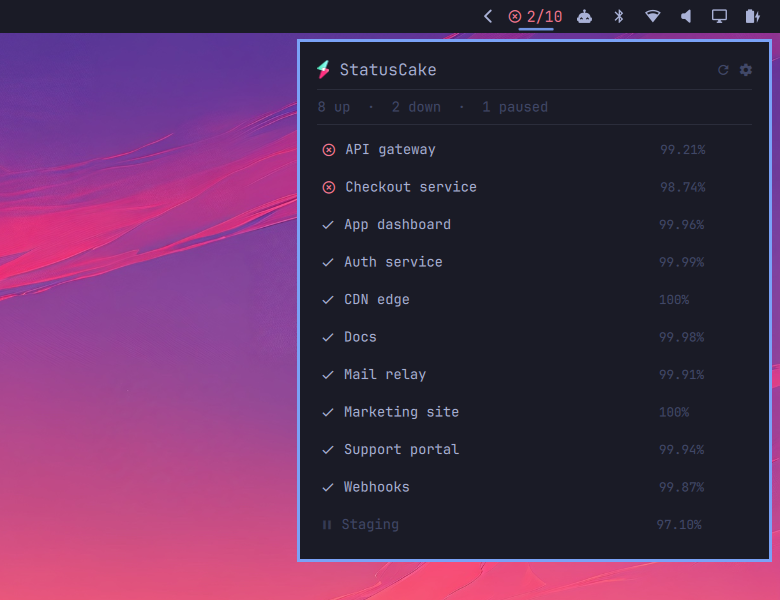
An Omarchy shell bar widget showing the status of your StatusCake uptime checks.
The widget contains a panel listing every check, each with its uptime percentage.
Install
omarchy plugin add https://github.com/robinvanderknaap/omarchy-statuscake.git --enable
Create a token at app.statuscake.com. The widget only needs read access to uptime tests.
Set your API token by clicking the widget in the bar. Paste the token and press Enter.
The token is verified against the API before anything is saved; then the token is stored in your keyring.
There is a terminal path too, which does the same thing:
~/.config/omarchy/plugins/robinvanderknaap.statuscake/bin/statuscake-setup
If the widget does not appear, place it explicitly:
omarchy bar move robinvanderknaap.statuscake --section right
Interactions
| Left click | list uptime checks, services that are down are listed first |
| Middle click | force a refresh |
| Right click | open app.statuscake.com in your browser |
| Cog in the panel | open settings |
Esc |
leave settings, or close the panel when the check list is up |
Settings
Everything is set behind the cog in the panel, and every control writes on the spot, so there is nothing to save.
| Key | Default | Meaning |
|---|---|---|
refreshIntervalSec |
300 |
How often to poll. Clamped to 60–3600. |
tags |
"" |
Comma-separated list of tags; only matching uptime checks are counted. |
matchAnyTag |
true |
Match uptime checks carrying any of tags rather than all of them. |
notify |
true |
Desktop notification when a check flips up→down or back. |
Tags
Tags are picked from the ones your account actually uses rather than typed: the control lists every distinct tag on your checks, with a search box for narrowing a long list and a checkbox per tag. That list comes from an unfiltered fetch each time the picker opens, so a tag you just added in StatusCake is one refresh button away.
Notifications
Notifications fire only on a change, and only for checks seen in both the previous and current poll. A shell restart never replays a backlog, pausing a down check is not a recovery, and twenty checks failing at once is one notification rather than twenty.
API token
The API token set in the settings panel is stored in your keyring. The token is never written to shell.json, never passed as a command-line argument, and never echoed.
The token is read at refresh time from, in order:
$STATUSCAKE_API_TOKEN- your keyring (
secret-tool lookup service statuscake account api)
That order is worth knowing if you set the environment variable: it wins over what the panel saves in the keyring.
bin/statuscake-setup --status reports where a token was found and whether it
still works (--no-verify skips the API call); --remove deletes it. Add
--json to any of them for one machine-readable object — that is how the panel
talks to it.
Removing API token
Removing the plugin does not remove the token. Omarchy has no uninstall hook —
omarchy plugin remove deletes the folder and stops — so the credential would
otherwise sit in your keyring after the widget that used it is gone.
Delete it first, from the settings view: Remove token in the API token section. Then remove the plugin:
omarchy plugin remove robinvanderknaap.statuscake
If the plugin is already gone, the entry is a plain keyring item and
secret-tool clears it without any of this plugin's files:
secret-tool clear service statuscake account api
Revoking the token at app.statuscake.com is the thorough version, and the only one that matters if the token ever left this machine.
Development
test/run.sh
Runs manifest validation, the Model.js unit tests, and the shell helpers
against a mock API. No network access and no StatusCake account required —
which is the point, since the states that matter most (checks down, transitions
between polls, API errors, a token the API refuses) never occur on a healthy
account. Nothing in the suite touches your real keyring, token file or account.
All decisions live in Model.js as pure functions; the QML files hold only Qt
objects and wiring. That is what makes the down path testable without waiting
for a real outage.
Notes for anyone writing an Omarchy bar widget
Five things cost real debugging time here. The first two contradict
shell/plugins/bar/README.md as shipped with Omarchy 4.0.0; the rest it is
silent on:
- A plain
MouseAreadoes not receive left clicks. The bar covers every widget slot with its own MouseArea to drive drag-to-reorder. It dispatches a real click by callingtriggerPress(button)on the widget root, andBar.moduleTargetClickable()tests for exactly that function — without it the widget is not clickable and gets no pointing-hand cursor. Right and middle clicks do reach your own MouseArea, since the bar accepts left only. bar.shellQuote()does not exist. UseUtil.shellQuote()fromqs.Commons. Calling the documented name throws at runtime.omarchy-shell shell rescanPluginsdoes not rebuild a mounted bar widget. It logsLocal plugin changed, reloadingand leaves the running instance alone, so you keep testing stale code. Useomarchy restart shell.- A text field in a
PopupCardnever receives a keystroke.PopupCardis an xdg-popup on the bar's layer surface, and the bar never asks for keyboard focus — itsBarPanelsets nokeyboardFocusat all, which layer-shell reads asNone— so focus is never routed into the popup and the field takes the caret and then receives nothing. Only a layer surface that asks for keyboard focus can be typed into, andqs.Ui'sKeyboardPanelis the drop-in answer: it primesWlrKeyboardFocus.Exclusivebriefly and then settles onOnDemand. - Never hold
WlrKeyboardFocus.Exclusivefor as long as a surface is up. Hyprland then routes every pointer event to that surface whatever output the cursor is over, and no other window can be clicked. A layer surface is also not a toplevel, soSUPER+Wcannot close it and closes whatever real window is behind it instead — which is what a centered modal invites the user to try. Both are why settings here live in the panel rather than a window of their own.
License
MIT — except assets/statuscake.svg, which is StatusCake's mark, cropped from
their own horizontal logo
and used to identify the service this widget talks to. It is their trademark, not
mine to relicense, and it is not covered by the MIT grant above.