
Omarchy GitHub
Your GitHub work, directly in the Omarchy bar.
Omarchy GitHub turns the Octocat in your bar into a fast, keyboard-friendly command center for everything that needs your attention—without keeping another browser tab open.
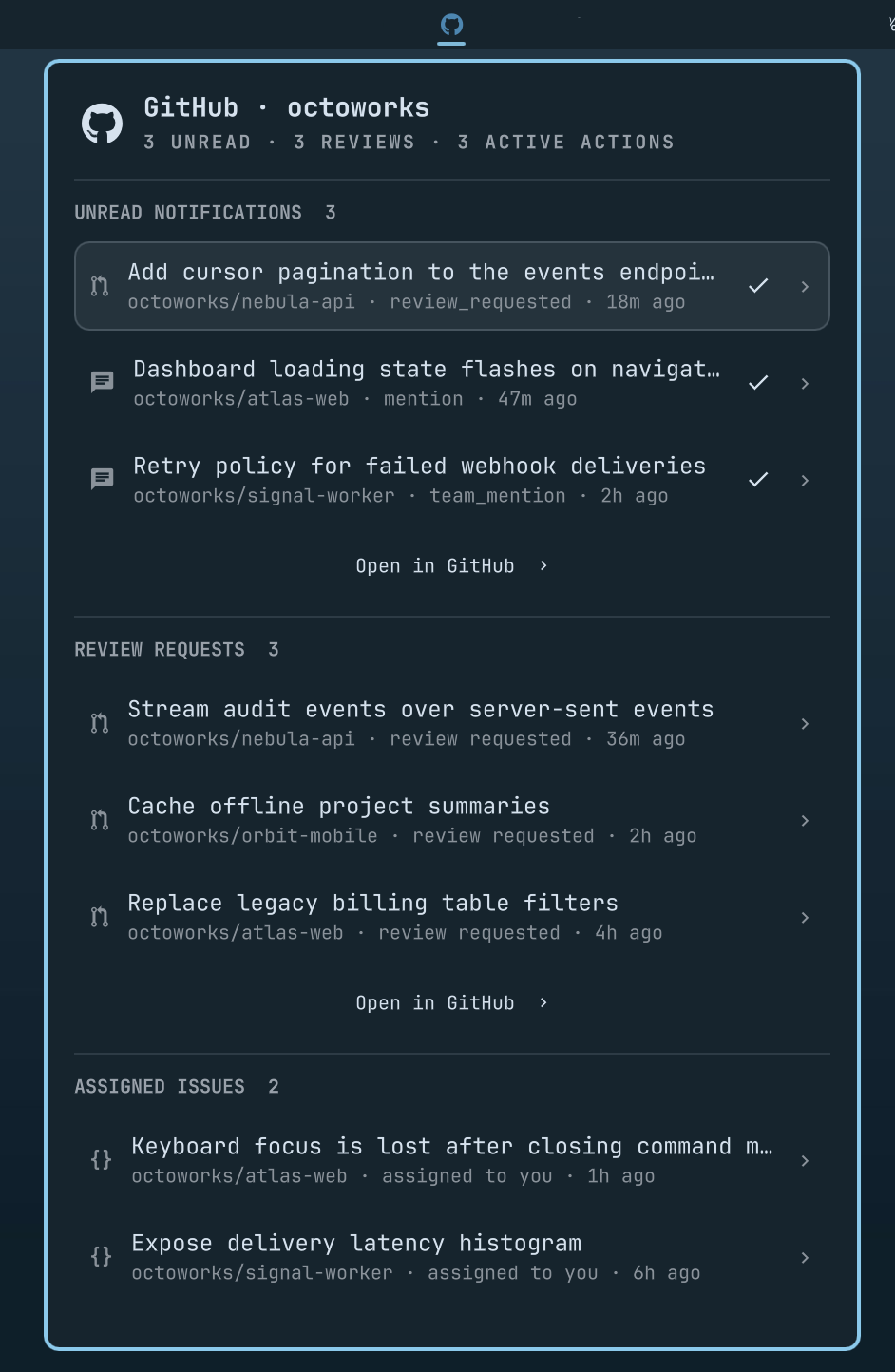
Everything waiting for you, in one panel
The dashboard is ordered by urgency so the most actionable work appears first:
- Unread notifications — open the related thread, mark it read in place, or clear the whole list
- Review requests — see pull requests waiting on your review
- My pull requests — track the pull requests you opened and the state of their checks
- Assigned issues — keep track of open issues assigned to you
- Active GitHub Actions — monitor queued, pending, requested, waiting, and running workflows
- Recent workflow failures — jump directly to failed, timed-out, or action-required runs
- Repositories — browse the repositories you own, and optionally those you reach through an organization, with open issue, open PR, star, and active workflow counts
Repository search, metric filters, and sorting make even large GitHub accounts manageable. Filter to repositories with issues, PRs, stars, or active Actions, then sort by the metric that matters.
Highlights
- Native Omarchy Quattro bar widget with an Octocat icon
- Compact previews that keep busy accounts readable
- Direct links to notifications, pull requests, issues, workflow runs, and repositories
- One-click notification mark-as-read, confirmed by GitHub before removal
- Bulk mark-as-read behind a confirmation step, bounded to the threads on screen
- Complete paginated repository and notification fetching
- Configurable Actions scanning with bounded concurrency
- Graceful partial results when an endpoint or repository is unavailable
- Explicit logged-out, rate-limited, missing CLI, loading, and error states
- Mouse and keyboard navigation throughout
- Uses the existing GitHub CLI credential store—no token configuration or secret files
Requirements
- Omarchy Quattro with shell plugin support
ghonPATHjq- A Nerd Font; Omarchy includes one by default
Authenticate GitHub CLI before installing:
gh auth login
gh auth status
The notifications scope is required to read notifications and mark threads read. The repo scope may be required for private repositories, review requests, assigned issues, and Actions:
gh auth refresh -h github.com -s notifications -s repo
Omarchy GitHub delegates authentication entirely to gh. It does not read, copy, log, or persist your GitHub token.
Install
Install directly from GitHub and enable the widget:
omarchy plugin add https://github.com/robzolkos/omarchy-github.git --enable
The widget defaults to the right side of the bar. To choose its position interactively:
omarchy bar move robzolkos.github
Confirm the installation:
omarchy plugin list | grep robzolkos.github
Update
omarchy plugin update robzolkos.github
If your Omarchy version only supports updating all third-party plugins:
omarchy plugin update
Remove
omarchy plugin remove robzolkos.github
Controls
| Input | Action |
|---|---|
| Left click Octocat | Open or close the dashboard |
| Right or middle click Octocat | Refresh |
| Click a row | Open it on GitHub |
| Check button on a notification | Mark the thread read after GitHub confirms it |
| Mark all read in the notifications footer | Arm the bulk mark-as-read |
| Confirm? on the armed button | Mark every notification on screen read |
j / k or arrow keys |
Move through visible rows |
Enter / Space |
Open the highlighted row |
m |
Mark the highlighted notification read |
/ |
Focus repository search |
r |
Refresh |
Escape in search |
Clear search and return to row navigation |
Escape elsewhere |
Close the panel |
Activity sections show five items initially and expand to a bounded list of 25. Open in GitHub takes you to the corresponding complete GitHub view where one is available.
The notifications footer also carries Mark all read. The first click captures the displayed notification snapshot and changes the label to Confirm?; only the second click sends the request. The confirmation lapses after a few seconds, when the panel closes, when a refresh changes the notification list, and whenever another mark is running. Notifications before the newest displayed second are handled in bulk, while displayed threads from that boundary second are marked by ID so same-second arrivals stay unread. The dashboard refreshes from GitHub after every attempt; large inboxes processed asynchronously may briefly retain threads that are already on their way out.
Repository dashboard
Every listed repository includes:
- Open issue count
- Open pull request count
- Star count
- Active Actions count, when present
- Last-updated time
Use the filter chips to show all repositories or only repositories with a non-zero issue, PR, star, or active Actions count. Sort by update time, name, or any metric. Search always runs against the complete fetched repository list, even when rendered rows are capped.
Settings
Configure the widget through Omarchy's bar widget settings. Existing installations retain the narrower repository scope and bounded Actions scan:
| Setting | Default |
|---|---|
| Refresh interval | 900 seconds (15 minutes) |
| Include archived repositories | Off |
| Include forks | Off |
| Repository scope | Owned |
| Include review requests and issues from archived repositories | Off |
| Include review requests on drafts | Off |
| Maximum displayed repositories | 25 |
| Actions scan | Recent repositories |
| Recent repository scan limit | 15 |
| Actions request concurrency | 6 |
| Failed Actions window | 7 days |
| Maximum failed Actions | 20 |
Repository scope controls both the repository dashboard and the candidate repositories for Actions scanning. Owned and organizations is opt-in. With the default Recent repositories scan, Actions requests remain capped to the 15 most recently updated repositories in that wider scope.
All repositories is also opt-in and starts six paginated Actions request streams per repository on every refresh. Combining it with Owned and organizations can consume substantial GitHub API capacity in large organizations. Use Recent repositories or Off for a bounded scan, and increase the refresh interval when broader monitoring is required.
Set these options from the command line after installing the plugin:
omarchy bar set robzolkos.github repositoryScope "Owned and organizations"
omarchy bar set robzolkos.github actionScanBehavior "Recent repositories"
Restore the narrowest behavior with:
omarchy bar set robzolkos.github repositoryScope "Owned"
omarchy bar set robzolkos.github actionScanBehavior "Off"
Review requests and assigned issues from archived repositories are hidden by default because archived repositories are read-only. Review requests on draft pull requests are also hidden by default, while teams that use drafts for early feedback can include them. Each behavior has its own setting.
Local development
From an existing checkout, validate and test the plugin:
omarchy plugin validate .
tests/helper-test.sh
tests/panel-source-test.sh
tests/service-source-test.sh
Install that checkout for local iteration:
omarchy plugin add "$PWD" --enable
The shell watches local plugin files, making QML iteration fast.
How it works
Service.qml schedules an executable helper, omarchy-github-fetch, which calls GitHub exclusively through gh api and processes responses with jq.
- GraphQL retrieves every repository in the configured scope and exact aggregate counts.
- REST retrieves notifications and workflow runs.
- GitHub issue search retrieves review requests and assigned issues.
- GraphQL search retrieves your authored pull requests together with the head commit's
statusCheckRollup, so check state costs no extra request. - Status-specific, paginated Actions requests prevent busy repositories from hiding active runs.
- Completed runs are server-bounded to the configured failure window.
- Independent requests allow successful sections to remain available when one endpoint fails.
Run the helper directly to inspect its JSON output:
./omarchy-github-fetch --action-scan recent --action-repo-limit 15 | jq
License
MIT