
Omarchy Downloads
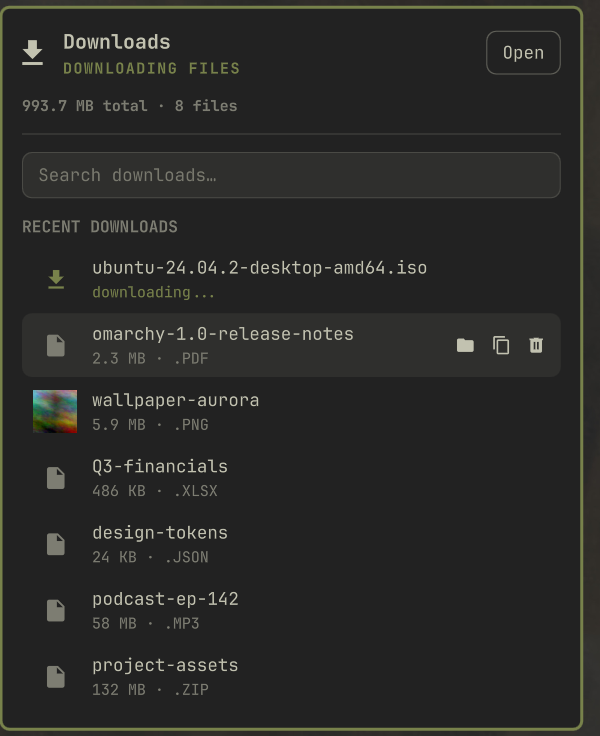
Your Downloads folder, one click away. A bar widget for Omarchy that shows your most recent downloads with live tracking, instant search, and quick actions — without opening a file manager.
Features
- Recent downloads at a glance — the newest files in your Downloads folder, with size and type.
- Live tracking — new files appear instantly; in-progress downloads (
.part,.crdownload,.download) show as downloading while the bar icon pulses, and it gets a badge when one finishes while the panel is closed. - Stalled downloads surfaced — when a download dies partway through (browser crash, dropped connection), its row stops claiming to be in progress and is marked Stalled — download incomplete, so you can reveal or trash the leftover file instead of watching it spin forever.
- Search everything — type to filter the entire folder, not just the recent list. Enter opens the top match.
- Quick actions on any finished file: open (default app), reveal in file manager, copy to clipboard (paste into any file manager or chat), move to trash (with confirmation). Files still downloading stay non-actionable, so you can't open or copy a half-written one by accident.
- Folder totals — total size and file count in the header, plus a button to open the folder.
- 100% local — no network access, no sudo, no bundled binaries. Just QML and a few tiny shell helpers (
wl-copy,gio,xdg-open,stat— all part of a standard Omarchy install).
Install
omarchy plugin add https://github.com/roymelgarv/omarchy-downloads --enable
Then place the widget where you want it:
omarchy bar move roymelgarv.omarchy-downloads --section right
Optional keybinding
Plugins can't ship keybindings, but one line in ~/.config/hypr/bindings.conf summons the panel from the keyboard:
bind = SUPER, D, exec, omarchy-shell downloads toggle
Keyboard
The panel opens with the search field already focused, so you can start typing straight away.
| Key | Action |
|---|---|
↑ / ↓ |
Move the selection |
Enter |
Open the selected file |
Delete |
Trash the selected file — only while the search box is empty, so it still forward-deletes as you type |
Shift+Delete |
Trash the selected file, even mid-search |
Esc |
Clear the search first, then close the panel |
Configure
Right-click the widget (or use the bar settings UI) to change:
| Setting | Default | Description |
|---|---|---|
| Folder to watch | ~/Downloads |
Any folder works — it's just a folder widget at heart. |
| Recent files shown | 7 | List length when not searching (3–15). |
| Badge on new downloads | on | Dot on the bar icon when a download finishes while the panel is closed. |
| Confirm before trashing | on | Skip the confirmation dialog if you like to live dangerously (trash is still recoverable). |
Update
omarchy plugin update roymelgarv.omarchy-downloads
Remove
omarchy plugin remove roymelgarv.omarchy-downloads
Development
See CONTRIBUTING.md. Short version:
node --test tests/*.test.mjs   # unit tests
scripts/dev.sh                 # deploy to the live shell
scripts/dev.sh --restart       # deploy + restart the shell (required after Service.qml edits)