
Obsidian Notes for Omarchy
Search, open, and capture Obsidian notes without leaving the Omarchy bar.
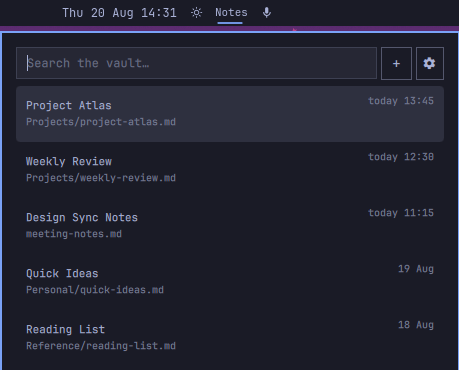
Highlights
- Search every Markdown note by title, path, or full text.
- See ranked results instantly, with matching-line previews when searching.
- Open a selected note through Obsidian's native
obsidian://URI. - Capture a quick Markdown note directly from the panel.
- Choose or change the vault with the built-in folder picker.
- Navigate entirely by keyboard or use the mouse.
- Match the active Omarchy theme, typography, and panel styling.
- Run locally with no network access, background service, or index database.
Install
omarchy plugin add https://github.com/joisephdev/omarchy-obsidian --enable
The Notes widget is placed in the center section by default. Move it anywhere
in the bar with:
omarchy bar move rperaza.obsidian-notes --section right
Choose a vault
- Open
Notesfrom the bar. - Select the settings icon.
- Browse to the directory containing your Markdown notes.
- Select Use this folder.
The selected path is stored in ~/.config/omarchy/shell.json and survives
shell and system restarts. Any directory of Markdown files works; it does not
need to be open in Obsidian while searching.
You can also configure the path from a terminal:
omarchy bar set rperaza.obsidian-notes vaultPath ~/Documents/my-vault
Both absolute paths and paths beginning with ~/ are supported.
Search and open notes
Open the panel and start typing. Results are ranked with title and path matches first, followed by full-text matches. Search is case-insensitive and treats the query as plain text rather than a regular expression.
- Up / Down — move through results
- Enter — open the selected note in Obsidian
- Escape — clear the query; press again to close the panel
- Tab — move to the next bar panel
- Left click — open or close the Notes panel
- Right click — open the vault root in Obsidian
Note titles are resolved in this order:
title:ortitulo:in YAML frontmatter- The first Markdown heading
- The Markdown filename
Capture a quick note
Select + to replace the result list with a focused Markdown editor. Write the note and select Save. The plugin creates the following directory when needed:
<vault>/omarchy-notes/
Notes use collision-safe timestamped filenames such as:
omarchy-notes/2026-08-20-143015.md
Existing files are never overwritten. Select Cancel or press Escape to return to search without writing a file.
Privacy and filesystem access
Everything happens locally:
search.shreads Markdown files inside the selected vault.create-note.shwrites only to<vault>/omarchy-notes/when you explicitly save a quick note..obsidian/,.trash/, and.git/directories are excluded from search.- No note contents, filenames, or queries are sent over the network.
- No index, cache, telemetry, or background daemon is created.
Like all Omarchy shell plugins, this plugin runs with your user permissions. Review the source before installing third-party plugins.
Requirements
- Omarchy Quattro with the Quickshell-based shell
- Obsidian, for opening notes through
obsidian:// - Standard tools already available on Omarchy:
bash,find,awk,sed,grep,stat, and coreutils - Optional:
rg(ripgrep) for faster full-text matching
Update
omarchy plugin update rperaza.obsidian-notes
Remove
omarchy plugin remove rperaza.obsidian-notes
Removing the plugin does not delete or modify your vault. Notes previously
created under omarchy-notes/ remain ordinary Markdown files.
Troubleshooting
The panel asks for a vault
Use the settings icon and select the vault directory, or set vaultPath with
the terminal command shown above.
No notes appear
Confirm that the selected directory exists and contains .md files. Hidden
Obsidian metadata and trash directories are intentionally ignored.
A note does not open
Confirm that Obsidian is installed and registered as the handler for
obsidian:// links. Search continues to work even when Obsidian is closed.
Changes do not appear after development edits
User plugins normally hot-reload. Force discovery when needed:
omarchy-shell shell rescanPlugins
Development
Validate the plugin directory before publishing:
omarchy plugin validate .
bash -n search.sh create-note.sh
The plugin has no build step and no downloaded runtime dependencies.