
Hazel
Hazel is a read-only database instrument for the Omarchy 4 bar. It monitors PostgreSQL, MySQL 8+, MariaDB, Percona Server, ClickHouse, and Microsoft SQL Server through native, noninteractive clients. PostgreSQL, the MySQL family, and SQL Server keep one persistent session per enabled profile; ClickHouse uses one bounded client process per sample because its native batch client consumes queries through EOF. Every collector keeps its own time-bucketed session history in memory and never writes to the database it observes.
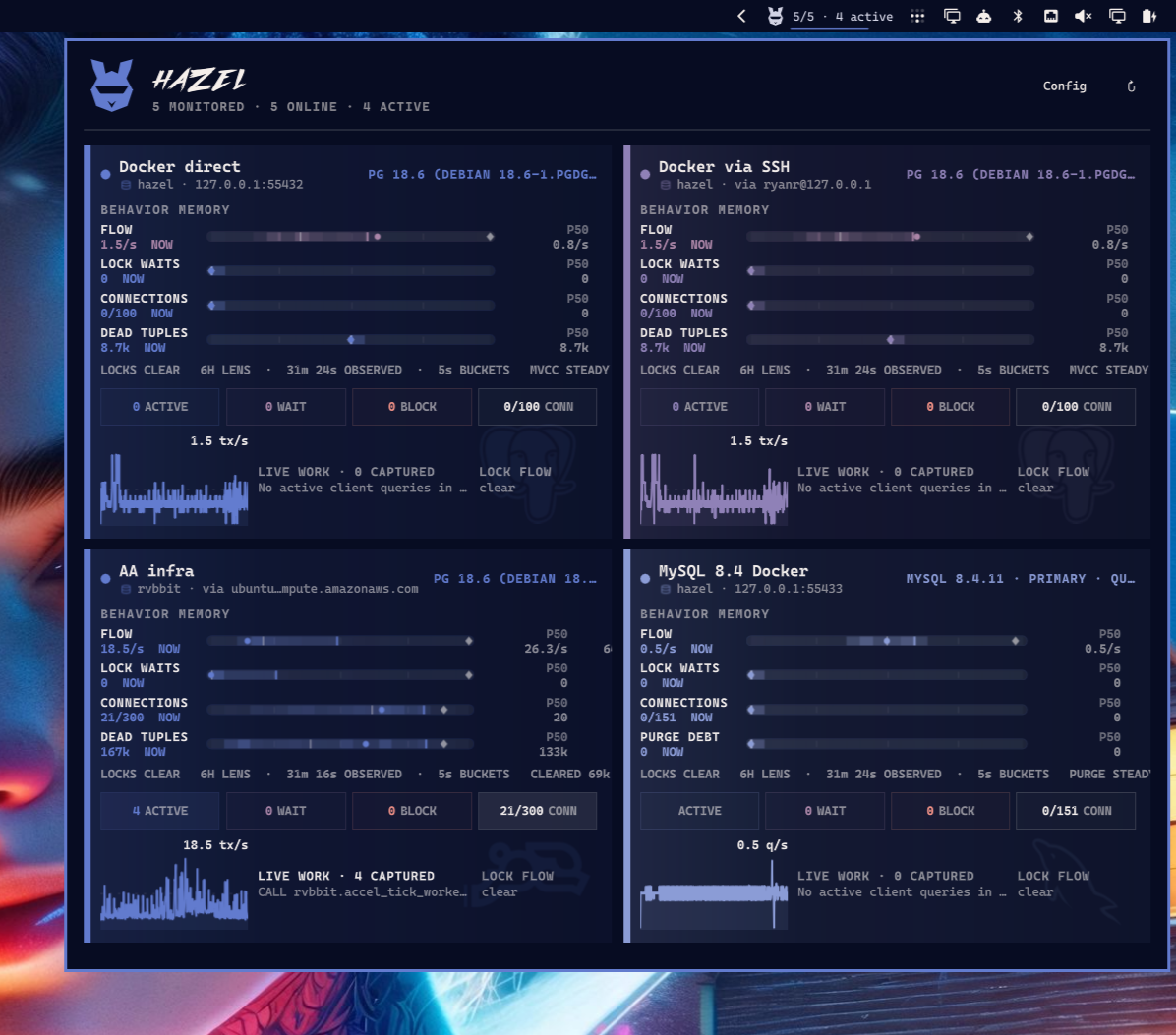
Hazel is deliberately not a tiny Grafana dashboard. Its first job is to show what changed: work rate, session pressure, waits and blocking, log generation, and engine-native maintenance signals.
The bar uses Hazel's original angular Visor rabbit mark rather than a text abbreviation. The open-panel HAZEL wordmark uses five embedded vector outlines derived from the Outrun Future Bold display face; Hazel does not ship or load the reusable font software. A larger Visor spans the panel header's two text rows, replaces the generic status dot, and inherits its live fleet-status color without increasing the header height. No font or artwork is fetched while Hazel is running. Both Visors use the SVG's original path geometry through Qt Quick Shape, keeping the enlarged header mark vector-sharp instead of scaling a rasterized texture. The wordmark uses that same native curve renderer and remains theme-tintable at every display scale.
Collapsed profile cards carry a faint, theme-tinted engine mark in a fixed
watermark bay. PostgreSQL uses the embedded CC0 SVG Repo elephant; databases
with the pg_rvbbit extension installed use Hazel's embedded rvbbit mark
instead. MySQL uses the embedded dolphin, MariaDB its sea-lion, and Percona its
triangular loop mark. Each is theme-tinted in the same fixed bay, which remains
the contract for future adapters. ClickHouse uses its column mark; SQL Server
uses Hazel's original stacked-data mark.
Profile cards are separated by space and their persistent accent rail rather than a perimeter stroke. A small embedded database glyph carries that same profile accent beside the database and route in compact and expanded views.
When the panel is open, Hazel also samples active client queries and current
blocking edges. PostgreSQL, MySQL-family, and ClickHouse query whitespace is
normalized and string/number literals are masked before text reaches the UI.
SQL Server never returns raw batch text: it reports the command plus a query
hash or stored-module name. Idle sessions are not shown. Lock flow is rendered holder-to-waiter with the waiting mode and target
when the engine exposes them. MySQL and Percona combine InnoDB data-lock waits
and pending metadata locks. MariaDB reads its native INNODB_LOCKS and
INNODB_LOCK_WAITS views, plus metadata locks when their Performance Schema
instrument is enabled. Every lock-capable adapter labels each edge by lock family.
ClickHouse has no synthetic lock lane: its expanded surface instead shows live
merges and mutations, with a restrained moving-part conveyor only while the
server is doing real background work.
Summary collection for every enabled profile continues while the panel is closed (every five seconds by default), so reopening Hazel preserves the context gathered while it was out of sight. Collection is staggered across profiles, active-query details run on a slower cadence than summaries, and the chart tree does not exist while the panel is closed. The Pressure Memory view rolls samples into bounded 30-second buckets, preserving bucket lows and high-water marks while avoiding unbounded work in Omarchy's shared shell process. It shows the current value, p50, p90, and session high-water mark for engine-native work flow, lock-wait counts, used connections, and maintenance backlog. Connections are shown as an actual used/max count while their rail zooms to the observed range. PostgreSQL pairs dead-tuple history with a five-minute accumulation or drain rate and active/recent autovacuum state. The MySQL family instead shows purge debt from the InnoDB undo history list, its accumulation/drain trend, and available purge threads. The lock row pairs its baseline with the current blocked count and oldest wait age. ClickHouse replaces those relational lanes with finished query flow, running queries, server memory against its effective limit, and merge/mutation debt. Its part surface keeps active part counts and per-table rows/bytes in view. SQL Server uses batch flow, current user waiting tasks, active/max workers, and transaction-log use. Its detail surface pairs live requests and holder/waiter edges with per-table reads, writes, and accumulated row/page lock-wait time. The window is configurable from 1–24 hours and defaults to six hours. History remains memory-only in v0.5 and resets when the Omarchy shell restarts. Flow subtracts Hazel's own known snapshot work so an otherwise quiet database still reads as quiet.
Status
This is an early working shell. PostgreSQL, MySQL 8, MariaDB, Percona, ClickHouse, and SQL Server summary/detail snapshots are implemented. Future releases will deepen capability-aware views and may add optional SQLite or DuckDB history outside the monitored database.
The PostgreSQL watermark is adapted from the CC0 mark at https://www.svgrepo.com/svg/306591/postgresql.
The MySQL watermark is adapted from the CC0 mark at https://www.svgrepo.com/svg/303251/mysql-logo.
The MariaDB watermark uses the MariaDB brand path distributed by Simple Icons: https://simpleicons.org/?q=mariadb.
The Percona watermark is adapted from Percona's official 2026 SVG mark: https://www.percona.com/wp-content/uploads/2026/02/Logo.svg.

The ClickHouse watermark uses the ClickHouse brand path distributed by Simple Icons: https://simpleicons.org/?q=clickhouse.
The SQL Server compatibility watermark is original Hazel artwork rather than a redistributed Microsoft logo.
The Visor rabbit is original artwork developed for Hazel. The HAZEL wordmark is
outlined from Outrun Future Bold by Andeh Pinkard / Press Gang Studios. The
publisher permits independent creators to use the face in independently
published projects, including for-profit projects. Hazel packages only the five
outlined letters—not the .otf—and records the vector source in
assets/hazel-wordmark.svg:
https://comicfontsby.tehandeh.com/fonts/outrun-future/
Install
omarchy plugin add https://github.com/ryrobes/hazel.git --enable
Hazel is configured entirely in its Config view after installation; no Hazel-specific connection files are required.
Requirements
- Omarchy 4.0 or newer
postgresql-libs(psql) for PostgreSQL profilesmariadb-clients(mariadb) for MySQL, MariaDB, and Percona profilesclickhouse(clickhouse client) for ClickHouse profilesmssql-tools(sqlcmd, from the AUR) for SQL Server profilesopenssh(ssh) for tunneled profileslibsecret(secret-tool) to remember passwords in the desktop keyring- A database account with read access to the engine's monitoring views
Hazel runs with the same user permissions as the Omarchy shell. At runtime it
only starts the client required by each enabled profile—psql, mariadb,
clickhouse client, or sqlcmd—plus ssh for tunnels and secret-tool for remembered
credentials. It does not use sudo, install packages, or create system
services. Docker and Docker Compose are development-test dependencies only.
For full visibility into other sessions, grant the monitoring account the
built-in pg_monitor role. Hazel degrades when fields are restricted and does
not require a superuser.
For the MySQL family, grant PROCESS and REPLICATION CLIENT, plus SELECT on the
monitored schema, performance_schema.*, and sys.*. Hazel's included Docker
fixture applies exactly this read-only monitoring grant set; fixture mutation
is performed separately as root by the tests. MariaDB remains useful with
Performance Schema disabled: Hazel falls back to Information Schema for active
work, row-lock waits, global counters, and a lower-fidelity relation surface,
and marks the profile as limited visibility.
For ClickHouse, grant SELECT on the monitored database and the system
database. Hazel reads system.processes, events, metrics, asynchronous_metrics,
merges, mutations, parts, disks, and replication queues. It does not
issue KILL, OPTIMIZE, ALTER, or SYSTEM commands.
For SQL Server 2022+, grant the login VIEW SERVER PERFORMANCE STATE, create a
user in each monitored database, grant it VIEW DATABASE PERFORMANCE STATE,
and add it to db_datareader. Older SQL Server releases expose the same DMV
shape through the broader VIEW SERVER STATE and VIEW DATABASE STATE
permissions. Hazel reads performance counters, schedulers, requests, waits,
transaction-log space, and database index statistics; it does not execute raw
query text or any mutation command.
Connect
Open Hazel's Config view to add, edit, pause, or enable named profiles. There is no selected database: Hazel samples every enabled profile concurrently and renders a live instrument block for each one. Profile tone is derived from the current Omarchy theme and follows that database through pressure memory, activity, lock flow, and status. Histories remain isolated per profile and are never combined into a synthetic database timeline.
Each profile chooses PostgreSQL, MySQL, MariaDB, Percona, ClickHouse, or SQL Server, then defines that engine's target and can optionally use a separate SSH gateway. Hazel manages forwarding internally, so the editor only asks for the database and SSH ports people actually configure. SSH is noninteractive: use the system agent/default key or specify an identity file in the profile. Hazel accepts a new OpenSSH host key once; changed keys still fail rather than silently replacing the trusted key.
The Remember database password preference belongs to the profile. Its password is stored through the desktop keyring when enabled, or kept only in the running shell session when disabled. Editing an existing profile leaves the password field blank and preserves the credential already in use unless a replacement is entered. All non-secret profile data is saved through Omarchy's supported per-widget settings API.
No .pg_service.conf, .pgpass, MySQL option file, or Hazel-specific
connection file is required. A local peer-authenticated PostgreSQL server can
leave the password empty; a Unix socket path can be entered in the host field.
Local database test targets
The included Compose project exposes six independent development databases:
- PostgreSQL 18 on
127.0.0.1:55432 - MySQL 8.4 LTS on
127.0.0.1:55433 - MariaDB 11.8 on
127.0.0.1:55434 - Percona Server 8.4 on
127.0.0.1:55435 - ClickHouse 25.8 on
127.0.0.1:55436 - SQL Server 2022 on
127.0.0.1:55437
docker compose up -d --wait
docker compose run --rm --no-deps sqlserver-init
All use database/user hazel and password hazel-dev-only, except the SQL
Server fixture password is Hazel-dev-only!42 to satisfy its password policy. These credentials
are for the local development containers only. The MySQL-family monitor account is
read-only; tests use separate fixture-administrator credentials only to
manufacture active queries, lock waits, purge debt, parts, and mutations.
Development install
ln -s "$PWD" ~/.config/omarchy/plugins/ryrobes.hazel
omarchy-shell shell rescanPlugins
omarchy plugin enable ryrobes.hazel
Saved QML changes hot-reload. Validate before testing:
omarchy plugin validate .
qmllint -I /usr/share/omarchy/shell \
  BarWidget.qml Panel.qml HazelController.qml BoundedLineReader.qml Sparkline.qml PressureAperture.qml \
  BackgroundWork.qml HazelMark.qml HazelWordmark.qml LiveQueries.qml LockFlow.qml InstanceBlock.qml
node --test tests/model.test.js
tests/bounded-line-reader.test.sh
tests/utf8-line-reader.test.sh
tests/credential-race.test.sh
tests/controller-queue.test.sh
tests/timeout-state.test.sh
tests/postgres-sql.test.sh
tests/postgres16-sql.test.sh
tests/mysql-sql.test.sh
tests/mariadb-sql.test.sh
tests/percona-sql.test.sh
tests/clickhouse-sql.test.sh
tests/clickhouse-qml.test.sh
tests/sqlserver-sql.test.sh
tests/sqlserver-qml.test.sh
Controls
- Left click: open or close Hazel
- Click a profile block: focus or close that profile's investigation details
- Click a minimized profile row: switch focus without reopening the full grid
- In a focused profile, choose 1H, 3H, 6H, or 24H to change the behavior-memory lens
- Middle click: refresh immediately
Cor Config: choose which profiles Hazel monitors and edit connectionsR: refresh immediatelyEsc: closeTab/Shift+Tab: switch between adjacent Omarchy panels
Hazel v0.5 is strictly read-only. Query inspection and cancellation affordances remain intentionally deferred until the interaction and privilege model is ready for them.
Remove
omarchy plugin remove ryrobes.hazel
Omarchy removes the configured bar instance when a plugin is disabled or removed, so its profile settings must be recreated after a later re-enable. Remembered passwords live separately in the desktop keyring and are not deleted automatically with the plugin.
Privacy and safety
- No telemetry or external service
- No passwords in Omarchy settings or Hazel-owned files
- Passwords never enter client command arguments; they are applied to the child process environment at launch
- No writes to the monitored database
- Active query text is session-only and literal-masked; SQL Server emits only command/query-hash or stored-module identifiers rather than raw batch text
- Fixed SQL shipped with the plugin; passwords use the child environment, non-secret connection fields use client arguments, and neither is interpolated into SQL
- Database output lines are capped at 1,048,576 characters and client error lines at 65,536; an over-limit producer is stopped instead of growing the shell buffer
License
Hazel's source code and original artwork are available under the MIT License. Third-party logos, trademarks, and the outlined wordmark retain their source terms and trademark rights; see THIRD_PARTY_NOTICES.md.