
salted.bartoggle
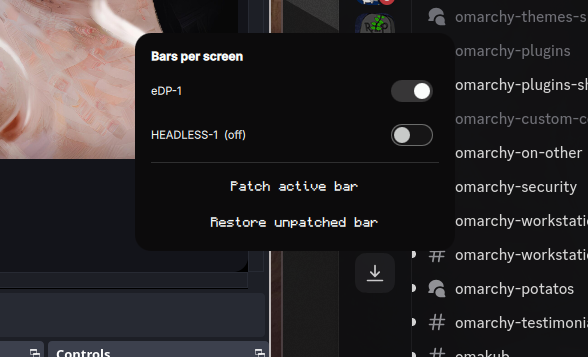
Per-screen bar control for Omarchy. Turn the status bar on or off independently for each connected monitor.

Features
- Switch popup listing every connected screen with an on/off toggle
- Works with any Omarchy bar clone (
omarchy plugin add <bar>) - Floating switch panel reachable even when every bar is hidden
(
SUPER + ALT + Bkeybind recommended) - Settings persist in
~/.config/omarchy/shell.jsonunderbar.monitors
Install
omarchy plugin add salted-sorbet/salted.bartoggle
omarchy restart shell
Then add the widget to your bar's layout in ~/.config/omarchy/shell.json:
"bar": {
  "layout": {
    "right": [ { "id": "salted.bartoggle" } ]
  }
}
(merge into your existing layout.left / center / right arrays — the bar
picks up the change without a restart).
The floating-panel keybind installs itself: on first shell start the service
appends SUPER + ALT + B to ~/.config/hypr/bindings.lua and reloads
Hyprland. If that combo is already taken it leaves your existing binding
alone — wire up omarchy-shell salted.bartoggle togglePanel however you
like instead.
One-time patch for enforcement
Switches and persistence work everywhere out of the box. For the active
bar to actually honor per-screen hiding and layouts, its clone needs the
screenNames patch — applied automatically:
- Click Patch active bar in the floating panel, or run:
~/.config/omarchy/plugins/salted.bartoggle/patch-active-bar.sh
The patch is idempotent, keeps a pristine Bar.qml.orig-monitor-bars backup,
and only restarts the shell when it actually changed something. Re-run it
after selecting a different bar.
omarchy-shell salted.bartoggle toggle|show|hide|showAll|status
Remove
# 1. Clear per-screen overrides so nothing references this plugin
python3 -c "import json,pathlib; p=pathlib.Path.home()/'.config/omarchy/shell.json'; c=json.loads(p.read_text()); c.setdefault('bar',{})['monitors']={}; p.write_text(json.dumps(c,indent=2))"

# 2. Uninstall
omarchy plugin remove salted.bartoggle
omarchy restart shell

# 3. Optional: restore patched bars to pristine
cd ~/.config/omarchy/plugins/<bar>
cp Bar.qml.orig-monitor-bars Bar.qml && rm -f MonitorBars.qml   # or: git checkout -- .
Also remove the keybind line from ~/.config/hypr/bindings.lua if you added it.
How it works
- The service writes
bar.monitors.<screen>entries through the shell's own config mutator; the host reacts live, no restarts needed. MonitorBars.qmlis spawner code that gets injected into patched bars. It reads the same map and spawns independent bar instances pinned to single screens.patch-bar.shapplies that injection mechanically using structural anchors present in everyomarchy.barclone, so future bars need no manual edits.