
salted.silence
Per-workspace audio control for Omarchy.
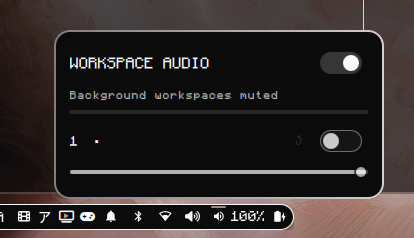
Silence adds a bar widget that gives every Hyprland workspace its own mute switch and volume slider, plus an optional auto-mute mode that silences whatever is playing on workspaces you are not looking at.
Features
- One panel row per workspace: name, mute switch, volume slider
- Focused workspaces are marked with a dot; muted rows dim their label
- AUTO-MUTE switch in the panel header mutes all background workspaces at once
- Per-workspace settings always win over auto-mute
- Slider positions are remembered per workspace and can be cleared with the reset button next to each row
- Audio streams are matched to windows through their process tree, so apps that play sound from a helper process still follow their workspace
Requirements
- Omarchy (Quickshell shell + Hyprland)
pipewire/pactl,jq,socat(all present on a stock Omarchy install)
Install
omarchy plugin add https://github.com/salted-sorbet/salted.silence.git --enable --yes
omarchy restart shell
Then add the widget to your bar:
omarchy bar put salted.silence --after omarchy.audio
The audio daemon (bin/silenced.sh) starts automatically with the shell as a
plugin service. It guards itself with a lock file, so restarting the shell or
reloading plugins never leaves a duplicate running.
Remove
omarchy plugin remove salted.silence
omarchy restart shell
pkill -f silenced.sh                # stop the daemon if it is still around
rm -rf "$XDG_RUNTIME_DIR/workspace-audio"   # optional: drop saved state
If you added the widget with omarchy bar put, also delete its entry from
bar.layout in ~/.config/omarchy/shell.json.
Usage
Click the speaker icon in the bar to open the panel.
| Control | Effect |
|---|---|
| Workspace switch | Mute or unmute that workspace's audio |
| Workspace slider | Fixed volume for that workspace (dimmed when unset) |
| Reset button | Clear that workspace's custom settings |
| AUTO-MUTE switch | Mute everything outside focused monitors |
Explicit per-workspace settings override auto-mute for that workspace.
Configuration
All runtime state lives in one JSON file:
$XDG_RUNTIME_DIR/workspace-audio/state.json
The widget writes it and the daemon reads it, so both stay in sync across shell restarts. Extra keys the daemon understands but the UI does not edit:
{
  "exclude": "^(wayvibes|mpd)$"
}
Streams whose application name matches this regex are never touched by auto-mute or workspace rules - useful for headless music players that have no window to attribute audio to.
Set SILENCE_DEBUG=1 when launching the shell to make the daemon log every
decision to $XDG_RUNTIME_DIR/workspace-audio/daemon.log.
How it works
- The bar widget (Quickshell/QML) renders the panel and writes the state file.
- The daemon listens to Hyprland's event socket and watches the state file.
- On every change it maps PipeWire streams to windows via PIDs (including
child processes), resolves each stream's workspace, and applies the right
mute/volume through
pactl.