
Patro Clock
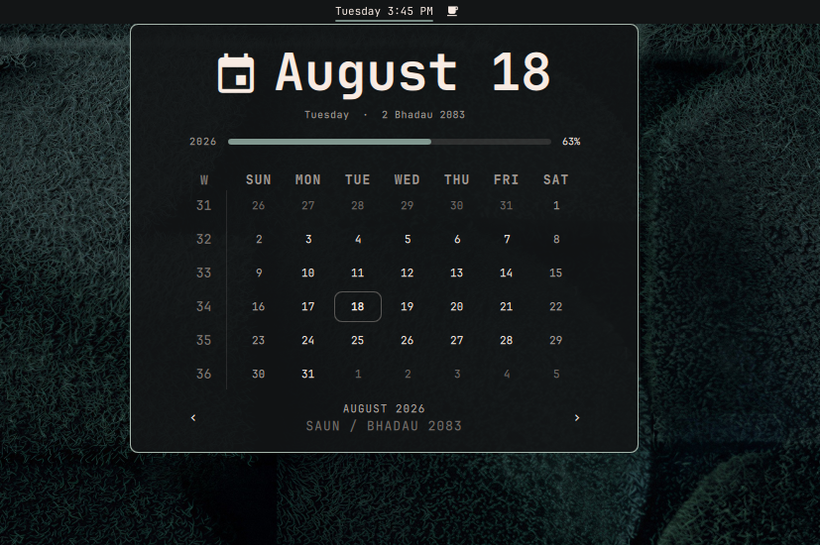
Omarchy's clock, with a Nepali Bikram Sambat calendar beside the Gregorian one. Two-finger swipe sideways in the popup to cross between them.
It replaces the built-in clock rather than sitting next to it, so you get one clock in the bar and one calendar popup — not a second date widget competing for space.
| Gregorian | Nepali |
|---|---|
 |
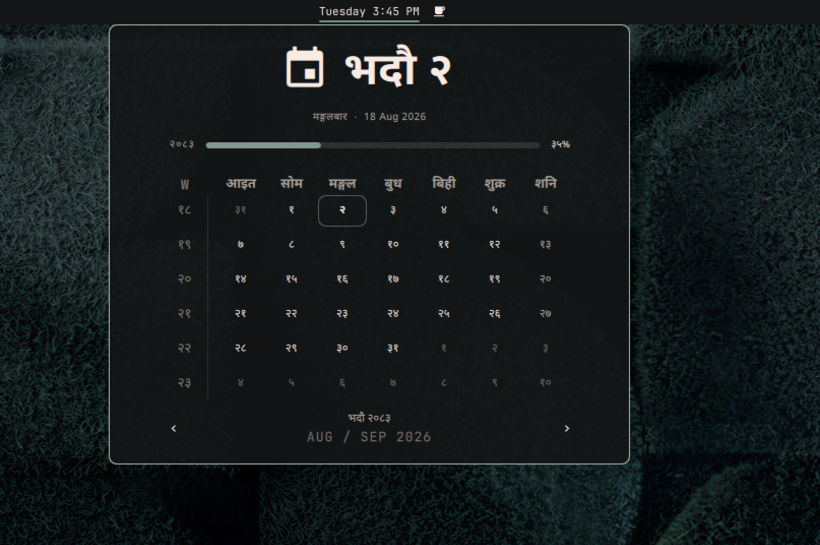 |
Both views are laid out to exactly the same width and height, so switching never resizes or reflows the popup. Each one sets its own date large and names the other calendar small — which is the pairing you actually want when you are reading one and thinking in the other.
Install
omarchy plugin add https://github.com/samirpokharel/omarchy-patro-clock.git --enable
Pick center when it asks for a section, then remove the built-in clock so you do not have two:
omarchy plugin disable omarchy.clock
If the built-in clock was your bar's center anchor, point the anchor at this plugin — otherwise the center section loses its pinned layout:
jq '.bar.centerAnchor = "samirpokharel.patro-clock"' ~/.config/omarchy/shell.json > /tmp/s \
  && mv /tmp/s ~/.config/omarchy/shell.json
Devanagari comes from noto-fonts, which Omarchy already installs. JetBrains
Mono has no Devanagari coverage, so the Nepali view asks for
Noto Sans Devanagari by name.
Removing it
omarchy plugin remove samirpokharel.patro-clock
omarchy plugin enable omarchy.clock
If you repointed the bar's center anchor during install, point it back:
jq '.bar.centerAnchor = "omarchy.clock"' ~/.config/omarchy/shell.json > /tmp/s \
  && mv /tmp/s ~/.config/omarchy/shell.json
The plugin writes only its own entry in ~/.config/omarchy/shell.json, and only
when you change one of its settings, so removing it leaves nothing else behind.
Using it
| Two-finger horizontal swipe | switch calendar |
n |
switch calendar |
| Vertical scroll | step the month |
← → or [ ] |
step the month |
↑ ↓ or { } |
step the year |
t or click the hero |
back to today |
w or click the W heading |
week start (Gregorian view only) |
| Left click the bar label | open the calendar |
| Right click the bar label | cycle the label format |
| Middle click the bar label | timezone picker |
| Double-tap the year rail | memento mori — set a birth year |
Optional hotkey, in ~/.config/hypr/bindings.conf:
bindd = SUPER SHIFT, C, Patro Clock, exec, omarchy-shell samirpokharel.patro-clock toggle
bindd = SUPER SHIFT, N, Switch calendar, exec, omarchy-shell samirpokharel.patro-clock toggleCalendar
toggleCalendar works whether or not the popup is open, which makes it a decent
fallback if the swipe does not suit your touchpad.
Settings
Under Setup › Plugins, or directly in ~/.config/omarchy/shell.json.
| Key | Default | |
|---|---|---|
calendarSystem |
bikram, gregorian |
bikram |
format |
Qt format for the bar label; ww becomes the ISO week |
dddd HH:mm |
formatAlt |
second format in the right-click ring | d MMMM 'W'ww yyyy |
verticalFormat |
used when the bar is vertical | HH\n—\nmm |
weekStartDay |
sunday, monday; unset follows the locale |
unset |
swipeThreshold |
sideways travel that counts as one swipe | 120 |
birthYear |
0 hides the memento-mori bar |
0 |
lifeExpectancy |
years, only used with a birth year | 90 |
If the swipe feels wrong, swipeThreshold is the knob. Touchpads differ
wildly in how much scroll delta they report per gesture: raise it if the calendar
flips too eagerly, lower it if a full swipe does nothing.
Notes on the Nepali view
- The week starts on Sunday and Saturday is the weekend, as a wall patro prints it. The week-start toggle is inert here, because a patro has no such choice to offer.
- Month and weekday names are the colloquial forms — भदौ, not भाद्र; साउन, not श्रावण.
- The week gutter counts the year in sevens from 1 Baisakh. Bikram Sambat has no ISO-week equivalent, so this is plainly "which seven-day block of the year is this" rather than a standard.
- Dates are covered for 2000–2090 BS. Month lengths are published rather than derived (see NOTICE.md), so 2084 onward is provisional and the chevrons go inert at the ends of the table rather than inventing months.
Not yet
- The bar label is always Gregorian. Switching the calendar changes the popup, not the label. Rendering a Bikram Sambat date in the bar needs its own format vocabulary, which is a separate piece of work.
- No tithi, no holidays. If you want the lunar day, Ekadashi/Purnima marks and a BS↔AD converter, yogeshojha/patro is a standalone bar widget that does all of that well.
Development
node tests/bikram.test.js      # or: npm test
omarchy-plugin-validate .
Two things about hacking on this that will otherwise cost you an afternoon:
- Editing
Panel.qmlneeds a full shell restart. Omarchy logsLocal plugin changed, reloading, but a file loaded throughLoader { source: Qt.resolvedUrl(...) }keeps serving Qt's cached compilation. Your edit appears to do nothing, with no error. Runomarchy-restart-shell. qmllintis useless here — it cannot resolve theqs.*imports and will pass a file with a deliberate typo in it. Useqmlformat <file> >/dev/nullas a syntax check and read real errors fromquickshell -p /usr/share/omarchy/shell log. Note the-p: plainquickshell logcannot find the running instance.
Credits
Built on Omarchy's built-in clock and on the Bikram Sambat table from yogeshojha/patro, both MIT. See NOTICE.md for exactly what came from where.
MIT licensed.